
SUR CETTE PAGE
Exemple : configuration du multihébergement actif-actif EVPN
Cet exemple montre comment configurer le VPN Ethernet (EVPN) pour les équipements de périphérie client multirésidents en mode de redondance actif-actif, de sorte que le trafic unicast de couche 2 puisse être équilibré en charge sur toutes les liaisons multirésidents sur et vers le périphérique CE.
Exigences
Cet exemple utilise les composants matériels et logiciels suivants :
Cinq plates-formes de routage universelles 5G MX Series avec interfaces MPC uniquement, où :
Trois équipements sont configurés en tant que routeurs PE (Provider Edge) connectés à un site client multirésident commun.
Un équipement est configuré en tant que routeur PE distant connecté à un site client en résidence unique.
Six périphériques de périphérie client (CE), avec un périphérique CE multirésident et le reste des équipements CE étant rehoming unique sur chacun des routeurs PE.
Junos OS version 16.1 ou ultérieure s’exécute sur tous les routeurs PE.
Note:Le mode de fonctionnement actif-actif du multihébergement EVPN est pris en charge dans les versions 16.1 et ultérieures de Junos OS.
À partir de Junos OS version 16.1R4, le mode de multihébergement actif-actif EVPN est pris en charge sur tous les commutateurs EX9200. Pour plus d’informations sur la configuration spécifique aux commutateurs EX9200, reportez-vous à la section Configuration sur les commutateurs EX9200.
Avant de commencer :
Configurez les interfaces du routeur.
Configurez IS-IS ou tout autre protocole IGP.
Configurez BGP.
Configurez LDP.
Configurez MPLS.
Configurez les tunnels RSVP, MPLS, LSP ou GRE.
Vue d’ensemble et topologie
À partir de la version 15.1 de Junos OS, la solution EVPN sur les routeurs MX Series dotés d’interfaces MPC est étendue pour offrir une fonctionnalité de multihébergement en mode de fonctionnement redondant actif-actif. Cette fonctionnalité permet de équilibrage de charge du trafic unicast de couche 2 sur toutes les liaisons multirésidents sur et vers un équipement de périphérie client.
La fonction de multihébergement actif-actif d’EVPN offre une redondance au niveau de la liaison et du nœud, ainsi qu’une utilisation efficace des ressources.
Pour activer le multihébergement actif-actif EVPN, incluez l’instruction all-active au niveau de la [edit interfaces esi] hiérarchie.
Sur la Figure 1, le cœur se compose de quatre routeurs PE (Provider Edge) et d’un routeur Provider (P) configuré en tant que réflecteur de route (RR). Le routeur CE10 est multihébergé sur les routeurs PE1, PE2 et PE3. Chaque routeur PE est également connecté à un site client en résidence unique.
Trois instances de routage sont en cours d’exécution dans la topologie (VS-1, VS-2 et mhevpn), ainsi que l’instance de routage par défaut. Les instances de routage partagent neuf VLAN avec trois ESI chacune. Les instances de routage VS-1 et VS-2 sont configurées en tant qu’instance de routage de type commutateur virtuel, et l’instance de routage mhevpn est une instance de routage EVPN.
Trois paquets agrégés (ae0, ae1 et ae2) sont utilisés pour connecter le périphérique CE multirésident, CE10, aux routeurs PE1, PE2 et PE3. Ces bundles agrégés sont configurés pour trois ESI chacun. Les faisceaux agrégés, ae12 et ae13, sont utilisés pour interconnecter les routeurs PE1 et PE2, et PE1 et PE3, respectivement.
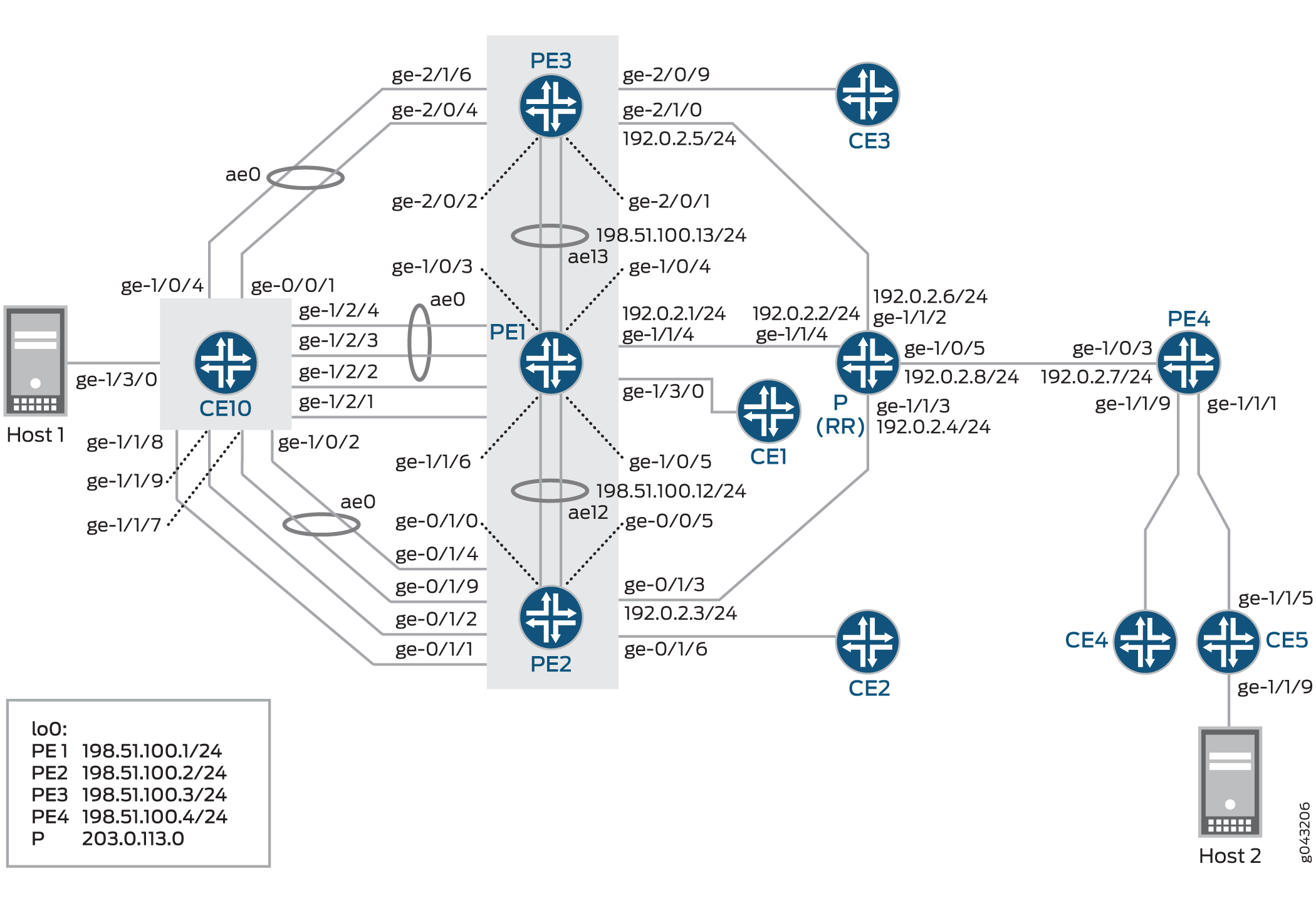 de multihébergement actif-actif EVPN
Pour la redondance actif-actif, des configurations supplémentaires sont requises dans la strophe « interconnexion » pour permettre l’interconnexion DCI. Pour une default switch (switch-options) configuration, assurez-vous de définir le DCI sous global protocols evpn: [edit global protocols evpn].
Exemple EVPN de protocoles :
evpn-vxlan-dc1
        vtep-source-interface lo0.0;
        instance-type mac-vrf;
        route-distinguisher 101:1;
        vrf-target target:1:1;
        protocols {
            evpn {
                encapsulation vxlan;
                extended-vni-list all;
        interconnect {
            vrf-target  target:2:2;
            vrf-import
            route-distinguisher 101:2;
            interconnected-vni-list all;
 		    esi {
 		        00:00:01:02:03:04:05:06:07:08;
 			    all-active;
               }
          }
      }
  }
        vlans  {
            bd1 {
                vlan-id 51;
                l3-interface irb.0;
                vxlan {
                    vni 51;
                    translation-vni
                }
            }
        }
    }


global
 protocols {
      evpn {
 	 	interconnect-multihoming-peer-gateways
       }
  }
Configurez cette instruction interconnect-multihoming-peer-gateways pour qu’elle contienne une liste de tous les homologues DCI sur le même DC.
La liste peut contenir jusqu’à 64 entrées de passerelle homologue. Assurez-vous de configurer sous la strophe [modifier les global protocol evpn protocoles globaux evpn] et non sous un paramètre mac-vrf [modifier les protocoles evpn-vxlan-dc1 type d’instance mac-vrf].
Configuration
Configuration rapide de la CLI
Pour configurer rapidement cet exemple, copiez les commandes suivantes, collez-les dans un fichier texte, supprimez les sauts de ligne, modifiez tous les détails nécessaires pour qu’ils correspondent à la configuration de votre réseau, copiez et collez les commandes dans l’interface de ligne de commande au niveau de la [edit] hiérarchie, puis passez commit en mode de configuration.
CE10
set chassis aggregated-devices ethernet device-count 20
set chassis network-services enhanced-ip
set interfaces ge-0/0/1 gigether-options 802.3ad ae0
set interfaces ge-1/0/2 gigether-options 802.3ad ae0
set interfaces ge-1/0/4 gigether-options 802.3ad ae0
set interfaces ge-1/1/7 gigether-options 802.3ad ae0
set interfaces ge-1/1/8 gigether-options 802.3ad ae2
set interfaces ge-1/1/9 gigether-options 802.3ad ae1
set interfaces ge-1/2/1 gigether-options 802.3ad ae2
set interfaces ge-1/2/2 gigether-options 802.3ad ae1
set interfaces ge-1/2/3 gigether-options 802.3ad ae0
set interfaces ge-1/2/4 gigether-options 802.3ad ae0
set interfaces ge-1/3/0 flexible-vlan-tagging
set interfaces ge-1/3/0 encapsulation flexible-ethernet-services
set interfaces ge-1/3/0 unit 0 encapsulation vlan-bridge
set interfaces ge-1/3/0 unit 0 vlan-id 10
set interfaces ge-1/3/0 unit 1 encapsulation vlan-bridge
set interfaces ge-1/3/0 unit 1 vlan-id 20
set interfaces ge-1/3/0 unit 2 encapsulation vlan-bridge
set interfaces ge-1/3/0 unit 2 vlan-id 30
set interfaces ge-1/3/0 unit 110 encapsulation vlan-bridge
set interfaces ge-1/3/0 unit 110 vlan-id 110
set interfaces ge-1/3/0 unit 120 encapsulation vlan-bridge
set interfaces ge-1/3/0 unit 120 vlan-id 120
set interfaces ge-1/3/0 unit 130 encapsulation vlan-bridge
set interfaces ge-1/3/0 unit 130 vlan-id 130
set interfaces ge-1/3/0 unit 210 encapsulation vlan-bridge
set interfaces ge-1/3/0 unit 210 vlan-id 210
set interfaces ge-1/3/0 unit 220 encapsulation vlan-bridge
set interfaces ge-1/3/0 unit 220 vlan-id 220
set interfaces ge-1/3/0 unit 230 encapsulation vlan-bridge
set interfaces ge-1/3/0 unit 230 vlan-id 230
set interfaces ae0 flexible-vlan-tagging
set interfaces ae0 encapsulation flexible-ethernet-services
set interfaces ae0 aggregated-ether-options minimum-links 1
set interfaces ae0 unit 0 encapsulation vlan-bridge
set interfaces ae0 unit 0 vlan-id 10
set interfaces ae0 unit 110 encapsulation vlan-bridge
set interfaces ae0 unit 110 vlan-id 110
set interfaces ae0 unit 210 encapsulation vlan-bridge
set interfaces ae0 unit 210 vlan-id 210
set interfaces ae1 flexible-vlan-tagging
set interfaces ae1 encapsulation flexible-ethernet-services
set interfaces ae1 aggregated-ether-options minimum-links 1
set interfaces ae1 unit 1 encapsulation vlan-bridge
set interfaces ae1 unit 1 vlan-id 20
set interfaces ae1 unit 120 encapsulation vlan-bridge
set interfaces ae1 unit 120 vlan-id 120
set interfaces ae1 unit 220 encapsulation vlan-bridge
set interfaces ae1 unit 220 vlan-id 220
set interfaces ae2 flexible-vlan-tagging
set interfaces ae2 encapsulation flexible-ethernet-services
set interfaces ae2 aggregated-ether-options minimum-links 1
set interfaces ae2 unit 2 encapsulation vlan-bridge
set interfaces ae2 unit 2 vlan-id 30
set interfaces ae2 unit 130 encapsulation vlan-bridge
set interfaces ae2 unit 130 vlan-id 130
set interfaces ae2 unit 230 encapsulation vlan-bridge
set interfaces ae2 unit 230 vlan-id 230
set routing-options forwarding-table export load-balancing-policy
set protocols l2-learning global-mac-table-aging-time 18000
set policy-options policy-statement load-balancing-policy then load-balance per-packet
set bridge-domains bd10 domain-type bridge
set bridge-domains bd10 vlan-id 10
set bridge-domains bd10 interface ae0.0
set bridge-domains bd10 interface ge-1/3/0.0
set bridge-domains bd110 domain-type bridge
set bridge-domains bd110 vlan-id 110
set bridge-domains bd110 interface ae0.110
set bridge-domains bd110 interface ge-1/3/0.110
set bridge-domains bd120 domain-type bridge
set bridge-domains bd120 vlan-id 120
set bridge-domains bd120 interface ge-1/3/0.120
set bridge-domains bd120 interface ae1.120
set bridge-domains bd130 domain-type bridge
set bridge-domains bd130 vlan-id 130
set bridge-domains bd130 interface ge-1/3/0.130
set bridge-domains bd130 interface ae2.130
set bridge-domains bd20 domain-type bridge
set bridge-domains bd20 vlan-id 20
set bridge-domains bd20 interface ge-1/3/0.1
set bridge-domains bd20 interface ae1.1
set bridge-domains bd210 domain-type bridge
set bridge-domains bd210 vlan-id 210
set bridge-domains bd210 interface ae0.210
set bridge-domains bd210 interface ge-1/3/0.210
set bridge-domains bd220 domain-type bridge
set bridge-domains bd220 vlan-id 220
set bridge-domains bd220 interface ge-1/3/0.220
set bridge-domains bd220 interface ae1.220
set bridge-domains bd230 domain-type bridge
set bridge-domains bd230 vlan-id 230
set bridge-domains bd230 interface ge-1/3/0.230
set bridge-domains bd230 interface ae2.230
set bridge-domains bd30 domain-type bridge
set bridge-domains bd30 vlan-id 30
set bridge-domains bd30 interface ge-1/3/0.2
set bridge-domains bd30 interface ae2.2
CE5
set chassis aggregated-devices ethernet device-count 20
set chassis network-services enhanced-ip
set interfaces ge-1/1/5 gigether-options 802.3ad ae0
set interfaces ge-1/1/9 flexible-vlan-tagging
set interfaces ge-1/1/9 encapsulation flexible-ethernet-services
set interfaces ge-1/1/9 unit 0 encapsulation vlan-bridge
set interfaces ge-1/1/9 unit 0 vlan-id 10
set interfaces ge-1/1/9 unit 1 encapsulation vlan-bridge
set interfaces ge-1/1/9 unit 1 vlan-id 20
set interfaces ge-1/1/9 unit 2 encapsulation vlan-bridge
set interfaces ge-1/1/9 unit 2 vlan-id 30
set interfaces ge-1/1/9 unit 110 encapsulation vlan-bridge
set interfaces ge-1/1/9 unit 110 vlan-id 110
set interfaces ge-1/1/9 unit 120 encapsulation vlan-bridge
set interfaces ge-1/1/9 unit 120 vlan-id 120
set interfaces ge-1/1/9 unit 130 encapsulation vlan-bridge
set interfaces ge-1/1/9 unit 130 vlan-id 130
set interfaces ge-1/1/9 unit 210 encapsulation vlan-bridge
set interfaces ge-1/1/9 unit 210 vlan-id 210
set interfaces ge-1/1/9 unit 220 encapsulation vlan-bridge
set interfaces ge-1/1/9 unit 220 vlan-id 220
set interfaces ge-1/1/9 unit 230 encapsulation vlan-bridge
set interfaces ge-1/1/9 unit 230 vlan-id 230
set interfaces ae0 flexible-vlan-tagging
set interfaces ae0 encapsulation flexible-ethernet-services
set interfaces ae0 unit 0 encapsulation vlan-bridge
set interfaces ae0 unit 0 vlan-id 10
set interfaces ae0 unit 1 encapsulation vlan-bridge
set interfaces ae0 unit 1 vlan-id 20
set interfaces ae0 unit 2 encapsulation vlan-bridge
set interfaces ae0 unit 2 vlan-id 30
set interfaces ae0 unit 110 encapsulation vlan-bridge
set interfaces ae0 unit 110 vlan-id 110
set interfaces ae0 unit 120 encapsulation vlan-bridge
set interfaces ae0 unit 120 vlan-id 120
set interfaces ae0 unit 130 encapsulation vlan-bridge
set interfaces ae0 unit 130 vlan-id 130
set interfaces ae0 unit 210 encapsulation vlan-bridge
set interfaces ae0 unit 210 vlan-id 210
set interfaces ae0 unit 220 encapsulation vlan-bridge
set interfaces ae0 unit 220 vlan-id 220
set interfaces ae0 unit 230 encapsulation vlan-bridge
set interfaces ae0 unit 230 vlan-id 230
set interfaces lo0 unit 6 family inet address 203.0.113.0/24
set interfaces lo0 unit 6 family iso address 47.0005.80ff.f800.0000.0108.0000.6006.0070.0600
set routing-options forwarding-table export load-balancing-policy
set protocols l2-learning global-mac-table-aging-time 18000
set policy-options policy-statement load-balancing-policy then load-balance per-packet
set bridge-domains bd10 domain-type bridge
set bridge-domains bd10 vlan-id 10
set bridge-domains bd10 interface ae0.0
set bridge-domains bd10 interface ge-1/1/9.0
set bridge-domains bd110 domain-type bridge
set bridge-domains bd110 vlan-id 110
set bridge-domains bd110 interface ae0.110
set bridge-domains bd110 interface ge-1/1/9.110
set bridge-domains bd120 domain-type bridge
set bridge-domains bd120 vlan-id 120
set bridge-domains bd120 interface ge-1/1/9.120
set bridge-domains bd120 interface ae0.120
set bridge-domains bd130 domain-type bridge
set bridge-domains bd130 vlan-id 130
set bridge-domains bd130 interface ge-1/1/9.130
set bridge-domains bd130 interface ae0.130
set bridge-domains bd20 domain-type bridge
set bridge-domains bd20 vlan-id 20
set bridge-domains bd20 interface ae0.1
set bridge-domains bd20 interface ge-1/1/9.1
set bridge-domains bd210 domain-type bridge
set bridge-domains bd210 vlan-id 210
set bridge-domains bd210 interface ae0.210
set bridge-domains bd210 interface ge-1/1/9.210
set bridge-domains bd220 domain-type bridge
set bridge-domains bd220 vlan-id 220
set bridge-domains bd220 interface ge-1/1/9.220
set bridge-domains bd220 interface ae0.220
set bridge-domains bd230 domain-type bridge
set bridge-domains bd230 vlan-id 230
set bridge-domains bd230 interface ge-1/1/9.230
set bridge-domains bd230 interface ae0.230
set bridge-domains bd30 domain-type bridge
set bridge-domains bd30 vlan-id 30
set bridge-domains bd30 interface ge-1/1/9.2
set bridge-domains bd30 interface ae0.2
PE1
set chassis aggregated-devices ethernet device-count 20
set chassis network-services enhanced-ip
set interfaces ge-1/0/3 gigether-options 802.3ad ae13
set interfaces ge-1/0/4 gigether-options 802.3ad ae13
set interfaces ge-1/0/5 gigether-options 802.3ad ae12
set interfaces ge-1/1/4 unit 0 family inet address 192.0.2.1/24
set interfaces ge-1/1/4 unit 0 family iso
set interfaces ge-1/1/4 unit 0 family mpls
set interfaces ge-1/1/6 gigether-options 802.3ad ae12
set interfaces ge-1/2/1 flexible-vlan-tagging
set interfaces ge-1/2/1 encapsulation flexible-ethernet-services
set interfaces ge-1/2/1 esi 00:33:33:33:33:33:33:33:33:33
set interfaces ge-1/2/1 esi all-active
set interfaces ge-1/2/1 unit 0 encapsulation vlan-bridge
set interfaces ge-1/2/1 unit 0 vlan-id 30
set interfaces ge-1/2/1 unit 130 family bridge interface-mode trunk
set interfaces ge-1/2/1 unit 130 family bridge vlan-id-list 130
set interfaces ge-1/2/1 unit 230 family bridge interface-mode trunk
set interfaces ge-1/2/1 unit 230 family bridge vlan-id-list 230
set interfaces ge-1/2/2 flexible-vlan-tagging
set interfaces ge-1/2/2 encapsulation flexible-ethernet-services
set interfaces ge-1/2/2 esi 00:22:22:22:22:22:22:22:22:22
set interfaces ge-1/2/2 esi all-active
set interfaces ge-1/2/2 unit 0 encapsulation vlan-bridge
set interfaces ge-1/2/2 unit 0 vlan-id 20
set interfaces ge-1/2/2 unit 120 family bridge interface-mode trunk
set interfaces ge-1/2/2 unit 120 family bridge vlan-id-list 120
set interfaces ge-1/2/2 unit 220 family bridge interface-mode trunk
set interfaces ge-1/2/2 unit 220 family bridge vlan-id-list 220
set interfaces ge-1/2/3 gigether-options 802.3ad ae0
set interfaces ge-1/2/4 gigether-options 802.3ad ae0
set interfaces ge-1/3/0 flexible-vlan-tagging
set interfaces ge-1/3/0 encapsulation flexible-ethernet-services
set interfaces ge-1/3/0 unit 0 encapsulation vlan-bridge
set interfaces ge-1/3/0 unit 0 vlan-id 10
set interfaces ge-1/3/0 unit 100 family bridge interface-mode trunk
set interfaces ge-1/3/0 unit 100 family bridge vlan-id-list 110
set interfaces ge-1/3/0 unit 100 family bridge vlan-id-list 120
set interfaces ge-1/3/0 unit 100 family bridge vlan-id-list 130
set interfaces ge-1/3/0 unit 200 family bridge interface-mode trunk
set interfaces ge-1/3/0 unit 200 family bridge vlan-id-list 210
set interfaces ge-1/3/0 unit 200 family bridge vlan-id-list 220
set interfaces ge-1/3/0 unit 200 family bridge vlan-id-list 230
set interfaces ae0 flexible-vlan-tagging
set interfaces ae0 encapsulation flexible-ethernet-services
set interfaces ae0 esi 00:11:11:11:11:11:11:11:11:11
set interfaces ae0 esi all-active
set interfaces ae0 unit 0 encapsulation vlan-bridge
set interfaces ae0 unit 0 vlan-id 10
set interfaces ae0 unit 110 family bridge interface-mode trunk
set interfaces ae0 unit 110 family bridge vlan-id-list 110
set interfaces ae0 unit 210 family bridge interface-mode trunk
set interfaces ae0 unit 210 family bridge vlan-id-list 210
set interfaces ae12 flexible-vlan-tagging
set interfaces ae12 encapsulation flexible-ethernet-services
set interfaces ae12 aggregated-ether-options minimum-links 1
set interfaces ae12 unit 0 vlan-id 1200
set interfaces ae12 unit 0 family inet address 198.51.100.12/24
set interfaces ae12 unit 0 family iso
set interfaces ae12 unit 0 family mpls
set interfaces ae13 flexible-vlan-tagging
set interfaces ae13 encapsulation flexible-ethernet-services
set interfaces ae13 aggregated-ether-options minimum-links 1
set interfaces ae13 unit 0 vlan-tags outer 1300
set interfaces ae13 unit 0 vlan-tags inner 13
set interfaces ae13 unit 0 family inet address 198.51.100.13/24
set interfaces ae13 unit 0 family iso
set interfaces ae13 unit 0 family mpls
set interfaces irb unit 0 family inet address 192.0.2.9/24
set interfaces irb unit 0 mac 00:99:99:99:01:99
set interfaces irb unit 1 family inet address 192.0.2.10/24
set interfaces irb unit 1 mac 00:99:99:99:02:99
set interfaces irb unit 2 family inet address 192.0.2.11/24
set interfaces irb unit 2 mac 00:99:99:99:03:99
set interfaces irb unit 10 family inet address 192.0.2.12/24
set interfaces irb unit 10 mac 00:99:99:99:01:90
set interfaces lo0 unit 0 family inet address 198.51.100.1/24 primary
set interfaces lo0 unit 0 family iso
set routing-options router-id 198.51.100.1
set routing-options autonomous-system 65221
set routing-options forwarding-table export load-balancing-policy
set protocols rsvp interface all
set protocols rsvp interface fxp0.0 disable
set protocols mpls label-switched-path pe1tope2 from 198.51.100.1
set protocols mpls label-switched-path pe1tope2 to 198.51.100.2
set protocols mpls label-switched-path pe1tope2 primary direct_to_pe2
set protocols mpls label-switched-path pe1tope3 from 198.51.100.1
set protocols mpls label-switched-path pe1tope3 to 198.51.100.3
set protocols mpls label-switched-path pe1tope3 primary direct_to_pe3
set protocols mpls label-switched-path pe1tope4 from 198.51.100.1
set protocols mpls label-switched-path pe1tope4 to 198.51.100.4
set protocols mpls label-switched-path pe1tope4 primary direct_to_pe4
set protocols mpls path pe4_to_pe3 198.51.100.4 strict
set protocols mpls path pe4_to_pe3 198.51.100.3 strict
set protocols mpls path direct_to_pe2 198.51.100.5 strict
set protocols mpls path direct_to_pe3 198.51.100.6 strict
set protocols mpls path direct_to_pe4 198.51.100.9 strict
set protocols mpls path pe2_to_pe3 198.51.100.2 strict
set protocols mpls path pe2_to_pe3 198.51.100.3 strict
set protocols mpls interface all
set protocols mpls interface fxp0.0 disable
set protocols bgp group RR type internal
set protocols bgp group RR local-address 198.51.100.1
set protocols bgp group RR family evpn signaling
set protocols bgp group RR neighbor 203.0.113.0
set protocols isis level 1 disable
set protocols isis interface all level 2 metric 10
set protocols isis interface fxp0.0 disable
set protocols isis interface lo0.0 level 2 metric 0
set protocols ldp deaggregate
set protocols ldp interface all
set protocols ldp interface fxp0.0 disable
set protocols evpn
set protocols l2-learning global-mac-table-aging-time 18000
set policy-options policy-statement load-balancing-policy then load-balance per-packet
set routing-instances VS-1 instance-type virtual-switch
set routing-instances VS-1 interface ge-1/2/1.130
set routing-instances VS-1 interface ge-1/2/2.120
set routing-instances VS-1 interface ge-1/3/0.100
set routing-instances VS-1 interface ae0.110
set routing-instances VS-1 route-distinguisher 198.51.100.1:101
set routing-instances VS-1 vrf-target target:100:101
set routing-instances VS-1 protocols evpn extended-vlan-list 110
set routing-instances VS-1 protocols evpn extended-vlan-list 120
set routing-instances VS-1 protocols evpn extended-vlan-list 130
set routing-instances VS-1 protocols evpn default-gateway do-not-advertise
set routing-instances VS-1 bridge-domains bd-110 vlan-id 110
set routing-instances VS-1 bridge-domains bd-110 routing-interface irb.0
set routing-instances VS-1 bridge-domains bd-120 vlan-id 120
set routing-instances VS-1 bridge-domains bd-120 routing-interface irb.1
set routing-instances VS-1 bridge-domains bd-130 vlan-id 130
set routing-instances VS-1 bridge-domains bd-130 routing-interface irb.2
set routing-instances VS-2 instance-type virtual-switch
set routing-instances VS-2 interface ge-1/2/1.230
set routing-instances VS-2 interface ge-1/2/2.220
set routing-instances VS-2 interface ge-1/3/0.200
set routing-instances VS-2 interface ae0.210
set routing-instances VS-2 route-distinguisher 198.51.100.1:201
set routing-instances VS-2 vrf-target target:100:201
set routing-instances VS-2 protocols evpn extended-vlan-list 210
set routing-instances VS-2 protocols evpn extended-vlan-list 220
set routing-instances VS-2 protocols evpn extended-vlan-list 230
set routing-instances VS-2 bridge-domains bd-a vlan-id-list 210
set routing-instances VS-2 bridge-domains bd-a vlan-id-list 220
set routing-instances VS-2 bridge-domains bd-a vlan-id-list 230
set routing-instances mhevpn instance-type evpn
set routing-instances mhevpn vlan-id 10
set routing-instances mhevpn interface ge-1/2/1.0
set routing-instances mhevpn interface ge-1/2/2.0
set routing-instances mhevpn interface ge-1/3/0.0
set routing-instances mhevpn interface ae0.0
set routing-instances mhevpn routing-interface irb.10
set routing-instances mhevpn route-distinguisher 198.51.100.1:1
set routing-instances mhevpn vrf-target target:100:1
set routing-instances mhevpn protocols evpn default-gateway do-not-advertise
set routing-instances vrf instance-type vrf
set routing-instances vrf interface irb.0
set routing-instances vrf interface irb.1
set routing-instances vrf interface irb.2
set routing-instances vrf interface irb.10
set routing-instances vrf route-distinguisher 198.51.100.1:11
set routing-instances vrf vrf-target target:100:11
set routing-instances vrf vrf-table-label
PE2
set chassis aggregated-devices ethernet device-count 20
set chassis network-services enhanced-ip
set interfaces ge-0/0/5 gigether-options 802.3ad ae12
set interfaces ge-0/1/0 gigether-options 802.3ad ae12
set interfaces ge-0/1/1 flexible-vlan-tagging
set interfaces ge-0/1/1 encapsulation flexible-ethernet-services
set interfaces ge-0/1/1 esi 00:33:33:33:33:33:33:33:33:33
set interfaces ge-0/1/1 esi all-active
set interfaces ge-0/1/1 unit 0 encapsulation vlan-bridge
set interfaces ge-0/1/1 unit 0 vlan-id 30
set interfaces ge-0/1/1 unit 130 family bridge interface-mode trunk
set interfaces ge-0/1/1 unit 130 family bridge vlan-id-list 130
set interfaces ge-0/1/1 unit 230 family bridge interface-mode trunk
set interfaces ge-0/1/1 unit 230 family bridge vlan-id-list 230
set interfaces ge-0/1/2 flexible-vlan-tagging
set interfaces ge-0/1/2 encapsulation flexible-ethernet-services
set interfaces ge-0/1/2 esi 00:22:22:22:22:22:22:22:22:22
set interfaces ge-0/1/2 esi all-active
set interfaces ge-0/1/2 unit 0 encapsulation vlan-bridge
set interfaces ge-0/1/2 unit 0 vlan-id 20
set interfaces ge-0/1/2 unit 120 family bridge interface-mode trunk
set interfaces ge-0/1/2 unit 120 family bridge vlan-id-list 120
set interfaces ge-0/1/2 unit 220 family bridge interface-mode trunk
set interfaces ge-0/1/2 unit 220 family bridge vlan-id-list 220
set interfaces ge-0/1/3 unit 0 family inet address 192.0.2.3/24
set interfaces ge-0/1/3 unit 0 family iso
set interfaces ge-0/1/3 unit 0 family mpls
set interfaces ge-0/1/4 gigether-options 802.3ad ae0
set interfaces ge-0/1/6 flexible-vlan-tagging
set interfaces ge-0/1/6 encapsulation flexible-ethernet-services
set interfaces ge-0/1/6 unit 0 encapsulation vlan-bridge
set interfaces ge-0/1/6 unit 0 vlan-id 10
set interfaces ge-0/1/6 unit 100 family bridge interface-mode trunk
set interfaces ge-0/1/6 unit 100 family bridge vlan-id-list 110
set interfaces ge-0/1/6 unit 100 family bridge vlan-id-list 120
set interfaces ge-0/1/6 unit 100 family bridge vlan-id-list 130
set interfaces ge-0/1/6 unit 200 family bridge interface-mode trunk
set interfaces ge-0/1/6 unit 200 family bridge vlan-id-list 210
set interfaces ge-0/1/6 unit 200 family bridge vlan-id-list 220
set interfaces ge-0/1/6 unit 200 family bridge vlan-id-list 230
set interfaces ge-0/1/9 gigether-options 802.3ad ae0
set interfaces ae0 flexible-vlan-tagging
set interfaces ae0 encapsulation flexible-ethernet-services
set interfaces ae0 esi 00:11:11:11:11:11:11:11:11:11
set interfaces ae0 esi all-active
set interfaces ae0 unit 0 encapsulation vlan-bridge
set interfaces ae0 unit 0 vlan-id 10
set interfaces ae0 unit 110 family bridge interface-mode trunk
set interfaces ae0 unit 110 family bridge vlan-id-list 110
set interfaces ae0 unit 210 family bridge interface-mode trunk
set interfaces ae0 unit 210 family bridge vlan-id-list 210
set interfaces ae12 flexible-vlan-tagging
set interfaces ae12 encapsulation flexible-ethernet-services
set interfaces ae12 aggregated-ether-options minimum-links 1
set interfaces ae12 unit 0 vlan-id 1200
set interfaces ae12 unit 0 family inet address 198.51.100.5/24
set interfaces ae12 unit 0 family iso
set interfaces ae12 unit 0 family mpls
set interfaces irb unit 0 family inet address 192.0.2.9/24
set interfaces irb unit 0 mac 00:99:99:99:01:99
set interfaces irb unit 1 family inet address 192.0.2.10/24
set interfaces irb unit 1 mac 00:99:99:99:02:99
set interfaces irb unit 2 family inet address 192.0.2.11/24
set interfaces irb unit 2 mac 00:99:99:99:03:99
set interfaces irb unit 10 family inet address 192.0.2.12/24
set interfaces irb unit 10 mac 00:99:99:99:01:90
set interfaces lo0 unit 0 family inet address 198.51.100.2/32 primary
set interfaces lo0 unit 0 family iso
set routing-options router-id 198.51.100.2
set routing-options autonomous-system 65221
set routing-options forwarding-table export load-balancing-policy
set protocols rsvp interface all
set protocols rsvp interface fxp0.0 disable
set protocols mpls label-switched-path pe2tope1 from 198.51.100.2
set protocols mpls label-switched-path pe2tope1 to 198.51.100.1
set protocols mpls label-switched-path pe2tope1 primary direct_to_pe1
set protocols mpls label-switched-path pe2tope3 from 198.51.100.2
set protocols mpls label-switched-path pe2tope3 to 198.51.100.3
set protocols mpls label-switched-path pe2tope3 primary direct_to_pe3
set protocols mpls label-switched-path pe2tope4 from 198.51.100.2
set protocols mpls label-switched-path pe2tope4 to 198.51.100.4
set protocols mpls label-switched-path pe2tope4 primary direct_to_pe4
set protocols mpls path direct_to_pe1 198.51.100.12 strict
set protocols mpls path direct_to_pe3 198.51.100.7 strict
set protocols mpls path direct_to_pe4 198.51.100.8 strict
set protocols mpls interface all
set protocols mpls interface fxp0.0 disable
set protocols bgp group RR type internal
set protocols bgp group RR local-address 198.51.100.2
set protocols bgp group RR family evpn signaling
set protocols bgp group RR neighbor 203.0.113.0
set protocols isis level 1 disable
set protocols isis interface all level 2 metric 10
set protocols isis interface fxp0.0 disable
set protocols isis interface lo0.0 level 2 metric 0
set protocols ldp deaggregate
set protocols ldp interface all
set protocols ldp interface fxp0.0 disable
set protocols l2-learning global-mac-table-aging-time 18000
set policy-options policy-statement load-balancing-policy then load-balance per-packet
set routing-instances VS-1 instance-type virtual-switch
set routing-instances VS-1 interface ge-0/1/1.130
set routing-instances VS-1 interface ge-0/1/2.120
set routing-instances VS-1 interface ge-0/1/6.100
set routing-instances VS-1 interface ae0.110
set routing-instances VS-1 route-distinguisher 198.51.100.2:101
set routing-instances VS-1 vrf-target target:100:101
set routing-instances VS-1 protocols evpn extended-vlan-list 110
set routing-instances VS-1 protocols evpn extended-vlan-list 120
set routing-instances VS-1 protocols evpn extended-vlan-list 130
set routing-instances VS-1 protocols evpn default-gateway do-not-advertise
set routing-instances VS-1 bridge-domains bd-110 vlan-id 110
set routing-instances VS-1 bridge-domains bd-110 routing-interface irb.0
set routing-instances VS-1 bridge-domains bd-120 vlan-id 120
set routing-instances VS-1 bridge-domains bd-120 routing-interface irb.1
set routing-instances VS-1 bridge-domains bd-130 vlan-id 130
set routing-instances VS-1 bridge-domains bd-130 routing-interface irb.2
set routing-instances VS-2 instance-type virtual-switch
set routing-instances VS-2 interface ge-0/1/1.230
set routing-instances VS-2 interface ge-0/1/2.220
set routing-instances VS-2 interface ge-0/1/6.200
set routing-instances VS-2 interface ae0.210
set routing-instances VS-2 route-distinguisher 198.51.100.2:201
set routing-instances VS-2 vrf-target target:100:201
set routing-instances VS-2 protocols evpn extended-vlan-list 210
set routing-instances VS-2 protocols evpn extended-vlan-list 220
set routing-instances VS-2 protocols evpn extended-vlan-list 230
set routing-instances VS-2 bridge-domains bd-a vlan-id-list 210
set routing-instances VS-2 bridge-domains bd-a vlan-id-list 220
set routing-instances VS-2 bridge-domains bd-a vlan-id-list 230
set routing-instances mhevpn instance-type evpn
set routing-instances mhevpn vlan-id 10
set routing-instances mhevpn interface ge-0/1/1.0
set routing-instances mhevpn interface ge-0/1/2.0
set routing-instances mhevpn interface ge-0/1/6.0
set routing-instances mhevpn interface ae0.0
set routing-instances mhevpn routing-interface irb.10
set routing-instances mhevpn route-distinguisher 198.51.100.2:1
set routing-instances mhevpn vrf-target target:100:1
set routing-instances mhevpn protocols evpn default-gateway do-not-advertise
set routing-instances vrf instance-type vrf
set routing-instances vrf interface irb.0
set routing-instances vrf interface irb.1
set routing-instances vrf interface irb.2
set routing-instances vrf interface irb.10
set routing-instances vrf route-distinguisher 198.51.100.2:11
set routing-instances vrf vrf-target target:100:11
set routing-instances vrf vrf-table-label
PE3
set chassis aggregated-devices ethernet device-count 20
set chassis network-services enhanced-ip
set interfaces ge-2/0/1 gigether-options 802.3ad ae13
set interfaces ge-2/0/2 gigether-options 802.3ad ae13
set interfaces ge-2/0/4 gigether-options 802.3ad ae0
set interfaces ge-2/0/9 flexible-vlan-tagging
set interfaces ge-2/0/9 encapsulation flexible-ethernet-services
set interfaces ge-2/0/9 unit 0 encapsulation vlan-bridge
set interfaces ge-2/0/9 unit 0 vlan-id 10
set interfaces ge-2/0/9 unit 100 family bridge interface-mode trunk
set interfaces ge-2/0/9 unit 100 family bridge vlan-id-list 110
set interfaces ge-2/0/9 unit 100 family bridge vlan-id-list 120
set interfaces ge-2/0/9 unit 100 family bridge vlan-id-list 130
set interfaces ge-2/0/9 unit 200 family bridge interface-mode trunk
set interfaces ge-2/0/9 unit 200 family bridge vlan-id-list 210
set interfaces ge-2/0/9 unit 200 family bridge vlan-id-list 220
set interfaces ge-2/0/9 unit 200 family bridge vlan-id-list 230
set interfaces ge-2/1/0 unit 0 family inet address 192.0.2.5/24
set interfaces ge-2/1/0 unit 0 family iso
set interfaces ge-2/1/0 unit 0 family mpls
set interfaces ge-2/1/6 gigether-options 802.3ad ae0
set interfaces ae0 flexible-vlan-tagging
set interfaces ae0 encapsulation flexible-ethernet-services
set interfaces ae0 esi 00:11:11:11:11:11:11:11:11:11
set interfaces ae0 esi all-active
set interfaces ae0 unit 0 encapsulation vlan-bridge
set interfaces ae0 unit 0 vlan-id 10
set interfaces ae0 unit 110 family bridge interface-mode trunk
set interfaces ae0 unit 110 family bridge vlan-id-list 110
set interfaces ae0 unit 210 family bridge interface-mode trunk
set interfaces ae0 unit 210 family bridge vlan-id-list 210
set interfaces ae13 flexible-vlan-tagging
set interfaces ae13 encapsulation flexible-ethernet-services
set interfaces ae13 aggregated-ether-options minimum-links 1
set interfaces ae13 unit 0 vlan-tags outer 1300
set interfaces ae13 unit 0 vlan-tags inner 13
set interfaces ae13 unit 0 family inet address 198.51.100.6/24
set interfaces ae13 unit 0 family iso
set interfaces ae13 unit 0 family mpls
set interfaces irb unit 0 family inet address 192.0.2.9/24
set interfaces irb unit 0 mac 00:99:99:99:01:99
set interfaces irb unit 1 family inet address 192.0.2.10/24
set interfaces irb unit 1 mac 00:99:99:99:02:99
set interfaces irb unit 2 family inet address 192.0.2.11/24
set interfaces irb unit 2 mac 00:99:99:99:03:99
set interfaces irb unit 10 family inet address 192.0.2.12/24
set interfaces irb unit 10 mac 00:99:99:99:01:90
set interfaces lo0 unit 0 family inet address 198.51.100.3/32 primary
set interfaces lo0 unit 0 family iso
set routing-options router-id 198.51.100.3
set routing-options autonomous-system 65221
set routing-options forwarding-table export load-balancing-policy
set protocols rsvp interface all
set protocols rsvp interface fxp0.0 disable
set protocols mpls label-switched-path pe3tope1 from 198.51.100.3
set protocols mpls label-switched-path pe3tope1 to 198.51.100.1
set protocols mpls label-switched-path pe3tope1 primary direct_to_pe1
set protocols mpls label-switched-path pe3tope2 from 198.51.100.3
set protocols mpls label-switched-path pe3tope2 to 198.51.100.2
set protocols mpls label-switched-path pe3tope2 primary direct_to_pe2
set protocols mpls label-switched-path pe3tope4 from 198.51.100.3
set protocols mpls label-switched-path pe3tope4 to 198.51.100.4
set protocols mpls label-switched-path pe3tope4 primary direct_to_pe4
set protocols mpls path direct_to_pe1 198.51.100.13 strict
set protocols mpls path direct_to_pe2 198.51.100.10 strict
set protocols mpls path direct_to_pe4 198.51.100.11 strict
set protocols mpls interface all
set protocols mpls interface fxp0.0 disable
set protocols bgp group RR type internal
set protocols bgp group RR local-address 198.51.100.3
set protocols bgp group RR family evpn signaling
set protocols bgp group RR neighbor 203.0.113.0
set protocols isis level 1 disable
set protocols isis interface all level 2 metric 10
set protocols isis interface fxp0.0 disable
set protocols isis interface lo0.0 level 2 metric 0
set protocols ldp deaggregate
set protocols ldp interface all
set protocols ldp interface fxp0.0 disable
set protocols l2-learning global-mac-table-aging-time 18000
set policy-options policy-statement load-balancing-policy then load-balance per-packet
set routing-instances VS-1 instance-type virtual-switch
set routing-instances VS-1 interface ge-2/0/9.100
set routing-instances VS-1 interface ae0.110
set routing-instances VS-1 route-distinguisher 198.51.100.3:101
set routing-instances VS-1 vrf-target target:100:101
set routing-instances VS-1 protocols evpn extended-vlan-list 110
set routing-instances VS-1 protocols evpn extended-vlan-list 120
set routing-instances VS-1 protocols evpn extended-vlan-list 130
set routing-instances VS-1 protocols evpn default-gateway do-not-advertise
set routing-instances VS-1 bridge-domains bd-110 vlan-id 110
set routing-instances VS-1 bridge-domains bd-110 routing-interface irb.0
set routing-instances VS-1 bridge-domains bd-120 vlan-id 120
set routing-instances VS-1 bridge-domains bd-120 routing-interface irb.1
set routing-instances VS-1 bridge-domains bd-130 vlan-id 130
set routing-instances VS-1 bridge-domains bd-130 routing-interface irb.2
set routing-instances VS-2 instance-type virtual-switch
set routing-instances VS-2 interface ge-2/0/9.200
set routing-instances VS-2 interface ae0.210
set routing-instances VS-2 route-distinguisher 198.51.100.3:201
set routing-instances VS-2 vrf-target target:100:201
set routing-instances VS-2 protocols evpn extended-vlan-list 210
set routing-instances VS-2 protocols evpn extended-vlan-list 220
set routing-instances VS-2 protocols evpn extended-vlan-list 230
set routing-instances VS-2 bridge-domains bd-a vlan-id-list 210
set routing-instances VS-2 bridge-domains bd-a vlan-id-list 220
set routing-instances VS-2 bridge-domains bd-a vlan-id-list 230
set routing-instances mhevpn instance-type evpn
set routing-instances mhevpn vlan-id 10
set routing-instances mhevpn interface ge-2/0/9.0
set routing-instances mhevpn interface ae0.0
set routing-instances mhevpn routing-interface irb.10
set routing-instances mhevpn route-distinguisher 198.51.100.3:1
set routing-instances mhevpn vrf-target target:100:1
set routing-instances mhevpn protocols evpn default-gateway do-not-advertise
set routing-instances vrf instance-type vrf
set routing-instances vrf interface irb.0
set routing-instances vrf interface irb.1
set routing-instances vrf interface irb.2
set routing-instances vrf interface irb.10
set routing-instances vrf route-distinguisher 198.51.100.3:11
set routing-instances vrf vrf-target target:100:11
set routing-instances vrf vrf-table-label
PE4
set chassis aggregated-devices ethernet device-count 20
set chassis network-services enhanced-ip
set interfaces ge-1/0/3 unit 0 family inet address 192.0.2.7/24
set interfaces ge-1/0/3 unit 0 family iso
set interfaces ge-1/0/3 unit 0 family mpls
set interfaces ge-1/1/1 flexible-vlan-tagging
set interfaces ge-1/1/1 encapsulation flexible-ethernet-services
set interfaces ge-1/1/1 esi 00:44:44:44:44:44:44:44:44:44
set interfaces ge-1/1/1 esi all-active
set interfaces ge-1/1/1 unit 0 encapsulation vlan-bridge
set interfaces ge-1/1/1 unit 0 vlan-id 10
set interfaces ge-1/1/1 unit 100 family bridge interface-mode trunk
set interfaces ge-1/1/1 unit 100 family bridge vlan-id-list 110
set interfaces ge-1/1/1 unit 100 family bridge vlan-id-list 120
set interfaces ge-1/1/1 unit 100 family bridge vlan-id-list 130
set interfaces ge-1/1/1 unit 200 family bridge interface-mode trunk
set interfaces ge-1/1/1 unit 200 family bridge vlan-id-list 210
set interfaces ge-1/1/1 unit 200 family bridge vlan-id-list 220
set interfaces ge-1/1/1 unit 200 family bridge vlan-id-list 230
set interfaces ge-1/1/9 flexible-vlan-tagging
set interfaces ge-1/1/9 encapsulation flexible-ethernet-services
set interfaces ge-1/1/9 unit 0 encapsulation vlan-bridge
set interfaces ge-1/1/9 unit 0 vlan-id 10
set interfaces ge-1/1/9 unit 100 family bridge interface-mode trunk
set interfaces ge-1/1/9 unit 100 family bridge vlan-id-list 110
set interfaces ge-1/1/9 unit 100 family bridge vlan-id-list 120
set interfaces ge-1/1/9 unit 100 family bridge vlan-id-list 130
set interfaces ge-1/1/9 unit 200 family bridge interface-mode trunk
set interfaces ge-1/1/9 unit 200 family bridge vlan-id-list 210
set interfaces ge-1/1/9 unit 200 family bridge vlan-id-list 220
set interfaces ge-1/1/9 unit 200 family bridge vlan-id-list 230
set interfaces irb unit 0 family inet address 192.0.2.9/24
set interfaces irb unit 0 mac 00:99:99:99:01:99
set interfaces irb unit 1 family inet address 192.0.2.10/24
set interfaces irb unit 1 mac 00:99:99:99:02:99
set interfaces irb unit 2 family inet address 192.0.2.11/24
set interfaces irb unit 2 mac 00:99:99:99:03:99
set interfaces irb unit 10 family inet address 192.0.2.12/24
set interfaces irb unit 10 mac 00:99:99:99:01:90
set interfaces lo0 unit 0 family inet address 198.51.100.4/32 primary
set routing-options router-id 198.51.100.4
set routing-options autonomous-system 65221
set routing-options forwarding-table export load-balancing-policy
set protocols rsvp interface all
set protocols rsvp interface fxp0.0 disable
set protocols mpls label-switched-path pe4tope1 from 198.51.100.4
set protocols mpls label-switched-path pe4tope1 to 198.51.100.1
set protocols mpls label-switched-path pe4tope1 primary direct_to_pe1
set protocols mpls label-switched-path pe4tope2 from 198.51.100.4
set protocols mpls label-switched-path pe4tope2 to 198.51.100.2
set protocols mpls label-switched-path pe4tope2 primary direct_to_pe2
set protocols mpls label-switched-path pe4tope3 from 198.51.100.4
set protocols mpls label-switched-path pe4tope3 to 198.51.100.3
set protocols mpls label-switched-path pe4tope3 primary direct_to_pe3
set protocols mpls path pe2_to_pe3 198.51.100.2 strict
set protocols mpls path pe2_to_pe3 198.51.100.3 strict
set protocols mpls path direct_to_pe1 198.51.100.14 strict
set protocols mpls path direct_to_pe2 198.51.100.15 strict
set protocols mpls path direct_to_pe3 198.51.100.16 strict
set protocols mpls interface all
set protocols mpls interface fxp0.0 disable
set protocols bgp group RR type internal
set protocols bgp group RR local-address 198.51.100.4
set protocols bgp group RR family evpn signaling
set protocols bgp group RR neighbor 203.0.113.0
set protocols isis level 1 disable
set protocols isis interface all level 2 metric 10
set protocols isis interface fxp0.0 disable
set protocols isis interface lo0.0 level 2 metric 0
set protocols ldp deaggregate
set protocols ldp interface all
set protocols ldp interface fxp0.0 disable
set protocols l2-learning global-mac-table-aging-time 18000
set policy-options policy-statement load-balancing-policy then load-balance per-packet
set routing-instances VS-1 instance-type virtual-switch
set routing-instances VS-1 interface ge-1/1/1.100
set routing-instances VS-1 interface ge-1/1/9.100
set routing-instances VS-1 route-distinguisher 198.51.100.4:101
set routing-instances VS-1 vrf-target target:100:101
set routing-instances VS-1 protocols evpn extended-vlan-list 110
set routing-instances VS-1 protocols evpn extended-vlan-list 120
set routing-instances VS-1 protocols evpn extended-vlan-list 130
set routing-instances VS-1 protocols evpn default-gateway do-not-advertise
set routing-instances VS-1 bridge-domains bd-110 vlan-id 110
set routing-instances VS-1 bridge-domains bd-110 routing-interface irb.0
set routing-instances VS-1 bridge-domains bd-120 vlan-id 120
set routing-instances VS-1 bridge-domains bd-120 routing-interface irb.1
set routing-instances VS-1 bridge-domains bd-130 vlan-id 130
set routing-instances VS-1 bridge-domains bd-130 routing-interface irb.2
set routing-instances VS-2 instance-type virtual-switch
set routing-instances VS-2 interface ge-1/1/1.200
set routing-instances VS-2 interface ge-1/1/9.200
set routing-instances VS-2 route-distinguisher 198.51.100.4:201
set routing-instances VS-2 vrf-target target:100:201
set routing-instances VS-2 protocols evpn extended-vlan-list 210
set routing-instances VS-2 protocols evpn extended-vlan-list 220
set routing-instances VS-2 protocols evpn extended-vlan-list 230
set routing-instances VS-2 bridge-domains bd-a vlan-id-list 210
set routing-instances VS-2 bridge-domains bd-a vlan-id-list 220
set routing-instances VS-2 bridge-domains bd-a vlan-id-list 230
set routing-instances mhevpn instance-type evpn
set routing-instances mhevpn vlan-id 10
set routing-instances mhevpn interface ge-1/1/1.0
set routing-instances mhevpn interface ge-1/1/9.0
set routing-instances mhevpn routing-interface irb.10
set routing-instances mhevpn route-distinguisher 198.51.100.4:1
set routing-instances mhevpn vrf-target target:100:1
set routing-instances mhevpn protocols evpn default-gateway do-not-advertise
set routing-instances vrf instance-type vrf
set routing-instances vrf interface irb.0
set routing-instances vrf interface irb.1
set routing-instances vrf interface irb.2
set routing-instances vrf interface irb.10
set routing-instances vrf route-distinguisher 198.51.100.4:11
set routing-instances vrf vrf-target target:100:11
set routing-instances vrf vrf-table-label
P (RR)
set interfaces ge-1/0/5 unit 0 family inet address 192.0.2.8/24
set interfaces ge-1/1/2 unit 0 family inet address 192.0.2.6/24
set interfaces ge-1/1/3 unit 0 family inet address 192.0.2.4/24
set interfaces ge-1/1/4 unit 0 family inet address 192.0.2.2/24
set interfaces lo0 unit 0 family inet address 203.0.113.0
set protocols bgp group RR type internal
set protocols bgp group RR local-address 203.0.113.0
set protocols bgp group RR family evpn signaling
set protocols bgp group RR cluster 1.2.3.4
set protocols bgp group RR neighbor 198.51.100.1
set protocols bgp group RR neighbor 198.51.100.2
set protocols bgp group RR neighbor 198.51.100.3
set protocols bgp group RR neighbor 198.51.100.4
set protocols isis interface all level 1 disable
set protocols ldp interface all
set routing-options router-id 203.0.113.0
set routing-options autonomous-system 65221
Procédure
Procédure étape par étape
L’exemple suivant vous oblige à naviguer à différents niveaux dans la hiérarchie de configuration. Pour plus d’informations sur la navigation dans l’interface de ligne de commande, reportez-vous à la section Utilisation de l’éditeur CLI en mode Configuration.
Pour configurer le routeur PE1 :
Répétez cette procédure pour tous les autres routeurs PE multirésidents après avoir modifié les noms d’interface, les adresses et les autres paramètres appropriés.
Configurez le routeur MX Series pour qu’il fonctionne en mode IP amélioré, car la fonctionnalité active-active EVPN est uniquement prise en charge sur les routeurs dotés d’interfaces MPC et MIC.
Un redémarrage du système est nécessaire lors de la validation de cette configuration.
[edit chassis]
user@PE1# set network-services enhanced-ip
Spécifiez le nombre d’interfaces Ethernet agrégées à créer.
[edit chassis]
user@PE1# set aggregated-devices ethernet device-count 20
Configurez les interfaces PE1 du routeur dans le bundle agrégé ae0 vers le site client multirésident, le routeur CE10.
Affectez les interfaces ge-1/2/3 et ge-1/2/4 dans le bundle agrégé ae0.
[edit interfaces]
user@PE1# set ge-1/2/3 gigether-options 802.3ad ae0
user@PE1# set ge-1/2/4 gigether-options 802.3ad ae0
Configurez les paramètres du bundle agrégé ae0 pour le balisage VLAN et l’encapsulation.
[edit interfaces]
user@PE1# set ae0 flexible-vlan-tagging
user@PE1# set ae0 encapsulation flexible-ethernet-services
Attribuez une valeur ESI pour le premier segment Ethernet et activez le multihébergement actif-actif EVPN pour le bundle agrégé ae0.
[edit interfaces]
user@PE1# set ae0 esi 00:11:11:11:11:11:11:11:11:11
user@PE1# set ae0 esi all-active
Configurez une interface trunk sur le réseau de pont pour le bundle agrégé ae0.
[edit interfaces]
user@PE1# set ae0 unit 0 encapsulation vlan-bridge
user@PE1# set ae0 unit 0 vlan-id 10
user@PE1# set ae0 unit 110 family bridge interface-mode trunk
user@PE1# set ae0 unit 110 family bridge vlan-id-list 110
user@PE1# set ae0 unit 210 family bridge interface-mode trunk
user@PE1# set ae0 unit 210 family bridge vlan-id-list 210
Configurez les autres interfaces PE1 du routeur vers le site client multirésident, le routeur CE10.
Configurez les paramètres de marquage VLAN et d’encapsulation pour l’interface ge-1/2/2 PE1.
[edit interfaces]
user@PE1# set ge-1/2/2 flexible-vlan-tagging
user@PE1# set ge-1/2/2 encapsulation flexible-ethernet-services
Attribuez une valeur ESI au deuxième segment Ethernet et activez le multihébergement actif-actif EVPN pour l’interface ge-1/2/2 PE1.
[edit interfaces]
user@PE1# set ge-1/2/2 esi 00:22:22:22:22:22:22:22:22:22
user@PE1# set ge-1/2/2 esi all-active
Configurez une interface trunk sur le réseau de pont pour l’interface ge-1/2/2 PE1.
[edit interfaces]
user@PE1# set ge-1/2/2 unit 0 encapsulation vlan-bridge
user@PE1# set ge-1/2/2 unit 0 vlan-id 20
user@PE1# set ge-1/2/2 unit 120 family bridge interface-mode trunk
user@PE1#  set ge-1/2/2 unit 120 family bridge vlan-id-list 120
user@PE1# set ge-1/2/2 unit 220 family bridge interface-mode trunk
user@PE1# set ge-1/2/2 unit 220 family bridge vlan-id-list 220
Configurez les paramètres de marquage et d’encapsulation VLAN pour l’interface ge-1/2/1 PE1.
[edit interfaces]
user@PE1# set ge-1/2/1 flexible-vlan-tagging
user@PE1# set ge-1/2/1 encapsulation flexible-ethernet-services
Attribuez une valeur ESI au troisième segment Ethernet et activez le multihébergement actif-actif EVPN pour l’interface ge-1/2/1 PE1.
[edit interfaces]
user@PE1# set ge-1/2/1 esi 00:33:33:33:33:33:33:33:33:33
user@PE1# set ge-1/2/1 esi all-active
Configurez une interface trunk sur le réseau de pont pour l’interface ge-1/2/1 PE1.
[edit interfaces]
user@PE1# set ge-1/2/1 unit 0 encapsulation vlan-bridge
user@PE1# set ge-1/2/1 unit 0 vlan-id 30
user@PE1# set ge-1/2/1 unit 130 family bridge interface-mode trunk
user@PE1# set ge-1/2/1 unit 130 family bridge vlan-id-list 130
user@PE1# set ge-1/2/1 unit 230 family bridge interface-mode trunk
user@PE1# set ge-1/2/1 unit 230 family bridge vlan-id-list 230
Configurez les interfaces du routeur PE1 vers le routeur PE2.
Affectez les interfaces ge-1/0/5 et ge-1/1/6 dans le bundle agrégé ae12.
[edit interfaces]
user@PE1# set ge-1/0/5 gigether-options 802.3ad ae12
user@PE1# set ge-1/1/6 gigether-options 802.3ad ae12
Spécifiez le nombre minimum de liens pour que le bundle agrégé ae12 soit étiqueté « up ».
[edit interfaces]
user@PE1# set ae12 aggregated-ether-options minimum-links 1
Attribuez une adresse IP au bundle agrégé ae12 et activez les familles de protocoles MPLS et IS-IS sur le bundle.
[edit interfaces]
user@PE1# set ae12 unit 0 family inet address 198.51.100.12/24
user@PE1# set ae12 unit 0 family iso
user@PE1# set ae12 unit 0 family mpls
Configurez les paramètres de balisage et d’encapsulation VLAN pour le bundle agrégé ae12 et attribuez l’ID VLAN 1200 au bundle.
[edit interfaces]
user@PE1# set ae12 flexible-vlan-tagging
user@PE1# set ae12 encapsulation flexible-ethernet-services
user@PE1# set ae12 unit 0 vlan-id 1200
Configurez les interfaces du routeur PE1 vers le routeur PE3.
Affectez les interfaces ge-1/0/3 et ge-1/0/4 dans le bundle agrégé ae13.
[edit interfaces]
user@PE1# set ge-1/0/3 gigether-options 802.3ad ae13
user@PE1# set ge-1/0/4 gigether-options 802.3ad ae13
Spécifiez le nombre minimum de liens pour que le bundle agrégé ae13 soit étiqueté « up ».
[edit interfaces]
user@PE1# set ae13 aggregated-ether-options minimum-links 1
Attribuez une adresse IP au bundle agrégé ae13 et activez les familles de protocoles MPLS et IS-IS sur le bundle.
[edit interfaces]
user@PE1# set ae13 unit 0 family inet address 198.51.100.13/24
user@PE1# set ae13 unit 0 family iso
user@PE1# set ae13 unit 0 family mpls
Configurez les paramètres de balisage VLAN et d’encapsulation pour le bundle agrégé ae12 et attribuez les balises VLAN interne et externe au bundle.
[edit interfaces]
user@PE1# set ae13 flexible-vlan-tagging
user@PE1# set ae13 encapsulation flexible-ethernet-services
user@PE1# set ae13 unit 0 vlan-tags outer 1300
user@PE1# set ae13 unit 0 vlan-tags inner 13
Configurez l’interface du routeur PE1 vers le site client de résidence unique, le routeur CE1.
Configurez les paramètres de marquage VLAN et d’encapsulation pour l’interface ge-1/3/0 PE1.
[edit interfaces]
user@PE1# set ge-1/3/0 flexible-vlan-tagging
user@PE1# set ge-1/3/0 encapsulation flexible-ethernet-services
Configurez une interface trunk sur le réseau de pont pour l’interface ge-1/3/0 PE1.
[edit interfaces]
user@PE1# set ge-1/3/0 unit 0 encapsulation vlan-bridge
user@PE1# set ge-1/3/0 unit 0 vlan-id 10
user@PE1# set ge-1/3/0 unit 100 family bridge interface-mode trunk
user@PE1# set ge-1/3/0 unit 100 family bridge vlan-id-list 110
user@PE1# set ge-1/3/0 unit 100 family bridge vlan-id-list 120
user@PE1# set ge-1/3/0 unit 100 family bridge vlan-id-list 130
user@PE1# set ge-1/3/0 unit 200 family bridge interface-mode trunk
user@PE1# set ge-1/3/0 unit 200 family bridge vlan-id-list 210
user@PE1# set ge-1/3/0 unit 200 family bridge vlan-id-list 220
user@PE1# set ge-1/3/0 unit 200 family bridge vlan-id-list 230
Configurez l’interface PE1 du routeur vers le routeur P (RR) et activez les familles de protocoles MPLS et IS-IS pour l’interface.
[edit interfaces]
user@PE1# set ge-1/1/4 unit 0 family inet address 192.0.2.1/24
user@PE1# set ge-1/1/4 unit 0 family iso
user@PE1# set ge-1/1/4 unit 0 family mpls
Configurez une interface IRB pour le routeur PE1.
[edit interfaces]
user@PE1# set irb unit 0 family inet address 192.0.2.9/24
user@PE1# set irb unit 0 mac 00:99:99:99:01:99
user@PE1# set irb unit 1 family inet address 192.0.2.10/24
user@PE1# set irb unit 1 mac 00:99:99:99:02:99
user@PE1# set irb unit 2 family inet address 192.0.2.11/24
user@PE1# set irb unit 2 mac 00:99:99:99:03:99
user@PE1# set irb unit 10 family inet address 192.0.2.12/24
user@PE1# set irb unit 10 mac 00:99:99:99:01:90
Configurez l’interface de bouclage pour le routeur PE1.
[edit interfaces]
user@PE1# set lo0 unit 0 family inet address 198.51.100.1/24 primary
user@PE1# set lo0 unit 0 family iso
Attribuez un ID de routeur et le numéro du système autonome au routeur PE1.
[edit routing-options]
user@PE1# set router-id 198.51.100.1
user@PE1# set autonomous-system 65221
Affectez une stratégie d’équilibrage de charge à la table de transfert du routeur PE1.
[edit routing-options]
user@PE1# set forwarding-table export load-balancing-policy
Configurez IS-IS sur le routeur PE1.
[edit protocols]
user@PE1# set isis level 1 disable
user@PE1# set isis interface all level 2 metric 10
user@PE1# set isis interface fxp0.0 disable
user@PE1# set isis interface lo0.0 level 2 metric 0
Configurez un groupe BGP interne pour que le routeur PE1 soit appairé avec le réflecteur de route, le routeur P.
[edit protocols]
user@PE1# set bgp group RR type internal
user@PE1# set bgp group RR local-address 198.51.100.1
user@PE1# set bgp group RR neighbor 203.0.113.0
Activez la signalisation EVPN pour le groupe RR BGP sur le routeur PE1.
[edit protocols]
user@PE1# set bgp group RR family evpn signaling
Configurez l’apprentissage RSVP, LDP, MPLS, EVPN et L2 sur le routeur PE1.
[edit protocols]
user@PE1# set rsvp interface all
user@PE1# set rsvp interface fxp0.0 disable
user@PE1# set ldp deaggregate
user@PE1# set ldp interface all
user@PE1# set ldp interface fxp0.0 disable
user@PE1# set mpls interface all
user@PE1# set mpls interface fxp0.0 disable
user@PE1# set evpn
user@PE1# set l2-learning global-mac-table-aging-time 18000
Configurez les chemins de commutation d’étiquettes entre les routeurs PE.
[edit protocols]
user@PE1# set mpls label-switched-path pe1tope2 from 198.51.100.1
user@PE1# set mpls label-switched-path pe1tope2 to 198.51.100.2
user@PE1# set mpls label-switched-path pe1tope2 primary direct_to_pe2
user@PE1# set mpls label-switched-path pe1tope3 from 198.51.100.1
user@PE1# set mpls label-switched-path pe1tope3 to 198.51.100.3
user@PE1# set mpls label-switched-path pe1tope3 primary direct_to_pe3
user@PE1# set mpls label-switched-path pe1tope4 from 198.51.100.1
user@PE1# set mpls label-switched-path pe1tope4 to 198.51.100.4
user@PE1# set mpls label-switched-path pe1tope4 primary direct_to_pe4
Configurez les chemins MPLS du routeur PE1 vers d’autres routeurs PE.
user@PE1# set mpls path pe4_to_pe3 198.51.100.4 strict
user@PE1# set mpls path pe4_to_pe3 198.51.100.3 strict
user@PE1# set mpls path direct_to_pe2 198.51.100.5 strict
user@PE1# set mpls path direct_to_pe3 198.51.100.6 strict
user@PE1# set mpls path direct_to_pe4 198.51.100.9 strict
user@PE1# set mpls path pe2_to_pe3 198.51.100.2 strict
user@PE1# set mpls path pe2_to_pe3 198.51.100.3 strict
Configurez la stratégie d’équilibrage de charge pour activer l’équilibrage de charge par paquet.
[edit policy-options]
user@PE1# set policy-statement load-balancing-policy then load-balance per-packet
Configurez la première instance de routage de commutateur virtuel.
Configurez le type d’instance de routage et affectez les interfaces PE1 du routeur à l’instance de routage.
[edit routing-instances]
user@PE1# set VS-1 instance-type virtual-switch
user@PE1# set VS-1 interface ge-1/2/1.130
user@PE1# set VS-1 interface ge-1/2/2.120
user@PE1# set VS-1 interface ge-1/3/0.100
user@PE1# set VS-1 interface ae0.110
Configurez le séparateur de route et la cible VRF (VPN routing and forwarding) pour l’instance de routage VS-1.
[edit routing-instances]
user@PE1# set VS-1 route-distinguisher 198.51.100.1:101
user@PE1# set VS-1 vrf-target target:100:101
Configurez EVPN et attribuez des VLAN à l’instance de routage VS-1.
[edit routing-instances]
user@PE1# set VS-1 protocols evpn extended-vlan-list 110
user@PE1# set VS-1 protocols evpn extended-vlan-list 120
user@PE1# set VS-1 protocols evpn extended-vlan-list 130
user@PE1# set VS-1 protocols evpn default-gateway do-not-advertise
Configurez les domaines de pont et leurs VLAN et interfaces IRB associés pour l’instance de routage VS-1.
[edit routing-instances]
user@PE1# set VS-1 bridge-domains bd-110 vlan-id 110
user@PE1# set VS-1 bridge-domains bd-110 routing-interface irb.0
user@PE1# set VS-1 bridge-domains bd-120 vlan-id 120
user@PE1# set VS-1 bridge-domains bd-120 routing-interface irb.1
user@PE1# set VS-1 bridge-domains bd-130 vlan-id 130
user@PE1# set VS-1 bridge-domains bd-130 routing-interface irb.2
Configurez la deuxième instance de routage du commutateur virtuel.
Configurez le type d’instance de routage et affectez les interfaces PE1 du routeur à l’instance de routage.
[edit routing-instances]
user@PE1# set VS-2 instance-type virtual-switch
user@PE1# set VS-2 interface ge-1/2/1.230
user@PE1# set VS-2 interface ge-1/2/2.220
user@PE1# set VS-2 interface ge-1/3/0.200
user@PE1# set VS-2 interface ae0.210
Configurez le séparateur de route et la cible VRF (VPN routing and forwarding) pour l’instance de routage VS-2.
[edit routing-instances]
user@PE1# set VS-2 route-distinguisher 198.51.100.1:201
user@PE1# set VS-2 vrf-target target:100:201
Configurez EVPN et attribuez des VLAN à l’instance de routage VS-2.
[edit routing-instances]
user@PE1# set VS-2 protocols evpn extended-vlan-list 210
user@PE1# set VS-2 protocols evpn extended-vlan-list 220
user@PE1# set VS-2 protocols evpn extended-vlan-list 230
Configurez les domaines de pont et leurs VLAN associés pour l’instance de routage VS-2.
[edit routing-instances]
user@PE1# set routing-instances VS-2 bridge-domains bd-a vlan-id-list 210
user@PE1# set routing-instances VS-2 bridge-domains bd-a vlan-id-list 220
user@PE1# set routing-instances VS-2 bridge-domains bd-a vlan-id-list 230
Configurez l’instance de routage EVPN multirésidente.
Configurez le type d’instance de routage et attribuez des VLAN et des interfaces PE1 de routeur à l’instance de routage.
[edit routing-instances]
user@PE1# set mhevpn instance-type evpn
user@PE1# set mhevpn vlan-id 10
user@PE1# set mhevpn interface ge-1/2/1.0
user@PE1# set mhevpn interface ge-1/2/2.0
user@PE1# set mhevpn interface ge-1/3/0.0
user@PE1# set mhevpn interface ae0.0
user@PE1# set mhevpn routing-interface irb.10
Configurez le séparateur de route et la cible VRF (VPN routing and forwarding) pour l’instance de routage mhevpn.
[edit routing-instances]
user@PE1# set mhevpn route-distinguisher 198.51.100.1:1
user@PE1# set mhevpn vrf-target target:100:1
Configurez EVPN sur l’instance de routage mhevpn.
[edit routing-instances]
user@PE1# set routing-instances mhevpn protocols evpn default-gateway do-not-advertise
Configurez l’instance de routage par défaut.
Configurez le type d’instance de routage et attribuez des interfaces IRB à l’instance de routage.
[edit routing-instances]
user@PE1# set vrf instance-type vrf
user@PE1# set vrf interface irb.0
user@PE1# set vrf interface irb.1
user@PE1# set vrf interface irb.2
user@PE1# set vrf interface irb.10
Configurez le séparateur de route et la cible VRF (VPN routing and forwarding) pour l’instance de routage vrf.
[edit routing-instances]
user@PE1# set vrf route-distinguisher 198.51.100.1:11
user@PE1# set vrf vrf-target target:100:11
user@PE1# set vrf vrf-table-label
Configuration sur les commutateurs EX9200
Procédure étape par étape
Plusieurs instructions de configuration utilisées pour configurer le mode actif-actif diffèrent sur les commutateurs EX9200 de celles utilisées sur les routeurs MX Series. Cette procédure indique les instructions de configuration spécifiques aux commutateurs EX9200. Toutes les autres configurations de cet exemple s’appliquent à la fois aux commutateurs EX9200 et aux routeurs MX Series.
Pour configurer une interface trunk, incluez les
family ethernet-switchinginstructions au lieu desfamily bridgeinstructions dans toutes les occurrences.[edit interfaces] user@PE#1# set interfaces ge-1/2/1 unit 130 family ethernet-switching interface-mode trunk
Pour configurer le domaine de commutation Ethernet de couche 2, incluez l’instruction
vlan members (vlan-id | name)au lieu de l’instructionvlan-id-list vlan-iddans toutes les occurrences.[edit interfaces] user@PE#1# set interfaces ge-1/2/1 unit 130 family ethernet-switching vlan members 130
Pour configurer le domaine VLAN et les VLAN associés pour chaque instance de routage, incluez l’instruction
vlans nameau lieu de l’instructionbridge-domainsdans toutes les occurrences.[edit] user@PE#1# set routing-instances VS-1 vlans bd-110 vlan-id 110
Pour configurer l’interface IRB dans chaque instance de routage, incluez l’instruction
l3-interface irb-interface-nameau lieu de l’instructionrouting-interfacedans toutes les occurrences.[edit] user@PE#1# set routing-instances VS-1 vlans bd-110 l3-interface irb.0
Résultats
À partir du mode configuration, confirmez votre configuration en entrant les show chassiscommandes , show interfaces, show routing-options, show protocolset show routing-instances . Si la sortie n’affiche pas la configuration prévue, répétez les instructions de cet exemple pour corriger la configuration.
user@PE1 show chassis
aggregated-devices {
    ethernet {
        device-count 20;
    }
}
network-services enhanced-ip;
user@PE1 show interfaces
ge-1/0/3 {
    gigether-options {
        802.3ad ae13;
    }
}
ge-1/0/4 {
    gigether-options {
        802.3ad ae13;
    }
}
ge-1/0/5 {
    gigether-options {
        802.3ad ae12;
    }
}
ge-1/1/4 {
    unit 0 {
        family inet {
            address 192.0.2.1/24;
        }
        family iso;
        family mpls;
    }
}
ge-1/1/6 {
    gigether-options {
        802.3ad ae12;
    }
}
ge-1/2/1 {
    flexible-vlan-tagging;
    encapsulation flexible-ethernet-services;
    esi {
        00:33:33:33:33:33:33:33:33:33;
        all-active;
    }
    unit 0 {
        encapsulation vlan-bridge;
        vlan-id 30;
    }
    unit 130 {
        family bridge {
            interface-mode trunk;
            vlan-id-list 130;
        }
    }
    unit 230 {
        family bridge {
            interface-mode trunk;
            vlan-id-list 230;
        }
    }
}
ge-1/2/2 {
    flexible-vlan-tagging;
    encapsulation flexible-ethernet-services;
    esi {
        00:22:22:22:22:22:22:22:22:22;
        all-active;
    }
    unit 0 {
        encapsulation vlan-bridge;
        vlan-id 20;
    }
    unit 120 {
        family bridge {
            interface-mode trunk;
            vlan-id-list 120;
        }
    }
    unit 220 {
        family bridge {
            interface-mode trunk;
            vlan-id-list 220;
        }
    }
}
ge-1/2/3 {
    gigether-options {
        802.3ad ae0;
    }
}
ge-1/2/4 {
    gigether-options {
        802.3ad ae0;
    }
}
ge-1/3/0 {
    flexible-vlan-tagging;
    encapsulation flexible-ethernet-services;
    unit 0 {
        encapsulation vlan-bridge;
        vlan-id 10;
    }
    unit 100 {
        family bridge {
            interface-mode trunk;
            vlan-id-list [ 110 120 130 ];
        }
    }
    unit 200 {
        family bridge {
            interface-mode trunk;
            vlan-id-list [ 210 220 230 ];
        }
    }
}
ae0 {
    flexible-vlan-tagging;
    encapsulation flexible-ethernet-services;
    esi {
        00:11:11:11:11:11:11:11:11:11;
        all-active;
    }
    unit 0 {
        encapsulation vlan-bridge;
        vlan-id 10;
    }
    unit 110 {
        family bridge {
            interface-mode trunk;
            vlan-id-list 110;
        }
    }
    unit 210 {
        family bridge {
            interface-mode trunk;
            vlan-id-list 210;
        }
    }
}
ae12 {
    flexible-vlan-tagging;
    encapsulation flexible-ethernet-services;
    aggregated-ether-options {
        minimum-links 1;
    }
    unit 0 {
        vlan-id 1200;
        family inet {
            address 198.51.100.12/24;
        }
        family iso;
        family mpls;
    }
}
ae13 {
    flexible-vlan-tagging;
    encapsulation flexible-ethernet-services;
    aggregated-ether-options {
        minimum-links 1;
    }
    unit 0 {
        vlan-tags outer 1300 inner 13;
        family inet {
            address 198.51.100.13/24;
        }
        family iso;
        family mpls;
    }
}
irb {
    unit 0 {
        family inet {
            address 192.0.2.9/24;
        }
        mac 00:99:99:99:01:99;
    }
    unit 1 {
        family inet {
            address 192.0.2.10/24;
        }
        mac 00:99:99:99:02:99;
    }
    unit 2 {
        family inet {
            address 192.0.2.11/24;
        }
        mac 00:99:99:99:03:99;
    }
    unit 10 {
        family inet {
            address 192.0.2.12/24;
        }
        mac 00:99:99:99:01:90;
    }
}
lo0 {
    unit 0 {
        family inet {
            address 198.51.100.1/24 {
                primary;
            }
        }
        family iso;
    }
}
user@PE1# show routing-options
router-id 198.51.100.1;
autonomous-system 65221;
forwarding-table {
    export load-balancing-policy;
}
user@PE1# show protocols
rsvp {
    interface all;
    interface fxp0.0 {
        disable;
    }
}
mpls {
    label-switched-path pe1tope2 {
        from 198.51.100.1;
        to 198.51.100.2;
        primary direct_to_pe2;
    }
    label-switched-path pe1tope3 {
        from 198.51.100.1;
        to 198.51.100.3;
        primary direct_to_pe3;
    }
    label-switched-path pe1tope4 {
        from 198.51.100.1;
        to 198.51.100.4;
        primary direct_to_pe4;
    }
    path pe4_to_pe3 {
        198.51.100.4 strict;
        198.51.100.3 strict;
    }
    path direct_to_pe2 {
        198.51.100.5 strict;
    }
    path direct_to_pe3 {
        198.51.100.6 strict;
    }
    path direct_to_pe4 {
        198.51.100.9 strict;
    }
    path pe2_to_pe3 {
        198.51.100.2 strict;
        198.51.100.3 strict;
    }
    interface all;
    interface fxp0.0 {
        disable;
    }
}
bgp {
    group RR {
        type internal;
        local-address 198.51.100.1;
        family evpn {
            signaling;
        }
        neighbor 203.0.113.0;
    }
}
isis {
    level 1 disable;
    interface all {
        level 2 metric 10;
    }
    interface fxp0.0 {
        disable;
    }
    interface lo0.0 {
        level 2 metric 0;
    }
}
ldp {
    deaggregate;
    interface all;
    interface fxp0.0 {
        disable;
    }
}
evpn {
}
l2-learning {
    global-mac-table-aging-time 18000;
}
user@PE1# show policy-options
policy-statement load-balancing-policy {
    then {
        load-balance per-packet;
    }
}
user@PE1# show routing-instances
VS-1 {
    instance-type virtual-switch;
    interface ge-1/2/1.130;
    interface ge-1/2/2.120;
    interface ge-1/3/0.100;
    interface ae0.110;
    route-distinguisher 198.51.100.1:101;
    vrf-target target:100:101;
    protocols {
        evpn {
            extended-vlan-list [ 110 120 130 ];
            default-gateway do-not-advertise;
        }
    }
    bridge-domains {
        bd-110 {
            vlan-id 110;
            routing-interface irb.0;
        }
        bd-120 {
            vlan-id 120;
            routing-interface irb.1;
        }
        bd-130 {
            vlan-id 130;
            routing-interface irb.2;
        }
    }
}
VS-2 {
    instance-type virtual-switch;
    interface ge-1/2/1.230;
    interface ge-1/2/2.220;
    interface ge-1/3/0.200;
    interface ae0.210;
    route-distinguisher 198.51.100.1:201;
    vrf-target target:100:201;
    protocols {
        evpn {
            extended-vlan-list [ 210 220 230 ];
        }
    }
    bridge-domains {
        bd-a {
            vlan-id-list [ 210 220 230 ];
        }
    }
}
mhevpn {
    instance-type evpn;
    vlan-id 10;
    interface ge-1/2/1.0;
    interface ge-1/2/2.0;
    interface ge-1/3/0.0;
    interface ae0.0;
    routing-interface irb.10;
    route-distinguisher 198.51.100.1:1;
    vrf-target target:100:1;
    protocols {
        evpn {
            default-gateway do-not-advertise;
        }
    }
}
vrf {
    instance-type vrf;
    interface irb.0;
    interface irb.1;
    interface irb.2;
    interface irb.10;
    route-distinguisher 198.51.100.1:11;
    vrf-target target:100:11;
    vrf-table-label;
}
Vérification
Vérifiez que la configuration fonctionne correctement.
- Vérification des services VPN dans le réseau central
- Vérification de l’état de l’instance EVPN
- Vérification des routes de découverte automatique par segment Ethernet
- Vérification de l’itinéraire des segments Ethernet
- Vérification de l’état DF
- Vérification de l’état BDF
- Vérification de l’IRB distant et de l’adresse IP de l’hôte
Vérification des services VPN dans le réseau central
But
Assurez-vous que les protocoles du cœur VPN fonctionnent correctement.
Action
À partir du mode opérationnel, entrez la show isis adjacency commande.
user@PE1> show isis adjacency
Interface             System         L State        Hold (secs) SNPA
ge-1/2/4.0                 		  CE10        2  Up                   24  5c:5e:ab:e:6f:4
À partir du mode opérationnel, entrez la show bgp summary commande.
user@PE1> show bgp summary
Groups: 1 Peers: 1 Down peers: 0
Table          Tot Paths  Act Paths Suppressed    History Damp State    Pending
bgp.evpn.0
                      45         45          0          0          0          0
Peer                     AS      InPkt     OutPkt    OutQ   Flaps Last Up/Dwn State|#Active/Received/Accepted/Damped...
203.0.113.0               65221         90         26       0       0        3:18 Establ
  bgp.evpn.0: 45/45/45/0
  VS-1.evpn.0: 19/19/19/0
  VS-2.evpn.0: 19/19/19/0
  mhevpn.evpn.0: 13/13/13/0
  __default_evpn__.evpn.0: 4/4/4/0
user@P> show bgp summary
Groups: 1 Peers: 4 Down peers: 0
Table          Tot Paths  Act Paths Suppressed    History Damp State    Pending
bgp.evpn.0
                      68         68          0          0          0          0
Peer                     AS      InPkt     OutPkt    OutQ   Flaps Last Up/Dwn State|#Active/Received/Accepted/Damped...
198.51.100.1         65221         25         90       0       0        3:04 Establ
  bgp.evpn.0: 22/22/22/0
198.51.100.2         65221         32         80       0       0        6:12 Establ
  bgp.evpn.0: 22/22/22/0
198.51.100.3         65221         31         62       0       0        6:58 Establ
  bgp.evpn.0: 12/12/12/0
198.51.100.4         65221         28         88       0       0        6:04 Establ
  bgp.evpn.0: 12/12/12/0
À partir du mode opérationnel, entrez la show mpls lsp commande.
user@PE1> show mpls lsp
Ingress LSP: 3 sessions
To              From            State Rt P     ActivePath       LSPname
198.51.100.2   198.51.100.1   Up     0 *     direct_to_pe2    pe1tope2
198.51.100.3   198.51.100.1   Up     0 *     direct_to_pe3    pe1tope3
198.51.100.4   198.51.100.1   Up     0 *     direct_to_pe4    pe1tope4
Total 3 displayed, Up 3, Down 0

Egress LSP: 3 sessions
To              From            State   Rt Style Labelin Labelout LSPname
198.51.100.1   198.51.100.3   Up       0  1 FF       3        - pe3tope1
198.51.100.1   198.51.100.4   Up       0  1 FF       3        - pe4tope1
198.51.100.1   198.51.100.2   Up       0  1 FF       3        - pe2tope1
Total 3 displayed, Up 3, Down 0

Transit LSP: 0 sessions
Total 0 displayed, Up 0, Down 0
À partir du mode opérationnel, entrez la show interface ae* terse commande.
user@PE1> show interface ae* terse
Interface               Admin Link Proto    Local                 Remote
ae0                     up    up
ae0.0                   up    up   bridge
ae0.110                 up    up   bridge
ae0.210                 up    up   bridge
ae0.32767               up    up   multiservice
ae12                    up    up
ae12.0                  up    up   inet     198.51.100.12/24
                                   iso
                                   mpls
                                   multiservice
ae12.32767              up    up   multiservice
ae13                    up    up
ae13.0                  up    up   inet     198.51.100.13/24
                                   iso
                                   mpls
                                   multiservice
ae13.32767              up    up   multiservice
Signification
Les protocoles IS-IS, BGP et MPLS sont opérationnels. Les bundles agrégés configurés sur le routeur PE1 sont opérationnels.
Vérification de l’état de l’instance EVPN
But
Vérifiez les instances de routage EVPN et leur état.
Action
À partir du mode opérationnel, exécutez la show evpn instance extensive commande.
user@PE1> show evpn instance extensive
Instance: VS-1
  Route Distinguisher: 198.51.100.1:101
  Per-instance MAC route label: 301664
  MAC database status                Local  Remote
    Total MAC addresses:                 0       0
    Default gateway MAC addresses:       3       0
  Number of local interfaces: 4 (3 up)
    Interface name  ESI                            Mode             Status
    ae0.110         00:11:11:11:11:11:11:11:11:11  all-active       Up
    ge-1/2/1.130    00:33:33:33:33:33:33:33:33:33  all-active       Up
    ge-1/2/2.120    00:22:22:22:22:22:22:22:22:22  all-active       Up
    ge-1/3/0.100    00:00:00:00:00:00:00:00:00:00  single-homed     Up
  Number of IRB interfaces: 3 (3 up)
    Interface name  VLAN ID  Status  L3 context
    irb.0           110      Up      vrf
    irb.1           120      Up      vrf
    irb.2           130      Up      vrf
  Number of bridge domains: 3
    VLAN ID  Intfs / up    Mode             MAC sync  IM route label
    110          2   1     Extended         Enabled   301984
    120          2   1     Extended         Enabled   302000
    130          2   1     Extended         Enabled   302016
  Number of neighbors: 3
    198.51.100.2
      Received routes
        MAC address advertisement:              0
        MAC+IP address advertisement:           0
        Inclusive multicast:                    3
        Ethernet auto-discovery:                6
    198.51.100.3
      Received routes
        MAC address advertisement:              0
        MAC+IP address advertisement:           0
        Inclusive multicast:                    1
        Ethernet auto-discovery:                2
    198.51.100.4
      Received routes
        MAC address advertisement:              0
        MAC+IP address advertisement:           0
        Inclusive multicast:                    3
        Ethernet auto-discovery:                2
  Number of ethernet segments: 4
    ESI: 00:11:11:11:11:11:11:11:11:11
      Status: Resolved by IFL ae0.110
      Local interface: ae0.110, Status: Up/Forwarding
      Number of remote PEs connected: 2
        Remote PE        MAC label  Aliasing label  Mode
        198.51.100.3    0          305584          all-active
        198.51.100.2    0          306000          all-active
      Designated forwarder: 198.51.100.3
      Backup forwarder: 198.51.100.1
      Backup forwarder: 198.51.100.2
      Advertised MAC label: 301792
      Advertised aliasing label: 301792
      Advertised split horizon label: 301808
    ESI: 00:22:22:22:22:22:22:22:22:22
      Status: Resolved by IFL ge-1/2/2.120
      Local interface: ge-1/2/2.120, Status: Up/Forwarding
      Number of remote PEs connected: 1
        Remote PE        MAC label  Aliasing label  Mode
        198.51.100.2    0          306032          all-active
      Designated forwarder: 198.51.100.1
      Backup forwarder: 198.51.100.2
      Advertised MAC label: 301824
      Advertised aliasing label: 301824
      Advertised split horizon label: 301840
    ESI: 00:33:33:33:33:33:33:33:33:33
      Status: Resolved by IFL ge-1/2/1.130
      Local interface: ge-1/2/1.130, Status: Up/Forwarding
      Number of remote PEs connected: 1
        Remote PE        MAC label  Aliasing label  Mode
        198.51.100.2    0          306064          all-active
      Designated forwarder: 198.51.100.1
      Backup forwarder: 198.51.100.2
      Advertised MAC label: 301856
      Advertised aliasing label: 301856
      Advertised split horizon label: 301872
    ESI: 00:44:44:44:44:44:44:44:44:44
      Status: Resolved by NH 1048613
      Number of remote PEs connected: 1
        Remote PE        MAC label  Aliasing label  Mode
        198.51.100.4    0          305152          all-active

Instance: VS-2
  Route Distinguisher: 198.51.100.1:201
  Per-instance MAC route label: 301696
  MAC database status                Local  Remote
    Total MAC addresses:                 0       0
    Default gateway MAC addresses:       0       0
  Number of local interfaces: 4 (3 up)
    Interface name  ESI                            Mode             Status
    ae0.210         00:11:11:11:11:11:11:11:11:11  all-active       Up
    ge-1/2/1.230    00:33:33:33:33:33:33:33:33:33  all-active       Up
    ge-1/2/2.220    00:22:22:22:22:22:22:22:22:22  all-active       Up
    ge-1/3/0.200    00:00:00:00:00:00:00:00:00:00  single-homed     Down
  Number of IRB interfaces: 0 (0 up)
  Number of bridge domains: 3
    VLAN ID  Intfs / up    Mode             MAC sync  IM route label
    210          2   1     Extended         Enabled   302032
    220          2   1     Extended         Enabled   302048
    230          2   1     Extended         Enabled   302064
  Number of neighbors: 3
    198.51.100.2
      Received routes
        MAC address advertisement:              0
        MAC+IP address advertisement:           0
        Inclusive multicast:                    3
        Ethernet auto-discovery:                6
    198.51.100.3
      Received routes
        MAC address advertisement:              0
        MAC+IP address advertisement:           0
        Inclusive multicast:                    1
        Ethernet auto-discovery:                2
    198.51.100.4
      Received routes
        MAC address advertisement:              0
        MAC+IP address advertisement:           0
        Inclusive multicast:                    3
        Ethernet auto-discovery:                2
  Number of ethernet segments: 4
    ESI: 00:11:11:11:11:11:11:11:11:11
      Status: Resolved by IFL ae0.210
      Local interface: ae0.210, Status: Up/Forwarding
      Number of remote PEs connected: 2
        Remote PE        MAC label  Aliasing label  Mode
        198.51.100.3    0          305648          all-active
        198.51.100.2    0          306096          all-active
      Designated forwarder: 198.51.100.1
      Backup forwarder: 198.51.100.2
      Backup forwarder: 198.51.100.3
      Advertised MAC label: 301888
      Advertised aliasing label: 301888
      Advertised split horizon label: 301808
    ESI: 00:22:22:22:22:22:22:22:22:22
      Status: Resolved by IFL ge-1/2/2.220
      Local interface: ge-1/2/2.220, Status: Up/Forwarding
      Number of remote PEs connected: 1
        Remote PE        MAC label  Aliasing label  Mode
        198.51.100.2    0          306112          all-active
      Designated forwarder: 198.51.100.1
      Backup forwarder: 198.51.100.2
      Advertised MAC label: 301904
      Advertised aliasing label: 301904
      Advertised split horizon label: 301840
    ESI: 00:33:33:33:33:33:33:33:33:33
      Status: Resolved by IFL ge-1/2/1.230
      Local interface: ge-1/2/1.230, Status: Up/Forwarding
      Number of remote PEs connected: 1
        Remote PE        MAC label  Aliasing label  Mode
        198.51.100.2    0          306128          all-active
      Designated forwarder: 198.51.100.1
      Backup forwarder: 198.51.100.2
      Advertised MAC label: 301920
      Advertised aliasing label: 301920
      Advertised split horizon label: 301872
    ESI: 00:44:44:44:44:44:44:44:44:44
      Status: Resolved by NH 1048616
      Number of remote PEs connected: 1
        Remote PE        MAC label  Aliasing label  Mode
        198.51.100.4    0          305184          all-active

Instance: __default_evpn__
  Route Distinguisher: 198.51.100.1:0
  VLAN ID: None
  Per-instance MAC route label: 301760
  MAC database status                Local  Remote
    Total MAC addresses:                 0       0
    Default gateway MAC addresses:       0       0
  Number of local interfaces: 0 (0 up)
  Number of IRB interfaces: 0 (0 up)
  Number of bridge domains: 0
  Number of neighbors: 2
    198.51.100.2
      Received routes
        Ethernet auto-discovery:                0
        Ethernet Segment:                       3
    198.51.100.3
      Received routes
        Ethernet auto-discovery:                0
        Ethernet Segment:                       1
  Number of ethernet segments: 0

Instance: mhevpn
  Route Distinguisher: 198.51.100.1:1
  VLAN ID: 10
  Per-instance MAC route label: 301728
  MAC database status                Local  Remote
    Total MAC addresses:                 0       0
    Default gateway MAC addresses:       1       0
  Number of local interfaces: 4 (3 up)
    Interface name  ESI                            Mode             Status
    ae0.0           00:11:11:11:11:11:11:11:11:11  all-active       Up
    ge-1/2/1.0      00:33:33:33:33:33:33:33:33:33  all-active       Up
    ge-1/2/2.0      00:22:22:22:22:22:22:22:22:22  all-active       Up
    ge-1/3/0.0      00:00:00:00:00:00:00:00:00:00  single-homed     Down
  Number of IRB interfaces: 1 (1 up)
    Interface name  VLAN ID  Status  L3 context
    irb.10          10       Up      vrf
  Number of bridge domains: 1
    VLAN ID  Intfs / up    Mode             MAC sync  IM route label
    10           4   3     Extended         Enabled   302080
 Number of neighbors: 3
    198.51.100.2
      Received routes
        MAC address advertisement:              0
        MAC+IP address advertisement:           0
        Inclusive multicast:                    1
        Ethernet auto-discovery:                6
    198.51.100.3
      Received routes
        MAC address advertisement:              0
        MAC+IP address advertisement:           0
        Inclusive multicast:                    1
        Ethernet auto-discovery:                2
    198.51.100.4
      Received routes
        MAC address advertisement:              0
        MAC+IP address advertisement:           0
        Inclusive multicast:                    1
        Ethernet auto-discovery:                2
  Number of ethernet segments: 4
    ESI: 00:11:11:11:11:11:11:11:11:11
      Status: Resolved by IFL ae0.0
      Local interface: ae0.0, Status: Up/Forwarding
      Number of remote PEs connected: 2
        Remote PE        MAC label  Aliasing label  Mode
        198.51.100.3    0          305680          all-active
        198.51.100.2    0          306144          all-active
      Designated forwarder: 198.51.100.2
      Backup forwarder: 198.51.100.1
      Backup forwarder: 198.51.100.3
      Advertised MAC label: 301936
      Advertised aliasing label: 301936
      Advertised split horizon label: 301808
    ESI: 00:22:22:22:22:22:22:22:22:22
      Status: Resolved by IFL ge-1/2/2.0
      Local interface: ge-1/2/2.0, Status: Up/Forwarding
      Number of remote PEs connected: 1
        Remote PE        MAC label  Aliasing label  Mode
        198.51.100.2    0          306160          all-active
      Designated forwarder: 198.51.100.1
      Backup forwarder: 198.51.100.2
      Advertised MAC label: 301952
      Advertised aliasing label: 301952
      Advertised split horizon label: 301840
    ESI: 00:33:33:33:33:33:33:33:33:33
      Status: Resolved by IFL ge-1/2/1.0
      Local interface: ge-1/2/1.0, Status: Up/Forwarding
      Number of remote PEs connected: 1
        Remote PE        MAC label  Aliasing label  Mode
        198.51.100.2    0          306176          all-active
      Designated forwarder: 198.51.100.1
      Backup forwarder: 198.51.100.2
      Advertised MAC label: 301968
      Advertised aliasing label: 301968
      Advertised split horizon label: 301872
    ESI: 00:44:44:44:44:44:44:44:44:44
      Status: Resolved by NH 1048612
      Number of remote PEs connected: 1
        Remote PE        MAC label  Aliasing label  Mode
        198.51.100.4    0          305200          all-active
Signification
La sortie fournit les informations suivantes :
Liste des instances de routage EVPN et commutateur virtuel
Mode de fonctionnement de chaque interface
Voisins de chaque instance de routage
Nombre d’itinéraires différents reçus de chaque voisin
ESI attaché à chaque instance de routage
Nombre de segments Ethernet sur chaque instance de routage
Rôles électoraux des DF pour chaque ESI dans une EVI
ID VLAN et étiquettes MAC pour chaque instance de routage
Détails de l’interface IRB
Nombre d’adresses MAC de passerelle par défaut reçues pour l’instance de routage du commutateur virtuel (VS-1 et VS-2)
Vérification des routes de découverte automatique par segment Ethernet
But
Vérifiez que les routes de découverte automatique par segment Ethernet sont reçues.
Action
À partir du mode opérationnel, exécutez la show route table mhevpn.evpn.0 commande.
Routeur PE1
user@PE1> show route table mhevpn.evpn.0
mhevpn.evpn.0: 17 destinations, 17 routes (17 active, 0 holddown, 0 hidden)
+ = Active Route, - = Last Active, * = Both

1:198.51.100.1:1::11111111111111111111::0/304
                   *[EVPN/170] 00:11:37
                      Indirect
1:198.51.100.1:1::22222222222222222222::0/304
                   *[EVPN/170] 00:11:37
                      Indirect
1:198.51.100.1:1::33333333333333333333::0/304
                   *[EVPN/170] 00:11:37
                      Indirect
1:198.51.100.2:0::11111111111111111111::FFFF:FFFF/304
                   *[BGP/170] 00:11:33, localpref 100, from 203.0.113.0
                      AS path: I, validation-state: unverified
                    > to 198.51.100.5 via ae12.0, label-switched-path pe1tope2
1:198.51.100.2:0::22222222222222222222::FFFF:FFFF/304
                   *[BGP/170] 00:11:33, localpref 100, from 203.0.113.0
                      AS path: I, validation-state: unverified
                    > to 198.51.100.5 via ae12.0, label-switched-path pe1tope2
1:198.51.100.2:0::33333333333333333333::FFFF:FFFF/304
                   *[BGP/170] 00:11:33, localpref 100, from 203.0.113.0
                      AS path: I, validation-state: unverified
                    > to 198.51.100.5 via ae12.0, label-switched-path pe1tope2
1:198.51.100.2:1::11111111111111111111::0/304
                   *[BGP/170] 00:11:33, localpref 100, from 203.0.113.0
                      AS path: I, validation-state: unverified
                    > to 198.51.100.5 via ae12.0, label-switched-path pe1tope2
1:198.51.100.2:1::22222222222222222222::0/304
                   *[BGP/170] 00:11:33, localpref 100, from 203.0.113.0
                      AS path: I, validation-state: unverified
                    > to 198.51.100.5 via ae12.0, label-switched-path pe1tope2
1:198.51.100.2:1::33333333333333333333::0/304
                   *[BGP/170] 00:11:33, localpref 100, from 203.0.113.0
                      AS path: I, validation-state: unverified
                    > to 198.51.100.5 via ae12.0, label-switched-path pe1tope2
1:198.51.100.3:0::11111111111111111111::FFFF:FFFF/304
                   *[BGP/170] 00:11:37, localpref 100, from 203.0.113.0
                      AS path: I, validation-state: unverified
                    > to 198.51.100.6 via ae13.0, label-switched-path pe1tope3
1:198.51.100.3:1::11111111111111111111::0/304
                   *[BGP/170] 00:11:37, localpref 100, from 203.0.113.0
                      AS path: I, validation-state: unverified
                    > to 198.51.100.6 via ae13.0, label-switched-path pe1tope3
3:198.51.100.1:1::10::198.51.100.1/304
                   *[EVPN/170] 00:13:38
                      Indirect
3:198.51.100.2:1::10::198.51.100.2/304
                   *[BGP/170] 00:11:33, localpref 100, from 203.0.113.0
                      AS path: I, validation-state: unverified
                    > to 198.51.100.5 via ae12.0, label-switched-path pe1tope2
3:198.51.100.3:1::10::198.51.100.3/304
                   *[BGP/170] 00:11:37, localpref 100, from 203.0.113.0
                      AS path: I, validation-state: unverified
                    > to 198.51.100.6 via ae13.0, label-switched-path pe1tope3
Routeur PE2
user@PE2> show route table mhevpn.evpn.0
mhevpn.evpn.0: 17 destinations, 17 routes (17 active, 0 holddown, 0 hidden)
+ = Active Route, - = Last Active, * = Both

1:198.51.100.1:0::11111111111111111111::FFFF:FFFF/304
                   *[BGP/170] 01:10:26, localpref 100, from 203.0.113.0
                      AS path: I, validation-state: unverified
                    > to 198.51.100.12 via ae12.0, label-switched-path pe2tope1
1:198.51.100.1:0::22222222222222222222::FFFF:FFFF/304
                   *[BGP/170] 01:10:26, localpref 100, from 203.0.113.0
                      AS path: I, validation-state: unverified
                    > to 198.51.100.12 via ae12.0, label-switched-path pe2tope1
1:198.51.100.1:0::33333333333333333333::FFFF:FFFF/304
                   *[BGP/170] 01:10:26, localpref 100, from 203.0.113.0
                      AS path: I, validation-state: unverified
                    > to 198.51.100.12 via ae12.0, label-switched-path pe2tope1
1:198.51.100.1:1::11111111111111111111::0/304
                   *[BGP/170] 01:10:26, localpref 100, from 203.0.113.0
                      AS path: I, validation-state: unverified
                    > to 198.51.100.12 via ae12.0, label-switched-path pe2tope1
1:198.51.100.1:1::22222222222222222222::0/304
                   *[BGP/170] 01:10:26, localpref 100, from 203.0.113.0
                      AS path: I, validation-state: unverified
                    > to 198.51.100.12 via ae12.0, label-switched-path pe2tope1
1:198.51.100.1:1::33333333333333333333::0/304
                   *[BGP/170] 01:10:26, localpref 100, from 203.0.113.0
                      AS path: I, validation-state: unverified
                    > to 198.51.100.12 via ae12.0, label-switched-path pe2tope1
1:198.51.100.2:1::11111111111111111111::0/304
                   *[EVPN/170] 01:10:26
                      Indirect
1:198.51.100.2:1::22222222222222222222::0/304
                   *[EVPN/170] 01:10:26
                      Indirect
1:198.51.100.2:1::33333333333333333333::0/304
                   *[EVPN/170] 01:10:26
                      Indirect
1:198.51.100.3:0::11111111111111111111::FFFF:FFFF/304
                   *[BGP/170] 01:10:26, localpref 100, from 203.0.113.0
                      AS path: I, validation-state: unverified
                    > to 198.51.100.7 via ge-0/0/4.0, label-switched-path pe2tope3
1:198.51.100.3:1::11111111111111111111::0/304
                   *[BGP/170] 01:10:26, localpref 100, from 203.0.113.0
                      AS path: I, validation-state: unverified
                    > to 198.51.100.7 via ge-0/0/4.0, label-switched-path pe2tope3
1:198.51.100.4:0::44444444444444444444::FFFF:FFFF/304
                   *[BGP/170] 01:10:17, localpref 100, from 203.0.113.0
                      AS path: I, validation-state: unverified
                    > to 198.51.100.8 via ge-0/1/8.0, label-switched-path pe2tope4
1:198.51.100.4:1::44444444444444444444::0/304
                   *[BGP/170] 01:10:17, localpref 100, from 203.0.113.0
                      AS path: I, validation-state: unverified
                    > to 198.51.100.8 via ge-0/1/8.0, label-switched-path pe2tope4
3:198.51.100.1:1::10::198.51.100.1/304
                   *[BGP/170] 01:10:26, localpref 100, from 203.0.113.0
                      AS path: I, validation-state: unverified
                    > to 198.51.100.12 via ae12.0, label-switched-path pe2tope1
3:198.51.100.2:1::10::198.51.100.2/304
                   *[EVPN/170] 01:12:14
                      Indirect
3:198.51.100.3:1::10::198.51.100.3/304
                   *[BGP/170] 01:10:26, localpref 100, from 203.0.113.0
                      AS path: I, validation-state: unverified
                    > to 198.51.100.7 via ge-0/0/4.0, label-switched-path pe2tope3
3:198.51.100.4:1::10::198.51.100.4/304
                   *[BGP/170] 01:10:17, localpref 100, from 203.0.113.0
                      AS path: I, validation-state: unverified
                    > to 198.51.100.8 via ge-0/1/8.0, label-switched-path pe2tope4
Signification
La route de découverte automatique de type 1 distante est reçue pour l’ESI connecté au routeur PE2, qui est l’autre routeur PE connecté au périphérique CE multirésident.
Vérification de l’itinéraire des segments Ethernet
But
Vérifiez que les routes de découverte automatique locales et annoncées par segment Ethernet et les routes de segment Ethernet sont reçues.
Action
À partir du mode opérationnel, exécutez la show route table __default_evpn__.evpn.0 commande.
Routeur PE1
user@PE1> show route table __default_evpn__.evpn.0
__default_evpn__.evpn.0: 10 destinations, 10 routes (10 active, 0 holddown, 0 hidden)
+ = Active Route, - = Last Active, * = Both

1:198.51.100.1:0::11111111111111111111::FFFF:FFFF/304
                   *[EVPN/170] 00:25:18
                      Indirect
1:198.51.100.1:0::22222222222222222222::FFFF:FFFF/304
                   *[EVPN/170] 00:25:18
                      Indirect
1:198.51.100.1:0::33333333333333333333::FFFF:FFFF/304
                   *[EVPN/170] 00:25:18
                      Indirect
4:198.51.100.1:0::11111111111111111111:198.51.100.1/304
                   *[EVPN/170] 00:25:18
                      Indirect
4:198.51.100.1:0::22222222222222222222:198.51.100.1/304
                   *[EVPN/170] 00:25:18
                      Indirect
4:198.51.100.1:0::33333333333333333333:198.51.100.1/304
                   *[EVPN/170] 00:25:18
                      Indirect
4:198.51.100.2:0::11111111111111111111:198.51.100.2/304
                   *[BGP/170] 00:25:14, localpref 100, from 203.0.113.0
                      AS path: I, validation-state: unverified
                    > to 198.51.100.5 via ae12.0, label-switched-path pe1tope2
4:198.51.100.2:0::22222222222222222222:198.51.100.2/304
                   *[BGP/170] 00:25:14, localpref 100, from 203.0.113.0
                      AS path: I, validation-state: unverified
                    > to 198.51.100.5 via ae12.0, label-switched-path pe1tope2
4:198.51.100.2:0::33333333333333333333:198.51.100.2/304
                   *[BGP/170] 00:25:14, localpref 100, from 203.0.113.0
                      AS path: I, validation-state: unverified
                    > to 198.51.100.5 via ae12.0, label-switched-path pe1tope2
4:198.51.100.3:0::11111111111111111111:198.51.100.3/304
                   *[BGP/170] 00:25:18, localpref 100, from 203.0.113.0
                      AS path: I, validation-state: unverified
                    > to 198.51.100.6 via ae13.0, label-switched-path pe1tope3
Routeur PE2
user@PE2> show route table __default_evpn__.evpn.0
__default_evpn__.evpn.0: 10 destinations, 10 routes (10 active, 0 holddown, 0 hidden)
+ = Active Route, - = Last Active, * = Both

1:198.51.100.2:0::11111111111111111111::FFFF:FFFF/304
                   *[EVPN/170] 01:17:59
                      Indirect
1:198.51.100.2:0::22222222222222222222::FFFF:FFFF/304
                   *[EVPN/170] 01:17:59
                      Indirect
1:198.51.100.2:0::33333333333333333333::FFFF:FFFF/304
                   *[EVPN/170] 01:17:59
                      Indirect
4:198.51.100.1:0::11111111111111111111:198.51.100.1/304
                   *[BGP/170] 01:17:59, localpref 100, from 203.0.113.0
                      AS path: I, validation-state: unverified
                    > to 198.51.100.12 via ae12.0, label-switched-path pe2tope1
4:198.51.100.1:0::22222222222222222222:198.51.100.1/304
                   *[BGP/170] 01:17:59, localpref 100, from 203.0.113.0
                      AS path: I, validation-state: unverified
                    > to 198.51.100.12 via ae12.0, label-switched-path pe2tope1
4:198.51.100.1:0::33333333333333333333:198.51.100.1/304
                   *[BGP/170] 01:17:59, localpref 100, from 203.0.113.0
                      AS path: I, validation-state: unverified
                    > to 198.51.100.12 via ae12.0, label-switched-path pe2tope1
4:198.51.100.2:0::11111111111111111111:198.51.100.2/304
                   *[EVPN/170] 01:17:59
                      Indirect
4:198.51.100.2:0::22222222222222222222:198.51.100.2/304
                   *[EVPN/170] 01:17:59
                      Indirect
4:198.51.100.2:0::33333333333333333333:198.51.100.2/304
                   *[EVPN/170] 01:17:59
                      Indirect
4:198.51.100.3:0::11111111111111111111:198.51.100.3/304
                   *[BGP/170] 01:17:59, localpref 100, from 203.0.113.0
                      AS path: I, validation-state: unverified
                    > to 198.51.100.7 via ge-0/0/4.0, label-switched-path pe2tope3
Signification
La sortie affiche les routes locales et distantes de type 1 (découverte automatique) et de type 4 (segment Ethernet).
Vérification de l’état DF
But
Indiquez quel routeur PE est le redirecteur désigné (DF) pour chaque instance de routage.
Action
À partir du mode opérationnel, exécutez la show evpn instance designated-forwarder commande.
user@PE1> show evpn instance designated forwarder
Instance: VS-1
  Number of ethernet segments: 4
    ESI: 00:11:11:11:11:11:11:11:11:11
      Designated forwarder: 198.51.100.3
    ESI: 00:22:22:22:22:22:22:22:22:22
      Designated forwarder: 198.51.100.1
    ESI: 00:33:33:33:33:33:33:33:33:33
      Designated forwarder: 198.51.100.1
    ESI: 00:44:44:44:44:44:44:44:44:44
      Designated forwarder: No local attachment to ethernet segment

Instance: VS-2
  Number of ethernet segments: 4
    ESI: 00:11:11:11:11:11:11:11:11:11
      Designated forwarder: 198.51.100.1
    ESI: 00:22:22:22:22:22:22:22:22:22
      Designated forwarder: 198.51.100.1
    ESI: 00:33:33:33:33:33:33:33:33:33
      Designated forwarder: 198.51.100.1
    ESI: 00:44:44:44:44:44:44:44:44:44
      Designated forwarder: No local attachment to ethernet segment

Instance: mhevpn
  Number of ethernet segments: 4
    ESI: 00:11:11:11:11:11:11:11:11:11
      Designated forwarder: 198.51.100.2
    ESI: 00:22:22:22:22:22:22:22:22:22
      Designated forwarder: 198.51.100.1
    ESI: 00:33:33:33:33:33:33:33:33:33
      Designated forwarder: 198.51.100.1
    ESI: 00:44:44:44:44:44:44:44:44:44
      Designated forwarder: No local attachment to ethernet segment
Signification
Le redirecteur désigné s’affiche pour chaque instance de routage et ESI.
Vérification de l’état BDF
But
Indiquez quel routeur PE est le redirecteur désigné de secours (BDF) pour chaque instance de routage.
Action
À partir du mode opérationnel, exécutez la show evpn instance backup-forwarder commande.
user@PE1> show evpn instance backup-forwarder
Instance: VS-1
  Number of ethernet segments: 4
    ESI: 00:11:11:11:11:11:11:11:11:11
      Backup forwarder: 198.51.100.1
      Backup forwarder: 198.51.100.2
    ESI: 00:22:22:22:22:22:22:22:22:22
      Backup forwarder: 198.51.100.2
    ESI: 00:33:33:33:33:33:33:33:33:33
      Backup forwarder: 198.51.100.2
    ESI: 00:44:44:44:44:44:44:44:44:44
      Backup forwarder: No local attachment to ethernet segment

Instance: VS-2
  Number of ethernet segments: 4
    ESI: 00:11:11:11:11:11:11:11:11:11
      Backup forwarder: 198.51.100.2
      Backup forwarder: 198.51.100.3
    ESI: 00:22:22:22:22:22:22:22:22:22
      Backup forwarder: 198.51.100.2
    ESI: 00:33:33:33:33:33:33:33:33:33
      Backup forwarder: 198.51.100.2
    ESI: 00:44:44:44:44:44:44:44:44:44
      Backup forwarder: No local attachment to ethernet segment

Instance: mhevpn
  Number of ethernet segments: 4
    ESI: 00:11:11:11:11:11:11:11:11:11
      Backup forwarder: 198.51.100.1
      Backup forwarder: 198.51.100.3
    ESI: 00:22:22:22:22:22:22:22:22:22
      Backup forwarder: 198.51.100.2
    ESI: 00:33:33:33:33:33:33:33:33:33
      Backup forwarder: 198.51.100.2
    ESI: 00:44:44:44:44:44:44:44:44:44
      Backup forwarder: No local attachment to ethernet segment
Signification
Le redirecteur désigné de secours s’affiche pour chaque instance de routage et ESI.
Vérification de l’IRB distant et de l’adresse IP de l’hôte
But
Vérifiez que l’adresse IP de l’IRB distante et l’adresse IP de l’hôte sont reçues.
Action
Routeur PE1
À partir du mode opérationnel, exécutez la show route table mhevpn commande.
user@PE1> show route table mhevpn
mhevpn.evpn.0: 17 destinations, 17 routes (17 active, 0 holddown, 0 hidden)
+ = Active Route, - = Last Active, * = Both

1:198.51.100.1:1::11111111111111111111::0/304
                   *[EVPN/170] 01:34:26
                      Indirect
1:198.51.100.1:1::22222222222222222222::0/304
                   *[EVPN/170] 01:34:26
                      Indirect
1:198.51.100.1:1::33333333333333333333::0/304
                   *[EVPN/170] 01:34:26
                      Indirect
1:198.51.100.2:0::11111111111111111111::FFFF:FFFF/304
                   *[BGP/170] 01:34:22, localpref 100, from 203.0.113.0
                      AS path: I, validation-state: unverified
                    > to 198.51.100.5 via ae12.0, label-switched-path pe1tope2
1:198.51.100.2:0::22222222222222222222::FFFF:FFFF/304
                   *[BGP/170] 01:34:22, localpref 100, from 203.0.113.0
                      AS path: I, validation-state: unverified
                    > to 198.51.100.5 via ae12.0, label-switched-path pe1tope2
1:198.51.100.2:0::33333333333333333333::FFFF:FFFF/304
                   *[BGP/170] 01:34:22, localpref 100, from 203.0.113.0
                      AS path: I, validation-state: unverified
                    > to 198.51.100.5 via ae12.0, label-switched-path pe1tope2
1:198.51.100.2:1::11111111111111111111::0/304
                   *[BGP/170] 01:34:22, localpref 100, from 203.0.113.0
                      AS path: I, validation-state: unverified
                    > to 198.51.100.5 via ae12.0, label-switched-path pe1tope2
1:198.51.100.2:1::22222222222222222222::0/304
                   *[BGP/170] 01:34:22, localpref 100, from 203.0.113.0
                      AS path: I, validation-state: unverified
                    > to 198.51.100.5 via ae12.0, label-switched-path pe1tope2
1:198.51.100.2:1::33333333333333333333::0/304
                   *[BGP/170] 01:34:22, localpref 100, from 203.0.113.0
                      AS path: I, validation-state: unverified
                    > to 198.51.100.5 via ae12.0, label-switched-path pe1tope2
1:198.51.100.3:0::11111111111111111111::FFFF:FFFF/304
                   *[BGP/170] 01:34:26, localpref 100, from 203.0.113.0
                      AS path: I, validation-state: unverified
                    > to 198.51.100.6 via ae13.0, label-switched-path pe1tope3
1:198.51.100.3:1::11111111111111111111::0/304
                   *[BGP/170] 01:34:26, localpref 100, from 203.0.113.0
                      AS path: I, validation-state: unverified
                    > to 198.51.100.6 via ae13.0, label-switched-path pe1tope3
3:198.51.100.1:1::10::198.51.100.1/304
                   *[EVPN/170] 01:36:27
                      Indirect
3:198.51.100.2:1::10::198.51.100.2/304
                   *[BGP/170] 01:34:22, localpref 100, from 203.0.113.0
                      AS path: I, validation-state: unverified
                    > to 198.51.100.5 via ae12.0, label-switched-path pe1tope2
3:198.51.100.3:1::10::198.51.100.3/304
                   *[BGP/170] 01:34:26, localpref 100, from 203.0.113.0
                      AS path: I, validation-state: unverified
                    > to 198.51.100.6 via ae13.0, label-switched-path pe1tope3
Routeur PE2
À partir du mode opérationnel, exécutez la show route table mhevpn commande.
user@PE2> show route table mhevpn
mhevpn.evpn.0: 17 destinations, 17 routes (17 active, 0 holddown, 0 hidden)
+ = Active Route, - = Last Active, * = Both

1:198.51.100.1:0::11111111111111111111::FFFF:FFFF/304
                   *[BGP/170] 01:35:11, localpref 100, from 203.0.113.0
                      AS path: I, validation-state: unverified
                    > to 198.51.100.12 via ae12.0, label-switched-path pe2tope1
1:198.51.100.1:0::22222222222222222222::FFFF:FFFF/304
                   *[BGP/170] 01:35:11, localpref 100, from 203.0.113.0
                      AS path: I, validation-state: unverified
                    > to 198.51.100.12 via ae12.0, label-switched-path pe2tope1
1:198.51.100.1:0::33333333333333333333::FFFF:FFFF/304
                   *[BGP/170] 01:35:11, localpref 100, from 203.0.113.0
                      AS path: I, validation-state: unverified
                    > to 198.51.100.12 via ae12.0, label-switched-path pe2tope1
1:198.51.100.1:1::11111111111111111111::0/304
                   *[BGP/170] 01:35:11, localpref 100, from 203.0.113.0
                      AS path: I, validation-state: unverified
                    > to 198.51.100.12 via ae12.0, label-switched-path pe2tope1
1:198.51.100.1:1::22222222222222222222::0/304
                   *[BGP/170] 01:35:11, localpref 100, from 203.0.113.0
                      AS path: I, validation-state: unverified
                    > to 198.51.100.12 via ae12.0, label-switched-path pe2tope1
1:198.51.100.1:1::33333333333333333333::0/304
                   *[BGP/170] 01:35:11, localpref 100, from 203.0.113.0
                      AS path: I, validation-state: unverified
                    > to 198.51.100.12 via ae12.0, label-switched-path pe2tope1
1:198.51.100.2:1::11111111111111111111::0/304
                   *[EVPN/170] 01:35:11
                      Indirect
1:198.51.100.2:1::22222222222222222222::0/304
                   *[EVPN/170] 01:35:11
                      Indirect
1:198.51.100.2:1::33333333333333333333::0/304
                   *[EVPN/170] 01:35:11
                      Indirect
1:198.51.100.3:0::11111111111111111111::FFFF:FFFF/304
                   *[BGP/170] 01:35:11, localpref 100, from 203.0.113.0
                      AS path: I, validation-state: unverified
                    > to 198.51.100.7 via ge-0/0/4.0, label-switched-path pe2tope3
1:198.51.100.3:1::11111111111111111111::0/304
                   *[BGP/170] 01:35:11, localpref 100, from 203.0.113.0
                      AS path: I, validation-state: unverified
                    > to 198.51.100.7 via ge-0/0/4.0, label-switched-path pe2tope3
1:198.51.100.4:0::44444444444444444444::FFFF:FFFF/304
                   *[BGP/170] 01:35:02, localpref 100, from 203.0.113.0
                      AS path: I, validation-state: unverified
                    > to 198.51.100.8 via ge-0/1/8.0, label-switched-path pe2tope4
1:198.51.100.4:1::44444444444444444444::0/304
                   *[BGP/170] 01:35:02, localpref 100, from 203.0.113.0
                      AS path: I, validation-state: unverified
                    > to 198.51.100.8 via ge-0/1/8.0, label-switched-path pe2tope4
3:198.51.100.1:1::10::198.51.100.1/304
                   *[BGP/170] 01:35:11, localpref 100, from 203.0.113.0
                      AS path: I, validation-state: unverified
                    > to 198.51.100.12 via ae12.0, label-switched-path pe2tope1
3:198.51.100.2:1::10::198.51.100.2/304
                   *[EVPN/170] 01:36:59
                      Indirect
3:198.51.100.3:1::10::198.51.100.3/304
                   *[BGP/170] 01:35:11, localpref 100, from 203.0.113.0
                      AS path: I, validation-state: unverified
                    > to 198.51.100.7 via ge-0/0/4.0, label-switched-path pe2tope3
3:198.51.100.4:1::10::198.51.100.4/304
                   *[BGP/170] 01:35:02, localpref 100, from 203.0.113.0
                      AS path: I, validation-state: unverified
                    > to 198.51.100.8 via ge-0/1/8.0, label-switched-path pe2tope4
Routeur PE3
À partir du mode opérationnel, exécutez la show route table mhevpn commande.
user@PE3> show route table mhevpn
mhevpn.evpn.0: 19 destinations, 19 routes (19 active, 0 holddown, 0 hidden)
+ = Active Route, - = Last Active, * = Both

1:198.51.100.1:0::11111111111111111111::FFFF:FFFF/304
                   *[BGP/170] 01:36:10, localpref 100, from 203.0.113.0
                      AS path: I, validation-state: unverified
                    > to 198.51.100.13 via ae13.0, label-switched-path pe3tope1
1:198.51.100.1:0::22222222222222222222::FFFF:FFFF/304
                   *[BGP/170] 01:36:10, localpref 100, from 203.0.113.0
                      AS path: I, validation-state: unverified
                    > to 198.51.100.13 via ae13.0, label-switched-path pe3tope1
1:198.51.100.1:0::33333333333333333333::FFFF:FFFF/304
                   *[BGP/170] 01:36:10, localpref 100, from 203.0.113.0
                      AS path: I, validation-state: unverified
                    > to 198.51.100.13 via ae13.0, label-switched-path pe3tope1
1:198.51.100.1:1::11111111111111111111::0/304
                   *[BGP/170] 01:36:10, localpref 100, from 203.0.113.0
                      AS path: I, validation-state: unverified
                    > to 198.51.100.13 via ae13.0, label-switched-path pe3tope1
1:198.51.100.1:1::22222222222222222222::0/304
                   *[BGP/170] 01:36:10, localpref 100, from 203.0.113.0
                      AS path: I, validation-state: unverified
                    > to 198.51.100.13 via ae13.0, label-switched-path pe3tope1
1:198.51.100.1:1::33333333333333333333::0/304
                   *[BGP/170] 01:36:10, localpref 100, from 203.0.113.0
                      AS path: I, validation-state: unverified
                    > to 198.51.100.13 via ae13.0, label-switched-path pe3tope1
1:198.51.100.2:0::11111111111111111111::FFFF:FFFF/304
                   *[BGP/170] 01:36:06, localpref 100, from 203.0.113.0
                      AS path: I, validation-state: unverified
                    > to 198.51.100.10 via ge-2/0/3.0, label-switched-path pe3tope2
1:198.51.100.2:0::22222222222222222222::FFFF:FFFF/304
                   *[BGP/170] 01:36:06, localpref 100, from 203.0.113.0
                      AS path: I, validation-state: unverified
                    > to 198.51.100.10 via ge-2/0/3.0, label-switched-path pe3tope2
1:198.51.100.2:0::33333333333333333333::FFFF:FFFF/304
                   *[BGP/170] 01:36:06, localpref 100, from 203.0.113.0
                      AS path: I, validation-state: unverified
                    > to 198.51.100.10 via ge-2/0/3.0, label-switched-path pe3tope2
1:198.51.100.2:1::11111111111111111111::0/304
                   *[BGP/170] 01:36:06, localpref 100, from 203.0.113.0
                      AS path: I, validation-state: unverified
                    > to 198.51.100.10 via ge-2/0/3.0, label-switched-path pe3tope2
1:198.51.100.2:1::22222222222222222222::0/304
                   *[BGP/170] 01:36:06, localpref 100, from 203.0.113.0
                      AS path: I, validation-state: unverified
                    > to 198.51.100.10 via ge-2/0/3.0, label-switched-path pe3tope2
1:198.51.100.2:1::33333333333333333333::0/304
                   *[BGP/170] 01:36:06, localpref 100, from 203.0.113.0
                      AS path: I, validation-state: unverified
                    > to 198.51.100.10 via ge-2/0/3.0, label-switched-path pe3tope2
1:198.51.100.3:1::11111111111111111111::0/304
                   *[EVPN/170] 01:36:25
                      Indirect
1:198.51.100.4:0::44444444444444444444::FFFF:FFFF/304
                   *[BGP/170] 01:35:58, localpref 100, from 203.0.113.0
                      AS path: I, validation-state: unverified
                    > to 198.51.100.11 via ge-2/1/3.0, label-switched-path pe3tope4
1:198.51.100.4:1::44444444444444444444::0/304
                   *[BGP/170] 01:35:58, localpref 100, from 203.0.113.0
                      AS path: I, validation-state: unverified
                    > to 198.51.100.11 via ge-2/1/3.0, label-switched-path pe3tope4
3:198.51.100.1:1::10::198.51.100.1/304
                   *[BGP/170] 01:36:10, localpref 100, from 203.0.113.0
                      AS path: I, validation-state: unverified
                    > to 198.51.100.13 via ae13.0, label-switched-path pe3tope1
3:198.51.100.2:1::10::198.51.100.2/304
                   *[BGP/170] 01:36:06, localpref 100, from 203.0.113.0
                      AS path: I, validation-state: unverified
                    > to 198.51.100.10 via ge-2/0/3.0, label-switched-path pe3tope2
3:198.51.100.3:1::10::198.51.100.3/304
                   *[EVPN/170] 01:37:33
                      Indirect
3:198.51.100.4:1::10::198.51.100.4/304
                   *[BGP/170] 01:35:58, localpref 100, from 203.0.113.0
                      AS path: I, validation-state: unverified
                    > to 198.51.100.11 via ge-2/1/3.0, label-switched-path pe3tope4
Signification
La sortie affiche les interfaces IRB locales et distantes. Il affiche également les hôtes locaux et distants installés dans le tableau VRF.
Tableau de l’historique des modifications
La prise en charge des fonctionnalités est déterminée par la plateforme et la version que vous utilisez. Utilisez l’explorateur de fonctionnalités pour déterminer si une fonctionnalité est prise en charge sur votre plateforme.