Help us improve your experience.

Let us know what you think.

Do you have time for a two-minute survey?


链路带宽预留

通过对链路应用 CoS 策略,可以将单个链路带宽预留方案分配给该链路。NorthStar 计划器允许用户定义一组强大的 CoS 策略,这些策略可以特定于路由器,也可以通用于所有路由器。

图 1:定义调度器图或 CoS 策略 Graphical user interface for configuring Class of Service policies in a network management system, showing CoS policies table and policy details.
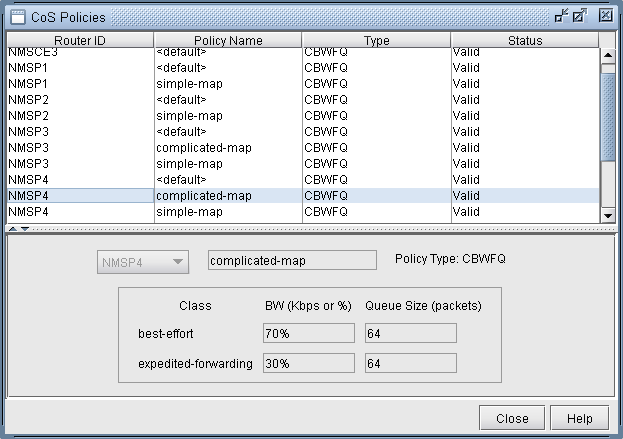
定义 CoS 策略后,即可将其分配给特定链路。由于每个链路都有两个接口,两端各一个,因此可以为链路的每一端分配一个策略。

图 2:将调度器映射或 CoS 策略分配给链路 Network configuration interface for modifying a link between Node A and Node Z. Tabs include Properties, Location, Multicast, MPLSTE, Protocols, Attributes, CoS Policy, PBR, User Parameters. Node A policy dropdown shows options like unspecified and NMSP4 default. Node Z policy is NMSP1 simple-map. Buttons for OK, Cancel, Help are at the bottom.
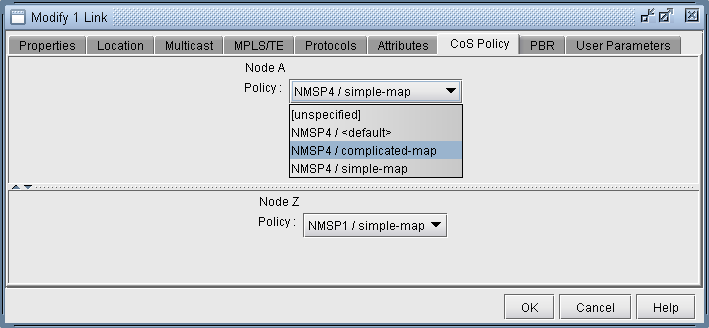
将策略分配给链路后,将更新链路上的容量以反映策略。带宽在链路容量窗口中的显示方式可以通过前面描述的带宽模型选项进行控制。在下面的屏幕截图中,正在使用的带宽模型是 MAM。

图 3:反映分配的调度器映射或 CoS 策略Network management software interface showing network links with attributes: Name, NodeA.ID, IP_A, NodeZ.ID, IP_Z, Area, Type, Media. Detailed metrics for a selected link include bandwidth and RSVP tunnel bandwidth. Navigation menu on the left includes Summary, Nodes, Links, Interfaces, Demands, Tunnels. Options to filter or highlight links are available.的链路容量
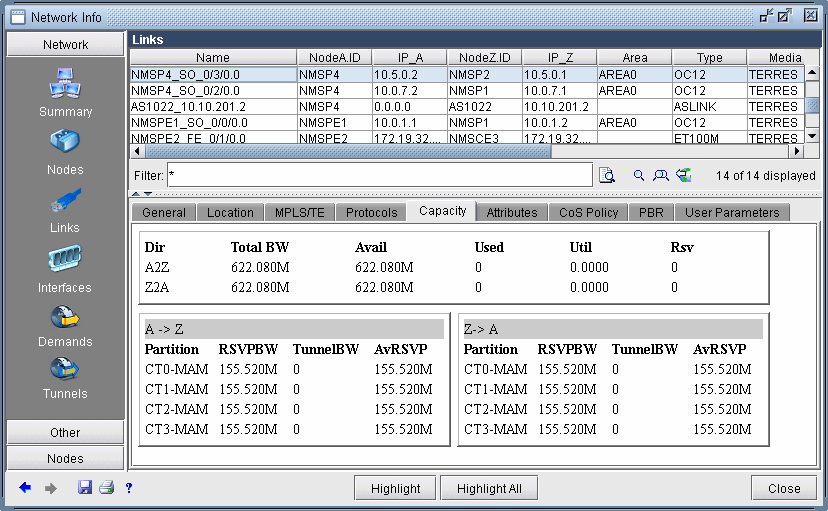
分区

这对应于与分配给接口的策略相关联的类类型。

RSVPBW

这是为相应分区保留的带宽量,由分配的策略定义。

隧道BW

这是当前通过接口的隧道带宽量。

AvRSVP

这是相应分区的剩余可用带宽量。