Help us improve your experience.

Let us know what you think.

Do you have time for a two-minute survey?


适用于第三方插件的思科 ISE 配置

策略实施器的思科 ISE 连接器使用思科 ISE API 与思科身份服务引擎服务器通信。作为威胁补救的一部分,策略实施器的连接器使用实施配置文件。本部分提供有关配置思科 ISE 的信息,以便策略实施器可以调用相应的实施配置文件。

作为配置的一部分,您将在思科 ISE 上创建两个强制配置文件,一个用于隔离,一个用于终止。然后,您将在思科 ISE 实施策略中使用它们。配置思科 ISE 后,您将在策略实施器上配置思科 ISE 连接器。

在思科 ISE 上,您将配置以下内容:

  • 更改策略模式

  • 创建 API 客户端

  • 配置网络配置文件

  • 添加自定义属性

  • 配置授权配置文件

  • 设置授权策略

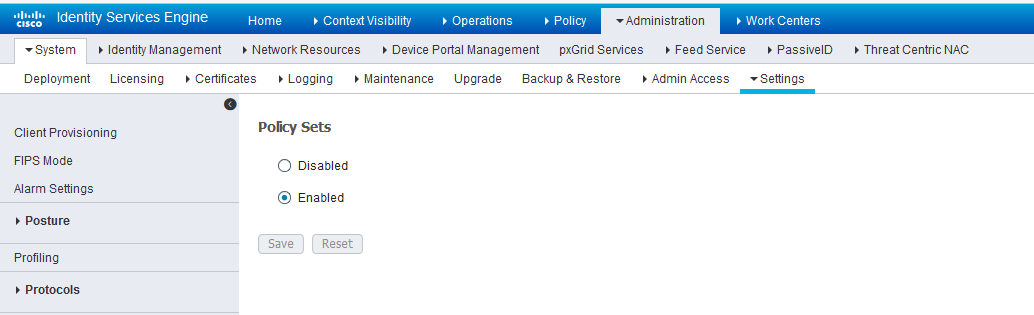
在思科 ISE 上,默认情况下选择简单模式策略模型。要创建 API 客户端,应启用策略集。

  • 导航到 “管理 ”> “系统 > 设置>“策略集” 和“启用 策略集 ”模式。

    更改模式后,系统会提示您重新登录。

    图 1:思科 ISE:启用策略集模式 Cisco ISE Policy Sets page under Administration tab. Policy Sets feature is enabled with Save and Reset buttons visible.
创建 API 客户端:

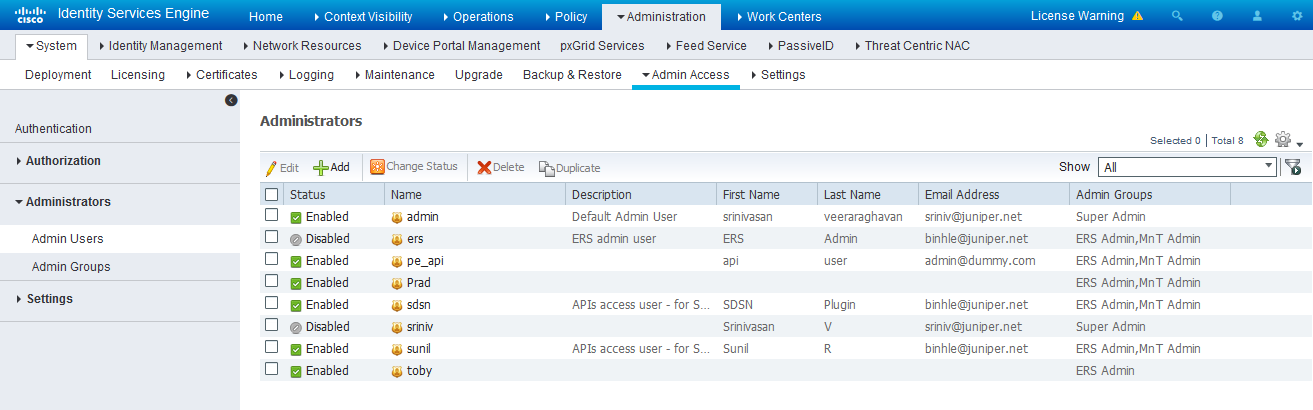
  1. 使用思科 ISE Web UI,通过导航到“管理员>系统>“管理员访问”>“管理员>管理员用户”来创建管理员用户。
  2. 创建管理员用户并将其分配给以下管理员组:ERS 管理员MnT 管理员

    记下用户名和密码。稍后在策略实施器中配置连接器部分时,您将需要它们。

    图 2:思科 ISE:创建管理员用户并分配给管理员组 Cisco ISE interface showing Admin Access menu. Administrators section lists users, details, and action buttons for managing access rights.
为管理节点启用外部 RESTful 服务 API (ERS):

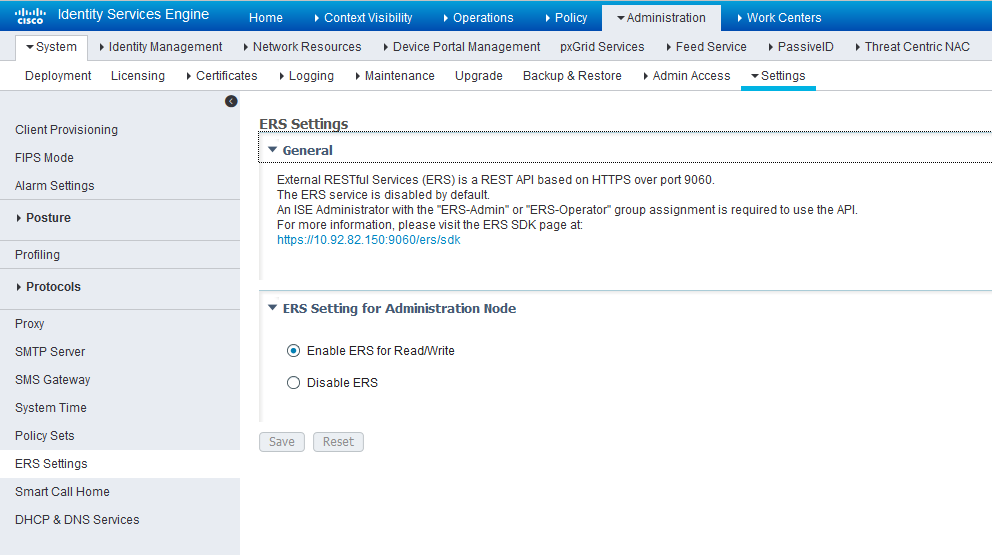
  1. 导航到 “管理 ”> “系统 > 设置 ”>“ERS 设置 ”,然后选择 “启用 ERS 进行读/写”。

  2. 点击 保存

    图 3:思科 ISE:启用 ERS Cisco ISE ERS Settings configuration page showing options to enable or disable ERS API, with navigation menu and save button.

配置网络配置文件:

由 ISE 管理的设备必须支持 RADIUS CoA,并分配适当的网络配置文件以处理 ISE 服务器发送的 CoA 命令:

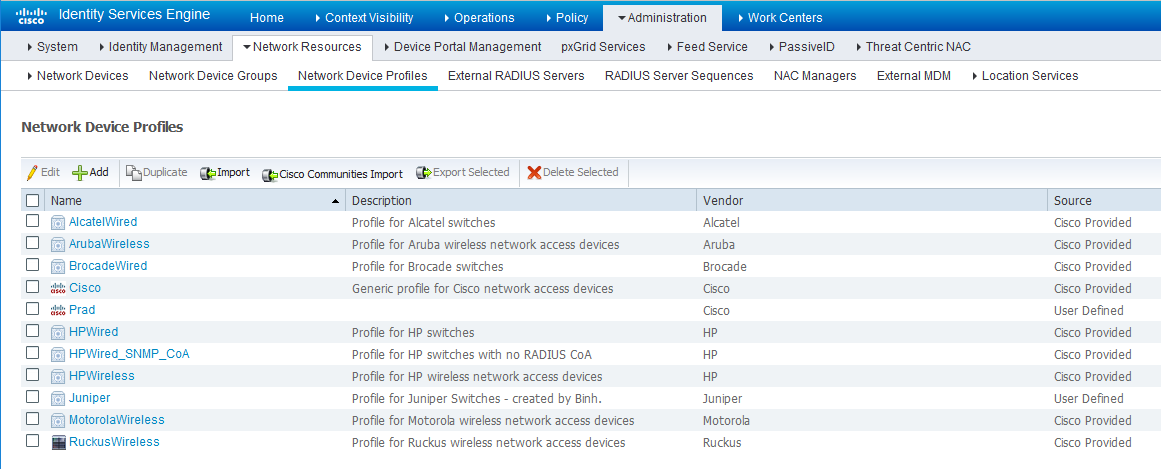
  1. 导航到 “管理>“网络资源>“网络设备配置文件” ,并验证现有网络设备配置文件列表。

    如果要创建新的配置文件,请继续执行下一步以获取信息。

    图 4:思科 ISE:网络设备配置文件列表 Cisco ISE Network Device Profiles interface with table of profiles showing name, description, vendor, and source. Actions include edit, add, duplicate, import, export, and delete.
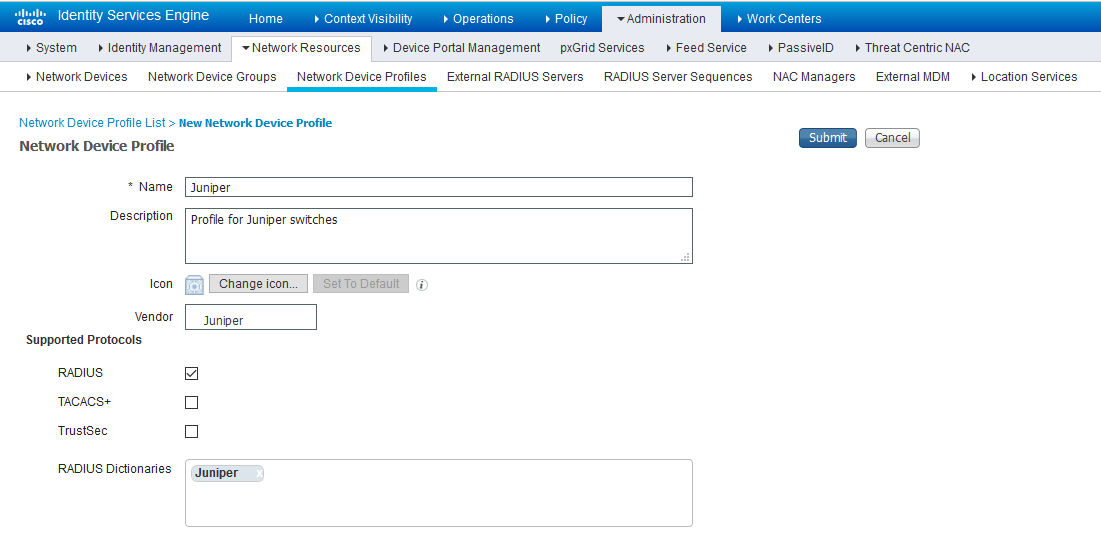
  2. 如果要配置新配置文件,则必须至少设置以下内容:

    • 启用 RADIUS 并在支持的协议列表中添加相应的字典。

      图 5:思科 ISE:网络设备配置文件,启用 RADIUS Cisco ISE Network Device Profile page showing a profile for Juniper with RADIUS enabled and Juniper dictionary selected.
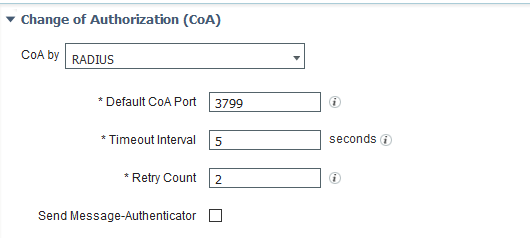
    • 根据下图启用和配置授权变更 (CoA)。

      图 6:思科 ISE:配置授权变更 (CoA) Configuration interface for Change of Authorization settings with RADIUS selected, default port 3799, timeout 5 seconds, retry count 2, Message-Authenticator unchecked.
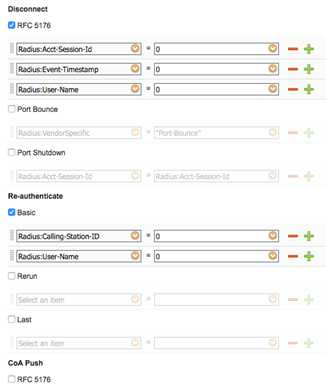
    • 使用适当的 RADIUS 属性和供应商特定的 VSA 配置断开连接和重新身份验证作,以处理标准断开连接和重新身份验证作。以下是瞻博网络 EX 设备的配置示例。

      图 7:瞻博网络 EX Configuration interface for managing RADIUS attributes and actions with options for Disconnect, Re-authenticate, and CoA Push. 的配置示例
配置自定义属性。

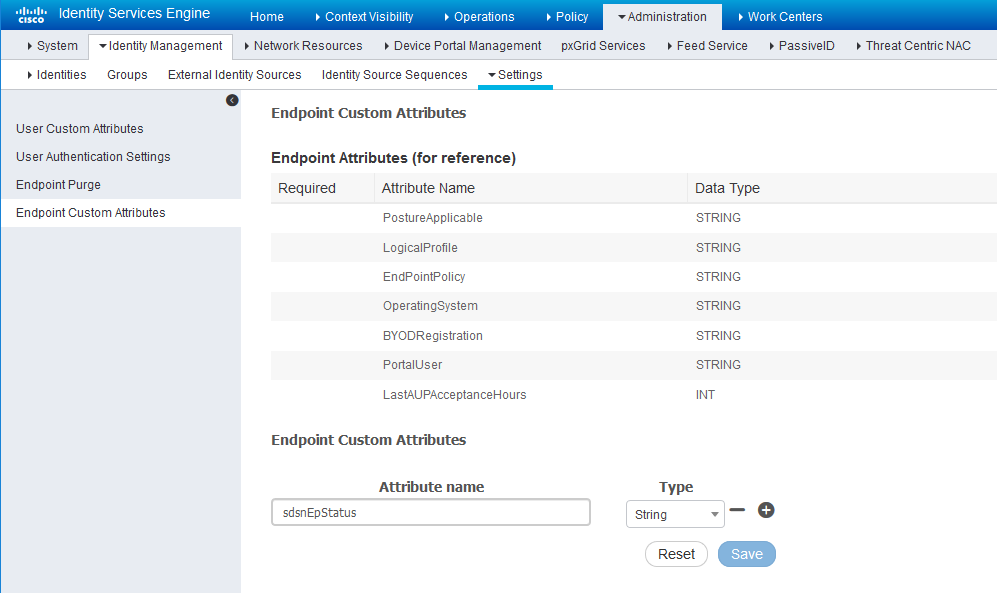
  1. 导航到 “管理 ”>“ 身份管理 > 设置>“终结点自定义属性” ,然后添加类型为字符串的属性 sdsnEpStatus

    图 8:思科 ISE:添加属性 sdsnEpStatus Cisco ISE interface showing Endpoint Custom Attributes page under Identity Management with navigation bar, predefined attributes, and options to create custom attributes.
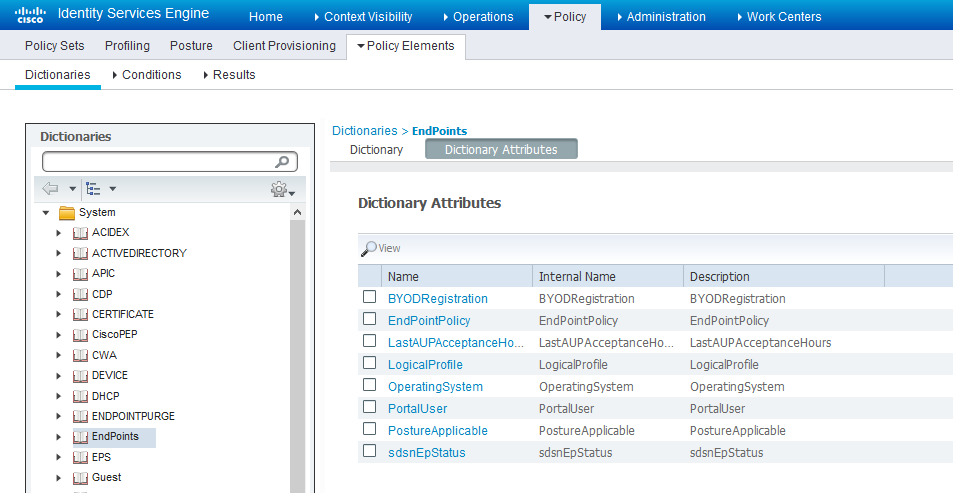
  2. 验证“策略”>“策略元素>字”下的属性>“系统>端点”。

    图 9:思科 ISE:验证属性 Cisco ISE interface showing Policy Elements in the Dictionaries section with EndPoints attributes like BYODRegistration and OperatingSystem.
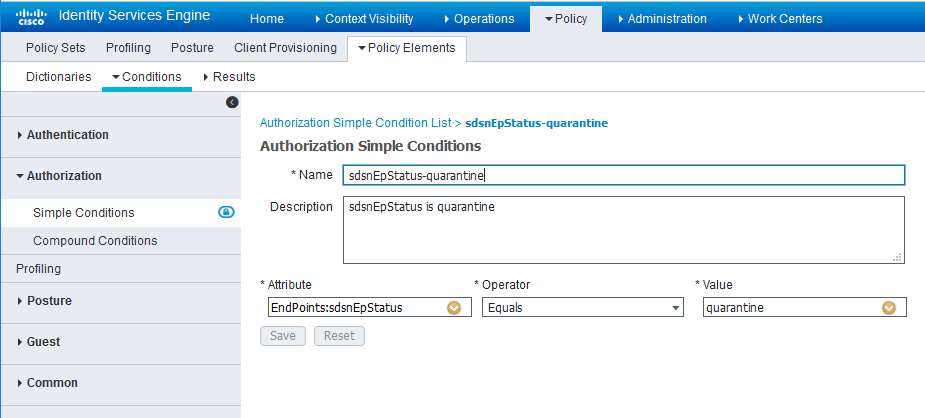
  3. 导航到 策略 > 策略元素 > 条件 > 授权 > 简单条件。使用您创建的 sdsnEpStatus 属性添加授权简单条件。

    在下面的屏幕中,使用 sdsnEpStatus 属性创建了三个条件。条件名称不需要与此处的屏幕中相同,但必须匹配表达式。这些条件将在策略集中用于处理托管终结点的威胁修正,如后面的策略集设置部分所述。其中仅使用 sdsnEpStatus 阻止和 sdsnEpStatus-quarantine 条件。sdsnEpStatus-healthy 是为实现目的而创建的,现在可以忽略。

    图 10:思科 ISE:配置简单条件,匹配表达式 Cisco ISE Policy Elements screen showing Authorization Simple Condition named sdsnEpStatus-blocked with attribute EndPoints sdsnEpStatus equals blocked.
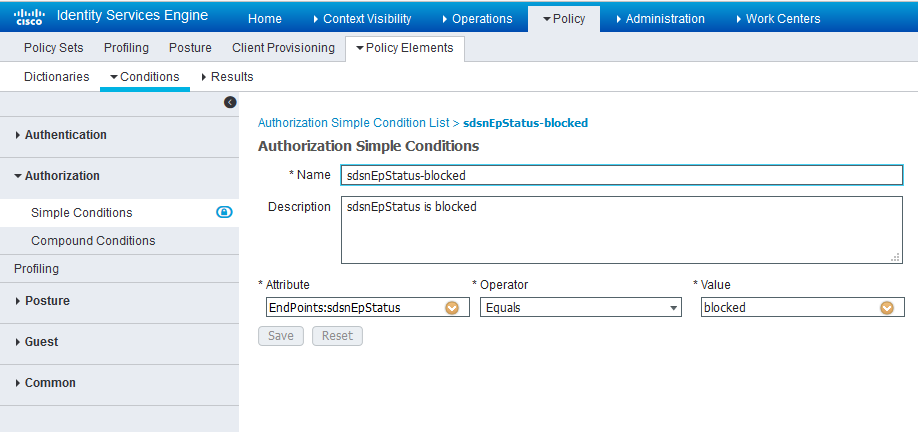
    图 11:思科 ISE:配置简单条件,匹配表达式 Cisco ISE Authorization Simple Conditions page showing condition sdsnEpStatus-quarantine with attribute EndPoints:sdsnEpStatus equals quarantine.

配置权限/授权配置文件。

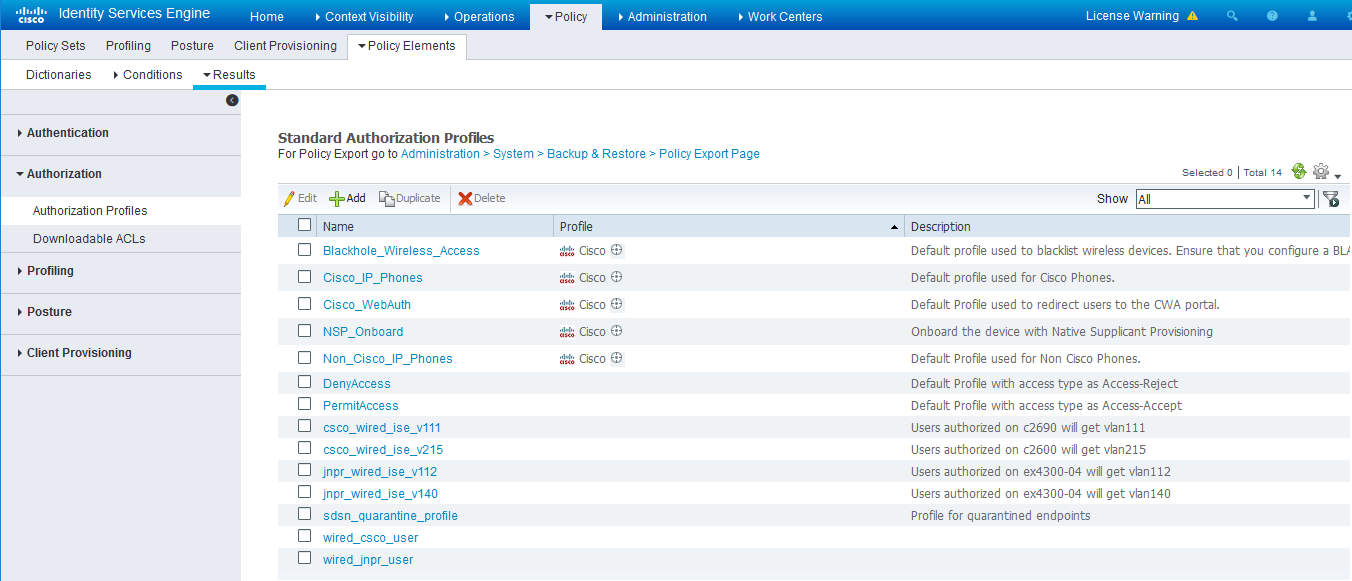
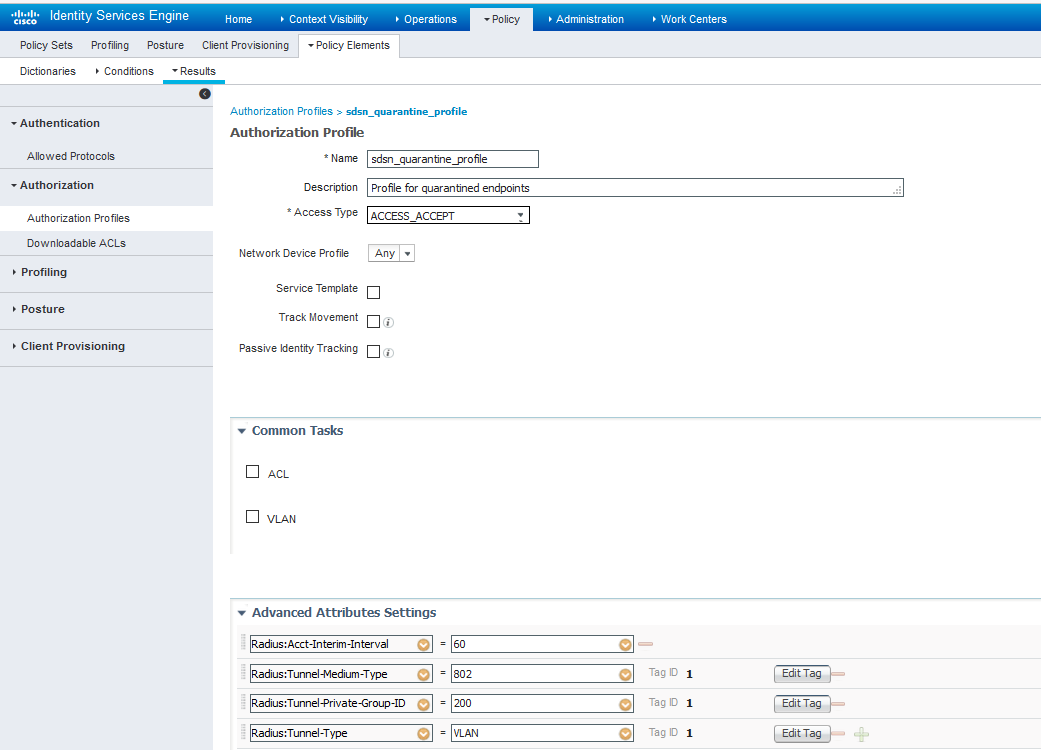
您可以根据需要创建与“阻止”和“隔离”作相对应的授权配置文件。在此处提供的示例配置中,阻止作将导致对网络的完全拒绝访问,隔离配置文件会将端点移动到另一个指定的 VLAN。

  1. 导航到“从 策略 ”> “策略元素 ”> “结果 ”> “授权 ”> “授权配置文件”

    有关示例配置,请参阅下图。

    图 12:思科 ISE:配置授权配置文件 Cisco ISE interface showing Standard Authorization Profiles under Policy Elements tab. Features navigation bar, profiles table, action buttons, and license warning.
    图 13:思科 ISE:配置授权配置文件 Cisco ISE Authorization Profile sdsn_quarantine_profile for quarantined endpoints with RADIUS attributes and no ACL or VLAN configured.
    注意:

    为了阻止主机,使用默认的“DenyAccess”配置文件。

设置授权策略:

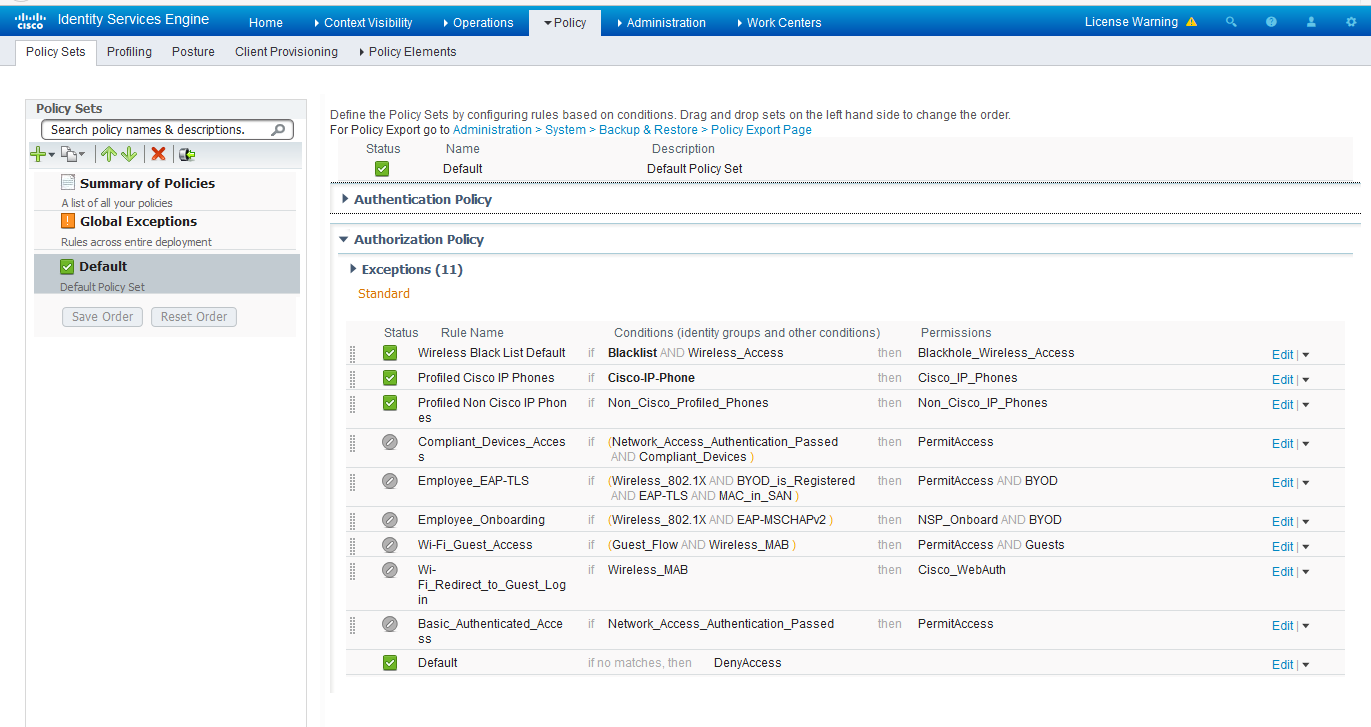
  1. 应用我们在上一步中创建的条件和授权/权限配置文件,创建两个规则作为本地例外。名称可能不同,但这两个规则必须位于“例外”列表的顶部。

    有关示例配置,请参阅下图。

    图 14:思科 ISE:本地例外规则、示例 Cisco ISE Policy Sets interface showing Authorization Policies under Default set with status, rule name, conditions, and permissions.
    注意:

    “策略>“策略集 > 授权策略”下找到此信息。

  2. 继续 为第三方交换机创建策略实施器连接器 ,以使用策略实施器完成配置。