Help us improve your experience.

Let us know what you think.

Do you have time for a two-minute survey?


重命名设备

请按照以下步骤为瞻博网络 Mist™ 组织中的设备添加新名称。

  1. 从左侧菜单中,选择 组织 > 管理员 > 清单
  2. 在“广告资源”页面顶部,点击您要查找的设备类型的按钮。
    location of the device buttons at the top of the Inventory page
  3. 选中要重命名的一个或多个设备的复选框。
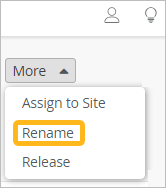
  4. 单击 “更多 ”按钮,然后单击 “重命名”。
    the More button and the Rename option
  5. 使用以下选项之一更改设备名称:
    • 在文本框中输入新名称。

    • 将文本框留空以删除名称,并保留未命名设备。

    • 阅读屏幕上有关生成名称的变量的信息,然后输入包含所需变量的名称。例如,输入 [site]-[ctr] 以生成名称,如 Main Site 1Main Site-2 等。

  6. 单击重命名接入点。