
示例:VPLS 多宿主,缩短收敛时间
此示例说明如何配置使用多宿主到客户站点的虚拟专用 LAN 服务 (VPLS)。此特定的 VPLS 多宿主示例说明了如何配置一项功能,以便在多宿主站点需要将流量切换至其备用 PE 路由器时缩短网络融合时间。
要求
此示例使用以下硬件和软件组件:
-
三台 M Series、MX 系列 或 T Series 路由器
-
Junos OS 12.2 或更高版本
如果您使用的是 M Series 或 T Series 路由器,则 PE 路由器必须具有虚拟环路隧道 (vt) 接口或标签交换接口 (LSI)。在 M Series 和 T Series 路由器上,VPLS 使用基于隧道的 PIC 在 vt 接口上创建虚拟端口。如果 M Series 或 T Series 路由器上未安装基于隧道的 PIC,仍可使用 LSI 配置 VPLS 以支持虚拟端口。使用 LSI 需要在增强型灵活 PIC 集中器 (FPC) 中安装基于以太网的 PIC。
无需为客户边缘设备使用路由器。例如,客户边缘设备可以是 EX 系列以太网交换机。
概述
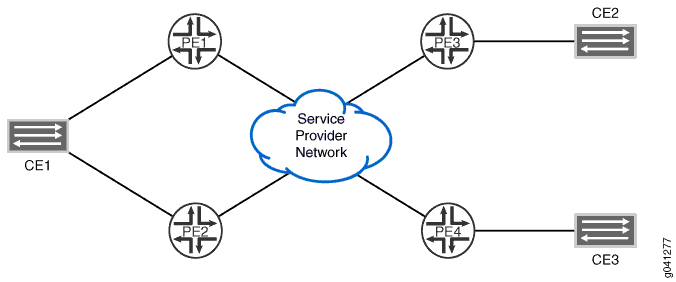
VPLS 网络中的所有 PE 路由器都像大型分布式以太网交换机一样运行,为连接的设备提供第 2 层服务。此示例说明了配置为使用 VPLS 多宿主的 PE 路由器和客户边缘设备网络。拓扑由六台路由器组成:四台 PE 路由器和两台客户边缘设备。设备 CE1 与路由器 PE1 和 PE2 多宿主。PE 路由器配置 best-site 了 and mac-flush 语句,以便在设备 CE1 与其其中一台多宿主 PE 路由器之间的连接发生故障时缩短融合时间。
此示例包括以下设置:
-
best-site— 在第 2 层信息扩展社区中使用控制标志位向量的 B 位(从最高有效位开始计数的第三位)来指示站点是首选站点。使用语句配置best-site的每个 VPLS 站点都会向其他 PE 路由器发出信号,表明自己是首选站点。第 2 层信息扩展社区包含以下信息:-
扩展社区类型(2 个八位位组)
-
封装类型(1 个八位位组)
-
控制标志(1 个八位位组)
-
第 2 层 MTU(2 个八位位组)
-
保留(2 个八位位组)
当 VPLS 路由实例中的相邻 PE 路由器收到标签块播发时,它知道相应的 PE 路由器是连接到该站点的远程 PE 路由器中最首选的路由器。如果相邻 PE 路由器不支持最佳站点功能,则使用标准本地站点选择流程。例如,如果路由器 PE1 未从任何标签块播发接收 B 位,则路由器 PE1 将继续假定路由器 PE3 不支持最佳站点功能。它基于其最小指定站点创建虚拟电路。对于支持最佳站点功能的其他 PE 路由器,路由器 PE1 使用本地标记的最佳站点构建虚拟电路。
-
-
mac-flush— 为 VPLS 路由实例或 VPLS 路由实例下的网格组启用媒体访问控制 (MAC) 刷新处理。MAC 刷新处理会从动态学习的 MAC 地址数据库中移除 MAC 地址。移除动态学习的 MAC 地址后,完成 MAC 地址融合所需的时间就会减少。
拓扑结构
图 1 显示了此示例中使用的拓扑。路由器 PE2 使用best-site语句进行配置,并充当来自设备 CE1 的流量的首选网关。
配置
CLI 快速配置
要快速配置此示例,请复制以下命令,将其粘贴到文本文件中,删除所有换行符,更改详细信息,以便与网络配置匹配,然后将命令复制并粘贴到层次结构级别的 [edit] CLI 中。
路由器 PE1:
set interfaces fe-0/1/0 encapsulation ethernet-vpls
set interfaces fe-0/1/0 unit 0 family vpls
set interfaces fe-0/1/2 unit 0 family inet address 10.0.59.14/32
set interfaces fe-0/1/2 unit 0 family iso
set interfaces fe-0/1/2 unit 0 family mpls
set interfaces fe-0/1/3 unit 0 family inet address 10.0.89.14/30
set interfaces fe-0/1/3 unit 0 family iso
set interfaces fe-0/1/3 unit 0 family mpls
set interfaces lo0 unit 0 family inet address 192.168.9.1/32
set interfaces lo0 unit 0 family iso address 47.0005.8083.0000.1921.6800.5003.00
set routing-options router-id 192.168.9.1
set protocols mpls interface all
set protocols bgp group int type internal
set protocols bgp group int local-address 192.0.2.1
set protocols bgp group int family l2vpn signaling
set protocols isis level 1 disable
set protocols isis interface fe-0/1/2.0
set protocols isis interface fe-0/1/3.0
set protocols isis interface lo0.0
set protocols ldp interface all
set protocols ldp interface fxp0.0 disable
set protocols ldp interface lo0.0
set routing-instances vpls_1 instance-type vpls
set routing-instances vpls_1 interface fe-0/1/0.0
set routing-instances vpls_1 route-distinguisher 10.255.107.74:1
set routing-instances vpls_1 vrf-target target:65056:1
set routing-instances vpls_1 protocols vpls no-tunnel-services
set routing-instances vpls_1 protocols vpls site site_3 site-identifier 3
set routing-instances vpls_1 protocols vpls site site_3 multi-homing
set routing-instances vpls_1 protocols vpls site site_3 site-preference primary
set routing-instances vpls_1 protocols vpls site site_3 interface fe-0/1/0.0
set routing-instances vpls_1 protocols vpls site site_994 site-identifier 994
set routing-instances vpls_1 protocols vpls mac-flush
路由器 PE2:
set interfaces fe-0/1/1 encapsulation ethernet-vpls
set interfaces fe-0/1/1 unit 0 family vpls
set interfaces fe-0/1/2 unit 0 family inet address 10.0.59.13/32
set interfaces fe-0/1/2 unit 0 family iso
set interfaces fe-0/1/2 unit 0 family mpls
set interfaces lo0 unit 0 family inet address 192.168.5.1/32
set interfaces lo0 unit 0 family iso address 47.0005.8083.0000.1921.6800.5005.00
set routing-options router-id 192.168.5.1
set protocols mpls interface all
set protocols isis level 1 disable
set protocols isis interface fe-0/1/2.0
set protocols isis interface lo0.0
set protocols ldp interface all
set protocols ldp interface fxp0.0 disable
set protocols ldp interface lo0.0
set routing-instances vpls_1 instance-type vpls
set routing-instances vpls_1 interface fe-0/1/1.0
set routing-instances vpls_1 route-distinguisher 10.255.107.76:1
set routing-instances vpls_1 vrf-target target:65056:1
set routing-instances vpls_1 protocols vpls no-tunnel-services
set routing-instances vpls_1 protocols vpls site site_3 site-identifier 3
set routing-instances vpls_1 protocols vpls site site_3 multi-homing
set routing-instances vpls_1 protocols vpls site site_3 site-preference backup
set routing-instances vpls_1 protocols vpls site site_3 interface fe-0/1/1.0
set routing-instances vpls_1 protocols vpls site site_995 site-identifier 995
set routing-instances vpls_1 protocols vpls site site_995 best-site
set routing-instances vpls_1 protocols vpls mac-flush
路由器 PE3:
set interfaces fe-1/3/0 unit 0 description "PE3 to PE1"
set interfaces fe-1/3/0 unit 0 family inet address 10.0.89.13/30
set interfaces fe-1/3/0 unit 0 family iso
set interfaces fe-1/3/0 unit 0 family mpls
set interfaces fe-1/3/1 encapsulation ethernet-vpls
set interfaces fe-1/3/1 unit 0 family vpls
set interfaces lo0 unit 0 family inet address 192.168.8.1/32
set interfaces lo0 unit 0 family iso address 47.0005.8083.0000.1921.6800.5002.00
set routing-options router-id 192.168.8.1
set protocols isis level 1 disable
set protocols isis interface fe-1/3/0.0
set protocols isis interface lo0.0
set protocols ldp interface all
set protocols ldp interface fxp0.0 disable
set protocols ldp interface lo0.0
set protocols mpls interface all
set routing-instances vpls_1 instance-type vpls
set routing-instances vpls_1 interface fe-1/3/1.0
set routing-instances vpls_1 route-distinguisher 10.255.107.72:1
set routing-instances vpls_1 vrf-target target:65056:1
set routing-instances vpls_1 protocols vpls no-tunnel-services
set routing-instances vpls_1 protocols vpls site site_2 site-identifier 2
set routing-instances vpls_1 protocols vpls site site_2 interface fe-0/1/0.100
set routing-instances vpls_1 protocols vpls site site_993 site-identifier 993
set routing-instances vpls_1 protocols vpls mac-flush
路由器 PE1
分步程序
要配置路由器 PE1,请执行以下作:
-
配置接口、接口封装和协议家族。
[edit interfaces]
user@PE1# set fe-0/1/0 encapsulation ethernet-vpls
user@PE1# set fe-0/1/0 unit 0 family vpls
user@PE1# set fe-0/1/2 unit 0 family inet address 10.0.59.14/32
user@PE1# set fe-0/1/2 unit 0 family iso
user@PE1# set fe-0/1/2 unit 0 family mpls
user@PE1# set fe-0/1/3 unit 0 family inet address 10.0.89.14/30
user@PE1# set fe-0/1/3 unit 0 family iso
user@PE1# set interfaces fe-0/1/3 unit 0 family mpls
user@PE1# set lo0 unit 0 family inet address 192.168.9.1/32
user@PE1# set lo0 unit 0 family iso address 47.0005.8083.0000.1921.6800.5003.00
-
配置与协议无关的属性。
[edit routing-options]
user@PE1# set router-id 192.168.9.1
-
在路由器的接口上配置 MPLS。
[edit protocols mpls]
user@PE1# set interface all
-
配置 BGP。
[edit protocols bgp]
user@PE1# set group int type internal
user@PE1# set group int local-address 192.0.2.1
user@PE1# set group int family l2vpn signaling
-
将 IS-IS 配置为 PE 路由器之间的 IGP。
[edit protocols isis]
user@PE1# set level 1 disable
user@PE1# set interface fe-0/1/3.0
user@PE1# set interface lo0.0
-
将 LDP 配置为 MPLS 的信令协议。
[edit protocols ldp]
user@PE1# set interface all
user@PE1# set interface fxp0.0 disable
user@PE1# set interface lo0.0
-
配置 VPLS 路由实例。
包含该
mac-flush语句以确保及时从路由器 PE1 中移除过时路由。[edit routing-instances vpls_1] user@PE1# set instance-type vpls user@PE1# set interface fe-0/1/0.0 user@PE1# set route-distinguisher 10.255.107.74:1 user@PE1# set vrf-target target:65056:1 user@PE1# set protocols vpls no-tunnel-services user@PE1# set protocols vpls site site_3 site-identifier 3 user@PE1# set protocols vpls site site_3 multi-homing user@PE1# set protocols vpls site site_3 site-preference primary user@PE1# set protocols vpls site site_3 interface fe-0/1/0.0 user@PE1# set protocols vpls site site_994 site-identifier 994 user@PE1# set protocols vpls mac-flush
结果
在配置模式下,输入 show interfaces、 show protocols、 show routing-instances和 show routing-options 命令以确认您的配置。如果输出未显示预期的配置,请重复此示例中的说明以更正配置。
user@PE1# show interfaces
fe-0/1/0 {
    encapsulation ethernet-vpls;
    unit 0 {
        family vpls;
    }
}
    fe-0/1/2 {
        unit 0 {
            family inet {
                address 10.0.59.14/32;
            }
            family iso;
            family mpls;
        }
    }
fe-0/1/3 {
    unit 0 {
        family inet {
            address 10.0.89.14/30;
        }
        family iso;
        family mpls;
    }
}
lo0 {
    unit 0 {
        family inet {
            address 192.168.9.1/32;
        }
        family iso {
            address 47.0005.8083.0000.1921.6800.5003.00;
        }
    }
}
user@PE1# show protocols
mpls {
    interface all;
}
bgp {
    group int {
        type internal;
        local-address 192.0.2.1;
        family l2vpn {
            signaling;
        }
    }
}
isis {
    level 1 disable;
    interface fe-0/1/2.0;
    interface fe-0/1/3.0;
    interface lo0.0;
}
ldp {
    interface all;
    interface fxp0.0 {
        disable;
    }
    interface lo0.0;
}
user@PE1# show routing-instances
vpls_1 {
    instance-type vpls;
    interface fe-0/1/0.0;
    route-distinguisher 10.255.107.74:1;
    vrf-target target:65056:1;
    protocols {
        vpls {
            no-tunnel-services;
            site site_3 {
                site-identifier 3;
                multi-homing;
                site-preference primary;
                interface fe-0/1/0.0;
            }
            site site_994 {
                site-identifier 994;
            }
            mac-flush;
        }
    }
}
user@PE1# show routing-options
router-id 192.168.9.1;
路由器 PE2
分步程序
要配置路由器 PE2,请执行以下作:
-
配置接口、接口封装和协议家族。
[edit interfaces]
user@PE2# set fe-0/1/1 encapsulation ethernet-vpls
user@PE2# set fe-0/1/1 unit 0 family vpls
user@PE2# set fe-0/1/2 unit 0 family inet address 10.0.59.13/32
user@PE2# set fe-0/1/2 unit 0 family iso
user@PE2# set fe-0/1/2 unit 0 family mpls
user@PE2# set lo0 unit 0 family inet address 192.168.5.1/32
user@PE2# set lo0 unit 0 family iso address 47.0005.8083.0000.1921.6800.5005.00
-
配置与协议无关的属性。
[edit routing-options]
user@PE2# set router-id 192.168.5.1
-
在路由器 PE2 接口上配置 MPLS。
[edit protocols]
user@PE2# set mpls interface all
-
将 LDP 配置为面向 PE 路由器的接口上 MPLS 的信令协议。
[edit protocols ldp]
user@PE2# set interface all
user@PE2# set interface fxp0.0 disable
user@PE2# set interface lo0.0
-
将 IS-IS 配置为 PE 路由器之间的 IGP。
[edit protocols isis]
user@PE2# set level 1 disable
user@PE2# set interface fe-0/1/2.0
user@PE2# set interface lo0.0
-
配置 VPLS 路由实例vpls_1。
包含该
best-site语句以确保路由器 PE2 充当客户边缘路由器的首选路径。包括该mac-flush语句,以确保及时从路由器 PE2 中移除过时的路由。[edit routing-instances vpls_1] user@PE2# set instance-type vpls user@PE2# set interface fe-0/1/1.0 user@PE2# set route-distinguisher 10.255.107.76:1 user@PE2# set vrf-target target:65056:1 user@PE2# set protocols vpls no-tunnel-services user@PE2# set protocols vpls site site_3 site-identifier 3 user@PE2# set protocols vpls site site_3 multi-homing user@PE2# set protocols vpls site site_3 site-preference backup user@PE2# set protocols vpls site site_3 interface fe-0/1/1.0 user@PE2# set protocols vpls site site_995 site-identifier 995 user@PE2# set protocols vpls site site_995 best-site user@PE2# set protocols vpls mac-flush
结果
在配置模式下,输入 show interfaces、 show protocols、 show routing-instances和 show routing-options 命令以确认您的配置。如果输出未显示预期的配置,请重复此示例中的说明以更正配置。
user@PE2# show interfaces
fe-0/1/1 {
    encapsulation ethernet-vpls;
    unit 0 {
        family vpls;
    }
}
fe-0/1/2 {
    unit 0 {
        family inet {
            address 10.0.59.13/32;
        }
        family iso;
        family mpls;
    }
}
lo0 {
    unit 0 {
        family inet {
            address 192.168.5.1/32;
        }
        family iso {
            address 47.0005.8083.0000.1921.6800.5005.00;
        }
    }
}
user@PE2# show protocols
mpls {
    interface all;
}
isis {
    level 1 disable;
    interface fe-0/1/2.0;
    interface lo0.0;
}
ldp {
    interface all;
    interface fxp0.0 {
        disable;
    }
    interface lo0.0;
}
user@PE2# show routing-instances
vpls_1 {
    instance-type vpls;
    interface fe-0/1/1.0;
    route-distinguisher 10.255.107.76:1;
    vrf-target target:65056:1;
    protocols {
        vpls {
            no-tunnel-services;
            site site_3 {
                site-identifier 3;
                multi-homing;
                site-preference backup;
                interface fe-0/1/1.0;
            }
            site site_995 {
                site-identifier 995;
                best-site;
            }
            mac-flush;
        }
    }
}
user@pe2# show routing-options
router-id 192.168.5.1;
路由器 PE3
分步程序
要配置路由器 PE3,请执行以下作:
-
配置接口、接口封装和协议家族。
[edit interfaces]
user@PE3# set fe-1/3/0 unit 0 description "PE3 to PE1"
user@PE3# set fe-1/3/0 unit 0 family inet address 10.0.89.13/30
user@PE3# set fe-1/3/0 unit 0 family iso
user@PE3# set fe-1/3/0 unit 0 family mpls
user@PE3# set fe-1/3/1 encapsulation ethernet-vpls
user@PE3# set fe-1/3/1 unit 0 family vpls
user@PE3# set lo0 unit 0 family inet address 192.168.8.1/32
user@PE3# set lo0 unit 0 family iso address 47.0005.8083.0000.1921.6800.5002.00
-
配置与协议无关的属性。
[edit routing-options]
user@PE3# set router-id 192.168.8.1
-
将 IS-IS 配置为 PE 路由器之间的 IGP。
[edit protocols isis]
user@PE3# set level 1 disable
user@PE3# set interface fe-0/1/3.0
user@PE3# set interface lo0.0
-
将 LDP 配置为 MPLS 的信令协议。
[edit protocols ldp]
user@PE3# set interface all
user@PE3# set interface fxp0.0 disable
user@PE3# set interface lo0.0
-
配置 VPLS 路由实例。
在此处包含该
mac-flush语句,以确保及时从路由器 PE1 中移除过时的路由。[edit routing-instances vpls_1] user@PE3# set instance-type vpls user@PE3# set interface fe-1/3/1.0 user@PE3# set route-distinguisher 10.255.107.72:1 user@PE3# set vrf-target target:65056:1 user@PE3# set protocols vpls no-tunnel-services user@PE3# set protocols vpls site site_2 site-identifier 2 user@PE3# set protocols vpls site site_2 interface fe-0/1/0.100 user@PE3# set protocols vpls site site_993 site-identifier 993 user@PE3# set protocols vpls mac-flush
结果
在配置模式下,输入 show interfaces、 show protocols show routing-instances和 show routing-options 命令以确认您的配置。如果输出未显示预期的配置,请重复此示例中的说明以更正配置。
user@PE3# show interfaces
fe-1/3/0 {
    unit 0 {
        description "PE3 to PE1";
        family inet {
            address 10.0.89.13/30;
        }
        family iso;
        family mpls;
    }
}
fe-1/3/1 {
    encapsulation ethernet-vpls;
    unit 0 {
        family vpls;
    }
}
lo0 {
    unit 0 {
        family inet {
            address 192.168.8.1/32;
        }
        family iso {
            address 47.0005.8083.0000.1921.6800.5002.00;
        }
    }
}
user@PE3# show protocols
mpls {
    interface all;
}
bgp {
    group int {
        type internal;
        local-address 192.0.2.2;
        family l2vpn {
            signaling;
        }
    }
}
isis {
    level 1 disable;
    interface fe-1/3/0.0;
    interface lo0.0;
}
ldp {
    interface all;
    interface fxp0.0 {
        disable;
    }
    interface lo0.0;
}
user@PE3# show routing-instances
vpls_1 {
    instance-type vpls;
    interface fe-0/1/0.100; ## 'fe-0/1/0.100' is not defined
    route-distinguisher 10.255.107.72:1;
    vrf-target target:65056:1;
    protocols {
        vpls {
            no-tunnel-services;
            site site_2 {
                site-identifier 2;
                interface fe-1/3/1.0;
            }
            site site_993 {
                site-identifier 993;
            }
            mac-flush;
        }
    }
}
user@pe3# show routing-options
router-id 192.168.8.1;