
示例:VPLS 配置(BGP 和 LDP 互连)
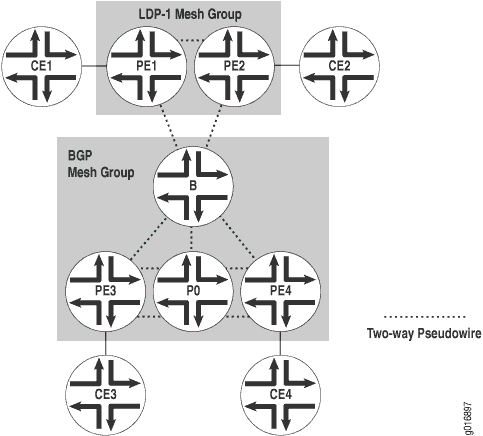
图 1 显示了两个 VPLS 网格组:LDP-1 和默认 BGP 网格组。VPLS 实例在配置中命名 v1 。 表 1 显示了示例拓扑中路由器接口的地址。
路由器 |
接口 |
地址 |
|---|---|---|
CE1 |
fe-0/0/3(链接到路由器 PE1) |
10.12.31.1 |
环路 |
10.12.53.1 |
|
CE2 |
fe-0/0/1(链接到路由器 PE2) |
10.12.31.2 |
环路 |
10.12.53.2 |
|
PE1 |
t1-1/1/1(链接到路由器 PE2) |
10.12.100.17 |
t1-0/1/0(链接到路由器 B) |
10.12.100.2 |
|
环路 |
10.255.170.106 |
|
PE2 |
t1-0/1/1(链接到路由器 PE1) |
10.12.100.18 |
t1–0/1/3(链接到路由器 B) |
10.12.100.6 |
|
环路 |
10.255.170.104 |
|
B |
t1-0/1/2(链接到路由器 PE1) |
10.12.100.1 |
t1-0/1/3(链接到路由器 PE2) |
10.12.100.5 |
|
so-0/2/2(链接到路由器 PE3) |
10.12.100.9 |
|
fe-0/0/3(链接到路由器 PE4) |
10.12.100.13 |
|
环路 |
10.255.170.98 |
|
PE3 |
s0-0/2/1(链接到路由器 B) |
10.12.100.10 |
so-0/2/2(链接到路由器 P0) |
10.12.100.21 |
|
环路 |
10.255.170.96 |
|
P0 |
so-0/2/1(链接到路由器 PE3) |
10.12.100.22 |
t1-0/1/3(链接到路由器 PE4) |
10.12.100.25 |
|
环路 |
10.255.170.100 |
|
PE4 |
fe-0/0/3(链接到路由器 B) |
10.12.100.14 |
t1-0/1/3(链接到路由器 P0) |
10.12.100.26 |
|
环路 |
10.255.170.102 |
|
CE3 |
ge-1/2/1(链接到 PE3) |
10.12.31.3 |
环路 |
10.12.53.3 |
|
CE4 |
fe-0/0/2(链接到 PE4) |
10.12.31.4 |
环路 |
10.12.53.4 |
在路由器 CE3 上,唯一需要配置的项目是连接到 PE3 的千兆以太网接口。
路由器 CE3
[edit]
interfaces {
    ge-1/2/1 {
        unit 0 {
            family inet {
                address 10.12.31.1/24;
            }
        }
    }
}
在路由器 PE3 上,通过配置 BGP、MPLS、OSPF 和 LDP 来为 VPLS 准备路由器。(这些协议是大多数第 2 层 VPN 相关应用的基础,包括 VPLS。)在层次结构级别包含[edit protocols bgp group group-name family l2vpn]该signaling语句,因为 VPLS 为内部 BGP 使用与第 2 层 VPN 相同的基础架构。
在 Junos OS 7.3 及更高版本中,该 signaling 语句取代 unicast 了层次结构级别的 [edit protocols bgp group group-name family l2vpn] 该语句。如果您希望同时配置 VPLS 域和第 2 层 VPN,则必须使用该 signaling 语句。
接下来,在连接到路由器 CE3 的千兆以太网接口上配置 VLAN 标记。最后,将千兆以太网接口添加到 VPLS 路由实例中,并指定站点范围、站点 ID 号和站点名称。
路由器 PE3
[edit]
interfaces {
    so-0/2/1 {
        unit 0 {
            family inet {
                address 10.12.100.10/30;
            }
            family mpls;
        }
    }
    so-0/2/2 {
        unit 0 {
            family inet {
                address 10.12.100.21/30;
            }
            family mpls;
        }
    }
    ge-1/3/1 {
        encapsulation ethernet-vpls;
        unit 0 {
            family vpls;
        }
    }
}
routing-instances {
    v1 {
        instance-type vpls;
        protocols {
            vpls {
                site 1 {
                    site-identifier 3;
                }
                site-range 10;
            }
        }
        interface ge-1/3/1.0;
        route-distinguisher 10.255.170.96:1;
        vrf-target target:1:2;
    }
}
routing-options {
    autonomous-system 65000;
}
protocols {
    bgp {
        group int {
            type internal;
            local-address 10.255.170.96;
            family l2vpn {
                signaling;
            }
            neighbor 10.255.170.98;
            neighbor 10.255.170.102;
        }
        log-updown;
    }
    ldp {
        interface so-0/2/1.0;
        interface so-0/2/2.0;
    }
    mpls {
        interface all;
    }
    ospf {
        area 0.0.0.0 {
            interface so-0/2/1.0;
            interface so-0/2/2.0;
            interface lo0.0 {
                passive;
            }
        }
    }
}
在路由器 P0 上,配置 MPLS、OSPF 和 LDP 以互连 PE3 和 PE4。
路由器 P0
[edit]
interfaces {
    t1-0/1/3 {
        unit 0 {
            family inet {
                address 10.12.100.25/30;
            }
            family mpls;
        }
    so-0/2/1 {
        unit 0 {
            family inet {
                address 10.12.100.22/30;
            }
            family mpls;
        }
    }
}
protocols {
    mpls {
        interface all;
    }
    ospf {
        area 0.0.0.0 {
            interface so-0/2/1.0;
            interface t1-0/1/3.0;
            interface lo0.0 {
                passive;
            }
        }
    }
    ldp {
        interface t1-0/1/3.0;
        interface so-0/2/1.0;
    }
}
在路由器 PE4 上,配置 BGP、MPLS、OSPF 和 LDP 以补充 PE3 上的配置。接下来,在连接到路由器 CE4 的快速以太网接口上配置 VLAN 标记。在物理和逻辑接口级别包括 VLAN VPLS 封装。最后,将快速以太网接口添加到 VPLS 路由实例中,并指定站点范围、站点 ID 号和站点名称。
路由器 PE4
[edit]
interfaces {
    fe-0/0/2 {
    encapsulation ethernet-vpls;
        unit 0 {
            family vpls;
        }
    fe-0/0/3 {
        unit 0 {
            family inet {
                address 10.12.100.14/30;
            }
            family mpls;
        }
    }
    t1-0/1/3 {
        unit 0 {
            family inet {
                address 10.12.100.26/30;
            }
            family mpls;
			}
        }
    }
}
protocols {
    mpls {
        interface all;
    }
    bgp {
        log-updown;
        group int {
            type internal;
            local-address 10.255.170.102;
            family l2vpn {
                signaling;
            }
            neighbor 10.255.170.96;
            neighbor 10.255.170.98;
        }
    }
    ospf {
        area 0.0.0.0 {
            interface fe-0/0/3.0;
            interface t1-0/1/3.0;
            interface lo0.0 {
                passive;
            }
        }
    }
    ldp {
        interface fe-0/0/3.0;
        interface t1-0/1/3.0;
        interface lo0.0;
		}
    }
routing-instances {
    v1 {
        instance-type vpls;
        interface fe-0/0/2.0;
        route-distinguisher 10.255.170.102:1;
        vrf-target target:1:2;
        protocols {
            vpls {
                site-range 10;
                site 1 {
                    site-identifier 4;
                }
            }
        }
    }
routing-options {
    autonomous-system 65000;
	}
在路由器 CE4 上,配置连接到 PE4 的快速以太网接口。
路由器 CE4
[edit]
interfaces {
    fe-0/0/2 {
        unit 0 {
            family inet {
                address 10.12.31.4/24;
            }
        }
    }
}
在路由器 B(区域边界路由器)上,配置接口。接下来,配置 BGP、MPLS、OSPF 和 LDP。确保通过在 interface lo0.0 [edit protocols ldp] 层次结构级别包含语句,将环路接口包含在 LDP 配置中。对于 BGP,请在 [edit bgp group group-name family l2vpn] 层级包含该signaling语句。最后,同时使用 BGP 和 LDP 信令配置 VPLS 实例。通过在 mesh-group ldp1 [edit routing-instances v1 protocols vpls] 层次结构级别包含语句来配置 LDP-1 网格组。
路由器 B
[edit]
interfaces {
    fe-0/0/3 {
        unit 0 {
            family inet {
                address 10.12.100.13/30;
            }
            family mpls;
        }
    }
    t1-0/1/2 {
        unit 0 {
            family inet {
                address 10.12.100.1/30;
            }
            family mpls;
        }
    }
    t1-0/1/3 {
        unit 0 {
            family inet {
                address 10.12.100.5/30;
            }
            family mpls;
        }
    }
    so-0/2/2 {
        unit 0 {
            family inet {
                address 10.12.100.9/30;
            }
            family mpls;
        }
    }
}
protocols {
    mpls {
        interface all;
    }
    bgp {
        log-updown;
        group int {
            type internal;
            local-address 10.255.170.98;
            family l2vpn {
                signaling;
            }
            neighbor 10.255.170.96;
            neighbor 10.255.170.102;
        }
    }
    ospf {
        area 0.0.0.0 {
            interface t1-0/1/2.0;
            interface t1-0/1/3.0;
            interface so-0/2/2.0;
            interface fe-0/0/3.0;
            interface lo0.0 {
                passive;
            }
        }
    }
    ldp {
        interface fe-0/0/3.0;
        interface t1-0/1/2.0;
        interface t1-0/1/3.0;
        interface so-0/2/2.0;
        interface lo0.0;
    }
}
routing-instances {
    v1 {
        instance-type vpls;
        route-distinguisher 10.255.170.98:1;
        vrf-target target:1:2;
        protocols {
            vpls {
                site-range 10;
                site 1 {
                    site-identifier 1;
                }
                vpls-id 101;
                mesh-group ldp-1 {
                    neighbor 10.255.170.106;
                    neighbor 10.255.170.104;
					}
				}
			}
		}
	}
routing-options {
    autonomous-system 65000;
	}
最后,配置 LDP PE 路由器。在路由器 PE1 上,通过配置 LDP、MPLS 和 OSPF,为 VPLS 准备路由器。接下来,在连接到 CE1 的快速以太网接口上配置 VPLS 封装。最后,将快速以太网接口添加到路由实例,指定 VPLS ID 和相邻路由器的环路地址。
路由器 PE1
[edit]
interfaces {
    fe-0/0/3 {
        encapsulation ethernet-vpls;
        unit 0 {
            family vpls;
        }
    }
    t1-0/1/0 {
        unit 0 {
            family inet {
                address 10.12.100.2/30;
            }
            family mpls;
        }
    }
    t1-1/1/1 {
        unit 0 {
            family inet {
                address 10.12.100.17/30;
            }
            family mpls;
        }
    }
}
protocols {
    mpls {
        interface all;
    }
    ospf {
        area 0.0.0.0 {
            interface t1-0/1/0.0;
            interface t1-1/1/1.0;
            interface lo0.0 {
                passive;
            }
        }
    }
    ldp {
        interface t1-0/1/0.0;
        interface t1-1/1/1.0;
        interface lo0.0;
    }
}
routing-instances {
    v1 {
        instance-type vpls;
        interface fe-0/0/3.0;
        protocols {
            vpls {
                vpls-id 101;
                neighbor 10.255.170.98;
                neighbor 10.255.170.104;
            }
        }
    }
}
接下来,在连接到路由器 PE1 的路由器 CE1 上配置快速以太网接口。
路由器 CE1
[edit]
interfaces {
    fe-0/0/3 {
        unit 0 {
            family inet {
                address 10.12.31.1/24;
            }
        }
    }
}
在路由器 PE2 上,通过配置 LDP、MPLS 和 OSPF 来为 VPLS 准备路由器。接下来,在连接到路由器 CE1 的快速以太网接口上配置 VPLS 封装。最后,将快速以太网接口添加到路由实例,指定 VPLS ID 和相邻路由器的环路地址。
路由器 PE2
[edit]
interfaces {
    t1-0/1/1 {
        unit 0 {
            family inet {
                address 10.12.100.18/30;
            }
            family mpls;
        }
    t1-0/1/3 {
        unit 0 {
            family inet {
                address 10.12.100.6/30;
            }
            family mpls;
        }
    }
    fe-1/0/2 {
        encapsulation ethernet-vpls;
        unit 0 {
            family vpls;
        }
    }
}
protocols {
    mpls {
        interface all;
    }
    ospf {
        area 0.0.0.0 {
            interface t1-0/1/3.0;
            interface t1-0/1/1.0;
            interface lo0.0 {
                passive;
            }
        }
    }
    ldp {
        interface t1-0/1/1.0;
        interface t1-0/1/3.0;
        interface lo0.0;
    }
}
routing-instances {
    v1 {
        instance-type vpls;
        interface fe-1/0/2.0;
        protocols {
            vpls {
                vpls-id 101;
                neighbor 10.255.170.98;
                neighbor 10.255.170.106;
            }
        }
    }
}
最后,在路由器 CE2 上配置连接到 PE2 的快速以太网接口:
路由器 CE2
[edit]
interfaces {
    fe-0/0/1 {
        unit 0 {
            family inet {
                address 10.12.31.2/24;
            }
        }
    }
}
验证您的工作
要验证 VPLS 是否正常运行,请使用以下命令:
show bgp summaryshow ldp neighborshow vpls connectionsshow route forwarding-table family vpls (destination | extensive | matching | table)show interfaces vt* terseshow vpls flood extensiveshow vpls statistics
以下部分显示了配置示例在路由器 B 上输出的一些命令。
使用此 show bgp summary 命令验证 VPLS 的 BGP 信令是否已开启。
user@B> show bgp summary
Groups: 1 Peers: 2 Down peers: 0
Table          Tot Paths  Act Paths Suppressed    History Damp State    Pending
bgp.l2vpn.0            2          2          0          0          0          0
Peer               AS      InPkt     OutPkt    OutQ   Flaps Last Up/Dwn
State|#Active/Received/Damped...
10.255.170.96   65000        124        125       0       0       54:26 Establ
  bgp.l2vpn.0: 1/1/0
  v1.l2vpn.0: 1/1/0
10.255.170.102  65000        122        124       0       0       54:18 Establ
  bgp.l2vpn.0: 1/1/0
  v1.l2vpn.0: 1/1/0
使用此 show ldp neighbors 命令验证 VPLS 的 LDP 信令是否已开启。
user@B>  show ldp neighbors
Address            Interface          Label space ID         Hold time
10.255.170.104     lo0.0              10.255.170.104:0         41
10.255.170.106     lo0.0              10.255.170.106:0         38
10.12.100.14       fe-0/0/3.0         10.255.170.102:0         12
10.12.100.10       so-0/2/2.0         10.255.170.96:0          14
10.12.100.2        t1-0/1/2.0         10.255.170.106:0         14
10.12.100.6        t1-0/1/3.0         10.255.170.104:0         13
要验证 VPLS 连接是否已开启,请使用命令 show vpls connections 。
user@B>show vpls connections
Layer-2 VPN connections:

Legend for connection status (St)
EI -- encapsulation invalid      NC -- interface encapsulation not CCC/TCC/VPLS
EM -- encapsulation mismatch     WE -- interface and instance encaps not same
VC-Dn -- Virtual circuit down    NP -- interface hardware not present
CM -- control-word mismatch      -> -- only outbound connection is up
CN -- circuit not provisioned    <- -- only inbound connection is up
OR -- out of range               Up -- operational
OL -- no outgoing label          Dn -- down
LD -- local site signaled down   CF -- call admission control failure
RD -- remote site signaled down  SC -- local and remote site ID collision LN -- local site not designated  LM -- local site ID not minimum designated RN -- remote site not designated RM -- remote site ID not minimum designated XX -- unknown connection status  IL -- no incoming label
MM -- MTU mismatch               MI -- Mesh-Group ID not availble

Legend for interface status
Up -- operational
Dn -- down

Instance: v1
BGP-VPLS State
  Local site: 1 (1)
    connection-site           Type  St     Time last up          # Up trans
    3                         rmt   Up     Jan 22 16:38:47 2008           1
      Local interface: vt-0/3/0.1048834, Status: Up, Encapsulation: VPLS
        Description: Intf - vpls v1 local site 1 remote site 3
      Remote PE: 10.255.170.96, Negotiated control-word: No
      Incoming label: 800258, Outgoing label: 800000
    4                         rmt   Up     Jan 22 16:38:54 2008           1
      Local interface: vt-0/3/0.1048835, Status: Up, Encapsulation: VPLS
        Description: Intf - vpls v1 local site 1 remote site 4
      Remote PE: 10.255.170.102, Negotiated control-word: No
      Incoming label: 800259, Outgoing label: 800000 LDP-VPLS State
VPLS-id: 101
  Mesh-group connections: m1
    Neighbor                  Type  St     Time last up          # Up trans
    10.255.170.104(vpls-id 101) rmt Up     Jan 22 16:38:40 2008           1
      Local interface: vt-0/3/0.1048833, Status: Up, Encapsulation: ETHERNET
        Description: Intf - vpls v1 neighbor 10.255.170.104 vpls-id 101
      Remote PE: 10.255.170.104, Negotiated control-word: No
      Incoming label: 800001, Outgoing label: 800000
    10.255.170.106(vpls-id 101) rmt Up     Jan 22 16:38:39 2008           1
      Local interface: vt-0/3/0.1048832, Status: Up, Encapsulation: ETHERNET
        Description: Intf - vpls v1 neighbor 10.255.170.106 vpls-id 101
      Remote PE: 10.255.170.106, Negotiated control-word: No
      Incoming label: 800000, Outgoing label: 800000
要在 vpls 转发表中显示 VPLS 路由(MAC 地址),请使用命令 show route forwarding-table family vpls 。
user@B> show route forwarding-table family vpls
Routing table: v1.vpls
VPLS:
Destination        Type RtRef Next hop           Type Index NhRef Netif
default            perm     0                    rjct   540     1
vt-0/3/0.1048832   user     0                    comp   587     3
vt-0/3/0.1048833   user     0                    comp   587     3
vt-0/3/0.1048834   user     0                    comp   589     3
vt-0/3/0.1048835   user     0                    comp   589     3
00:17:cb:c2:10:01/48
                   dynm     0                    indr 262143     4
                                                Push 800000   580     2
t1-0/1/3.0
00:17:cb:c2:10:02/48
                   dynm     0                    indr 262145     4
                              10.12.100.14      Push 800000   594     2
fe-0/0/3.0
00:17:cb:c2:10:03/48
                   dynm     0                    indr 262142     4
                                                Push 800000   576     2
t1-0/1/2.0
00:17:cb:c2:10:bd/48
                   dynm     0                    indr 262144     4
                                                Push 800000   585     2
so-0/2/2.0
要显示 VPLS 源和目标 MAC 地址计费信息, destination请将 、 extensive、 matching或 table 选项与命令一起使用 show route forwarding-table family vpls 。分析显示输出时,请记住以下几点:
对于每个 VPLS 实例,我们将按MAC 地址处理 VPLS MAC 地址核算。所有信息都是从 MAC 地址表中的 MAC 地址条目中检索的。VPLS MAC 地址核算仅在本地客户边缘路由器上执行。
源和目标 MAC 地址的 VPLS 计数器会持续递增,直到最旧的 MAC 地址条目从内存缓冲区中移除(当条目超时或 VPLS 实例重新启动时)。
要显示有关 VPLS 实例中虚拟环路隧道接口的状态信息,请使用命令 show interfaces vt* terse 。
user@B> show interfaces vt* terse
Interface               Admin Link Proto    Local                 Remote
vt-0/3/0                up    up
vt-0/3/0.1048832        up    up   vpls
vt-0/3/0.1048833        up    up   vpls
vt-0/3/0.1048834        up    up   vpls
vt-0/3/0.1048835        up    up   vpls
要显示与泛洪过程相关的 VPLS 路由信息,请使用命令 show vpls flood extensive 。
user@B> show vpls flood extensive
Name: v1
CEs: 0
VEs: 4
  Flood route prefix: 0x4a/32
  Flood route type: IFF_FLOOD
  Flood route owner: vt-0/3/0.1048834
  Flood group name: __ves__
  Flood group index: 0
  Nexthop type: comp
  Nexthop index: 589
    Flooding to:
    Name             Type          NhType          Index
    m1               Group          comp            588
        Composition: flood-to-all
        Flooding to:
        Name             Type          NhType          Index
        vt-0/3/0.1048832 VE             indr            262142
        vt-0/3/0.1048833 VE             indr            262143

  Flood route prefix: 0x4b/32
  Flood route type: IFF_FLOOD
  Flood route owner: vt-0/3/0.1048835
  Flood group name: __ves__
  Flood group index: 0
  Nexthop type: comp
  Nexthop index: 589
    Flooding to:
    Name             Type          NhType          Index
    m1               Group          comp            588
        Composition: flood-to-all
        Flooding to:
        Name             Type          NhType          Index
        vt-0/3/0.1048832 VE             indr            262142
        vt-0/3/0.1048833 VE             indr            262143

  Flood route prefix: 0x48/32
  Flood route type: IFF_FLOOD
  Flood route owner: vt-0/3/0.1048832
  Flood group name: m1
  Flood group index: 2
  Nexthop type: comp
  Nexthop index: 587
    Flooding to:
    Name             Type          NhType          Index
    __ves__          Group          comp            586
        Composition: flood-to-all
        Flooding to:
        Name             Type          NhType          Index
        vt-0/3/0.1048834 VE             indr            262144
        vt-0/3/0.1048835 VE             indr            262145

  Flood route prefix: 0x49/32
  Flood route type: IFF_FLOOD
  Flood route owner: vt-0/3/0.1048833
  Flood group name: m1
  Flood group index: 2
  Nexthop type: comp
  Nexthop index: 587
    Flooding to:
    Name             Type          NhType          Index
    __ves__          Group          comp            586
        Composition: flood-to-all
        Flooding to:
        Name             Type          NhType          Index
        vt-0/3/0.1048834 VE             indr            262144
        vt-0/3/0.1048835 VE             indr            262145
要查看 VPLS 实例的数据包流统计信息,请使用以下 show vpls statistics 命令:
user@B> show vpls statistics
Instance: v1
   Local interface: vt-0/3/0.1048832, Index: 72
   Remote PE: 10.255.170.106
     Multicast packets:                     6
     Multicast bytes  :                   360
     Flooded packets  :                    16
     Flooded bytes    :                  1188
     Current MAC count:                     1
   Local interface: vt-0/3/0.1048833, Index: 73
   Remote PE: 10.255.170.104
     Multicast packets:                     4
     Multicast bytes  :                   240
     Flooded packets  :                     6
     Flooded bytes    :                   398
     Current MAC count:                     1
   Local interface: vt-0/3/0.1048834, Index: 74
   Remote PE: 10.255.170.96
     Multicast packets:                     2
     Multicast bytes  :                   120
     Flooded packets  :                     4
     Flooded bytes    :                   278
     Current MAC count:                     1
   Local interface: vt-0/3/0.1048835, Index: 75
   Remote PE: 10.255.170.102
     Multicast packets:                     1
     Multicast bytes  :                    60
     Flooded packets  :                     2
     Flooded bytes    :                   158
     Current MAC count:                     1