
示例:为 LDP VPLS 配置 BGP 自动发现
此示例介绍如何按照转发同等类 (FEC) 129 中的规定,为 LDP VPLS 配置 BGP 自动发现。FEC 129 使用 BGP 自动发现来传达端点信息,因此您无需手动配置伪线。
要求
此示例使用以下硬件和软件组件:
-
四个 MX 系列 5G 通用路由平台
-
Junos OS 10.4R2 或更高版本
如果您使用的是 M Series 或 T Series 路由器,则 PE 路由器必须具有虚拟环路隧道 (vt) 接口或标签交换接口 (LSI)。在 M Series 和 T Series 路由器上,VPLS 使用基于隧道的 PIC 在接口上 vt 创建虚拟端口。如果 M Series 或 T Series 路由器上未安装基于隧道的 PIC,仍可使用 LSI 配置 VPLS 以支持虚拟端口。使用 LSI 需要在增强型灵活 PIC 集中器 (FPC) 中安装基于以太网的 PIC。
无需为客户边缘设备使用路由器。例如,客户边缘设备可以是 EX 系列以太网交换机。
概述
VPLS 网络中的所有 PE 路由器都像大型分布式以太网交换机一样运行,为连接的设备提供第 2 层服务。此示例显示了 PE 路由器和客户边缘设备用于创建自动发现 VPLS 网络的最低配置。拓扑由五台路由器组成:两台 PE 路由器、两台客户边缘路由器和一个可选路由反射器 (RR)。PE 路由器使用 BGP 自动发现在两个 PE 路由器上配置的两个不同的 VPLS 实例。然后,PE 路由器使用 LDP 自动在发现的端点之间的两个伪线发出信号。最后,PE 路由器将启动两个 VPLS 实例以转发流量。每个客户边缘设备均配置了两个 VLAN,每个 VLAN 都属于 PE 路由器中的不同 VPLS 实例。
此示例包括以下设置:
-
auto-discovery-only— 允许路由器仅处理基于 LDP 的第 2 层 VPN 的自动发现网络层可达性信息 (NLRI) 更新消息和 VPLS 更新消息 (BGP_L2VPN_AD_NLRI) (FEC 129)。具体而言,该auto-discovery-only语句会通知路由进程 (rpd) 需要与自动发现相关的 NLRI 消息,以便 LDP 和 VPLS 可以解读信息并使用。您可以在 BGP 的全局、组和邻接方级别配置此语句。必须在 VPLS 中的所有 PE 路由器上配置该auto-discovery-only语句。如果配置路由反射,则在充当路由反射器的 P 路由器上也需要该auto-discovery-only语句,以支持 FEC 129 相关更新。此示例中未包含该
signaling语句,但为了完整起见,此处对此进行了讨论。该signaling语句允许路由器仅处理用于基于 BGP 的第 2 层 VPN (FEC 128) 的 BGP_L2VPN_NLRI。对于 PE 路由器必须支持两种类型的 NLRI(FEC 128 和 FEC 129)的互作方案,您可以同时
signaling配置语句和auto-discovery-only语句。例如,单个 PE 路由器可能需要处理由 BGP 自动发现辅助的 BGP 信号虚拟专用线服务 (VPWS) 和 LDP 信号 VPLS 的组合。同时配置语句和auto-discovery-only语句可以signaling让两种类型的信令独立运行。该signaling语句与该语句在auto-discovery-only相同的层次结构级别上受支持。 -
cluster— 对于 FEC 129 自动发现的 PE 路由器,配置路由反射器是可选的。在此示例中,语句将cluster路由器 RR 配置为 IBGP 组中的路由反射器。对于入站更新,如果将路由器配置为路由反射器,或者keep all如果该语句配置在 IBGP 组中,则接受 BGP 自动发现 NLRI 消息。 -
l2vpn-id— 为实例指定一个全局唯一的第 2 层 VPN 社区标识符。此语句可配置用于类型的路由实例vpls。您可以为公共组标识符配置以下格式:
-
自治系统 (AS) 编号格式—
l2vpn-id:as-number:2-byte-number。例如:l2vpn-id:100:200。AS 编号的范围可以是 1 到 65535。 -
IPv4 格式—
l2vpn-id:ip-address:2-byte-number。例如:l2vpn-id:10.1.1.1:2。
-
-
vrf-target- 定义 NLRI 的导入和导出路由目标。您必须配置vrf-target语句或vrf-importandvrf-export语句来定义 NLRI 的实例导入和导出策略或导入和导出路由目标。此示例使用语vrf-target句。 -
route-distinguisher— 构成 BGP 自动发现 NLRI 的一部分,并区分每个路由所属的 VPN 或 VPLS 路由实例。每个路由识别符都是一个 6 字节值。您必须为每个路由实例配置唯一的路由识别符。您可以为路由识别符配置以下格式:
-
AS 编号格式 —
as-number:2-byte-number -
IPv4 格式 —
ip-address:2-byte-number
-
此示例包含两个值得注意的语句。这些声明对于与其他供应商设备的互作性非常重要。对于此示例中使用的拓扑来说,互作性语句不是必需的,但为了完整起见,它们被包含在内。
互作性声明如下:
-
input-vlan-map pop— 从 VLAN 标记堆栈顶部移除外部 VLAN 标记。 -
output-vlan-map push— 在现有 VLAN 标记前面添加一个外部 VLAN 标记。
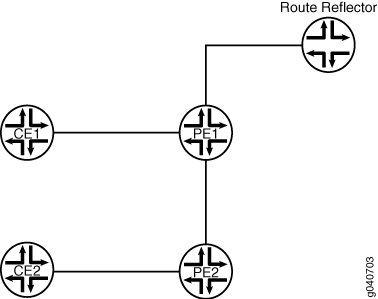
配置
CLI 快速配置
要为 LDP VPLS 快速配置 BGP 自动发现,请复制以下命令,删除所有换行符,然后将命令粘贴到每个设备的 CLI 中。
在路由器 PE1 上:
[edit]
set interfaces ge-0/1/0 vlan-tagging
set interfaces ge-0/1/0 encapsulation flexible-ethernet-services
set interfaces ge-0/1/0 unit 100 encapsulation vlan-vpls
set interfaces ge-0/1/0 unit 100 vlan-id 100
set interfaces ge-0/1/0 unit 100 input-vlan-map pop
set interfaces ge-0/1/0 unit 100 output-vlan-map push
set interfaces ge-0/1/0 unit 100 family vpls
set interfaces ge-0/1/0 unit 200 encapsulation vlan-vpls
set interfaces ge-0/1/0 unit 200 vlan-id 200
set interfaces ge-0/1/0 unit 200 family vpls
set interfaces ge-0/1/1 unit 0 description "PE1 to PE2"
set interfaces ge-0/1/1 unit 0 family inet address 192.0.2.4/24
set interfaces ge-0/1/1 unit 0 family iso
set interfaces ge-0/1/1 unit 0 family mpls
set interfaces ge-0/3/0 unit 0 description "PE1 to RR"
set interfaces ge-0/3/0 unit 0 family inet address 192.0.2.7/24
set interfaces ge-0/3/0 unit 0 family iso
set interfaces ge-0/3/0 unit 0 family mpls
set interfaces lo0 unit 0 family inet address 192.0.2.8/24
set routing-options router-id 192.0.2.8
set routing-options autonomous-system 100
set protocols mpls interface lo0.0
set protocols mpls interface all
set protocols mpls interface fxp0.0 disable
set protocols bgp group int type internal
set protocols bgp group int local-address 192.0.2.8
set protocols bgp group int family l2vpn auto-discovery-only
set protocols bgp group int neighbor 192.0.2.9
set protocols isis level 1 disable
set protocols isis interface all
set protocols isis interface fxp0.0 disable
set protocols isis interface lo0.0
set protocols ldp interface all
set protocols ldp interface fxp0.0 disable
set protocols ldp interface lo0.0
set routing-instances vpls100 instance-type vpls
set routing-instances vpls100 interface ge-0/1/0.100
set routing-instances vpls100 route-distinguisher 192.0.2.8:100
set routing-instances vpls100 l2vpn-id l2vpn-id:100:100
set routing-instances vpls100 vrf-target target:100:100
set routing-instances vpls100 protocols vpls no-tunnel-services
set routing-instances vpls200 instance-type vpls
set routing-instances vpls200 interface ge-0/1/0.200
set routing-instances vpls200 route-distinguisher 192.0.2.8:200
set routing-instances vpls200 l2vpn-id l2vpn-id:100:200
set routing-instances vpls200 vrf-target target:100:208
set routing-instances vpls200 protocols vpls no-tunnel-services
在设备 CE1 上:
[edit]
set interfaces ge-1/2/1 vlan-tagging
set interfaces ge-1/2/1 mtu 1400
set interfaces ge-1/2/1 unit 100 vlan-id 100
set interfaces ge-1/2/1 unit 100 family inet address 203.0.113.3/24
set interfaces ge-1/2/1 unit 200 vlan-id 200
set interfaces ge-1/2/1 unit 200 family inet address 203.0.113.2/24
set protocols ospf area 0.0.0.0 interface ge-1/2/1.100
set protocols ospf area 0.0.0.0 interface ge-1/2/1.200
在路由器 PE2 上:
[edit]
set interfaces ge-1/1/0 vlan-tagging
set interfaces ge-1/1/0 encapsulation flexible-ethernet-services
set interfaces ge-1/1/0 unit 100 encapsulation vlan-vpls
set interfaces ge-1/1/0 unit 100 vlan-id 100
set interfaces ge-1/1/0 unit 100 input-vlan-map pop
set interfaces ge-1/1/0 unit 100 output-vlan-map push
set interfaces ge-1/1/0 unit 100 family vpls
set interfaces ge-1/1/0 unit 200 encapsulation vlan-vpls
set interfaces ge-1/1/0 unit 200 vlan-id 200
set interfaces ge-1/1/0 unit 200 family vpls
set interfaces ge-1/2/1 unit 0 description "PE2 to PE1"
set interfaces ge-1/2/1 unit 0 family inet address 192.0.2.14/24
set interfaces ge-1/2/1 unit 0 family iso
set interfaces ge-1/2/1 unit 0 family mpls
set interfaces lo0 unit 0 family inet address 192.0.2.10/24
set routing-options router-id 192.0.2.10
set routing-options autonomous-system 100
set protocols mpls interface lo0.0
set protocols mpls interface all
set protocols mpls interface fxp0.0 disable
set protocols bgp group int type internal
set protocols bgp group int local-address 192.0.2.10
set protocols bgp group int family l2vpn auto-discovery-only
set protocols bgp group int neighbor 192.0.2.9
set protocols isis level 1 disable
set protocols isis interface ge-1/2/1.0
set protocols isis interface lo0.0
set protocols ldp interface all
set protocols ldp interface fxp0.0 disable
set protocols ldp interface lo0.0
set routing-instances vpls100 instance-type vpls
set routing-instances vpls100 interface ge-1/1/0.100
set routing-instances vpls100 route-distinguisher 192.0.2.10:100
set routing-instances vpls100 l2vpn-id l2vpn-id:100:100
set routing-instances vpls100 vrf-target target:100:100
set routing-instances vpls100 protocols vpls no-tunnel-services
set routing-instances vpls200 instance-type vpls
set routing-instances vpls200 interface ge-1/1/0.200
set routing-instances vpls200 route-distinguisher 192.0.2.10:200
set routing-instances vpls200 l2vpn-id l2vpn-id:100:200
set routing-instances vpls200 vrf-target target:100:208
set routing-instances vpls200 protocols vpls no-tunnel-services
在设备 CE2 上:
[edit]
set interfaces ge-1/1/0 vlan-tagging
set interfaces ge-1/1/0 mtu 1400
set interfaces ge-1/1/0 unit 100 vlan-id 100
set interfaces ge-1/1/0 unit 100 family inet address 203.0.113.15/24
set interfaces ge-1/1/0 unit 200 vlan-id 200
set interfaces ge-1/1/0 unit 200 family inet address 203.0.113.16/24
set protocols ospf area 0.0.0.0 interface ge-1/1/0.100
set protocols ospf area 0.0.0.0 interface ge-1/1/0.200
在路由器 RR 上:
[edit]
set interfaces ge-1/3/2 unit 0 description "RR to PE1"
set interfaces ge-1/3/2 unit 0 family inet address 192.0.2.17/24
set interfaces ge-1/3/2 unit 0 family iso
set interfaces ge-1/3/2 unit 0 family mpls
set interfaces lo0 unit 0 family inet address 192.0.2.9/24
set routing-options router-id 192.0.2.9
set routing-options autonomous-system 100
set protocols bgp group int type internal
set protocols bgp group int local-address 192.0.2.9
set protocols bgp group int family l2vpn auto-discovery-only
set protocols bgp group int cluster 198.51.100.0
set protocols bgp group int neighbor 192.0.2.8
set protocols bgp group int neighbor 192.0.2.10
set protocols isis level 1 disable
set protocols isis interface all
set protocols isis interface fxp0.0 disable
set protocols isis interface lo0.0
set protocols ldp interface all
set protocols ldp interface fxp0.0 disable
set protocols ldp interface lo0.0
路由器 PE1
分步程序
要配置路由器 PE1,请执行以下作:
-
配置接口、接口封装和协议家族。
[edit]
user@PE1# edit interfaces
[edit interfaces]
user@PE1# set ge-0/1/0 encapsulation flexible-ethernet-services
user@PE1# set ge-0/1/0 unit 100 encapsulation vlan-vpls
user@PE1# set ge-0/1/0 unit 100 family vpls
user@PE1# set ge-0/1/0 unit 200 encapsulation vlan-vpls
user@PE1# set ge-0/1/0 unit 200 family vpls
user@PE1# set ge-0/1/1 unit 0 description "PE1 to PE2"
user@PE1# set ge-0/1/1 unit 0 family inet address 192.0.2.4/24
user@PE1# set ge-0/1/1 unit 0 family iso
user@PE1# set ge-0/1/1 unit 0 family mpls
user@PE1# set ge-0/3/0 unit 0 description "PE1 to RR"
user@PE1# set ge-0/3/0 unit 0 family inet address 192.0.2.7/24
user@PE1# set ge-0/3/0 unit 0 family iso
user@PE1# set ge-0/3/0 unit 0 family mpls
user@PE1# set lo0 unit 0 family inet address 192.0.2.8/24
-
配置 VLAN。
[edit interfaces]
user@PE1# set ge-0/1/0 vlan-tagging
user@PE1# set ge-0/1/0 unit 100 vlan-id 100
user@PE1# set ge-0/1/0 unit 100 input-vlan-map pop
user@PE1# set ge-0/1/0 unit 100 output-vlan-map push
user@PE1# set ge-0/1/0 unit 200 vlan-id 200
user@PE1# exit
-
配置与协议无关的属性。
建议路由器 ID 与本地地址相同。(请参阅
local-address步骤 4 中的语句。[edit] user@PE1# edit routing-options [edit routing-options] user@PE1# set router-id 192.0.2.8 user@PE1# set autonomous-system 100 user@PE1# exit
-
配置 IBGP,包括
auto-discovery-only语句。[edit] user@PE1# edit protocols [edit protocols] user@PE1# set bgp group int type internal user@PE1# set bgp group int local-address 192.0.2.8 user@PE1# set bgp group int family l2vpn auto-discovery-only user@PE1# set bgp group int neighbor 192.0.2.9
-
配置 MPLS、LDP 和 IGP。
[edit protocols]
user@PE1# set mpls interface lo0.0
user@PE1# set mpls interface all
user@PE1# set mpls interface fxp0.0 disable
user@PE1# set isis level 1 disable
user@PE1# set isis interface all
user@PE1# set isis interface fxp0.0 disable
user@PE1# set isis interface lo0.0
user@PE1# set ldp interface all
user@PE1# set ldp interface fxp0.0 disable
user@PE1# set ldp interface lo0.0
user@PE1# exit
-
配置路由实例。
如果将 LSI 接口用于 VPLS 而不是
vt接口,则需要使用该no-tunnel-services语句。[edit] user@PE1# edit routing-instances [edit routing-instances] user@PE1# set vpls100 instance-type vpls user@PE1# set vpls100 interface ge-0/1/0.100 user@PE1# set vpls100 route-distinguisher 192.0.2.8:100 user@PE1# set vpls100 l2vpn-id l2vpn-id:100:100 user@PE1# set vpls100 vrf-target target:100:100 user@PE1# set vpls100 protocols vpls no-tunnel-services user@PE1# set vpls200 instance-type vpls user@PE1# set vpls200 interface ge-0/1/0.200 user@PE1# set vpls200 route-distinguisher 192.0.2.8:200 user@PE1# set vpls200 l2vpn-id l2vpn-id:100:200 user@PE1# set vpls200 vrf-target target:100:208 user@PE1# set vpls200 protocols vpls no-tunnel-services
-
如果完成设备配置,请提交配置。
[edit]
user@PE1# commit
结果
在配置模式下,输入 show interfaces、 show protocols、 show routing-options和 show routing-instances 命令以确认您的配置。如果输出未显示预期的配置,请重复此示例中的说明以更正配置。
user@PE1# show interfaces
ge-0/1/0 {
    vlan-tagging;
    encapsulation flexible-ethernet-services;
    unit 100 {
        encapsulation vlan-vpls;
        vlan-id 100;
        input-vlan-map pop;
        output-vlan-map push;
        family vpls;
    }
    unit 200 {
        encapsulation vlan-vpls;
        vlan-id 200;
        family vpls;
    }
}
ge-0/1/1 {
    unit 0 {
        description "PE1 to PE2";
        family inet {
            address 192.0.2.4/24;
        }
        family iso;
        family mpls;
    }
}
ge-0/3/0 {
    unit 0 {
        description "PE1 to RR";
        family inet {
            address 192.0.2.7/24;
        }
        family iso;
        family mpls;
    }
}
lo0 {
    unit 0 {
        family inet {
            address 192.0.2.8/24;
        }
    }
}
user@PE1# show protocols
mpls {
    interface lo0.0;
    interface all;
    interface fxp0 disable;
}
bgp {
    group int {
        type internal;
        local-address 192.0.2.8;
        family l2vpn {
            auto-discovery-only;
        }
        neighbor 192.0.2.9;
    }
}
isis {
    level 1 disable;
    interface all;
    interface lo0.0;
    interface fxp0 disable;
}
ldp {
    interface lo0.0;
    interface all;
    interface fxp0 disable;
}
user@PE1# show routing-options
router-id 192.0.2.8;
autonomous-system 100;
user@PE1# show routing-instances
vpls100 {
    instance-type vpls;
    interface ge-0/1/0.100;
    route-distinguisher 192.0.2.8:100;
    l2vpn-id l2vpn-id:100:100;
    vrf-target target:100:100;
    protocols {
        vpls {
            no-tunnel-services;
        }
    }
}
vpls200 {
    instance-type vpls;
    interface ge-0/1/0.200;
    route-distinguisher 192.0.2.8:200;
    l2vpn-id l2vpn-id:100:200;
    vrf-target target:100:208;
    protocols {
        vpls {
            no-tunnel-services;
        }
    }
}
设备 CE1
分步程序
要配置设备 CE1:
-
配置接口地址和接口最大传输单元 (MTU)。
[edit]
user@CE1# edit interfaces
[edit interfaces]
user@CE1# set ge-1/2/1 mtu 1400
user@CE1# set ge-1/2/1 unit 100 family inet address 203.0.113.3/24
user@CE1# set ge-1/2/1 unit 200 family inet address 203.0.113.2/24
-
配置 VLAN。
[edit interfaces]
user@CE1# set ge-1/2/1 vlan-tagging
user@CE1# set ge-1/2/1 unit 100 vlan-id 100
user@CE1# set ge-1/2/1 unit 200 vlan-id 200
user@CE1# exit
-
配置 IGP。
user@CE1# edit protocols
[edit protocols]
user@CE1# set ospf area 0.0.0.0 interface ge-1/2/1.100
user@CE1# set ospf area 0.0.0.0 interface ge-1/2/1.200
user@CE1# exit
-
如果完成设备配置,请提交配置。
[edit]
user@CE1# commit
结果
在配置模式下,输入和show interfacesshow protocols命令以确认您的配置。如果输出未显示预期的配置,请重复此示例中的说明以更正配置。
user@CE1# show interfaces
ge-1/2/1 {
    vlan-tagging;
    mtu 1400;
    unit 100 {
        vlan-id 100;
        family inet {
            address 203.0.113.3/24;
        }
    }
    unit 200 {
        vlan-id 200;
        family inet {
            address 203.0.113.2/24;
        }
    }
}
user@CE1# show protocols
ospf {
    area 0.0.0.0 {
        interface ge-1/2/1.100;
        interface ge-1/2/1.200;
    }
}
路由器 PE2
分步程序
要配置路由器 PE2,请执行以下作:
-
配置接口、接口封装和协议家族。
[edit]
user@PE2# edit interfaces
[edit interfaces]
user@PE2# set ge-1/1/0 encapsulation flexible-ethernet-services
user@PE2# set ge-1/1/0 unit 100 encapsulation vlan-vpls
user@PE2# set ge-1/1/0 unit 100 family vpls
user@PE2# set ge-1/1/0 unit 200 encapsulation vlan-vpls
user@PE2# set ge-1/1/0 unit 200 family vpls
user@PE2# set ge-1/2/1 unit 0 description "PE2 to PE1"
user@PE2# set ge-1/2/1 unit 0 family inet address 192.0.2.14/24
user@PE2# set ge-1/2/1 unit 0 family iso
user@PE2# set ge-1/2/1 unit 0 family mpls
user@PE2# set lo0 unit 0 family inet address 192.0.2.10/24
-
配置 VLAN。
[edit interfaces]
user@PE2# set ge-1/1/0 vlan-tagging
user@PE2# set ge-1/1/0 unit 100 vlan-id 100
user@PE2# set ge-1/1/0 unit 100 input-vlan-map pop
user@PE2# set ge-1/1/0 unit 100 output-vlan-map push
user@PE2# set ge-1/1/0 unit 200 vlan-id 200
user@PE2# exit
-
配置与协议无关的属性。
建议路由器 ID 与本地地址相同。(请参阅
local-address步骤 4 中的语句。[edit] user@PE2# edit routing-options [edit routing-options] user@PE2# set router-id 192.0.2.10 user@PE2# set autonomous-system 100
-
配置 IBGP,包括
auto-discovery-only语句。[edit] user@PE2# edit protocols [edit protocols] user@PE2# set bgp group int type internal user@PE2# set bgp group int local-address 192.0.2.10 user@PE2# set bgp group int family l2vpn auto-discovery-only user@PE2# set bgp group int neighbor 192.0.2.9
-
配置 MPLS、LDP 和 IGP。
[edit protocols]
user@PE2# set mpls interface lo0.0
user@PE2# set mpls interface all
user@PE2# set mpls interface fxp0.0 disable
user@PE2# set isis level 1 disable
user@PE2# set isis interface ge-1/2/1.0
user@PE2# set isis interface lo0.0
user@PE2# set ldp interface all
user@PE2# set ldp interface fxp0.0 disable
user@PE2# set ldp interface lo0.0
user@PE2# exit
-
配置路由实例。
如果将 LSI 接口用于 VPLS 而不是
vt接口,则需要使用该no-tunnel-services语句。[edit] user@PE2# edit routing-instances [edit routing-instances] user@PE2# set vpls100 instance-type vpls user@PE2# set vpls100 interface ge-1/1/0.100 user@PE2# set vpls100 route-distinguisher 192.0.2.10:100 user@PE2# set vpls100 l2vpn-id l2vpn-id:100:100 user@PE2# set vpls100 vrf-target target:100:100 user@PE2# set vpls100 protocols vpls no-tunnel-services user@PE2# set vpls200 instance-type vpls user@PE2# set vpls200 interface ge-1/1/0.200 user@PE2# set vpls200 route-distinguisher 192.0.2.10:200 user@PE2# set vpls200 l2vpn-id l2vpn-id:100:200 user@PE2# set vpls200 vrf-target target:100:208 user@PE2# set vpls200 protocols vpls no-tunnel-services
-
如果完成设备配置,请提交配置。
[edit]
user@PE2# commit
结果
在配置模式下,输入 show interfaces、 show protocols、 show routing-options和 show routing-instances 命令以确认您的配置。如果输出未显示预期的配置,请重复此示例中的说明以更正配置。
user@PE2# show interfaces
ge-1/1/0 {
    vlan-tagging;
    encapsulation flexible-ethernet-services;
    unit 100 {
        encapsulation vlan-vpls;
        vlan-id 100;
        input-vlan-map pop;
        output-vlan-map push;
        family vpls;
    }
    unit 200 {
        encapsulation vlan-vpls;
        vlan-id 200;
        family vpls;
    }
}
ge-1/2/1 {
    unit 0 {
        description "PE2 to PE1";
        family inet {
            address 192.0.2.14/24;
        }
        family iso;
        family mpls;
    }
}
lo0 {
    unit 0 {
        family inet {
            address 192.0.2.10/24;
        }
    }
}
user@PE2# show protocols
mpls {
    interface lo0.0;
    interface all;
    interface fxp0 disable;
}
bgp {
    group int {
        type internal;
        local-address 192.0.2.10;
        family l2vpn {
            auto-discovery-only;
        }
        neighbor 192.0.2.9;
    }
}
isis {
    level 1 disable;
    interface ge-1/2/1.0;
    interface lo0.0;
}
ldp {
    interface lo0.0;
    interface all;
    interface fxp0 disable;
}
user@PE2# show routing-options
router-id 192.0.2.10;
autonomous-system 100;
user@PE2# show routing-instances
vpls100 {
    instance-type vpls;
    interface ge-1/1/0.100;
    route-distinguisher 192.0.2.10:100;
    l2vpn-id l2vpn-id:100:100;
    vrf-target target:100:100;
    protocols {
        vpls {
            no-tunnel-services;
        }
    }
}
vpls200 {
    instance-type vpls;
    interface ge-1/1/0.200;
    route-distinguisher 192.0.2.10:200;
    l2vpn-id l2vpn-id:100:200;
    vrf-target target:100:208;
    protocols {
        vpls {
            no-tunnel-services;
        }
    }
}
设备 CE2
分步程序
要配置设备 CE2:
-
配置 VLAN 接口。
[edit]
user@CE2# edit interfaces ge-1/1/0
[edit interfaces ge-1/1/0]
user@CE2# set vlan-tagging
user@CE2# set mtu 1400
user@CE2# set unit 100 vlan-id 100
user@CE2# set unit 100 family inet address 203.0.113.15/24
user@CE2# set unit 200 vlan-id 200
user@CE2# set unit 200 family inet address 203.0.113.16/24
user@CE2# exit
-
在接口上配置 OSPF。
[edit]
user@CE2# edit protocols ospf area 0.0.0.0
[edit protocols ospf area 0.0.0.0]
user@CE2# set interface ge-1/1/0.100
user@CE2# set interface ge-1/1/0.200
user@CE2# exit
-
如果完成设备配置,请提交配置。
[edit]
user@CE2# commit
结果
在配置模式下,输入和show interfacesshow protocols命令以确认您的配置。如果输出未显示预期的配置,请重复此示例中的说明以更正配置。
user@CE2# show interfaces
ge-1/1/0 {
    vlan-tagging;
    mtu 1400;
    unit 100 {
        vlan-id 100;
        family inet {
            address 203.0.113.15/24;
        }
    }
    unit 200 {
        vlan-id 200;
        family inet {
            address 203.0.113.16/24;
        }
    }
}
user@CE2# show protocols
ospf {
    area 0.0.0.0 {
        interface ge-1/1/0.100;
        interface ge-1/1/0.200;
    }
}
路由器 RR
分步程序
要配置路由器 RR,请执行以下作:
-
配置接口地址和协议族。
[edit]
user@RR# edit interfaces
[edit interfaces]
user@RR# set ge-1/3/2 unit 0 description "RR to PE1"
user@RR# set ge-1/3/2 unit 0 family inet address 192.0.2.17/24
user@RR# set ge-1/3/2 unit 0 family iso
user@RR# set ge-1/3/2 unit 0 family mpls
user@RR# set lo0 unit 0 family inet address 192.0.2.9/24
user@RR# exit
-
配置自治系统和路由器 ID。
[edit]
user@RR# edit routing-options
[edit routing-options]
user@RR# set autonomous-system 100
user@RR# set router-id 192.0.2.9
user@RR# exit
-
配置 BGP 并将此路由器设置为路由反射器。路由反射对于 FEC 129 是可选的。
[edit]
user@RR# edit protocols bgp group int
[edit protocols bgp group int]
user@RR# set type internal
user@RR# set local-address 192.0.2.9
user@RR# set family l2vpn auto-discovery-only
user@RR# set cluster 198.51.100.0
user@RR# set neighbor 192.0.2.8
user@RR# set neighbor 192.0.2.10
user@RR# exit
-
为 IGP 配置 IS-IS。
[edit]
user@RR# edit protocols isis
[edit protocols isis]
user@RR# set level 1 disable
user@RR# set interface all
user@RR# set interface fxp0.0 disable
user@RR# set interface lo0.0
user@RR# exit
-
为 MPLS 信令协议配置 LDP。
[edit]
user@RR# edit protocols ldp
[edit protocols ldp]
user@RR# set interface all
user@RR# set interface fxp0.0 disable
user@RR# set interface lo0.0
user@RR# exit
-
如果完成设备配置,请提交配置。
[edit]
user@RR# commit
结果
在配置模式下,输入 show interfaces、 show protocols和 show routing-options 命令以确认您的配置。如果输出未显示预期的配置,请重复此示例中的说明以更正配置。
user@RR# show interfaces
ge-1/3/2 {
    unit 0 {
        description "RR to PE1";
        family inet {
            address 192.0.2.17/24;
        }
        family iso;
        family mpls;
    }
}
lo0 {
    unit 0 {
        family inet {
            address 192.0.2.9/24;;
        }
    }
}
user@RR# show protocols
bgp {
    group int {
        type internal;
        local-address 192.0.2.9;
        family l2vpn {
            auto-discovery-only;
        }
        cluster 198.51.100.0;
        neighbor 192.0.2.8;
        neighbor 192.0.2.10;
    }
}
isis {
    level 1 disable;
    interface lo0.0;
    interface all;
    interface fxp0 disable;
}
ldp {
    interface lo0.0;
    interface all;
    interface fxp0 disable;
}
user@RR# show routing-options
router-id 192.0.2.9;
autonomous-system 100;
验证
要验证该作,请使用以下命令:
-
show route advertising-protocol bgp neighbor -
show route receive-protocol bgp neighbor -
show route table bgp.l2vpn.0 -
show route table vpls100.l2vpn.0 -
show route table vpls200.l2vpn.0 -
show vpls connections extensive -
show vpls mac-table detail
AD指示自动发现 NLRI,路由表输出。