
示例:在移动回传场景中配置伪线冗余
此示例说明如何在移动回传场景中配置伪线冗余,其中第 2 层和第 3 层分段互连。
要求
可以使用以下硬件和软件组件配置此示例:
-
Junos OS 13.2 或更高版本
-
ACX5000 系列路由器作为接入 (A) 路由器
-
MX 系列5G通用路由平台或M Series用于提供商边缘 (PE) 路由器的多服务边缘路由器
-
充当中转标签交换路由器的 PTX 系列数据包传输路由器
-
用于核心路由器的 T Series 核心路由器
PE 路由器也可以是 T Series 核心路由器,但这并不常见。根据您的扩展要求,核心路由器也可以MX 系列5G通用路由平台或M Series多服务边缘路由器。客户边缘 (客户边缘) 设备可以是瞻博网络或其他供应商的其他路由器或交换机。
配置此示例之前,不需要除设备初始化之外的特殊配置。
概述
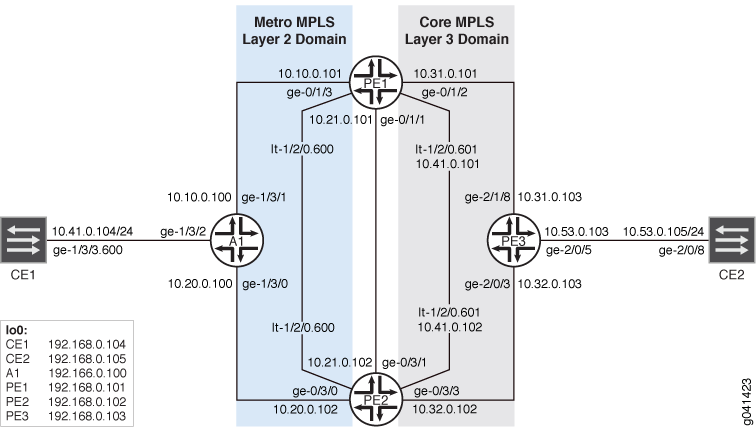
配置
过程
CLI 快速配置
要快速配置此示例,请复制以下命令,将其粘贴到文本文件中,删除所有换行符,更改详细信息,以便与网络配置匹配,然后将命令复制并粘贴到层次结构级别的 [edit] CLI 中。
设备 CE1
set interfaces ge-1/3/3 vlan-tagging
set interfaces ge-1/3/3 unit 600 vlan-id 600
set interfaces ge-1/3/3 unit 600 family inet address 10.41.0.104/24
set interfaces lo0 unit 0 family inet address 192.168.0.104/32 primary
set protocols ospf area 0.0.0.0 interface ge-1/3/3.600
set protocols ospf area 0.0.0.0 interface lo0.0
set routing-options static route 192.168.0.0/8 next-hop 10.41.0.1
set routing-options static route 10.53.0.0/16 next-hop 10.41.0.1
set routing-options router-id 192.168.0.104
设备 A1
set interfaces ge-1/3/0 unit 0 family inet address 10.20.0.100/24
set interfaces ge-1/3/0 unit 0 family iso
set interfaces ge-1/3/0 unit 0 family mpls
set interfaces ge-1/3/1 unit 0 family inet address 10.10.0.100/24
set interfaces ge-1/3/1 unit 0 family iso
set interfaces ge-1/3/1 unit 0 family mpls
set interfaces ge-1/3/2 vlan-tagging
set interfaces ge-1/3/2 encapsulation vlan-ccc
set interfaces ge-1/3/2 unit 600 encapsulation vlan-ccc
set interfaces ge-1/3/2 unit 600 vlan-id 600
set interfaces ge-1/3/2 unit 600 family ccc
set interfaces lo0 unit 0 family inet address 192.168.0.100/32 primary
set interfaces lo0 unit 0 family iso address 49.0002.0192.0168.0100.00
set routing-options router-id 192.168.0.100
set routing-options autonomous-system 64510
set routing-options forwarding-table export pplb
set protocols rsvp interface ge-1/3/0.0
set protocols rsvp interface ge-1/3/1.0
set protocols rsvp interface lo0.0
set protocols mpls interface ge-1/3/0.0
set protocols mpls interface ge-1/3/1.0
set protocols isis interface ge-1/3/0.0
set protocols isis interface ge-1/3/1.0
set protocols isis interface lo0.0
set protocols ldp interface ge-1/3/0.0
set protocols ldp interface ge-1/3/1.0
set protocols ldp interface lo0.0
set protocols l2circuit neighbor 192.168.0.101 interface ge-1/3/2.600 virtual-circuit-id 1
set protocols l2circuit neighbor 192.168.0.101 interface ge-1/3/2.600 pseudowire-status-tlv
set protocols l2circuit neighbor 192.168.0.101 interface ge-1/3/2.600 revert-time 10 maximum 60
set protocols l2circuit neighbor 192.168.0.101 interface ge-1/3/2.600 backup-neighbor 192.168.0.102 virtual-circuit-id 2
set protocols l2circuit neighbor 192.168.0.101 interface ge-1/3/2.600 backup-neighbor 192.168.0.102 hot-standby
set policy-options policy-statement pplb then load-balance per-packet
设备 PE1
set interfaces ge-0/1/1 unit 0 family inet address 10.21.0.101/24
set interfaces ge-0/1/1 unit 0 family iso
set interfaces ge-0/1/1 unit 0 family mpls
set interfaces ge-0/1/2 unit 0 family inet address 10.31.0.101/24
set interfaces ge-0/1/2 unit 0 family iso
set interfaces ge-0/1/2 unit 0 family mpls
set interfaces ge-0/1/3 unit 0 family inet address 10.10.0.101/24
set interfaces ge-0/1/3 unit 0 family iso
set interfaces ge-0/1/3 unit 0 family mpls
set interfaces lt-1/2/0 unit 600 encapsulation vlan-ccc
set interfaces lt-1/2/0 unit 600 vlan-id 600
set interfaces lt-1/2/0 unit 600 peer-unit 601
set interfaces lt-1/2/0 unit 601 encapsulation vlan
set interfaces lt-1/2/0 unit 601 vlan-id 600
set interfaces lt-1/2/0 unit 601 peer-unit 600
set interfaces lt-1/2/0 unit 601 family inet filter input icmp_inet
set interfaces lt-1/2/0 unit 601 family inet filter output icmp_inet
set interfaces lt-1/2/0 unit 601 family inet address 10.41.0.101/24 vrrp-group 0 virtual-address 10.41.0.1
set interfaces lt-1/2/0 unit 601 family inet address 10.41.0.101/24 vrrp-group 0 accept-data
set interfaces lo0 unit 0 family inet address 192.168.0.101/32 primary
set interfaces lo0 unit 0 family iso address 49.0002.0192.0168.0003.00
set interfaces lo0 unit 1 family inet address 192.168.1.101/32
set routing-options router-id 192.168.0.101
set routing-options autonomous-system 64511
set protocols rsvp interface ge-0/1/1.0
set protocols rsvp interface ge-0/1/2.0
set protocols rsvp interface ge-0/1/3.0
set protocols rsvp interface lo0.0
set protocols mpls label-switched-path to_PE3 to 192.168.0.103
set protocols mpls label-switched-path to_PE2 to 192.168.0.102
set protocols mpls interface ge-0/1/1.0
set protocols mpls interface ge-0/1/2.0
set protocols mpls interface ge-0/1/3.0
set protocols bgp local-address 192.168.0.101
set protocols bgp group ibgp family inet-vpn any
set protocols bgp group ibgp peer-as 64511
set protocols bgp group ibgp neighbor 192.168.0.102
set protocols bgp group ibgp neighbor 192.168.0.103
set protocols isis interface ge-0/1/1.0
set protocols isis interface ge-0/1/2.0
set protocols isis interface ge-0/1/3.0
set protocols isis interface lo0.0
set protocols ldp interface ge-0/1/1.0
set protocols ldp interface ge-0/1/2.0
set protocols ldp interface ge-0/1/3.0
set protocols ldp interface lo0.0
set protocols l2circuit neighbor 192.168.0.100 interface lt-1/2/0.600 virtual-circuit-id 1
set protocols l2circuit neighbor 192.168.0.100 interface lt-1/2/0.600 pseudowire-status-tlv hot-standby-vc-on
set policy-options policy-statement l3vpn_export term primary from condition primary
set policy-options policy-statement l3vpn_export term primary then local-preference add 300
set policy-options policy-statement l3vpn_export term primary then community set l3vpn
set policy-options policy-statement l3vpn_export term primary then accept
set policy-options policy-statement l3vpn_export term standby from condition standby
set policy-options policy-statement l3vpn_export term standby then local-preference add 30
set policy-options policy-statement l3vpn_export term standby then community set l3vpn
set policy-options policy-statement l3vpn_export term standby then accept
set policy-options policy-statement l3vpn_export term default then community set l3vpn
set policy-options policy-statement l3vpn_export term default then accept
set policy-options policy-statement l3vpn_import term 1 from community l3vpn
set policy-options policy-statement l3vpn_import term 1 then accept
set policy-options policy-statement l3vpn_import term default then reject
set policy-options policy-statement ospf_export term 0 from community l3vpn
set policy-options policy-statement ospf_export term 0 then accept
set policy-options community l3vpn members target:64511:600
set policy-options condition primary if-route-exists address-family ccc lt-1/2/0.600
set policy-options condition primary if-route-exists address-family ccc table mpls.0
set policy-options condition primary if-route-exists address-family ccc peer-unit 601
set policy-options condition standby if-route-exists address-family ccc lt-1/2/0.600
set policy-options condition standby if-route-exists address-family ccc table mpls.0
set policy-options condition standby if-route-exists address-family ccc standby
set policy-options condition standby if-route-exists address-family ccc peer-unit 601
set firewall family inet filter icmp_inet interface-specific
set firewall family inet filter icmp_inet term 0 from source-address 10.41.0.101/32 except
set firewall family inet filter icmp_inet term 0 from source-address 10.0.0.0/8
set firewall family inet filter icmp_inet term 0 from protocol icmp
set firewall family inet filter icmp_inet term 0 then count icmp_inet
set firewall family inet filter icmp_inet term 0 then log
set firewall family inet filter icmp_inet term 0 then accept
set firewall family inet filter icmp_inet term 1 then accept
set routing-instances l3vpn instance-type vrf
set routing-instances l3vpn interface lt-1/2/0.601
set routing-instances l3vpn interface lo0.1
set routing-instances l3vpn route-distinguisher 192.168.1.101:64511
set routing-instances l3vpn vrf-import l3vpn_import
set routing-instances l3vpn vrf-export l3vpn_export
set routing-instances l3vpn vrf-table-label
set routing-instances l3vpn protocols ospf export ospf_export
set routing-instances l3vpn protocols ospf area 0.0.0.0 lt-1/2/0.601
set routing-instances l3vpn protocols ospf area 0.0.0.0 lo0.1
设备 PE2
set interfaces ge-0/3/0 unit 0 family inet address 10.20.0.102/24
set interfaces ge-0/3/0 unit 0 family iso
set interfaces ge-0/3/0 unit 0 family mpls
set interfaces ge-0/3/1 unit 0 family inet address 10.21.0.102/24
set interfaces ge-0/3/1 unit 0 family iso
set interfaces ge-0/3/1 unit 0 family mpls
set interfaces ge-0/3/3 unit 0 family inet address 10.32.0.102/24
set interfaces ge-0/3/3 unit 0 family iso
set interfaces ge-0/3/3 unit 0 family mpls
set interfaces lt-1/2/0 unit 600 encapsulation vlan-ccc
set interfaces lt-1/2/0 unit 600 vlan-id 600
set interfaces lt-1/2/0 unit 600 peer-unit 601
set interfaces lt-1/2/0 unit 601 encapsulation vlan
set interfaces lt-1/2/0 unit 601 vlan-id 600
set interfaces lt-1/2/0 unit 601 peer-unit 600
set interfaces lt-1/2/0 unit 601 family inet filter input icmp_inet
set interfaces lt-1/2/0 unit 601 family inet filter output icmp_inet
set interfaces lt-1/2/0 unit 601 family inet address 10.41.0.102/24 vrrp-group 0 virtual-address 10.41.0.1
set interfaces lt-1/2/0 unit 601 family inet address 10.41.0.102/24 vrrp-group 0 accept-data
set interfaces lo0 unit 0 family inet address 192.168.0.102/32 primary
set interfaces lo0 unit 0 family iso address 49.0002.0192.0168.0102.00
set interfaces lo0 unit 1 family inet address 192.168.1.102/32
set routing-options router-id 192.168.0.102
set routing-options autonomous-system 64511
set protocols rsvp interface ge-0/3/0.0
set protocols rsvp interface ge-0/3/1.0
set protocols rsvp interface ge-0/3/3.0
set protocols rsvp interface lo0.0
set protocols mpls label-switched-path to_PE1 to 192.168.0.101
set protocols mpls label-switched-path to_PE3 to 192.168.0.103
set protocols mpls interface ge-0/3/0.0
set protocols mpls interface ge-0/3/1.0
set protocols mpls interface ge-0/3/3.0
set protocols bgp local-address 192.168.0.102
set protocols bgp group ibgp family inet-vpn any
set protocols bgp group ibgp peer-as 64511
set protocols bgp group ibgp neighbor 192.168.0.101
set protocols bgp group ibgp neighbor 192.168.0.103
set protocols isis interface ge-0/3/0.0
set protocols isis interface ge-0/3/1.0
set protocols isis interface ge-0/3/3.0
set protocols isis interface lo0.0
set protocols ldp interface ge-0/3/0.0
set protocols ldp interface ge-0/3/1.0
set protocols ldp interface ge-0/3/3.0
set protocols ldp interface lo0.0
set protocols l2circuit neighbor 192.168.0.100 interface lt-1/2/0.600 virtual-circuit-id 2
set protocols l2circuit neighbor 192.168.0.100 interface lt-1/2/0.600 pseudowire-status-tlv hot-standby-vc-on
set policy-options policy-statement l3vpn_export term primary from condition primary
set policy-options policy-statement l3vpn_export term primary then local-preference add 300
set policy-options policy-statement l3vpn_export term primary then community set l3vpn
set policy-options policy-statement l3vpn_export term primary then accept
set policy-options policy-statement l3vpn_export term standby from condition standby
set policy-options policy-statement l3vpn_export term standby then local-preference add 30
set policy-options policy-statement l3vpn_export term standby then community set l3vpn
set policy-options policy-statement l3vpn_export term standby then accept
set policy-options policy-statement l3vpn_export term default then community set l3vpn
set policy-options policy-statement l3vpn_export term default then accept
set policy-options policy-statement l3vpn_import term 1 from community l3vpn
set policy-options policy-statement l3vpn_import term 1 then accept
set policy-options policy-statement l3vpn_import term default then reject
set policy-options policy-statement ospf_export term 0 from community l3vpn
set policy-options policy-statement ospf_export term 0 then accept
set policy-options community l3vpn members target:64511:600
set policy-options condition primary if-route-exists address-family ccc lt-1/2/0.600
set policy-options condition primary if-route-exists address-family ccc table mpls.0
set policy-options condition primary if-route-exists address-family ccc peer-unit 601
set policy-options condition standby if-route-exists address-family ccc lt-1/2/0.600
set policy-options condition standby if-route-exists address-family ccc table mpls.0
set policy-options condition standby if-route-exists address-family ccc standby
set policy-options condition standby if-route-exists address-family ccc peer-unit 601
set firewall family inet filter icmp_inet interface-specific
set firewall family inet filter icmp_inet term 0 from source-address 10.41.0.102/32 except
set firewall family inet filter icmp_inet term 0 from source-address 10.0.0.0/8
set firewall family inet filter icmp_inet term 0 from protocol icmp
set firewall family inet filter icmp_inet term 0 then count icmp_inet
set firewall family inet filter icmp_inet term 0 then log
set firewall family inet filter icmp_inet term 0 then accept
set firewall family inet filter icmp_inet term 1 then accept
set routing-instances l3vpn instance-type vrf
set routing-instances l3vpn interface lt-1/2/0.601
set routing-instances l3vpn interface lo0.1
set routing-instances l3vpn route-distinguisher 192.168.1.102:64511
set routing-instances l3vpn vrf-import l3vpn_import
set routing-instances l3vpn vrf-export l3vpn_export
set routing-instances l3vpn vrf-table-label
set routing-instances l3vpn protocols ospf export ospf_export
set routing-instances l3vpn protocols ospf area 0.0.0.0 interface lt-1/2/0.601
set routing-instances l3vpn protocols ospf area 0.0.0.0 interface lo0.1
设备 PE3
set interfaces ge-2/0/3 unit 0 family inet address 10.32.0.103/24
set interfaces ge-2/0/3 unit 0 family iso
set interfaces ge-2/0/3 unit 0 family mpls
set interfaces ge-2/0/5 unit 0 family inet address 10.53.0.103/24
set interfaces ge-2/0/5 unit 0 family mpls
set interfaces ge-2/1/8 unit 0 family inet address 10.31.0.103/24
set interfaces ge-2/1/8 unit 0 family iso
set interfaces ge-2/1/8 unit 0 family mpls
set interfaces lo0 unit 0 family inet address 192.168.0.103/32 primary
set interfaces lo0 unit 0 family iso address 49.0002.0192.0168.0103.00
set interfaces lo0 unit 1 family inet address 192.168.1.103/32
set routing-options router-id 192.168.0.103
set routing-options autonomous-system 64511
set protocols rsvp interface ge-2/0/3.0
set protocols rsvp interface ge-2/1/8.0
set protocols rsvp interface lo0.0
set protocols mpls label-switched-path to_PE1 to 192.168.0.101
set protocols mpls label-switched-path to_PE2 to 192.168.0.102
set protocols mpls interface ge-2/0/3.0
set protocols mpls interface ge-2/1/8.0
set protocols bgp local-address 192.168.0.103
set protocols bgp group ibgp family inet-vpn any
set protocols bgp group ibgp peer-as 64511
set protocols bgp group ibgp neighbor 192.168.0.101
set protocols bgp group ibgp neighbor 192.168.0.102
set protocols isis interface ge-2/0/3.0
set protocols isis interface ge-2/1/8.0
set protocols isis interface lo0.0
set protocols ldp interface ge-2/0/3.0
set protocols ldp interface ge-2/1/8.0
set protocols ldp interface lo0.0
set policy-options policy-statement l3vpn_ospf_export term 0 from protocol direct
set policy-options policy-statement l3vpn_ospf_export term 0 then accept
set policy-options policy-statement l3vpn_ospf_import term 0 from protocol bgp
set policy-options policy-statement l3vpn_ospf_import term 0 from community l3vpn
set policy-options policy-statement l3vpn_ospf_import term 0 then accept
set policy-options policy-statement ospf_export term 0 from community l3vpn
set policy-options policy-statement ospf_export term 0 then accept
set policy-options community l3vpn members target:64511:600
set routing-instances l3vpn instance-type vrf
set routing-instances l3vpn interface ge-2/0/5.0
set routing-instances l3vpn interface lo0.1
set routing-instances l3vpn route-distinguisher 192.168.0.103:64511
set routing-instances l3vpn vrf-target target:64511:600
set routing-instances l3vpn vrf-table-label
set routing-instances l3vpn protocols ospf export ospf_export
set routing-instances l3vpn protocols ospf area 0.0.0.0 interface ge-2/0/5.0
set routing-instances l3vpn protocols ospf area 0.0.0.0 interface lo0.1
设备 CE2
set interfaces ge-2/0/8 unit 0 family inet address 10.53.0.105/24
set interfaces lo0 unit 0 family inet address 192.168.0.105/32 primary
set protocols ospf area 0.0.0.0 interface ge-2/0/8.0
set protocols ospf area 0.0.0.0 interface lo0.0
set routing-options router-id 192.168.0.105
分步程序
下面的示例要求您在各个配置层级中进行导航。有关导航 CLI 的信息,请参阅 《CLI 用户指南》中的在配置模式下使用 CLI 编辑器。
要配置设备 A1:
-
配置接口。
在面向核心的接口上启用 MPLS。ISO 地址族也处于启用状态,因为 IS-IS 用作提供商网络中的内部网关协议 (IGP)。
在面向客户的接口上,无需启用 MPLS。在此接口上,启用 CCC 封装和地址族 CCC。
[edit interfaces]
user@A1# set ge-1/3/0 unit 0 family inet address 10.20.0.100/24
user@A1# set ge-1/3/0 unit 0 family iso
user@A1# set ge-1/3/0 unit 0 family mpls
user@A1# set ge-1/3/1 unit 0 family inet address 10.10.0.100/24
user@A1# set ge-1/3/1 unit 0 family iso
user@A1# set ge-1/3/1 unit 0 family mpls
user@A1# set ge-1/3/2 vlan-tagging
user@A1# set ge-1/3/2 encapsulation vlan-ccc
user@A1# set ge-1/3/2 unit 600 encapsulation vlan-ccc
user@A1# set ge-1/3/2 unit 600 vlan-id 600
user@A1# set ge-1/3/2 unit 600 family ccc
user@A1# set lo0 unit 0 family inet address 192.168.0.100/32 primary
user@A1# set lo0 unit 0 family iso address 49.0002.0192.0168.0100.00
-
在面向核心的接口和环路接口上配置 RSVP。
RSVP 在第 3 层域中使用。
[edit protocols rsvp]
user@A1# set interface ge-1/3/0.0
user@A1# set interface ge-1/3/1.0
user@A1# set interface lo0.0
-
在面向核心的接口和环路接口上配置 LDP。
LDP 用于第 2 层域。
[edit protocols ldp]
user@A1# set interface ge-1/3/0.0
user@A1# set interface ge-1/3/1.0
user@A1# set interface lo0.0
-
在面向核心的接口上配置 MPLS。
[edit protocols mpls]
user@A1# set interface ge-1/3/0.0
user@A1# set interface ge-1/3/1.0
-
在面向核心的接口和环路接口上配置内部网关协议,例如 IS-IS 或 OSPF。
[edit protocols isis]
user@A1# set interface ge-1/3/0.0
user@A1# set interface ge-1/3/1.0
user@A1# set interface lo0.0
-
在面向客户边缘的接口上,配置第 2 层电路。
在同时具有主动和备用虚拟电路 (VC) 的路由器上配置该
hot-standby语句(拓扑中的设备 A1)。您必须在接入路由器上包含pseudowire-status-tlv该语句。如果没有状态 TLV 信令,则无法将备用标志播发至远程提供商边缘 (PE) 设备。revert-time还应在接入路由器上配置该语句和maximum选项。如果没有该revert-time语句,则在还原完成后,所有 VC 的流量将不会转换为主路径。如果定义了延迟,但maximum未定义延迟,则revert-time在恢复计时器到期后立即恢复 VC。maximum 选项允许以分散的方式恢复 VC,而不是一次恢复所有 VC。[edit protocols l2circuit neighbor 192.168.0.101 interface ge-1/3/2.600] user@A1# set virtual-circuit-id 1 user@A1# set pseudowire-status-tlv user@A1# set revert-time 10 maximum 60 user@A1# set backup-neighbor 192.168.0.102 virtual-circuit-id 2 user@A1# set backup-neighbor 192.168.0.102 hot-standby
-
要将单列表下一跃点推送到其他接入路由器,请配置按数据包的负载平衡。
[edit policy-options policy-statement pplb]
user@A1# set then load-balance per-packet
-
应用按数据包的负载平衡策略。
[edit routing-options forwarding-table]
user@A1# set export pplb
-
配置自治系统 (AS) ID 和路由器 ID。
[edit routing-options]
user@A1# set router-id 192.168.0.100
user@A1# set autonomous-system 64510
同样,配置任何其他接入设备。
分步程序
下面的示例要求您在各个配置层级中进行导航。有关导航 CLI 的信息,请参阅 《CLI 用户指南》中的在配置模式下使用 CLI 编辑器。
要配置设备 PE1:
-
配置接口。
在面向核心的接口上启用 MPLS。
[edit interfaces]
user@PE1# set ge-0/1/1 unit 0 family inet address 10.21.0.101/24
user@PE1# set ge-0/1/1 unit 0 family iso
user@PE1# set ge-0/1/1 unit 0 family mpls
user@PE1# set ge-0/1/2 unit 0 family inet address 10.31.0.101/24
user@PE1# set ge-0/1/2 unit 0 family iso
user@PE1# set ge-0/1/2 unit 0 family mpls
user@PE1# set ge-0/1/3 unit 0 family inet address 10.10.0.101/24
user@PE1# set ge-0/1/3 unit 0 family iso
user@PE1# set ge-0/1/3 unit 0 family mpls
user@PE1# set lo0 unit 0 family inet address 192.168.0.101/32 primary
user@PE1# set lo0 unit 0 family iso address 49.0002.0192.0168.0003.00
user@PE1# set lo0 unit 1 family inet address 192.168.1.101/32
-
在设备 PE1 和设备 PE2(聚合路由器)上,配置一对逻辑隧道接口来表示 LT(x) 和 LT(y)。
该解决方案使用逻辑隧道 (lt-) 配对接口拼接第 2 层和第 3 层域。
第 2 层伪线在用电路交叉连接 (CCC) 地址族定义的其中一个逻辑隧道接口 LT(x) 上终止。第 3 层 VPN 终止用 IPv4 (inet) 地址族定义的第二个逻辑隧道接口 LT(y)。LT(x) 和 LT(y) 成对。
[edit interfaces]
user@PE1# set lt-1/2/0 unit 600 encapsulation vlan-ccc
user@PE1# set lt-1/2/0 unit 600 vlan-id 600
user@PE1# set lt-1/2/0 unit 600 peer-unit 601
user@PE1# set lt-1/2/0 unit 601 encapsulation vlan
user@PE1# set lt-1/2/0 unit 601 vlan-id 600
user@PE1# set lt-1/2/0 unit 601 peer-unit 600
user@PE1# set lt-1/2/0 unit 601 family inet filter input icmp_inet
user@PE1# set lt-1/2/0 unit 601 family inet filter output icmp_inet
-
(选答)将唯一 VRRP 地址与设备 PE1 和设备 PE2 相关联。
在这种情况下,设备 PE1 和设备 PE2 都采用定义的 VIP IPv4 地址的主要状态,因此路由器之间不会交换任何 VRRP hello 消息。
[edit interfaces lt-1/2/0 unit 601 family inet address 10.41.0.101/24]
user@PE1# set vrrp-group 0 virtual-address 10.41.0.1
user@PE1# set vrrp-group 0 accept-data
-
配置 IS-IS 或其他 IGP。
[edit protocols isis]
user@PE1# set interface ge-0/1/1.0
user@PE1# set interface ge-0/1/2.0
user@PE1# set interface ge-0/1/3.0
user@PE1# set interface lo0.0
-
在面向核心的接口上配置 MPLS。
[edit protocols mpls]
user@PE1# set interface ge-0/1/1.0
user@PE1# set interface ge-0/1/2.0
user@PE1# set interface ge-0/1/3.0
-
配置到其他 PE 设备的标签交换路径。
BGP 是一种由策略驱动的协议,因此还要配置和应用任何所需的路由策略。例如,您可能希望将静态路由导出到 BGP。
[edit protocols mpls]
user@PE1# set label-switched-path to_PE3 to 192.168.0.103
user@PE1# set label-switched-path to_PE2 to 192.168.0.102
-
在面向核心的接口和环路接口上配置 LDP。
[edit protocols ldp]
user@PE1# set interface ge-0/1/1.0
user@PE1# set interface ge-0/1/2.0
user@PE1# set interface ge-0/1/3.0
user@PE1# set interface lo0.0
-
在面向核心的接口和环路接口上配置 RSVP。
[edit protocols rsvp]
user@PE1# set interface ge-0/1/1.0
user@PE1# set interface ge-0/1/2.0
user@PE1# set interface ge-0/1/3.0
user@PE1# set interface lo0.0
-
配置内部 BGP (IBGP)。
[edit protocols bgp]
user@PE1# set local-address 192.168.0.101
user@PE1# set group ibgp family inet-vpn any
user@PE1# set group ibgp peer-as 64511
user@PE1# set group ibgp neighbor 192.168.0.102
user@PE1# set group ibgp neighbor 192.168.0.103
-
在逻辑隧道接口上配置第 2 层电路。
如果希望在到达PW_FWD_STDBY状态TLV时建立热备用伪线,请配置
hot-standby-vc-on该语句。[edit protocols l2circuit neighbor 192.168.0.100 interface lt-1/2/0.600] user@PE1# set virtual-circuit-id 1 user@PE1# set pseudowire-status-tlv hot-standby-vc-on
-
定义要应用于在第 3 层 VPN 实例中定义的出口策略的一对条件。
在 condition
primary和 conditionstandby中,匹配路由对应于接口 lt-1/2/0.600 (y),因为这是出口路由显示在路由表 mpls.0 中的格式,用于表示任何给定伪线。这些条件之间的区别在于
standby属性。到达设备 PE1 或设备 PE2 的PW_FWD_STDBY状态TLV后,Junos OS匹配条件standby,因此,将仅执行策略中的l3vpn术语standby。另一方面,如果PW_FWD_STDBY状态TLV不存在,则策略仅匹配条件primary,然后在策略中l3vpn执行 termprimary。此外,对于基于逻辑隧道的 CCC 服务,您必须指定与逻辑隧道 CCC 接口 LT(x) 关联的逻辑隧道接口 LT(y)。(请参阅了解伪线冗余移动回传方案。)最后,对于基于 CCC 的条件,Junos OS 仅允许 mpls.0 作为匹配路由表。对于
address属性,Junos OS 仅允许逻辑接口单元格式为字符串(例如 lt-0/0/0.0)。[edit policy-options condition primary if-route-exists address-family ccc] user@PE1# set lt-1/2/0.600 user@PE1# set table mpls.0 user@PE1# set peer-unit 601 [edit policy-options condition standby if-route-exists address-family ccc] user@PE1# set lt-1/2/0.600 user@PE1# set table mpls.0 user@PE1# set standby user@PE1# set peer-unit 601
-
配置第 3 层 VPN 导出策略。
如果第 2 层虚拟电路 (VC) 是主电路,则相应的提供商边缘 (PE) 路由设备将以较高的本地优先级播发连接电路 (AC) 的子网。所有聚合 PE 设备最初都会使用相同的本地优先级播发 AC 的子网。
此路由策略允许在第 2 层 VC 处于活动状态时通告更高的本地优先级值。
[edit policy-options policy-statement l3vpn_export]
user@PE1# set term primary from condition primary
user@PE1# set term primary then local-preference add 300
user@PE1# set term primary then community set l3vpn
user@PE1# set term primary then accept
user@PE1# set term standby from condition standby
user@PE1# set term standby then local-preference add 30
user@PE1# set term standby then community set l3vpn
user@PE1# set term standby then accept
user@PE1# set term default then community set l3vpn
user@PE1# set term default then accept
-
配置第 3 层 VPN 社区成员。
[edit policy-options community l3vpn]
user@PE1# set members target:64511:600
-
基于第 3 层 VPN 社区配置第 3 层 VPN 导入策略。
[edit policy-options policy-statement l3vpn_import]
user@PE1# set term 1 from community l3vpn
user@PE1# set term 1 then accept
user@PE1# set term default then reject
-
基于第 3 层 VPN 社区配置 OSPF 导出策略。
[edit policy-options policy-statement ospf_export term 0]
user@PE1# set from community l3vpn
user@PE1# set then accept
-
(选答)配置防火墙过滤器以检查流量所采用的路径。
[edit firewall family inet filter icmp_inet]
user@PE1# set interface-specific
user@PE1# set term 0 from source-address 10.41.0.101/32 except
user@PE1# set term 0 from source-address 10.0.0.0/8
user@PE1# set term 0 from protocol icmp
user@PE1# set term 0 then count icmp_inet
user@PE1# set term 0 then log
user@PE1# set term 0 then accept
user@PE1# set term 1 then accept
-
配置路由实例。
此路由实例位于第 2 层域中,设备 PE1 和设备 PE2 通过多接入介质(以太网)互连至城域环网。您必须在设备 PE1 和设备 PE2 上添加
vrf-table-label' 语句,以允许向第 3 层域播发与逻辑隧道 (lt-) 接口相对应的直接子网前缀。设备 PE1 和设备 PE2 使用 OSPF 与设备 CE1 进行第 3 层 VPN 通信。
[edit routing-instances l3vpn]
user@PE1# set instance-type vrf
user@PE1# set interface lt-1/2/0.601
user@PE1# set interface lo0.1
user@PE1# set route-distinguisher 192.168.1.101:64511
user@PE1# set vrf-import l3vpn_import
user@PE1# set vrf-export l3vpn_export
user@PE1# set vrf-table-label
user@PE1# set protocols ospf export ospf_export
user@PE1# set protocols ospf area 0.0.0.0 interface lt-1/2/0.601
user@PE1# set protocols ospf area 0.0.0.0 interface lo0.1
-
配置自治系统 (AS) ID 和路由器 ID。
[edit routing-options]
user@PE1# set router-id 192.168.0.101
user@PE1# set autonomous-system 64511
同样,配置设备 PE2。
结果
在配置模式下,输入 show interfaces、 show firewall、 show routing-optionsshow protocolsshow policy-options、 和show routing-instances命令以确认您的配置。如果输出未显示预期的配置,请重复此示例中的说明以更正配置。
设备 A1
user@A1#

                     show interfaces


ge-1/3/0 {
    unit 0 {
        family inet {
            address 10.20.0.100/24;
        }
        family iso;
        family mpls;
    }
}
ge-1/3/1 {
    unit 0 {
        family inet {
            address 10.10.0.100/24;
        }
        family iso;
        family mpls;
    }
}
ge-1/3/2 {
    vlan-tagging;
    encapsulation vlan-ccc;
    unit 600 {
        encapsulation vlan-ccc;
        vlan-id 600;
        family ccc;
    }
}
lo0 {
    unit 0 {
        family inet {
            address 192.168.0.100/32 {
                primary;
            }
        }
        family iso {
            address 49.0002.0192.0168.0100.00;
        }
    }
}
user@A1#

                     show protocols


rsvp {
    interface ge-1/3/0.0;
    interface ge-1/3/1.0;
    interface lo0.0;
}
mpls {
    interface ge-1/3/0.0;
    interface ge-1/3/1.0;
}
isis {
    interface ge-1/3/0.0;
    interface ge-1/3/1.0;
    interface lo0.0;
}
ldp {
    interface ge-1/3/0.0;
    interface ge-1/3/1.0;
    interface lo0.0;
}
l2circuit {
    neighbor 192.168.0.101 {
        interface ge-1/3/2.600 {
            virtual-circuit-id 1;
            pseudowire-status-tlv;
            backup-neighbor 192.168.0.102 {
                virtual-circuit-id 2;
                hot-standby;
            }
        }
    }
}
user@A1#

                     show policy-options


policy-statement pplb {
    then {
        load-balance per-packet;
    }
}
user@A1#

                     show routing-options


autonomous-system 64510;
router-id 192.168.0.100;
forwarding-table {
    export pplb;
}
设备 PE1
user@PE1#

                     show interfaces


ge-0/1/1 {
    unit 0 {
        family inet {
            address 10.21.0.101/24;
        }
        family iso;
        family mpls;
    }
}
ge-0/1/2 {
    unit 0 {
        family inet {
            address 10.31.0.101/24;
        }
        family iso;
        family mpls;
    }
}
ge-0/1/3 {
    unit 0 {
        family inet {
            address 10.10.0.101/24;
        }
        family iso;
        family mpls;
    }
}
lt-1/2/0 {
    unit 600 {
        encapsulation vlan-ccc;
        vlan-id 600;
        peer-unit 601;
    }
    unit 601 {
        encapsulation vlan;
        vlan-id 600;
        peer-unit 600;
        family inet {
            filter {
                input icmp_inet;
                output icmp_inet;
            }
            address 10.41.0.101/24 {
                vrrp-group 0 {
                    virtual-address 10.41.0.1;
                    accept-data;
                }
            }
        }
    }
}
lo0 {
    unit 0 {
        family inet {
            address 192.168.0.101/32 {
                primary;
            }
        }
        family iso {
            address 49.0002.0192.0168.0003.00;
        }
    }
    unit 1 {
        family inet {
            address 192.168.1.101/32;
        }
    }
}
user@PE1#

                     show firewall


family inet {
    filter icmp_inet {
        interface-specific;
        term 0 {
            from {
                source-address {
                    10.41.0.101/32 except;
                    10.0.0.0/8;
                }
                protocol icmp;
            }
            then {
                count icmp_inet;
                log;
                accept;
            }
        }
        term 1 {
            then accept;
        }
    }
}
user@PE1#

                     show protocols


rsvp {
    interface ge-0/1/1.0;
    interface ge-0/1/2.0;
    interface ge-0/1/3.0;
    interface lo0.0;
}
mpls {
    label-switched-path to_PE3 {
        to 192.168.0.103;
    }
    label-switched-path to_PE2 {
        to 192.168.0.102;
    }
    interface ge-0/1/1.0;
    interface ge-0/1/2.0;
    interface ge-0/1/3.0;
}
bgp {
    local-address 192.168.0.101;
    group ibgp {
        family inet-vpn {
            any;
        }
        peer-as 64511;
        neighbor 192.168.0.102;
        neighbor 192.168.0.103;
    }
}
isis {
    interface ge-0/1/1.0;
    interface ge-0/1/2.0;
    interface ge-0/1/3.0;
    interface lo0.0;
}
ldp {
    interface ge-0/1/1.0;
    interface ge-0/1/2.0;
    interface ge-0/1/3.0;
    interface lo0.0;
}
l2circuit {
    neighbor 192.168.0.100 {
        interface lt-1/2/0.600 {
            virtual-circuit-id 1;
            pseudowire-status-tlv hot-standby-vc-on;
        }
    }
}
user@PE1#

                     show policy-options


policy-statement l3vpn_export {
    term primary {
        from condition primary;
        then {
            local-preference add 300;
            community set l3vpn;
            accept;
        }
    }
    term standby {
        from condition standby;
        then {
            local-preference add 30;
            community set l3vpn;
            accept;
        }
    }
    term default {
        then {
            community set l3vpn;
            accept;
        }
    }
}
policy-statement l3vpn_import {
    term 1 {
        from community l3vpn;
        then accept;
    }
    term default {
        then reject;
    }
}
policy-statement ospf_export {
    term 0 {
        from community l3vpn;
        then accept;
    }
}
community l3vpn members target:64511:600;
condition primary {
    if-route-exists {
        address-family {
            ccc {
                lt-1/2/0.600;
                table mpls.0;
                peer-unit 601;
            }
        }
    }
}
condition standby {
    if-route-exists {
        address-family {
            ccc {
                lt-1/2/0.600;
                table mpls.0;
                standby;
                peer-unit 601;
            }
        }
    }
}
user@PE1#

                     show routing-options


router-id 192.168.0.101;
autonomous-system 64511;
user@PE1#

                     show routing-instances


l3vpn {
    instance-type vrf;
    interface lt-1/2/0.601;
    interface lo0.1;
    route-distinguisher 192.168.1.101:64511;
    vrf-import l3vpn_import;
    vrf-export l3vpn_export;
    vrf-table-label;
    protocols {
        ospf {
            export ospf_export;
            area 0.0.0.0 {
                interface lt-1/2/0.601;
                interface lo0.1;
            }
        }
    }
}
如果完成设备配置,请从配置模式进入。commit
验证
确认配置工作正常。
检查第 2 层电路
目的
建立第 2 层虚拟电路 (VC) 后,命令输出 show l2circuit connections 会显示活动 VC 和热备用 VC。此外,还会显示热备用 VC 的控制平面详细信息。
行动
在作模式下,输入命令 show l2circuit connections extensive 。
user@A1> show l2circuit connections extensive

Layer-2 Circuit Connections:

Legend for connection status (St)
EI -- encapsulation invalid      NP -- interface h/w not present
MM -- mtu mismatch               Dn -- down
EM -- encapsulation mismatch     VC-Dn -- Virtual circuit Down
CM -- control-word mismatch      Up -- operational
VM -- vlan id mismatch           CF -- Call admission control failure
OL -- no outgoing label          IB -- TDM incompatible bitrate
NC -- intf encaps not CCC/TCC    TM -- TDM misconfiguration
BK -- Backup Connection          ST -- Standby Connection
CB -- rcvd cell-bundle size bad  SP -- Static Pseudowire
LD -- local site signaled down   RS -- remote site standby
RD -- remote site signaled down  HS -- Hot-standby Connection
XX -- unknown

Legend for interface status
Up -- operational
Dn -- down
Neighbor: 192.168.0.101
    Interface                 Type  St     Time last up          # Up trans
    ge-1/3/2.600(vc 1)        rmt   Up     Jan 24 11:00:26 2013           1
      Remote PE: 192.168.0.101, Negotiated control-word: Yes (Null)
      Incoming label: 299776, Outgoing label: 299776
      Negotiated PW status TLV: Yes
      local PW status code: 0x00000000, Neighbor PW status code: 0x00000000
      Local interface: ge-1/3/2.600, Status: Up, Encapsulation: VLAN
    Connection History:
        Jan 24 11:00:26 2013  status update timer
        Jan 24 11:00:26 2013  PE route changed
        Jan 24 11:00:26 2013  Out lbl Update                    299776
        Jan 24 11:00:26 2013  In lbl Update                     299776
        Jan 24 11:00:26 2013  loc intf up                 ge-1/3/2.600
Neighbor: 192.168.0.102
    Interface                 Type  St     Time last up          # Up trans
    ge-1/3/2.600(vc 2)        rmt   HS     -----                       ----
      Remote PE: 192.168.0.102, Negotiated control-word: Yes (Null)
      Incoming label: 299792, Outgoing label: 299776
      Negotiated PW status TLV: Yes
      local PW status code: 0x00000020, Neighbor PW status code: 0x00000000
      Local interface: ge-1/3/2.600, Status: Up, Encapsulation: VLAN
user@PE1> show l2circuit connections extensive

Layer-2 Circuit Connections:

Legend for connection status (St)
EI -- encapsulation invalid      NP -- interface h/w not present
MM -- mtu mismatch               Dn -- down
EM -- encapsulation mismatch     VC-Dn -- Virtual circuit Down
CM -- control-word mismatch      Up -- operational
VM -- vlan id mismatch           CF -- Call admission control failure
OL -- no outgoing label          IB -- TDM incompatible bitrate
NC -- intf encaps not CCC/TCC    TM -- TDM misconfiguration
BK -- Backup Connection          ST -- Standby Connection
CB -- rcvd cell-bundle size bad  SP -- Static Pseudowire
LD -- local site signaled down   RS -- remote site standby
RD -- remote site signaled down  HS -- Hot-standby Connection
XX -- unknown

Legend for interface status
Up -- operational
Dn -- down
Neighbor: 192.168.0.100
    Interface                 Type  St     Time last up          # Up trans
    lt-1/2/0.600(vc 1)        rmt   Up     Jan 24 11:06:36 2013           1
      Remote PE: 192.168.0.100, Negotiated control-word: Yes (Null)
      Incoming label: 299776, Outgoing label: 299776
      Negotiated PW status TLV: Yes
      local PW status code: 0x00000000, Neighbor PW status code: 0x00000000
      Local interface: lt-1/2/0.600, Status: Up, Encapsulation: VLAN
    Connection History:
        Jan 24 11:06:36 2013  status update timer
        Jan 24 11:06:36 2013  PE route changed
        Jan 24 11:06:36 2013  Out lbl Update                    299776
        Jan 24 11:06:36 2013  In lbl Update                     299776
        Jan 24 11:06:36 2013  loc intf up                 lt-1/2/0.600
user@PE2> show l2circuit connections extensive

Layer-2 Circuit Connections:

Legend for connection status (St)
EI -- encapsulation invalid      NP -- interface h/w not present
MM -- mtu mismatch               Dn -- down
EM -- encapsulation mismatch     VC-Dn -- Virtual circuit Down
CM -- control-word mismatch      Up -- operational
VM -- vlan id mismatch           CF -- Call admission control failure
OL -- no outgoing label          IB -- TDM incompatible bitrate
NC -- intf encaps not CCC/TCC    TM -- TDM misconfiguration
BK -- Backup Connection          ST -- Standby Connection
CB -- rcvd cell-bundle size bad  SP -- Static Pseudowire
LD -- local site signaled down   RS -- remote site standby
RD -- remote site signaled down  HS -- Hot-standby Connection
XX -- unknown

Legend for interface status
Up -- operational
Dn -- down
Neighbor: 192.168.0.100
    Interface                 Type  St     Time last up          # Up trans
    lt-1/2/0.600(vc 2)        rmt   Up     Jan 24 10:55:31 2013           1
      Remote PE: 192.168.0.100, Negotiated control-word: Yes (Null)
      Incoming label: 299776, Outgoing label: 299792
      Negotiated PW status TLV: Yes
      local PW status code: 0x00000000, Neighbor PW status code: 0x00000020
      Local interface: lt-1/2/0.600, Status: Up, Encapsulation: VLAN
    Connection History:
        Jan 24 10:55:31 2013  status update timer
        Jan 24 10:55:31 2013  PE route changed
        Jan 24 10:55:31 2013  Out lbl Update                    299792
        Jan 24 10:55:31 2013  In lbl Update                     299776
        Jan 24 10:55:31 2013  loc intf up                 lt-1/2/0.600
意义
从设备 PE1 和设备 PE2 的角度来看,单个第 2 层电路是指向接入路由器的,因此命令的 show l2circuit connections CLI 输出中不会包含备用设备信息。请注意,不会为充当热备用的 VC 提供计时和抖动信息。Junos OS 仅允许跟踪活动 VC 的这些计数器。
检查策略条件
目的
在 PE 设备上,验证定义为第 3 层 VPN 出口策略一部分的不同条件的状态,其中 10.41.0.0/24 对应于逻辑隧道 (y) 子网。
行动
在作模式下,输入命令 show policy conditions detail 。
user@PE1> show policy conditions detail
Configured conditions:
Condition primary (static), event: Existence of a route in a specific routing table
Dependent routes:
 10.41.0.0/24, generation 8
 192.168.0.104/32, generation 8

Condition standby (static), event: Existence of a route in a specific routing table
Dependent routes:
None

Condition tables:
Table mpls.0, generation 0, dependencies 0, If-route-exists conditions: primary (static) standby (static)
Table l3vpn.inet.0, generation 12, dependencies 2
user@PE2> show policy conditions detail
Configured conditions:
Condition primary (static), event: Existence of a route in a specific routing table
Dependent routes:
 10.41.0.0/24, generation 18

Condition standby (static), event: Existence of a route in a specific routing table
Dependent routes:
 10.41.0.0/24, generation 18

Condition tables:
Table mpls.0, generation 0, dependencies 0, If-route-exists conditions: primary (static) standby (static)
Table l3vpn.inet.0, generation 367, dependencies 2