
示例:为第 2 层电路的 VCCV 配置 BFD
此示例说明如何为第 2 层电路的 VCCV 配置 BFD,以便更快地检测数据路径中的故障。
要求
此示例使用以下硬件和软件组件:
两个 MX 系列 5G 通用路由平台
在所有设备上运行 Junos OS 12.1 或更高版本
概述
从 Junos OS 12.1 版开始,除了要通过该控制通道使用的相应作和管理功能外,您还可以通过虚拟电路连接验证 (VCCV) 支持双向转发检测 (BFD) 为伪线配置控制通道。BFD 为伪线数据路径的连续监控和检测数据平面故障提供了低资源机制。此功能支持 VCCV 的异步模式 BFD,如 RFC 5885, 伪线虚拟电路连接验证 (VCCV) 的双向转发检测 (BFD) 中所述。您还可以使用 ping 来检测伪线故障。但是,ping 所需的处理资源大于 BFD 所需的资源。此外,BFD 检测数据平面故障的速度比 VCCV ping 更快。第 2 层电路(基于 LDP)支持伪线的 BFD。
要为第 2 层电路的 VCCV 配置 BFD,请在层次结构级别配置 oam [edit protocols l2circuit neighbor address interface interface-name] configuration 语句。 control-channel 层次结构级别的 [edit routing-instances routing-instance-name protocols l2vpn oam] 配置语句不适用于第 2 层电路配置。
拓扑结构
在拓扑中,设备 R0 上配置了用于第 2 层电路的 VCCV 的 BFD。
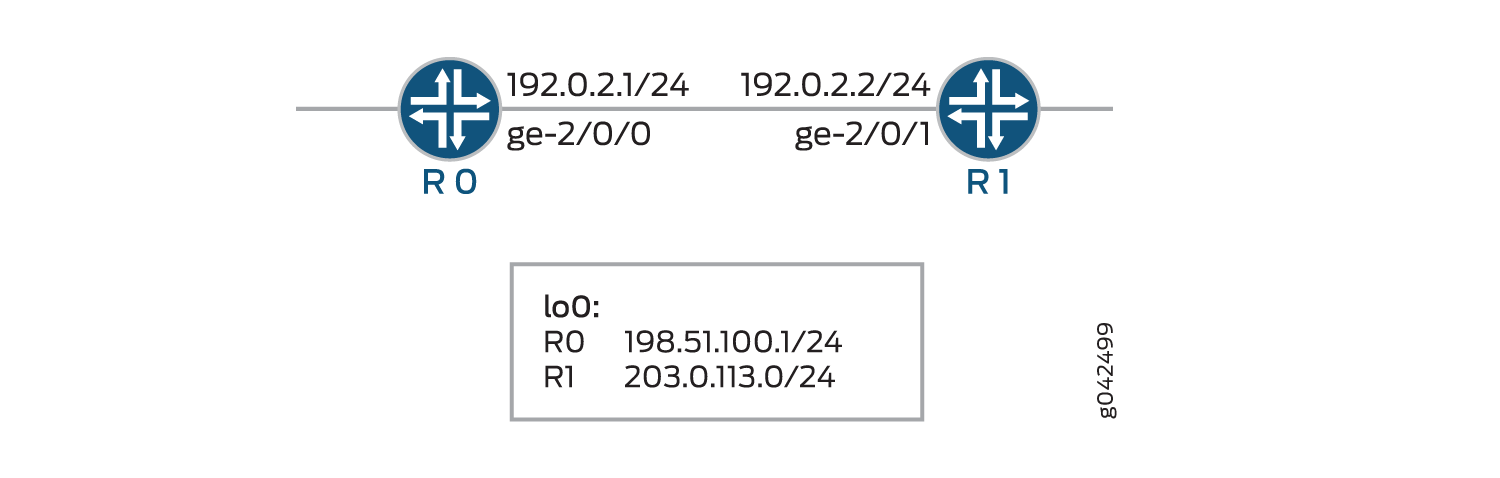 的 VCCV BFD
配置
CLI 快速配置
要快速配置此示例,请复制以下命令,将其粘贴到文本文件中,删除所有换行符,更改详细信息,以便与网络配置匹配,将命令复制并粘贴到层次结构级别的 [edit] CLI 中,然后从配置模式进入。commit
R0
set chassis redundancy graceful-switchover
set interfaces ge-1/1/9 vlan-tagging
set interfaces ge-1/1/9 encapsulation vlan-ccc
set interfaces ge-1/1/9 unit 0 encapsulation vlan-ccc
set interfaces ge-1/1/9 unit 0 vlan-id 512
set interfaces ge-2/0/0 unit 0 family inet address 192.0.2.1/24
set interfaces ge-2/0/0 unit 0 family mpls
set interfaces lo0 unit 0 family inet address 198.51.100.0/24
set routing-options nonstop-routing
set routing-options static route 203.0.113.0/24 next-hop 192.0.2.2
set routing-options router-id 198.51.100.0
set protocols rsvp interface ge-2/0/0.0
set protocols mpls label-switched-path lsp1 to 203.0.113.0
set protocols mpls interface ge-2/0/0.0
set protocols ospf traffic-engineering
set protocols ospf area 0.0.0.0 interface ge-2/0/0.0
set protocols ldp interface all
set protocols l2circuit neighbor 203.0.113.0 interface ge-1/1/9.0 virtual-circuit-id 1
set protocols l2circuit neighbor 203.0.113.0 interface ge-1/1/9.0 oam bfd-liveness-detection minimum-interval 300
set protocols l2circuit neighbor 203.0.113.0 interface ge-1/1/9.0 oam bfd-liveness-detection minimum-receive-interval 10
set protocols l2circuit neighbor 203.0.113.0 interface ge-1/1/9.0 oam bfd-liveness-detection multiplier 3
set protocols l2circuit neighbor 203.0.113.0 interface ge-1/1/9.0 oam bfd-liveness-detection transmit-interval minimum-interval 5
set protocols l2circuit neighbor 203.0.113.0 interface ge-1/1/9.0 oam bfd-liveness-detection transmit-interval threshold 30
set protocols l2circuit neighbor 203.0.113.0 interface ge-1/1/9.0 oam bfd-liveness-detection detection-time threshold 40
R1
set interfaces ge-1/1/9 vlan-tagging
set interfaces ge-1/1/9 encapsulation vlan-ccc
set interfaces ge-1/1/9 unit 0 encapsulation vlan-ccc
set interfaces ge-1/1/9 unit 0 vlan-id 512
set interfaces ge-2/0/1 unit 0 family inet address 192.0.2.2/24
set interfaces ge-2/0/1 unit 0 family mpls
set interfaces lo0 unit 0 family inet address 203.0.113.0/24
set routing-options static route 198.51.100.0/24 next-hop 192.0.2.1
set routing-options router-id 203.0.113.0
set protocols rsvp interface ge-2/0/1.0
set protocols mpls label-switched-path lsp2 to 198.51.100.0
set protocols mpls interface ge-2/0/1.0
set protocols ospf traffic-engineering
set protocols ospf area 0.0.0.0 interface ge-2/0/1.0
set protocols ldp interface all
set protocols l2circuit neighbor 198.51.100.0 interface ge-1/1/9.0 virtual-circuit-id 1
set protocols l2circuit neighbor 198.51.100.0 interface ge-1/1/9.0 oam bfd-liveness-detection minimum-interval 300
set protocols l2circuit neighbor 198.51.100.0 interface ge-1/1/9.0 oam bfd-liveness-detection minimum-receive-interval 10
set protocols l2circuit neighbor 198.51.100.0 interface ge-1/1/9.0 oam bfd-liveness-detection multiplier 3
set protocols l2circuit neighbor 198.51.100.0 interface ge-1/1/9.0 oam bfd-liveness-detection transmit-interval minimum-interval 5
set protocols l2circuit neighbor 198.51.100.0 interface ge-1/1/9.0 oam bfd-liveness-detection transmit-interval threshold 30
set protocols l2circuit neighbor 198.51.100.0 interface ge-1/1/9.0 oam bfd-liveness-detection detection-time threshold 40
配置设备 R0
分步程序
下面的示例要求您在各个配置层级中进行导航。有关导航 CLI 的信息,请参阅 《CLI 用户指南》中的在配置模式下使用 CLI 编辑器。
要配置设备 R0:
修改设备的相应接口名称、地址和任何其他参数后,对设备 R1 重复此过程。
配置平滑切换冗余。
[edit chassis]
user@R0# set redundancy graceful-switchover
配置接口。
[edit interfaces]
user@R0# set ge-1/1/9 vlan-tagging
user@R0# set ge-1/1/9 encapsulation vlan-ccc
user@R0# set ge-1/1/9 unit 0 encapsulation vlan-ccc
user@R0# set ge-1/1/9 unit 0 vlan-id 512
user@R0# set ge-2/0/0 unit 0 family inet address 192.0.2.1/24
user@R0# set ge-2/0/0 unit 0 family mpls
user@R0# set lo0 unit 0 family inet address 198.51.100.0/24
配置不间断路由选项、静态路由和路由器 ID 路由选项。
[edit routing-options]
user@R0# set nonstop-routing
user@R0# set static route 203.0.113.0/24 next-hop 192.0.2.2
user@R0# set router-id 198.51.100.0
配置 RSVP 协议。
[edit protocols rsvp]
user@R0# set interface ge-2/0/0.0
配置 MPLS 协议。
[edit protocols mpls]
user@R0# set label-switched-path lsp1 to 203.0.113.0
user@R0# set interface ge-2/0/0.0
配置 OSPF 协议。
[edit protocols ospf]
user@R0# set traffic-engineering
user@R0# set area 0.0.0.0 interface ge-2/0/0.0
配置 LDP 协议。
[edit protocols ldp]
user@R0# set interface all
为第 2 层电路协议的邻接方配置虚拟电路 ID。
[edit protocols l2circuit]
user@R0# set neighbor 203.0.113.0 interface ge-1/1/9.0 virtual-circuit-id 1
配置第 2 层电路协议的 oam 属性。
[edit protocols l2circuit]
user@R0# set neighbor 203.0.113.0 interface ge-1/1/9.0 oam bfd-liveness-detection minimum-interval 300
user@R0# set neighbor 203.0.113.0 interface ge-1/1/9.0 oam bfd-liveness-detection minimum-receive-interval 10
user@R0# set neighbor 203.0.113.0 interface ge-1/1/9.0 oam bfd-liveness-detection multiplier 3
user@R0# set neighbor 203.0.113.0 interface ge-1/1/9.0 oam bfd-liveness-detection transmit-interval minimum-interval 5
user@R0# set neighbor 203.0.113.0 interface ge-1/1/9.0 oam bfd-liveness-detection transmit-interval threshold 30
user@R0# set neighbor 203.0.113.0 interface ge-1/1/9.0 oam bfd-liveness-detection detection-time threshold 40
结果
在配置模式下,输入 show chassis、 show interfaces、 show protocols和 show routing-options 命令以确认您的配置。如果输出未显示预期的配置,请重复此示例中的说明以更正配置。
user@R0# show chassis
redundancy {
    graceful-switchover;
}
user@R0# show interfaces
ge-1/1/9 {
    vlan-tagging;
    encapsulation vlan-ccc;
    unit 0 {
        encapsulation vlan-ccc;
        vlan-id 512;
    }
}
ge-2/0/0 {
    unit 0 {
        family inet {
            address 192.0.2.1/24;
        }
        family mpls;
    }
}
lo0 {
    unit 0 {
        family inet {
            address 198.51.100.0/24;
        }
    }
}
user@R0# show protocols
rsvp {
    interface ge-2/0/0.0;
}
mpls {
    label-switched-path lsp1 {
        to 203.0.113.0;
    }
    interface ge-2/0/0.0;
}
ospf {
    traffic-engineering;
    area 0.0.0.0 {
        interface ge-2/0/0.0;
    }
}
ldp {
    interface all;
}
l2circuit {
    neighbor 203.0.113.0 {
        interface ge-1/1/9.0 {
            virtual-circuit-id 1;
            oam {
                bfd-liveness-detection {
                    minimum-interval 300;
                    minimum-receive-interval 10;
                    multiplier 3;
                    transmit-interval {
                        minimum-interval 5;
                        threshold 30;
                    }
                    detection-time {
                        threshold 40;
                    }
                }
            }
        }
    }
}
user@R0# show routing-options
nonstop-routing;
static {
    route 203.0.113.0/24 next-hop 192.0.2.2;
}
router-id 198.51.100.0;
如果完成设备配置,请从配置模式进入。commit
验证
验证配置是否工作正常。
验证第 2 层电路连接
目的
验证第 2 层电路中的连接。
行动
在作模式下,为设备 R0 运行 show l2circuit connections 命令。
user@R0> show l2circuit connections

Layer-2 Circuit Connections:

Legend for connection status (St)
EI -- encapsulation invalid      NP -- interface h/w not present
MM -- mtu mismatch               Dn -- down
EM -- encapsulation mismatch     VC-Dn -- Virtual circuit Down
CM -- control-word mismatch      Up -- operational
VM -- vlan id mismatch           CF -- Call admission control failure
OL -- no outgoing label          IB -- TDM incompatible bitrate
NC -- intf encaps not CCC/TCC    TM -- TDM misconfiguration
BK -- Backup Connection          ST -- Standby Connection
CB -- rcvd cell-bundle size bad  SP -- Static Pseudowire
LD -- local site signaled down   RS -- remote site standby
RD -- remote site signaled down  HS -- Hot-standby Connection
XX -- unknown

Legend for interface status
Up -- operational
Dn -- down
Neighbor: 203.0.113.0
    Interface                 Type  St     Time last up          # Up trans
    ge-1/1/9.0(vc 1)          rmt   Up     Jun  2 03:19:44 2014           1
      Remote PE: 203.0.113.0, Negotiated control-word: Yes (Null)
      Incoming label: 299792, Outgoing label: 299792
      Negotiated PW status TLV: No
      Local interface: ge-1/1/9.0, Status: Up, Encapsulation: VLAN
      Flow Label Transmit: No, Flow Label Receive: No
      Flow Label Transmit: No, Flow Label Receive: No
意义
输出显示从设备 R0 到其邻接方的第 2 层虚拟电路信息。
验证 BFD 会话
目的
验证 BFD 会话。
行动
在作模式下,为设备 R0 运行 show bfd session 命令。
user@R0> show bfd session

                                                  Detect   Transmit
Address                  State     Interface      Time     Interval  Multiplier

203.0.113.7                Up        ge-2/0/0.0     0.030     0.010        3

1 sessions, 1 clients
Cumulative transmit rate 100.0 pps, cumulative receive rate 100.0 pps
意义
输出显示地址以及 BFD 会话处于活动状态的接口。状态指示 Up BFD 会话已启动。BFD会话检测BFD控制数据包的时间间隔为30毫秒,发送系统发送BFD控制数据包的时间间隔为10毫秒,发送系统通过乘以时间间隔确定 3 检测时间。活动 BFD 会话总数和托管活动 BFD 会话的客户端总数。累积传输速率表示所有活动会话上每秒传输的 BFD 控制数据包总数,累积接收速率表示所有活动会话上每秒接收的 BFD 控制数据包总数。
验证详细的 BFD 会话信息
目的
验证详细的 BFD 会话信息。
行动
在作模式下,为设备 R0 运行 show bfd session extensive 命令。
user@R0> show bfd session extensive

                                                  Detect   Transmit
Address                  State     Interface      Time     Interval  Multiplier

203.0.113.7                Up        ge-2/0/0.0     0.030     0.010        3
 Client L2CKT-OAM, TX interval 0.005, RX interval 0.010
 Session up time 03:47:14
 Local diagnostic None, remote diagnostic None
 Remote state Up, version 1
 Replicated
 Session type: VCCV BFD
 Min async interval 0.005, min slow interval 1.000
 Adaptive async TX interval 0.005, RX interval 0.010
 Local min TX interval 0.005, minimum RX interval 0.010, multiplier 3
 Remote min TX interval 0.005, min RX interval 0.010, multiplier 3
 Threshold transmission interval 0.030, Threshold for detection time 0.040
 Local discriminator 20, remote discriminator 13004
 Echo mode disabled/inactive
 Remote is control-plane independent
 Neighbor address 203.0.113.0, Virtual circuit id 1
  Session ID: 0x0

1 sessions, 1 clients
Cumulative transmit rate 100.0 pps, cumulative receive rate 100.0 pps
意义
输出显示 BFD 会话的详细信息。