
示例:为 BGP 信号第 2 层服务配置 MPLS 出口保护服务镜像
从 Junos OS 14.2 版开始,当出口 PE 节点中出现链路或节点故障时,Junos OS 支持恢复出口流量。如果核心网络中出现链路或节点故障,可在PE路由器之间的传输LSP上触发MPLS快速重新路由等保护机制,在几十毫秒内修复连接。出口保护 LSP 可解决网络边缘的节点链路故障(例如,PE 路由器故障)的问题。
此示例说明如何为 BGP 信号第 2 层服务配置链路保护。
要求
运行 Junos OS 14.2 或更高版本的 MX 系列路由器。
概述
如果核心网络中出现链路或节点故障,可在PE路由器之间的传输LSP上触发MPLS快速重新路由等保护机制,在几十毫秒内修复连接。出口保护 LSP 可解决网络边缘的节点链路故障(例如,PE 路由器故障)的问题。
此示例包括以下配置概念和语句,这些概念和语句对于出口保护 LSP 的配置来说是独有的:
context-identifier— 指定用于定义参与出口保护 LSP 的一对 PE 路由器的 IPv4 或 IPv6 地址。它被分配给每对有序的主 PE 和保护器,以方便建立保护。此地址是全局唯一的,或者在主 PE 和保护器所在的网络的地址空间中是唯一的。egress-protection— 配置受保护的第 2 层电路的保护器信息,并在层次结构级别配置[edit protocols mpls]保护器第 2 层电路。在层次结构级别将[edit protocols mpls]LSP 配置为出口保护 LSP。protector— 配置在备用 PE 上创建备用伪线,以便为实例提供链路或节点保护。
拓扑结构
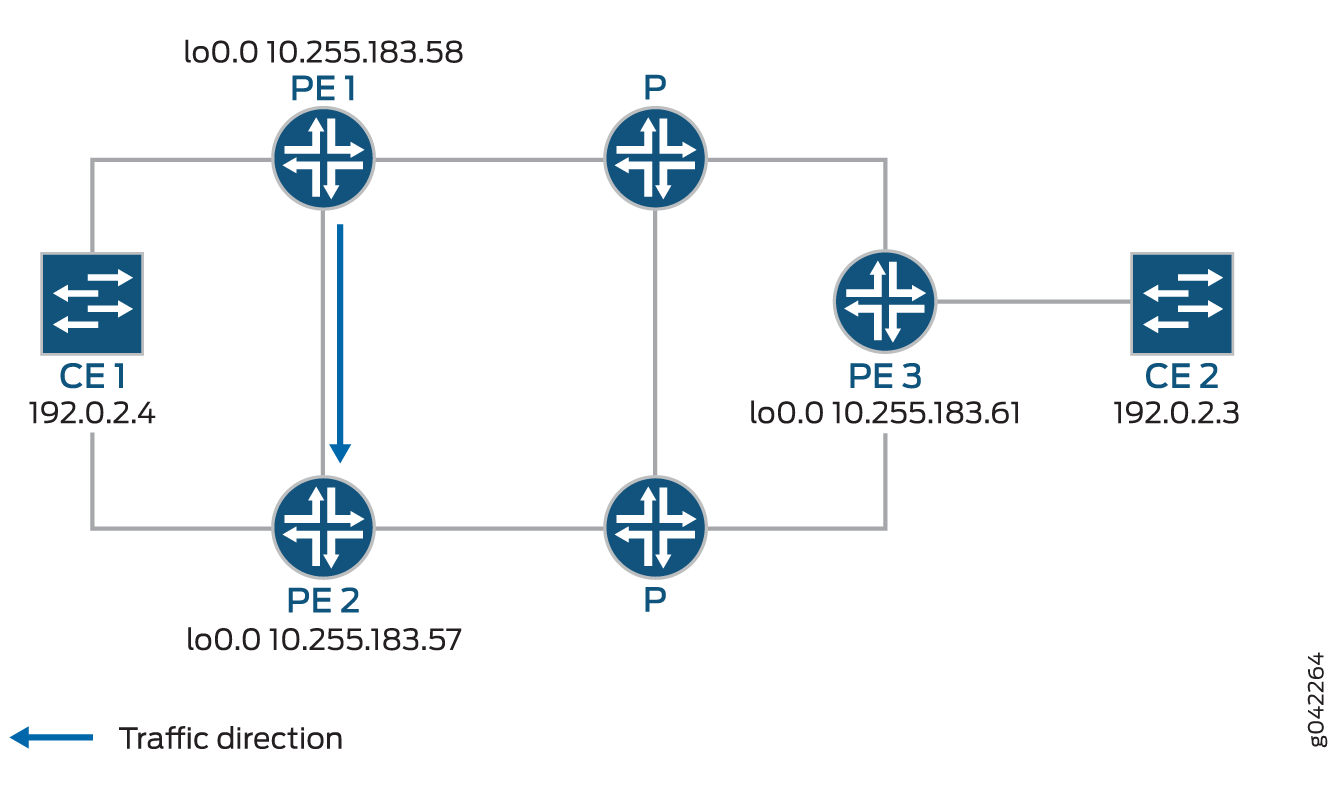 的出口保护 LSP
如果出口 PE 路由器 PE1 发生故障,流量将切换到路由器 PE1 和路由器 PE2 之间配置的出口保护 LSP(保护器 PE 路由器):
设备 CE2 — 流量来源
路由器 PE3 — 入口 PE 路由器
路由器 PE1 — (主)出口 PE 路由器
路由器 PE2 — 保护程序 PE 路由器
设备 CE1 — 流量目标
当 CE1 与 PE1 之间的链路中断时,PE1 将短暂地将该流量重定向到 CE1,再到 PE2。PE2 将其转发至 CE1,直到入口路由器 PE3 重新计算以将流量转发至 PE2。
最初,流量方向为:CE2 – PE3 – P – PE1 – CE1。
当 CE1 – PE1 之间的链路中断时,流量将为: CE2 – PE3 – P – PE1 – PE2 –CE1。然后,PE3 重新计算路径:CE2 – PE3 – P – PE2 – CE1。
此示例说明如何配置路由器 PE1、PE2 和 PE3。
配置
CLI 快速配置
要快速配置出口保护 LSP,请复制以下命令,将其粘贴到文本文件中,删除所有换行符,更改任何必要的详细信息以匹配您的网络配置,将命令复制并粘贴到 CLI 中,然后从配置模式进入 commit 。
PE1
set protocols rsvp interface all
set protocols rsvp interface fxp0.0 disable
set protocols mpls interface all
set protocols mpls interface fxp0.0 disable
set protocols mpls egress-protection context-identifier 198.51.100.3 primary
set protocols mpls egress-protection context-identifier 198.51.100.3 advertise-mode stub-alias
set protocols mpls egress-protection traceoptions file ep size 100m
set protocols mpls egress-protection traceoptions flag all
set protocols bgp traceoptions file bgp.log world-readable
set protocols bgp group ibgp type internal
set protocols bgp group ibgp local-address 10.255.183.58
set protocols bgp group ibgp family inet unicast
set protocols bgp group ibgp family l2vpn signaling egress-protection
set protocols bgp group ibgp neighbor 192.0.2.3
set protocols bgp group ibgp neighbor 192.0.2.4
set protocols isis traceoptions file isis-edge size 10m world-readable
set protocols isis traceoptions flag error
set protocols isis level 1 disable
set protocols isis level 2 wide-metrics-only
set protocols isis interface all point-to-point
set protocols isis interface all level 2 metric 10
set protocols isis interface fxp0.0 disable
set protocols ldp interface all
set protocols ldp interface fxp0.0 disable
set policy-options policy-statement lb then load-balance per-packet
set routing-options traceoptions file ro.log
set routing-options traceoptions flag all
set routing-options traceoptions flag route
set routing-options autonomous-system 100
set routing-options forwarding-table export lb
set routing-instances foo instance-type l2vpn
set routing-instances foo egress-protection context-identifier 198.51.100.3
set routing-instances foo interface ge-2/0/2.0
set routing-instances foo route-distinguisher 10.255.183.58:1
set routing-instances foo vrf-target target:9000:1
set routing-instances foo protocols l2vpn encapsulation-type ethernet-vlan
set routing-instances foo protocols l2vpn site foo site-identifier 1
set routing-instances foo protocols l2vpn site foo site-preference primary
set routing-instances foo protocols l2vpn site foo interface ge-2/0/2.0 remote-site-id 2
PE2
set protocols rsvp interface all
set protocols rsvp interface fxp0.0 disable
set protocols mpls interface all
set protocols mpls interface fxp0.0 disable
set protocols mpls egress-protection context-identifier 198.51.100.3 protector
set protocols mpls egress-protection context-identifier 198.51.100.3 advertise-mode stub-alias
set protocols mpls egress-protection traceoptions file ep size 100m
set protocols mpls egress-protection traceoptions flag all
set protocols bgp traceoptions file bgp.log world-readable
set protocols bgp group ibgp type internal
set protocols bgp group ibgp local-address 10.255.183.57
set protocols bgp group ibgp family inet unicast
set protocols bgp group ibgp family l2vpn signaling egress-protection
set protocols bgp group ibgp neighbor 192.0.2.3
set protocols bgp group ibgp neighbor 192.0.2.4
set protocols isis traceoptions file isis-edge size 10m world-readable
set protocols isis traceoptions flag error
set protocols isis level 1 disable
set protocols isis level 2 wide-metrics-only
set protocols isis interface all point-to-point
set protocols isis interface all level 2 metric 10
set protocols isis interface fxp0.0 disable
set protocols ldp interface all
set protocols ldp interface fxp0.0 disable
set policy-options policy-statement lb then load-balance per-packet
set routing-options traceoptions file ro.log
set routing-options traceoptions flag normal
set routing-options traceoptions flag route
set routing-options autonomous-system 100
set routing-options forwarding-table export lb
set routing-instances foo instance-type l2vpn
set routing-instances foo egress-protection protector
set routing-instances foo interface ge-2/0/2.0
set routing-instances foo route-distinguisher 10.255.183.57:1
set routing-instances foo vrf-target target:9000:1
set routing-instances foo protocols l2vpn encapsulation-type ethernet-vlan
set routing-instances foo protocols l2vpn site foo hot-standby
set routing-instances foo protocols l2vpn site foo site-identifier 1
set routing-instances foo protocols l2vpn site foo site-preference backup
set routing-instances foo protocols l2vpn site foo interface ge-2/0/2.0 remote-site-id 2
PE3
set protocols rsvp interface all
set protocols rsvp interface fxp0.0 disable
set protocols mpls interface all
set protocols mpls interface fxp0.0 disable
set protocols bgp traceoptions file bgp.log world-readable
set protocols bgp group ibgp type internal
set protocols bgp group ibgp local-address 10.255.183.61
set protocols bgp group ibgp family inet unicast
set protocols bgp group ibgp family l2vpn signaling
set protocols bgp group ibgp neighbor 192.0.2.3
set protocols bgp group ibgp neighbor 192.0.2.4
set protocols isis traceoptions file isis-edge size 10m world-readable
set protocols isis traceoptions flag error
set protocols isis level 1 disable
set protocols isis level 2 wide-metrics-only
set protocols isis interface all point-to-point
set protocols isis interface all level 2 metric 10
set protocols isis interface fxp0.0 disable
set protocols ldp interface all
set protocols ldp interface fxp0.0 disable
set policy-options policy-statement lb then load-balance per-packet
set routing-options traceoptions file ro.log
set routing-options traceoptions flag normal
set routing-options traceoptions flag route
set routing-options autonomous-system 100
set routing-options forwarding-table export lb
set routing-instances foo instance-type l2vpn
set routing-instances foo interface ge-2/1/2.0
set routing-instances foo route-distinguisher 10.255.183.61:1
set routing-instances foo vrf-target target:9000:1
set routing-instances foo protocols l2vpn encapsulation-type ethernet-vlan
set routing-instances foo protocols l2vpn site foo site-identifier 2
set routing-instances foo protocols l2vpn site foo interface ge-2/1/2.0 remote-site-id 1
分步程序
分步程序
下面的示例要求您在各个配置层级中进行导航。有关导航 CLI 的信息,请参阅在 配置模式下使用 CLI 编辑器。
要为路由器 PE1 配置出口保护 LSP:
配置 RSVP。
[edit protocols rsvp]
user@PE1# set interface all
user@PE1# set interface fxp0.0 disable
配置 MPLS 以使用出口保护 LSP 来防止设备 CE1 的链路故障。
[edit protocols mpls]
user@PE1# set interface all
user@PE1# set interface fxp0.0 disable
user@PE1# set egress-protection context-identifier 198.51.100.3 primary
user@PE1# set egress-protection context-identifier 198.51.100.3 advertise-mode stub-alias
user@PE1# set egress-protection traceoptions file ep size 100m
user@PE1# set egress-protection traceoptions flag all
配置 BGP。
[edit protocols bgp]
user@PE1# set traceoptions file bgp.log world-readable
user@PE1# set group ibgp type internal
user@PE1# set group ibgp local-address 10.255.183.58
user@PE1# set group ibgp family inet unicast
user@PE1# set group ibgp family l2vpn signaling egress-protection
user@PE1# set group ibgp neighbor 192.0.2.3
user@PE1# set group ibgp neighbor 192.0.2.4
配置 IS-IS。
[edit protocols isis]
user@PE1# set traceoptions file isis-edge size 10m world-readable
user@PE1# set traceoptions flag error
user@PE1# set level 1 disable
user@PE1# set level 2 wide-metrics-only
user@PE1# set interface all point-to-point
user@PE1# set interface all level 2 metric 10
user@PE1# set interface fxp0.0 disable
配置 LDP。
[edit protocols ldp]
user@PE1# set interface all
user@PE1# set interface fxp0.0 disable
配置负载均衡策略。
[edit]
user@PE1# set policy-options policy-statement lb then load-balance per-packet
配置路由选项,以根据负载均衡策略导出路由。
[edit routing-options]
user@PE1# set traceoptions file ro.log
user@PE1# set traceoptions flag all
user@PE1# set autonomous-system 100
user@PE1# set forwarding-table export lb
配置 BGP 以从路由实例播发 NRLI,并将上下文 ID 作为下一跃点。
[edit routing-instances]
user@PE1# set foo instance-type l2vpn
user@PE1# set foo egress-protection context-identifier 198.51.100.3
user@PE1# set foo interface ge-2/0/2.0
user@PE1# set foo route-distinguisher 10.255.183.58:1
user@PE1# set foo vrf-target target:9000:1
配置 l2vpn 实例以使用配置的出口 LSP。
[edit routing-instances]
user@PE1# set foo protocols l2vpn encapsulation-type ethernet-vlan
user@PE1# set foo protocols l2vpn site foo site-identifier 1
user@PE1# set foo protocols l2vpn site foo site-preference primary
user@PE1# set foo protocols l2vpn site foo interface ge-2/0/2.0 remote-site-id 2
如果完成设备配置,请从配置模式进入。
commit
分步程序
要为路由器 PE2 配置出口保护 LSP:
配置 RSVP。
[edit protocols rsvp]
user@PE2# set interface all
user@PE2# set interface fxp0.0 disable
配置 MPLS 和充当出口保护 LSP 的 LSP。
[edit protocols mpls]
user@PE2# set interface all
user@PE2# set interface fxp0.0 disable
user@PE2# set egress-protection context-identifier 198.51.100.3 protector
user@PE2# set egress-protection context-identifier 198.51.100.3 advertise-mode stub-alias
user@PE2# set egress-protection traceoptions file ep size 100m
user@PE2# set egress-protection traceoptions flag all
配置 BGP。
[edit protocols bgp]
user@PE2# set traceoptions file bgp.log world-readable
user@PE2# set group ibgp type internal
user@PE2# set group ibgp local-address 10.255.183.57
user@PE2# set group ibgp family inet unicast
user@PE2# set group ibgp family l2vpn signaling
user@PE2# set group ibgp family l2vpn egress-protection
user@PE2# set group ibgp neighbor 192.0.2.3
user@PE2# set group ibgp neighbor 192.0.2.4
配置 IS-IS。
[edit protocols isis]
user@PE2# set traceoptions file isis-edge size 10m world-readable
user@PE2# set traceoptions flag error
user@PE2# set level 1 disable
user@PE2# set level 2 wide-metrics-only
user@PE2# set interface all point-to-point
user@PE2# set interface all level 2 metric 10
user@PE2# set interface fxp0.0 disable
配置 LDP。
[edit protocols ldp]
user@PE2# set interface all
user@PE2# set interface fxp0.0 disable
配置负载均衡策略。
[edit]
user@PE2# set policy-options policy-statement lb then load-balance per-packet
配置路由选项,以根据负载均衡策略导出路由。
[edit routing-options]
user@PE2# set traceoptions file ro.log
user@PE2# set traceoptions flag all
user@PE2# set autonomous-system 100
user@PE2# set forwarding-table export lb
配置 BGP 以从路由实例播发 NRLI,并将上下文 ID 作为下一跃点。
[edit routing-instances]
user@PE2# set foo instance-type l2vpn
user@PE2# set foo egress-protection protector
user@PE2# set foo interface ge-2/0/2.0
user@PE2# set foo route-distinguisher 10.255.183.57:1
user@PE2# set foo vrf-target target:9000:1
配置 l2vpn 实例以使用配置的出口 LSP。
[edit routing-instances]
user@PE2# set foo protocols l2vpn encapsulation-type ethernet-vlan
user@PE2# set foo protocols l2vpn site foo hot-standby
user@PE2# set foo protocols l2vpn site foo site-identifier 1
user@PE2# set foo protocols l2vpn site foo site-preference backup
user@PE2# set foo protocols l2vpn site foo interface ge-2/0/2.0 remote-site-id 2
如果完成设备配置,请从配置模式进入。
commit
分步程序
要为路由器 PE3 配置出口保护 LSP:
配置 RSVP。
[edit protocols rsvp]
user@PE3# set interface all
user@PE3# set interface fxp0.0 disable
配置 MPLS。
[edit protocols mpls]
user@PE3# set interface all
user@PE3# set interface fxp0.0 disable
配置 BGP。
[edit protocols bgp]
user@PE3# set traceoptions file bgp.log world-readable
user@PE3# set group ibgp type internal
user@PE3# set group ibgp local-address 10.255.183.61
user@PE3# set group ibgp family inet unicast
user@PE3# set group ibgp family l2vpn signaling
user@PE3# set group ibgp neighbor 192.0.2.3
user@PE3# set group ibgp neighbor 192.0.2.4
配置 IS-IS。
[edit protocols isis]
user@PE3# set traceoptions file isis-edge size 10m world-readable
user@PE3# set traceoptions flag error
user@PE3# set level 1 disable
user@PE3# set level 2 wide-metrics-only
user@PE3# set protocols isis interface all point-to-point
[edit protocols isis]
user@PE3# set protocols isis interface all level 2 metric 10
[edit protocols isis]
user@PE3# set protocols isis interface fxp0.0 disable
配置 LDP。
[edit protocols ldp]
user@PE3# set interface all
user@PE3# set interface fxp0.0 disable
配置负载均衡策略。
[edit]
user@PE3# set policy-options policy-statement lb then load-balance per-packet
配置路由选项,以根据负载均衡策略导出路由。
[edit routing-options]
user@PE3# set traceoptions file ro.log
user@PE3# set traceoptions flag normal
user@PE3# set traceoptions flag route
user@PE3# set autonomous-system 100
user@PE3# set forwarding-table export lb
配置 BGP 以从路由实例播发 NLRI,并将上下文 ID 作为下一跃点。
[edit]
user@PE3# set routing-instances foo instance-type l2vpn
user@PE3# set routing-instances foo interface ge-2/1/2.0
user@PE3# set routing-instances foo route-distinguisher 10.255.183.61:1
user@PE3# set routing-instances foo vrf-target target:9000:1
配置 l2vpn 以指定连接到站点的接口以及希望指定接口连接的远程接口。
[edit routing-instances]
user@PE3# set foo protocols l2vpn encapsulation-type ethernet-vlan
user@PE3# set foo protocols l2vpn site foo site-identifier 2
user@PE3# set foo protocols l2vpn site foo interface ge-2/1/2.0 remote-site-id 1
如果完成设备配置,请从配置进入。
commit
结果
在配置模式下,输入 show protocols、 show policy-options和 show routing-options 命令来确认您在路由器 PE1 上的配置。如果输出未显示预期的配置,请重复此示例中的说明以更正配置。
[edit]
user@PE1# show protocols
rsvp {
    interface all;
    interface fxp0.0 {
        disable;
    }
}
mpls {
    interface all;
    interface fxp0.0 {
        disable;
    }
    egress-protection {
        context-identifier 198.51.100.3 {
            primary;
            advertise-mode stub-alias;
        }
        traceoptions {
            file ep size 100m;
            flag all;
        }
    }
}
bgp {
    traceoptions {
        file bgp.log world-readable;
    }
    group ibgp {
        type internal;
        local-address 10.255.183.58;
        family inet {
            unicast;
        }
        family l2vpn {
            signaling {
                egress-protection;
            }
        }
        neighbor 192.0.2.3;
        neighbor 192.0.2.4;
    }
}
isis {
    traceoptions {
        file isis-edge size 10m world-readable;
        flag error;
    }
    level 1 disable;
    level 2 wide-metrics-only;
    interface all {
        point-to-point;
        level 2 metric 10;
    }
    interface fxp0.0 {
        disable;
    }
}
ldp {
    interface all;
    interface fxp0.0 {
        disable;
    }
}

[edit]
user@PE1# show policy-options
policy-statement lb {
    then {
        load-balance per-packet;
    }
}
[edit]
user@PE1# show routing-options
traceoptions {
    file ro.log;
    flag all;
}
autonomous-system 100;
forwarding-table {
    export lb;
}

[edit]
user@PE1# show routing-instances
foo {
    instance-type l2vpn;
    egress-protection {
        context-identifier {
            198.51.100.3;
        }
    }
    interface ge-2/0/2.0;
    route-distinguisher 10.255.183.58:1;
    vrf-target target:9000:1;
    protocols {
        l2vpn {
            encapsulation-type ethernet-vlan;
            site foo {
                site-identifier 1;
                site-preference primary;
                interface ge-2/0/2.0 {
                    remote-site-id 2;
                }
            }
        }
    }
}
在配置模式下,输入 show protocols、 show policy-options和 show routing-options 命令来确认您在路由器 PE2 上的配置。如果输出未显示预期的配置,请重复此示例中的说明以更正配置。
[edit]
user@PE2# show protocols
rsvp {
    interface all;
    interface fxp0.0 {
        disable;
    }
}
mpls {
    interface all;
    interface fxp0.0 {
        disable;
    }

    egress-protection {
        context-identifier 198.51.100.3 {
            protector;
            advertise-mode stub-alias;
        }
        traceoptions {
            file ep size 100m;
            flag all;
        }
    }
}
bgp {
    traceoptions {
        file bgp.log world-readable;
    }
    group ibgp {
        type internal;
        local-address 10.255.183.57;
        family inet {
            unicast;
        }
        family l2vpn {
            signaling {
                egress-protection;
            }
        }
        neighbor 192.0.2.3;
        neighbor 192.0.2.4;
    }
}
isis {
    traceoptions {
        file isis-edge size 10m world-readable;
        flag error;
    }
    level 1 disable;
    level 2 wide-metrics-only;
    interface all {
        point-to-point;
        level 2 metric 10;
    }
    interface fxp0.0 {
        disable;
    }
}
ldp {
    interface all;
    interface fxp0.0 {
        disable;
    }
}

[edit]
user@PE2# show policy-options
policy-statement lb {
    then {
        load-balance per-packet;
    }
}

[edit]
user@PE2# show routing-options
traceoptions {
    file ro.log;
    flag normal;
    flag route;
}
autonomous-system 100;
forwarding-table {
    export lb;
}

[edit]
user@PE2# show routing-instances
foo {
    instance-type l2vpn;
    egress-protection {
        protector;
    }
    interface ge-2/0/2.0;
    route-distinguisher 10.255.183.57:1;
    vrf-target target:9000:1;
    protocols {
        l2vpn {
            encapsulation-type ethernet-vlan;
            site foo {
                hot-standby;
                site-identifier 1;
                site-preference backup;
                interface ge-2/0/2.0 {
                    remote-site-id 2;
                }
            }
        }
    }
}
在配置模式下,输入 show protocols、 show policy-options和 show routing-options 命令来确认您在路由器 PE3 上的配置。如果输出未显示预期的配置,请重复此示例中的说明以更正配置。
[edit]
user@PE3# show protocols
rsvp {
    interface all;
    interface fxp0.0 {
        disable;
    }
}
mpls {
    interface all;
    interface fxp0.0 {
        disable;
    }
}
bgp {
    traceoptions {
        file bgp.log world-readable;
    }
    group ibgp {
        type internal;
        local-address 10.255.183.61;
        family inet {
            unicast;
        }
        family l2vpn {
            signaling;
        }
        neighbor 192.0.2.3;
        neighbor 192.0.2.4;
    }
}
isis {
    traceoptions {
        file isis-edge size 10m world-readable;
        flag error;
    }
    level 1 disable;
    level 2 wide-metrics-only;
    interface all {
        point-to-point;
        level 2 metric 10;
    }
    interface fxp0.0 {
        disable;
    }
}
ldp {
    interface all;
    interface fxp0.0 {
        disable;
    }
}

[edit]
user@PE3# show policy-options
policy-statement lb {
    then {
        load-balance per-packet;
    }
}

[edit]
user@PE3# show routing-options
traceoptions {
    file ro.log;
    flag normal;
    flag route;
}
autonomous-system 100;
forwarding-table {
    export lb;
}

[edit]
user@PE3# show routing-instances
foo {
    instance-type l2vpn;
    interface ge-2/1/2.0;
    route-distinguisher 10.255.183.61:1;
    vrf-target target:9000:1;
    protocols {
        l2vpn {
            encapsulation-type ethernet-vlan;
            site foo {
                site-identifier 2;
                interface ge-2/1/2.0 {
                    remote-site-id 1;
                }
            }
        }
    }
}
验证
确认配置工作正常。
验证 L2VPN 配置
目的
验证 LSP 是否受到连接保护逻辑的保护。
行动
在作模式下,运行命令 show l2vpn connections extensive 。
user@PE2> show l2vpn connections extensive
Layer-2 VPN connections:
Legend for connection status (St)
EI -- encapsulation invalid      NC -- interface encapsulation not CCC/TCC/VPLS
EM -- encapsulation mismatch     WE -- interface and instance encaps not same
VC-Dn -- Virtual circuit down    NP -- interface hardware not present
CM -- control-word mismatch      -> -- only outbound connection is up
CN -- circuit not provisioned    <- -- only inbound connection is up
OR -- out of range               Up -- operational
OL -- no outgoing label          Dn -- down
LD -- local site signaled down   CF -- call admission control failure
RD -- remote site signaled down  SC -- local and remote site ID collision
LN -- local site not designated  LM -- local site ID not minimum designated
RN -- remote site not designated RM -- remote site ID not minimum designated
XX -- unknown connection status  IL -- no incoming label
MM -- MTU mismatch               MI -- Mesh-Group ID not available
BK -- Backup connection          ST -- Standby connection
PF -- Profile parse failure      PB -- Profile busy
RS -- remote site standby        SN -- Static Neighbor
LB -- Local site not best-site   RB -- Remote site not best-site
VM -- VLAN ID mismatch
Legend for interface status
Up -- operational
Dn -- down
Instance: foo
Local site: foo (1)
   connection-site           Type  St  Time last up          # Up trans
    2                         rmt   Up  Aug  3 00:08:14 2001           1
      Local circuit: ge-2/0/2.0, Status: Up
      Remote PE: 192.0.2.3
      Incoming label: 32769, Outgoing label: 32768
      Egress Protection: Yes
        Time                  Event            Interface/Lbl/PE
        Aug  3 00:08:14 2001  PE route up
        Aug  3 00:08:14 2001  Out lbl Update               32768
        Aug  3 00:08:14 2001  In lbl Update                32769
        Aug  3 00:08:14 2001  ckt0 up                 fe-0/0/0.0
意义
输出显示 Egress Protection: Yes 给定的 PVC 受连接保护逻辑的保护。
验证路由实例详细信息
目的
验证路由实例信息和在主节点链路发生故障时用作下一跃点地址的主节点上配置的上下文标识符。
行动
在作模式下,运行命令 show route foo detail 。
user@PE2> show route foo detail
foo:
  Router ID: 0.0.0.0
  Type: l2vpn non-forwarding State: Active
  Interfaces:
    lt-1/2/0.56
  Route-distinguisher: 10.255.255.11:1
  Vrf-import: [ __vrf-import-foo-internal__ ]
  Vrf-export: [ __vrf-export-foo-internal__ ]
  Vrf-import-target: [ target:100:200 ]
  Vrf-export-target: [ target:100:200 ]
  Fast-reroute-priority: low
  Vrf-edge-protection-id:  198.51.100.3
  Tables:
    foo.l2vpn.0           : 5 routes (3 active, 0 holddown, 0 hidden)
    foo.l2id.0            : 6 routes (2 active, 0 holddown, 0 hidden)
意义
context-id 设置为 198.51.100.3 ,输出中的 提到 Vrf-import: [ __vrf-import-foo-internal__] 用于重写下一跃点地址的策略。
验证 IS-IS 配置
目的
验证 IS-IS 上下文标识符信息。
行动
在作模式下,运行命令 show isis context-identifier detail 。
user@PE2> show isis context-identifier detail
IS-IS context database:
Context               L  Owner     Role       Primary      Metric
198.51.100.3             2  MPLS      Protector  pro17-b-lr-R1 0
  Advertiser pro17-b, Router ID 10.255.107.49, Level 2, tlv protector
  Advertiser pro17-b-lr-R1, Router ID 10.255.255.11, Metric 1, Level 2, tlv prefix
意义
路由器 PE2 是保护器,配置的上下文标识符用于 MPLS 协议。
验证 MPLS 配置
目的
验证主 PE 和保护器 PE 上的上下文标识详细信息。
行动
在作模式下,运行命令 show mpls context-identifier detail 。
user@PE1> show mpls context-identifier detail
ID: 198.51.100.3
  Type: primary, Metric: 1, Mode: alias

Total 1, Primary 1, Protector 0
user@PE2> show mpls context-identifier detail
ID: 198.51.100.3
  Type: protector, Metric: 16777215, Mode: alias
  Context table: __198.51.100.3__.mpls.0, Label out: 299968
user@PE2> show mpls egress-protection detail
Instance                 Type      Protection-Type
foo                    local-l2vpn Protector
  Route Target 100:200
意义
上下文 ID 是 198.51.100.3,advertise-mode 是 alias,为出口保护创建的 MPLS 表是 __198.51.100.3__.mpls.0,出口实例名称是 foo,其类型 local-l2vpn为 。
变更历史表
是否支持某项功能取决于您使用的平台和版本。使用 功能资源管理器 确定您的平台是否支持某个功能。