
示例:为 FCoE 流量配置 CoS PFC
基于优先级的流量控制(PFC,在 IEEE 802.1Qbb 中有所描述)是在入口接口上应用的链路级流量控制机制。通过 PFC,您可以将一个物理链路上的流量分为八个优先级。您可以将这八个优先级视为与队列(转发类)相对应的八个流量“通道”。每个优先级都映射到 VLAN 报头中的 3 位 IEEE 802.1p CoS 值。
您可以有选择地将 PFC 应用于任何队列中的流量,而不暂停同一链路上其他队列中的流量。您必须将 PFC 应用于 FCoE 流量,以确保无损传输。
此示例介绍如何为 FCoE 流量配置 PFC:
要求
此示例使用以下硬件和软件组件:
一台 QFX 系列交换机
任何受支持的 Junos 版本
概述
FCoE 流量需要 PFC 来确保无损数据包传输。此示例说明如何在 FCoE 流量上配置 PFC,使用默认的 FCoE 转发类到队列映射,以及:
配置一个分类器,用于将 FCoE 转发类与 FCoE 流量相关联,由 IEEE 802.1p 代码点 011(优先级 3)标识。
配置拥塞通知配置文件,将 PFC 应用于 FCoE 流量。
将分类器和 PFC 配置应用于入口接口。
注意:在接口上配置或更改 PFC 会阻塞整个端口,直到 PFC 更改完成。完成 PFC 更改后,端口将解除阻塞,流量将恢复。阻止端口将停止入口和出口流量,并导致端口上所有队列上的数据包丢失,直到端口解除阻塞。
为 FCoE 转发类输出队列配置 CoS 带宽调度。
在支持增强型传输选择 (ETS) 分层端口调度的交换机上,创建包含 FCoE 转发类的转发类集(优先级组);这是配置增强型传输选择 (ETS) 和支持数据中心桥接 (DCB) 所必需的。
对于 ETS,请为 FCoE 优先级组配置带宽调度。
将配置应用于入口和出口接口。执行此操作的方式因您对 CoS 配置使用 ETS 还是直接端口调度而异。
对于直接端口调度,您可以将调度器图直接应用于接口。调度器图将调度器映射到转发类,并将调度器的 CoS 属性应用于映射到转发类的输出队列。
对于 ETS 分层端口调度,您可以将调度器图应用于流量控制配置文件,然后将流量控制配置文件应用于接口。调度器映射将 CoS 属性映射到转发类(及其关联的输出队列),就像处理直接端口调度一样。流量控制配置文件将 CoS 属性映射到包含转发类的优先级组(转发类集中定义的一组转发类),从而创建一个 CoS 层次结构,用于将端口带宽分配给一组转发类(优先级组),然后将优先级组带宽分配给各个转发类。
此示例中的每个接口都充当入口接口和出口接口,因此分类器、拥塞通知配置文件和调度将应用于所有接口。
拓扑结构
表 1 显示了此示例的配置组件。
组件 |
设置 |
|---|---|
硬件 |
一台交换机 |
行为聚合分类器(通过 IEEE 802.1 代码点将 FCoE 转发类映射到传入数据包) |
转发类 入口接口: |
PFC 拥塞通知配置文件 |
|
FCoE 队列调度程序 |
|
转发类到调度器映射 |
调度器映射 在支持直接端口调度的交换机上,如果使用端口调度,请将调度器图直接连接到接口 |
仅 ETS:转发类集(FCoE 优先级组) |
|
仅限 ETS: 流量控制配置文件 |
对于 ETS 分层调度,将流量控制配置文件(使用 |
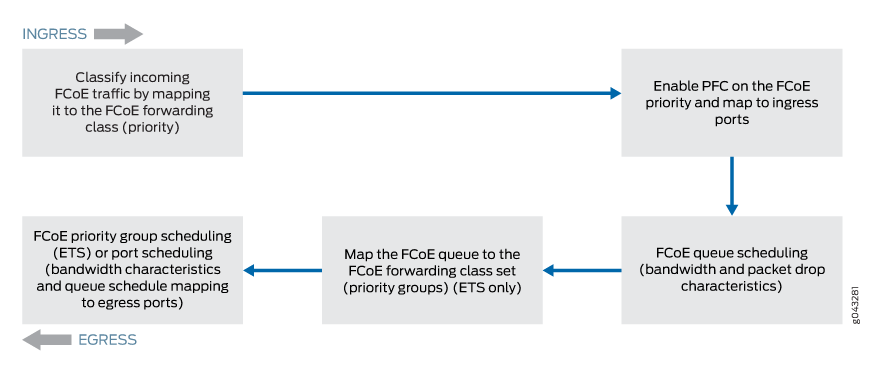
图 1 显示了示例中使用的 CLI 语句的配置组件和配置流程的框图。
配置
CLI 快速配置
要为 FCoE 流量快速配置 PFC,请复制以下命令,将其粘贴到文本文件中,删除换行符,更改变量和详细信息以匹配您的网络配置,然后将命令复制并粘贴到 [edit] 层次结构级别的 CLI 中。
该配置分为 ETS 和直接端口调度通用的配置,以及仅适用于 ETS 和仅适用于端口调度的配置部分。
适用于 ETS 分层调度和端口调度的通用配置:
[edit class-of-service]
set classifiers ieee-802.1 fcoe-classifier forwarding-class fcoe loss-priority low code-points 011
set congestion-notification-profile fcoe-cnp input ieee-802.1 code-point 011 pfc
set interfaces xe-0/0/31 unit 0 classifiers ieee-802.1 fcoe-classifier
set interfaces xe-0/0/32 unit 0 classifiers ieee-802.1 fcoe-classifier
set interfaces xe-0/0/33 unit 0 classifiers ieee-802.1 fcoe-classifier
set interfaces xe-0/0/34 unit 0 classifiers ieee-802.1 fcoe-classifier
set interfaces xe-0/0/31 congestion-notification-profile fcoe-cnp
set interfaces xe-0/0/32 congestion-notification-profile fcoe-cnp
set interfaces xe-0/0/33 congestion-notification-profile fcoe-cnp
set interfaces xe-0/0/34 congestion-notification-profile fcoe-cnp
set schedulers fcoe-sched priority low transmit-rate 3g
set schedulers fcoe-sched shaping-rate percent 100
set scheduler-maps fcoe-map forwarding-class fcoe scheduler fcoe-sched
ETS 分层调度配置 — 此示例的特定于 ETS 的部分配置转发类集(优先级组)成员资格、优先级组 CoS 设置(流量控制配置文件),并将优先级组及其 CoS 配置分配给接口:
[edit class-of-service]
set forwarding-class-sets fcoe-pg class fcoe
set traffic-control-profiles fcoe-tcp scheduler-map fcoe-map guaranteed-rate 3g
set traffic-control-profiles fcoe-tcp shaping-rate percent 100
set interfaces xe-0/0/31 forwarding-class-set fcoe-pg output-traffic-control-profile fcoe-tcp
set interfaces xe-0/0/32 forwarding-class-set fcoe-pg output-traffic-control-profile fcoe-tcp
set interfaces xe-0/0/33 forwarding-class-set fcoe-pg output-traffic-control-profile fcoe-tcp
set interfaces xe-0/0/34 forwarding-class-set fcoe-pg output-traffic-control-profile fcoe-tcp
端口调度配置 — 此示例的特定于端口调度的部分会将调度器映射(用于设置调度器映射中转发类的 CoS 处理)分配给接口:
[edit class-of-service]
set interfaces xe-0/0/31 scheduler-map fcoe-map
set interfaces xe-0/0/32 scheduler-map fcoe-map
set interfaces xe-0/0/33 scheduler-map fcoe-map
set interfaces xe-0/0/34 scheduler-map fcoe-map
通用配置(适用于 ETS 分层调度和端口调度)
分步程序
要为 FCoE 流量配置入口分类器,要在 FCoE 流量上配置 PFC,请将 PFC 和分类器配置应用于接口,并为 ETS 分层调度和端口调度(通用配置)配置队列调度:
配置分类器以设置丢失优先级和分配给入口处 FCoE 转发类的 IEEE 802.1 代码点:
[edit class-of-service]
user@switch# set classifiers ieee-802.1 fcoe-classifier forwarding-class fcoe loss-priority low code-points 011
通过将 FCoE 应用于 IEEE 802.1 代码点
011,在 FCoE 队列上配置 FCoE :[edit class-of-service] user@switch# set congestion-notification-profile fcoe-cnp input ieee-802.1 code-point 011 pfc
将 PFC 配置应用于入口接口:
[edit class-of-service]
user@switch# set interfaces xe-0/0/31 congestion-notification-profile fcoe-cnp
user@switch# set interfaces xe-0/0/32 congestion-notification-profile fcoe-cnp
user@switch# set interfaces xe-0/0/33 congestion-notification-profile fcoe-cnp
user@switch# set interfaces xe-0/0/34 congestion-notification-profile fcoe-cnp
将分类器分配给入口接口:
[edit class-of-service]
user@switch# set interfaces xe-0/0/31 unit 0 classifiers ieee-802.1 fcoe-classifier
user@switch# set interfaces xe-0/0/32 unit 0 classifiers ieee-802.1 fcoe-classifier
user@switch# set interfaces xe-0/0/33 unit 0 classifiers ieee-802.1 fcoe-classifier
user@switch# set interfaces xe-0/0/34 unit 0 classifiers ieee-802.1 fcoe-classifier
配置 FCoE 队列的输出调度:
[edit class-of-service]
user@switch# set schedulers fcoe-sched priority low transmit-rate 3g
user@switch# set schedulers fcoe-sched shaping-rate percent 100
将 FCoE 转发类映射到 FCoE 调度器:
[edit class-of-service]
user@switch# set scheduler-maps fcoe-map forwarding-class fcoe scheduler fcoe-sched
ETS 分层调度配置
分步程序
要配置转发类集(优先级组)和优先级组调度(在流量控制配置文件中),并将 FCoE 流量的 ETS 分层调度应用于接口,请执行以下操作:
为 FCoE 流量配置转发类集:
[edit class-of-service]
user@switch# set forwarding-class-sets fcoe-pg class fcoe
定义 FCoE 转发类集的流量控制配置文件:
[edit class-of-service]
user@switch# set traffic-control-profiles fcoe-tcp scheduler-map fcoe-map guaranteed-rate 3g
user@switch# set traffic-control-profiles fcoe-tcp shaping-rate percent 100
将 FCoE 转发类集和流量控制配置文件应用于出口端口:
[edit class-of-service]
user@switch# set interfaces xe-0/0/31 forwarding-class-set fcoe-pg output-traffic-control-profile fcoe-tcp
user@switch# set interfaces xe-0/0/32 forwarding-class-set fcoe-pg output-traffic-control-profile fcoe-tcp
user@switch# set interfaces xe-0/0/33 forwarding-class-set fcoe-pg output-traffic-control-profile fcoe-tcp
user@switch# set interfaces xe-0/0/34 forwarding-class-set fcoe-pg output-traffic-control-profile fcoe-tcp
端口调度配置
分步程序
要将 FCoE 流量的端口调度应用于接口:
将调度器图应用于出口端口:
[edit class-of-service]
user@switch# set interfaces xe-0/0/31 scheduler-map fcoe-map
user@switch# set interfaces xe-0/0/32 scheduler-map fcoe-map
user@switch# set interfaces xe-0/0/33 scheduler-map fcoe-map
user@switch# set interfaces xe-0/0/34 scheduler-map fcoe-map
结果
显示配置结果(系统仅显示显式配置的参数,不显示无损转发类等 fcoe 默认参数)。结果来自 ETS 分层调度配置,以显示更复杂的配置。直接端口调度结果不会显示配置的流量控制配置文件或转发类集部分,而是在每个接口下显示调度器图的名称(而不是转发类集和输出流量控制配置文件的名称),但在其他方面是相同的。
user@switch> show configuration class-of-service
classifiers {
    ieee-802.1 fcoe-classifier {
        forwarding-class fcoe {
            loss-priority low code-points 011;
        }
    }
    traffic-control-profiles {
        fcoe-tcp {
            scheduler-map fcoe-map;
            shaping-rate percent 100;
            guaranteed-rate 3000000000;
        }
    }
    forwarding-class-sets {
        fcoe-pg {
            class fcoe;
        }
    }
    congestion-notification-profile {
        fcoe-cnp {
            input {
                ieee-802.1 {
                    code-point 011 {
                        pfc;
                    }
                }
            }
        }
    }
    interfaces {
        xe-0/0/31 {
            congestion-notification-profile fcoe-cnp;
            forwarding-class-set {
                fcoe-pg {
                    output-traffic-control-profile fcoe-tcp;
                }
            }
            unit 0 {
                classifiers {
                    ieee-802.1 fcoe-classifier;
                }
            }
        }
        xe-0/0/32 {
            congestion-notification-profile fcoe-cnp;
            forwarding-class-set {
                fcoe-pg {
                    output-traffic-control-profile fcoe-tcp;
                }
            }
            unit 0 {
                classifiers {
                    ieee-802.1 fcoe-classifier;
                }
            }
        }
        xe-0/0/33 {
            congestion-notification-profile fcoe-cnp;
            forwarding-class-set {
                fcoe-pg {
                    output-traffic-control-profile fcoe-tcp;
                }
            }
            unit 0 {
                classifiers {
                    ieee-802.1 fcoe-classifier;
                }
            }
        }
        xe-0/0/34 {
            congestion-notification-profile fcoe-cnp;
            forwarding-class-set {
                fcoe-pg {
                    output-traffic-control-profile fcoe-tcp;
                }
            }
            unit 0 {
                classifiers {
                    ieee-802.1 fcoe-classifier;
                }
            }
        }
    }
    scheduler-maps {
        fcoe-map {
            forwarding-class fcoe scheduler fcoe-sched;
        }
    }
    schedulers {
        fcoe-sched {
            transmit-rate 3000000000;
            shaping-rate percent 100;
            priority low;
        }
    }
要快速配置接口,请发出 load merge terminal 命令,然后复制层次结构并将其粘贴到交换机终端窗口中。
验证
要验证是否已创建 FCoE 流量组件的 PFC 配置以及是否可以正常运行,请执行以下任务:
验证是否已启用基于优先级的流控制
目的
验证是否在 FCoE 队列上启用了 PFC,以启用无损传输。
行动
使用操作模式命令 show class-of-service congestion-notification列出拥塞通知配置文件:
user@switch> show class-of-service congestion-notification
Type: Input, Name: fcoe-cnp, Index: 51697
Cable Length: 100 m
  Priority     PFC          MRU
  000          Disabled
  001          Disabled
  010          Disabled
  011          Enabled      2500
  100          Disabled
  101          Disabled
  110          Disabled
  111          Disabled
Type: Output
  Priority     Flow-Control-Queues
  000
               0
  001
               1
  010
               2
  011
               3
  100
               4
  101
               5
  110
               6
  111
               7
意义
操作show class-of-service congestion-notification命令将列出所有拥塞通知配置文件以及哪些 IEEE 802.1p 代码点启用了 PFC。命令输出显示,在拥塞通知配置文件的fcoe-cnp代码点011上启用了 PFC。
该命令还显示默认电缆长度(100 米)、默认最大接收单位(2500 字节)以及优先级到输出队列的默认映射,因为此示例不包括配置这些选项。
验证入口接口 PFC 配置
目的
验证是否在入口接口 、 、 和 上配置了分类器和fcoe-classifier拥塞通知配置文件fcoe-cnp。xe-0/0/34xe-0/0/33xe-0/0/32xe-0/0/31
行动
使用操作模式命令 show configuration class-of-service interfaces列出入口接口:
user@switch> show configuration class-of-service interfaces xe-0/0/31
congestion-notification-profile fcoe-cnp;
unit 0 {
    classifiers {
        ieee-802.1 fcoe-classifier;
    }
}
user@switch> show configuration class-of-service interfaces xe-0/0/32
congestion-notification-profile fcoe-cnp;
unit 0 {
    classifiers {
        ieee-802.1 fcoe-classifier;
    }
}
user@switch> show configuration class-of-service interfaces xe-0/0/33
congestion-notification-profile fcoe-cnp;
unit 0 {
    classifiers {
        ieee-802.1 fcoe-classifier;
    }
}
user@switch> show configuration class-of-service interfaces xe-0/0/34
congestion-notification-profile fcoe-cnp;
unit 0 {
    classifiers {
        ieee-802.1 fcoe-classifier;
    }
}
意义
这些 show configuration class-of-service interfaces 命令列出了映射到接口 (fcoe-cnp) 以及与接口 () 关联的 IEEE 802.1p 分类器 (fcoe-classifier) 的拥塞通知配置文件。