
示例:在不同的 FCoE 中转交换机接口上配置两个或多个无损 FCoE IEEE 802.1p 优先级
尽管默认配置提供两个映射到两个不同 IEEE 802.1p 优先级(代码点)的无损转发类,但您最多可以显式配置六个无损转发类并将它们映射到不同的优先级。您最多可以支持六种不同类型的无损流量,如果该流量在融合网络的不同部分使用不同的优先级,则可以支持相同类型的流量。
此示例说明如何为 FCoE 流量配置两个无损转发类,并将它们映射到 FCoE 中转交换机上的两个不同优先级。
要求
此示例使用以下硬件和软件组件:
-
一台用作 FCoE 中继交换机的 QFX 交换机
-
任何受支持的 Junos 版本
概述
某些网络拓扑支持多个 IEEE 802.1p 优先级上的 FCoE 流量。例如,当交换机充当中转交换机时,可以在 FCoE-光纤通道网关模式下将其连接到两台 QFX 交换机。每台网关交换机都可以将一组 FCoE 客户端连接到不同的 SAN,并且每组 FCoE 客户端可以对 FCoE 流量使用不同的优先级,以避免命运共享并保持两个 FCoE 网络的分离。在这种情况下,您需要为 FCoE 流量配置两个转发类,每个转发类映射到不同的输出队列和不同的优先级。
支持两个 FCoE 流量类的无损行为需要配置:
-
FCoE 流量至少有一个无损转发类(此示例使用默认
fcoe转发类作为两个无损 FCoE 转发类之一,因此我们只需要显式配置一个 FCoE 转发类) -
行为聚合 (BA) 分类器,用于将 FCoE 转发类映射到每个接口上的相应 IEEE 802.1p 代码点(优先级)
-
每个接口的拥塞通知配置文件 (CNP),用于在接口入口处的 FCoE 代码点上启用 PFC,并在接口出口上配置 PFC 流控制,以便接口可以响应从连接对等方接收的 PFC 消息
注意:在接口上配置或更改 PFC 会阻塞整个端口,直到 PFC 更改完成。完成 PFC 更改后,端口将解除阻塞,流量将恢复。阻止端口将停止入口和出口流量,并导致端口上所有队列上的数据包丢失,直到端口解除阻塞。
-
DCBX 应用程序和应用程序映射,以支持 DCBX 应用程序 TLV 交换,以在配置的 FCoE 优先级上进行无损 FCoE 流量。默认情况下,DCBX 在所有以太网接口上启用,但仅在优先级 3(IEEE 802.1p 代码点 011)上启用。要在未使用默认配置时支持 DCBX 应用 TLV 交换,必须配置所有应用并将其映射到接口和优先级。
BA 分类器、CNP 和 DCBX 应用程序映射中指定的优先级必须匹配,否则配置不起作用。您必须在每个配置中指定相同的无损 FCoE 转发类,并使用相同的 IEEE 802.1p 代码点(优先级),以便将 FCoE 流量正确分类为流,并使这些流得到无损处理。
拓扑结构
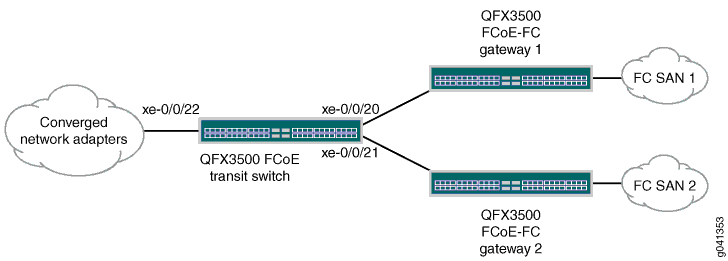
此示例说明如何配置两个无损 FCoE 流量类,将其映射到两个不同的优先级,并配置流量控制以确保接口上这些优先级的无损行为。此示例使用三个以太网接口:xe-0/0/20、xe-0/0/21 和 xe-0/0/22:
-
接口 xe-0/0/20 连接到连接到 光纤通道 (光纤通道) SAN 1 的 FCoE-光纤通道 网关。进出光纤通道 SAN 1 的 FCoE 流量使用默认
fcoe转发类以及到优先级 3(IEEE 802.1p 代码点 011)和输出队列 3 的默认映射。 -
接口 xe-0/0/21 连接到另一个连接到 光纤通道 (光纤通道) SAN 2 的 FCoE-光纤通道 网关。进出 光纤通道SAN-2 的FCoE流量使用显式配置的FCoE转发类,该转发类映射到优先级 5(代码点 101)和输出队列 5。
-
接口 xe-0/0/22 连接到融合以太网网络上的FCoE设备,并处理发往 光纤通道 SAN 1 和 光纤通道 SAN 2 的流量。接口 xe-0/0/22 必须正确处理两个优先级(两个 FCoE 转发类)的无损 FCoE 流量,包括根据需要暂停入口或出口流量。
图 1 显示了此示例的拓扑结构,表 1 显示了此示例的配置组件。
| 组件 |
设置 |
|---|---|
| 硬件 |
一台交换机 |
| 转发等级 |
名称 —
注意:
无损转发类可以映射到任何输出队列。但是,由于此示例中的转发类使用优先级 5,因此 名称 — |
| BA 分类器 |
每个接口都需要不同的分类器,因为每个接口处理不同的 FCoE 流量子集。
|
| PFC 配置 (CNP) |
每个接口都需要不同的 CNP,因为每个接口处理不同的 FCoE 流量子集,并且必须以不同的优先级暂停该流量。
注意:
将具有显式输出队列流控制配置的 CNP 应用于接口时,显式 CNP 将覆盖默认输出 CNP。在默认配置中启用暂停的输出队列(队列 3 和 4)不会启用暂停,除非这些队列包含在显式配置的输出 CNP 中。 |
| DCBX 应用映射 |
接口 xe-0/0/20 不需要应用映射,因为 DCBX 仅在默认 FCoE 优先级(优先级 3)上交换应用协议 TLV。 接口 xe-0/0/21 需要一个应用映射,用于在优先级 5(代码点 101)上为 FCoE 流量启用 DCBX 应用协议 TLV 交换。接口 xe-0/0/22 需要一个应用映射,用于在优先级 3(代码点 011)和优先级 5(代码点 101)上为 FCoE 流量启用 DCBX 应用协议 TLV 交换。
注意:
必须在接口上启用 LLDP 和 DCBX。默认情况下,LLDP 和 DCBX 都在所有以太网接口上启用。 |
此示例不包括调度(带宽分配)配置或 FIP 侦听配置。此示例仅重点介绍无损 FCoE 优先级配置。
QFX10000 交换机不支持 FIP 侦听。因此,QFX10000 交换机不能用作 FCoE 接入中转交换机。QFX10000 交换机可用作 FCoE 路径中执行 FIP 侦听的 FCoE 接入中继交换机和 FCF 之间的FCoE 中转交换机或聚合中转交换机。
配置
CLI 快速配置
要在 FCoE 中转交换机上快速配置两个使用不同优先级的无损 FCoE 转发类,请复制以下命令,将其粘贴到文本文件中,删除换行符,更改变量和详细信息以匹配您的网络配置,然后将命令复制粘贴到层次结构级别的 [edit] CLI 中。
set class-of-service forwarding-classes class fcoe1 queue-num 5 no-loss
set class-of-service classifiers ieee-802.1 fcoe_p3 forwarding-class fcoe loss-priority low code-points 011

set class-of-service classifiers ieee-802.1 fcoe_p5 forwarding-class fcoe1 loss-priority low code-points 101

set class-of-service classifiers ieee-802.1 fcoe_p3_p5 forwarding-class fcoe loss-priority low code-points 011
set class-of-service classifiers ieee-802.1 fcoe_p3_p5 forwarding-class fcoe1 loss-priority low code-points 101

set class-of-service interfaces xe-0/0/20 unit 0 classifiers ieee-802.1 fcoe_p3
set class-of-service interfaces xe-0/0/21 unit 0 classifiers ieee-802.1 fcoe_p5
set class-of-service interfaces xe-0/0/22 unit 0 classifiers ieee-802.1 fcoe_p3_p5
set class-of-service congestion-notification-profile fcoe_p3_cnp input ieee-802.1 code-point 011 pfc mru 2240
set class-of-service congestion-notification-profile fcoe_p3_cnp input cable-length 100
set class-of-service congestion-notification-profile fcoe_p5_cnp input ieee-802.1 code-point 101 pfc mru 2240
set class-of-service congestion-notification-profile fcoe_p5_cnp input cable-length 150
set class-of-service congestion-notification-profile fcoe_p5_cnp output ieee-802.1 code-point 101 pfc flow-control-queue 5
set class-of-service congestion-notification-profile fcoe_p3_p5_cnp input ieee-802.1 code-point 011 pfc mru 2240
set class-of-service congestion-notification-profile fcoe_p3_p5_cnp input ieee-802.1 code-point 101 pfc mru 2240
set class-of-service congestion-notification-profile fcoe_p3_p5_cnp input cable-length 100
set class-of-service congestion-notification-profile fcoe_p3_p5_cnp output ieee-802.1 code-point 011 pfc flow-control-queue 3
set class-of-service congestion-notification-profile fcoe_p3_p5_cnp output ieee-802.1 code-point 101 pfc flow-control-queue 5
set class-of-service interfaces xe-0/0/20 congestion-notification-profile fcoe_p3_cnp
set class-of-service interfaces xe-0/0/21 congestion-notification-profile fcoe_p5_cnp
set class-of-service interfaces xe-0/0/22 congestion-notification-profile fcoe_p3_p5_cnp
set applications application fcoe_p5_app ether-type 0x8906
set applications application fcoe_all_app ether-type 0x8906
set policy-options application-maps fcoe_p5_app_map application fcoe_p5_app code-points 101
set policy-options application-maps fcoe_all_app_map application fcoe_all_app code-points [011 101]
set protocols dcbx interface xe-0/0/21 application-map fcoe_p5_app_map
set protocols dcbx interface xe-0/0/22 application-map fcoe_all_app_map
过程
分步程序
要为不同接口上的 FCoE 流量配置两个无损转发类,请将 FCoE 流量分类为转发类,配置拥塞通知配置文件以在 FCoE 优先级和输出队列上启用 PFC,并为两个 FCoE 优先级上的流量配置 DCBX 应用协议 TLV 交换:
-
配置无损转发类
fcoe1并将其映射到使用 IEEE 802.1p 优先级 5 的 FCoE 流量的输出队列5:[edit class-of-service] user@switch# set forwarding-classes class fcoe1 queue-num 5 no-loss注意:此示例使用默认
fcoe转发类作为其他无损 FCoE 转发类。 -
为接口
xe-0/0/20配置入口分类器 (fcoe_p3) 。分类器将FCoE优先级(IEEE 802.1p代码点011)映射到无损FCoE转发类fcoe:[edit class-of-service classifiers] user@switch# set ieee-802.1 fcoe_p3 forwarding-class fcoe loss-priority low code-points 011 -
为接口
xe-0/0/21配置入口分类器 (fcoe_p5) 。分类器将FCoE优先级(IEEE 802.1p代码点101)映射到无损FCoE转发类fcoe1:[edit class-of-service classifiers] user@switch# set ieee-802.1 fcoe_p5 forwarding-class fcoe1 loss-priority low code-points 101
-
为接口
xe-0/0/22配置入口分类器 (fcoe_p3_p5) 。分类器将两个 FCoE 优先级(IEEE 802.1p 代码点011和101)分别映射到两个无损 FCoE 转发类fcoefcoe1和 :[edit class-of-service classifiers] user@switch# set ieee-802.1 fcoe_p3_p5 forwarding-class fcoe loss-priority low code-points 011 user@switch# set ieee-802.1 fcoe_p3_p5 forwarding-class fcoe1 loss-priority low code-points 101
-
将每个分类器应用于相应的接口:
[edit class-of-service]
user@switch# set interfaces xe-0/0/20 unit 0 classifiers ieee-802.1 fcoe_p3
user@switch# set interfaces xe-0/0/21 unit 0 classifiers ieee-802.1 fcoe_p5
user@switch# set interfaces xe-0/0/22 unit 0 classifiers ieee-802.1 fcoe_p3_p5
-
配置接口 xe-0/0/20 的 CNP 输入部分,以在 FCoE 优先级(IEEE 802.1p 代码点 011)上启用 PFC,设置 MRU 值(2240 字节),并设置电缆长度值(100 米)。不需要输出节,因为队列 3 默认在优先级 3 上暂停,并且我们没有为任何其他队列显式配置输出队列流控制。
[edit class-of-service]
user@switch# set congestion-notification-profile fcoe_p3_cnp input ieee-802.1 code-point 011 pfc mru 2240
user@switch# set congestion-notification-profile fcoe_p3_cnp input cable-length 100
-
为接口 xe-0/0/21 配置 CNP。输入节在 FCoE 优先级(IEEE 802.1p 代码点 101)上启用 PFC,设置 MRU 值(2240 字节),并设置电缆长度值(150 米)。输出节在 FCoE 优先级的输出队列 5 上配置流控制:
[edit class-of-service]
user@switch# set congestion-notification-profile fcoe_p5_cnp input ieee-802.1 code-point 101 pfc mru 2240
user@switch# set congestion-notification-profile fcoe_p5_cnp input cable-length 150
user@switch# set congestion-notification-profile fcoe_p5_cnp output ieee-802.1 code-point 101 pfc flow-control-queue 5
-
为接口 xe-0/0/22 配置 CNP。输入节在 FCoE 优先级(IEEE 802.1p 代码点 011 和 101)上启用 PFC,设置 MRU 值(2240 字节),并设置电缆长度值(100 米)。输出节在 FCoE 优先级的输出队列 3 和 5 上配置流控制:
[edit class-of-service]
user@switch# set congestion-notification-profile fcoe_p3_p5_cnp input ieee-802.1 code-point 011 pfc mru 2240
user@switch# set congestion-notification-profile fcoe_p3_p5_cnp input ieee-802.1 code-point 101 pfc mru 2240
user@switch# set congestion-notification-profile fcoe_p3_p5_cnp input cable-length 100
user@switch# set congestion-notification-profile fcoe_p3_p5_cnp output ieee-802.1 code-point 011 pfc flow-control-queue 3
user@switch# set congestion-notification-profile fcoe_p3_p5_cnp output ieee-802.1 code-point 101 pfc flow-control-queue 5
-
将每个 CNP 应用到相应的接口:
[edit class-of-service]
user@switch# set interfaces xe-0/0/20 congestion-notification-profile fcoe_p3_cnp
user@switch# set interfaces xe-0/0/21 congestion-notification-profile fcoe_p5_cnp
user@switch# set interfaces xe-0/0/22 congestion-notification-profile fcoe_p3_p5_cnp
-
配置 DCBX FCoE 应用程序和应用映射以应用于接口 xe-0/0/21。接口 xe-0/0/21 对 FCoE 流量使用优先级 5 (IEEE 802.1p 代码点 101),这要求 DCBX 在接口 xe-0/0/21 上的优先级 5 上交换 FCoE 应用协议 TLV。配置名为 FCoE 流量 (EtherType
0x8906) 的fcoe_p5_app应用程序,并配置名为fcoe_p5_app_map将应用程序映射到代码点 101 的应用程序映射:[edit] user@switch# set applications application fcoe_p5_app ether-type 0x8906 user@switch# set policy-options application-maps fcoe_p5_app_map application fcoe_p5_app code-points 101
注意:接口 xe-0/0/20 使用默认 FCoE 配置(优先级 3)。默认情况下,DCBX 为 FCoE 应用程序交换协议 TLV,因此您无需在接口 xe-0/0/20 上显式配置 DCBX。
-
配置要应用于接口 xe-0/0/22 的 DCBX FCoE 应用和应用映射。接口 xe-0/0/22 将优先级 3 (IEEE 802.1p 代码点 011) 和优先级 5 用于 FCoE 流量,这要求 DCBX 在优先级 3 和优先级 5 上交换 FCoE 应用协议 TLV。配置名为 FCoE 流量 (EtherType
0x8906) 的fcoe_all_app应用程序,并配置名为fcoe_all_app_map将应用程序映射到代码点 011 和 101 的应用程序映射:[edit] user@switch# set applications application fcoe_all_app ether-type 0x8906 user@switch# set policy-options application-maps fcoe_all_app_map application fcoe_all_app code-points [011 101]
-
将应用映射应用于接口 xe-0/0/21 和 xe-0/0/22,以便 DCBX 在每个接口上的正确代码点上交换 FCoE 应用 TLV:
[edit]
user@switch# set protocols dcbx interface xe-0/0/21 application-map fcoe_p5_app_map
user@switch# set protocols dcbx interface xe-0/0/22 application-map fcoe_all_app_map
验证
要验证无损转发类和 IEEE 802.1p 优先级的配置和正确操作,请执行以下任务:
验证转发类配置
目的
验证是否已创建无损转发类 fcoe1 。
行动
使用操作命令 show class-of-service forwarding class显示转发类配置:
user@switch# show class-of-service forwarding-class
Forwarding class                       ID      Queue  Policing priority  No-Loss
  best-effort                          0         0         normal        Disabled
  fcoe                                 1         3         normal        Enabled
  no-loss                              2         4         normal        Enabled
  network-control                      3         7         normal        Disabled
  fcoe1                                4         5         normal        Enabled
  mcast                                8         8         normal        Disabled
意义
命令 show class-of-service forwarding-class 将显示所有转发类。命令输出显示, fcoe1 转发类配置在输出队列 5 上,并启用了无丢失数据包丢弃属性。
由于我们没有显式配置默认转发类,因此它们将保持默认状态,包括 和 fcoe no-loss 默认转发类的无损配置。
验证行为聚合分类器配置
目的
验证三个分类器是否将转发类映射到正确的 IEEE 802.1p 代码点(优先级)和数据包丢失优先级。
行动
使用操作模式命令 show class-of-service classifier列出配置为支持无损 FCoE 传输的分类器:
user@switch> show class-of-service classifier
Classifier: fcoe_p3, Code point type: ieee-802.1, Index: 13913
  Code point         Forwarding class                    Loss priority
  011                fcoe                                low

Classifier: fcoe_p5, Code point type: ieee-802.1, Index: 63065
  Code point         Forwarding class                    Loss priority
  101                fcoe1                               low

Classifier: fcoe_p3_p5, Code point type: ieee-802.1, Index: 10964
  Code point         Forwarding class                    Loss priority
  011                fcoe                                low
  101                fcoe1                               low
意义
该 show class-of-service classifier 命令显示 IEEE 802.1p 代码点以及映射到每个分类器中的转发类的丢失优先级。命令输出显示有三个分类器, fcoe_p3、 fcoe_p5和 fcoe_p3_p5。
分类器fcoe_p3将代码点011(优先级 3)映射到默认无损转发类fcoe,丢包优先级为 low,所有其他优先级映射到丢包优先级high为 的转发类。best-effort
分类器fcoe_p5将代码点101(优先级 5)映射到显式配置的无损转发类fcoe1,丢包优先级为 low,所有其他优先级映射到丢包优先级high为 的转发类。best-effort
分类器 fcoe_p3_p5 将代码点 011 映射到默认的无损转发类 fcoe 和数据包丢失优先级 low,并将代码点 101 映射到显式配置的无损转发类 fcoe1 和数据包丢失优先级 low。分类器将所有其他优先级映射到 best-effort 数据包丢弃优先级为 high的转发类。
验证 PFC 流控制配置 (CNP)
目的
验证是否在正确的输入优先级上启用了 PFC,以及是否在每个 CNP 中的正确输出队列和优先级上配置了流控制。
行动
使用操作模式命令 show class-of-service congestion-notification列出拥塞通知配置文件:
user@switch> show class-of-service congestion-notification
Name: fcoe_p3_cnp, Index: 12037
Type: Input
Cable Length: 100 m
  Priority     PFC          MRU
  000          Disabled
  001          Disabled
  010          Disabled
  011          Enabled      2240
  100          Disabled
  101          Disabled
  110          Disabled
  111          Disabled
Type: Output
  Priority     Flow-Control-Queues
  000
               0
  001
               1
  010
               2
  011
               3
  100
               4
  101
               5
  110
               6
  111
               7

Name: fcoe_p3_p5_cnp, Index: 46484
Type: Input
Cable Length: 100 m
  Priority     PFC          MRU
  000          Disabled
  001          Disabled
  010          Disabled
  011          Enabled      2240
  100          Disabled
  101          Enabled      2240
  110          Disabled
  111          Disabled
Type: Output
  Priority     Flow-Control-Queues
  011
               3
  101
               5

Name: fcoe_p5_cnp, Index: 12133
Type: Input
Cable Length: 150 m
  Priority     PFC          MRU
  000          Disabled
  001          Disabled
  010          Disabled
  011          Disabled
  100          Disabled
  101          Enabled      2240
  110          Disabled
  111          Disabled
Type: Output
  Priority     Flow-Control-Queues
  101
               5
意义
该 show class-of-service congestion-notification 命令显示三个 CNP 的输入和输出节。对于 CNP fcoe_p3_cnp,输入节显示 PFC 在 IEEE 802.1p 代码点 011 (优先级 3)上启用,MRU 为 2240 字节,电缆长度为 100 米。CNP 输出部分显示了优先级到输出队列的默认映射。
默认情况下,仅启用队列 3 和 4 来响应来自连接的对等方的暂停消息。要使队列 3 响应暂停消息,必须为输入节中的 PFC 启用优先级 3(代码点 011)。要使队列 4 响应暂停消息,必须在输入节中为 PFC 启用优先级 4(代码点 100)。在此示例中,只有队列 3 响应来自使用 CNP fcoe_p3_cnp的接口上连接的对等方的暂停消息,因为输入节仅启用 PFC 优先级 3。
对于 CNP fcoe_p3_p5_cnp,输入部分显示 PFC 在代码点101011上启用,并且 MRU 在两个优先级上都是2240字节,电缆长度为100米。CNP 输出节显示输出流控制分别在队列3和5代码点011101和 上配置。
对于 CNP fcoe_p5_cnp,输入节显示 PFC 在代码点101上启用(优先级 5),MRU 为2240字节,电缆长度为150米。CNP 输出节显示输出流控制配置在代码点101(优先级 5)的队列5上。
验证接口配置
目的
验证是否在正确的接口上配置了正确的分类器和拥塞通知配置文件。
行动
使用操作模式命令 show configuration class-of-service interfaces xe-0/0/20、 show configuration class-of-service interfaces xe-0/0/21和 show configuration class-of-service interfaces xe-0/0/22列出入口接口:
user@switch> show configuration class-of-service interfaces xe-0/0/20
ccongestion-notification-profile fcoe_p3_cnp;
unit 0 {
    classifiers {
        ieee-802.1 fcoe_p3;
    }
}
user@switch> show configuration class-of-service interfaces xe-0/0/21
congestion-notification-profile fcoe_p5_cnp;
unit 0 {
    classifiers {
        ieee-802.1 fcoe_p5;
    }
}
user@switch> show configuration class-of-service interfaces xe-0/0/22
congestion-notification-profile fcoe_p3_p5_cnp;
unit 0 {
    classifiers {
        ieee-802.1 fcoe_p3_p5;
    }
}
意义
命令显示 show configuration class-of-service interfaces xe-0/0/20 接口上已配置拥塞通知配置文件 fcoe_p3_cnp ,并且与接口关联的 IEEE 802.1p 分类器为 fcoe_p3。
命令显示 show configuration class-of-service interfaces xe-0/0/21 接口上已配置拥塞通知配置文件 fcoe_p5_cnp ,并且与接口关联的 IEEE 802.1p 分类器为 fcoe_p5。
命令显示 show configuration class-of-service interfaces xe-0/0/22 接口上已配置拥塞通知配置文件 fcoe_p3_p5_cnp ,并且与接口关联的 IEEE 802.1p 分类器为 fcoe_p3_p5。
验证 DCBX 应用配置
目的
验证是否已配置用于 FCoE 的两个 DCBX 应用程序。
行动
使用配置模式命令 show applications列出 DCBX 应用程序:
user@switch# show applications
application fcoe_all_app {
    ether-type 0x8906;

application fcoe_p5_app {
    ether-type 0x8906;
意义
配置模式命令显示show applications所有配置的应用程序。输出显示,应用程序fcoe_all_app配置了 EtherType 0x8906 (用于 FCoE 流量的正确 EtherType),并且应用程序fcoe_p5_app还配置了 EtherType 。0x8906
验证 DCBX 应用程序映射配置
目的
验证应用程序映射是否已配置。
行动
使用配置模式命令 show policy-options application-maps列出应用程序映射:
user@switch# show policy-options application-maps
fcoe_all_app_map {
    application fcoe_all_app code-points [011 101];
}
fcoe_p5_app_map {
    application fcoe_p5_app code-points 101;
}
意义
show policy-options application-maps配置模式命令将列出所有已配置的应用程序映射以及属于每个应用程序映射的应用程序。输出显示有两个应用程序映射。
应用程序映射fcoe_all_app_map由映射到 IEEE 802.1p 代码点011(优先级 3)和101(优先级 5)的应用程序fcoe_all_app组成。
应用程序映射fcoe_p5_app_map由映射到 IEEE 802.1p 代码点101(优先级 5)的名为fcoe_p5_app应用程序组成。
验证 DCBX 应用协议交换接口配置
目的
验证应用映射是否应用于正确的接口。
行动
使用配置模式命令 show protocols dcbx列出每个接口上的应用程序映射:
user@switch# show protocols dcbx
interface xe-0/0/21.0 {
    application-map fcoe_p5_app_map;
}
interface xe-0/0/22.0 {
    application-map fcoe_all_app_map;
}
意义
配置模式命令会show protocols dcbx列出应用程序映射与接口的关联。输出显示接口使用应用程序映射fcoe_p5_app_map,xe-0/0/21.0接口xe-0/0/22.0使用应用程序映射fcoe_all_app_map。
由于接口 xe-0/0/20 使用默认的无损 FCoE 配置,因此您无需配置到接口 xe-0/0/20 的应用映射。默认配置会自动将应用协议 TLV 交换为优先级 3 上的默认 FCoE 配置(IEEE 802.1p 代码点 011)。