
在 BNG 的传输逻辑接口上配置 PWHT
您可以使用订阅者管理 (BNG) 服务逻辑接口在传输逻辑接口上配置基于 EVPN-VPWS 的 PWHT。
概述
您可以部署连接到运行 EVPN-VPWS 的聚合网络的宽带网络网关 (BNG),并且可以在伪线用户 (PS) 接口上的传输逻辑接口上配置伪线头端接 (PWHT)。BNG 弹出 EVPN 和 VPWS 标头,并在第 2 层终止用户。
此功能包括支持:
- MX 系列路由器上 PWHT 提供的所有宽带功能
- 单宿主 EVPN-VPWS,PS 接口锚定到逻辑隧道 (LT) 接口
- 选择是否使用控制词
拓扑结构
此示例显示了将 PS 接口锚定到逻辑隧道 (LT) 接口的单宿主 EVPN-VPWS 配置。
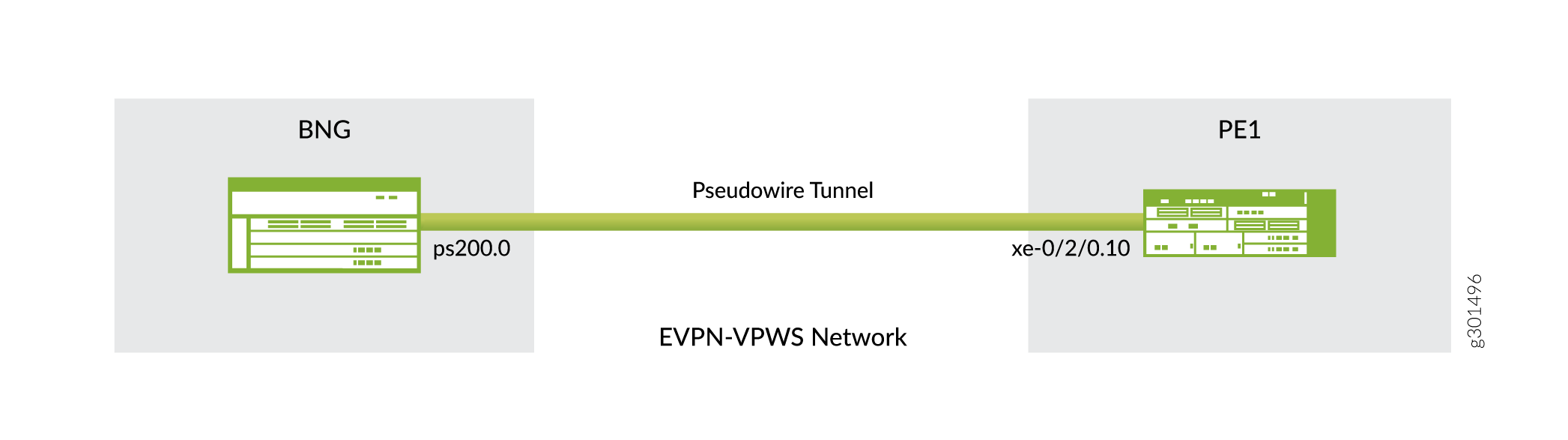
要求
- 用作 BNG 路由器的 MX 系列路由器
- 用作 BNG 路由器的 EVPN-VPWS 远程对等方的路由器(拓扑中的 PE1)
- Juno OS 21.1R1 或更高版本
开始之前
此示例显示了 BNG 路由器与 EVPN-VPWS 远程对等路由器 PE1 之间的连接。有关配置订阅者管理设置(例如 CoS 动态配置文件和路由器通告、DHCP 或 PPPoE 客户端、RADIUS 服务器)或 EVPN-VPWS 网络的详细信息,请参阅以下指南:
注意:
在尝试为两个路由器提交配置之前,请确保已完成以下两件事:
- 在层次结构中
[edit dynamic-profiles]定义了动态配置文件 - 启用 MPLS 以运行 EVPN 实例,以便您可以提交层次结构中的
[edit routing-instances VLL_VPWS_PWHT protocols]命令
如果在尝试提交两个路由器配置时未定义和启用这些项,则会发生提交错误。
配置
配置 BNG 路由器上 PS 接口上的传输逻辑接口与 PE1 远程对等路由器上伪线隧道端的逻辑接口之间的连接。
BNG 路由器
先决条件
作为先决条件之一,必须配置。 auto-vlan-pwht 例如,您可以通过自动配置的堆叠 VLAN 配置 PPPoE。示例配置如下:
[edit routing-instances]
user@host# show auto-vlan-pwht
vlan-demux {
    interfaces {
        demux0 {
            unit "$junos-interface-unit" {
                no-traps;
                vlan-tags outer "$junos-stacked-vlan-id" inner "$junos-vlan-id";
                advisory-options {
                    upstream-rate 1g;
                    downstream-rate 1g;
                }
                demux-options {
                    underlying-interface "$junos-interface-ifd-name";
                }
                family pppoe {
                    duplicate-protection;
                    dynamic-profile pppv6p;
                    max-sessions 1;
                    short-cycle-protection {
                        lockout-time-min 5;
                        lockout-time-max 60;
                    }
                }
           }
     }
}
CLI 快速配置
要快速配置此示例,请复制以下命令,将其粘贴到文本文件中,删除所有换行符,更改详细信息,以便与网络配置匹配,然后将命令复制并粘贴到层次结构级别的 [edit] CLI 中。
set interfaces lt-1/0/0 hierarchical-scheduler maximum-hierarchy-levels 2
set interfaces ps0 description BNG-ps0____PE-xe-0/2/0
set interfaces ps0 anchor-point lt-1/0/0
set interfaces ps0 flexible-vlan-tagging
set interfaces ps0 auto-configure stacked-vlan-ranges dynamic-profile auto-vlan-pwht accept pppoe ranges any,any
set interfaces ps0 unit 0 encapsulation ethernet-ccc
set routing-instances VLL_VPWS_PWHT instance-type evpn-vpws interface ps0.0
set routing-instances VLL_VPWS_PWHT route-distinguisher 10.255.0.1:100
set routing-instances VLL_VPWS_PWHT vrf-target target:100:1004
set routing-instances VLL_VPWS_PWHT protocols evpn interface ps0.0 vpws-service-id local 33 remote 34
分步程序
- 导航至层次结构。
interfaces指定作为伪线逻辑接口设备的锚点的逻辑隧道接口。锚点必须是格式lt-fpc/pic/port为 的 lt 设备。[edit interfaces] user@host# set lt-1/0/0 hierarchical-scheduler maximum-hierarchy-levels 2
- 仍然在层次结构中
interfaces,使用您提供的说明配置伪线用户 (PS) 接口,然后将其与其锚点逻辑隧道接口相关联。[edit interfaces] user@host# set ps0 description BNG-ps0____PE-xe-0/2/0 user@host# set ps0 anchor-point lt-1/0/0
- 为 PS 接口上的混合(灵活)VLAN 标记配置 VLAN 标记方法。
[edit]
user@host# set ps0 flexible-vlan-tagging
- 将 PS 接口配置为在创建动态 VLAN 时使用动态配置文件。动态配置文件使用为接口配置的 VLAN 范围。
[edit interfaces]
user@host# set ps0 auto-configure stacked-vlan-ranges dynamic-profile auto-vlan-pwht accept pppoe ranges any,any
- 配置 PS 接口的逻辑接口(即传输逻辑接口)并配置
ethernet-ccc封装。[edit interfaces] user@host# set ps0 unit 0 encapsulation ethernet-ccc
- 导航至
routing-instances层次结构,然后为 EVPN-VPWS 路由实例配置路由实例名称、实例类型evpn-vpws、路由识别符以及 VPN 路由和转发 (VRF) 目标社区。[edit routing-instances] user@host# set VLL_VPWS_PWHT instance-type evpn-vpws interface ps0.0 user@host# set VLL_VPWS_PWHT route-distinguisher 10.255.0.1:1004 user@host# set VLL_VPWS_PWHT vrf-target target:100:1004
- 仍在层次结构中
routing-instances,使用本地和远程服务标识符配置路由实例的接口。这些标识符标识在 EVPN-VPWS 网络中转发和接收流量的 PE 路由器。本地服务标识符用于识别转发流量的 PE 路由器,远程服务标识符用于识别在网络中接收流量的 PE 路由器。[edit routing-instances] user@host# set VLL_VPWS_PWHT protocols evpn interface ps0.0 vpws-service-id local 33 remote 34
结果
检查配置结果:
[edit interfaces]
user@host# show
lt-2/0/0 {
    hierarchical-scheduler maximum-hierarchy-levels 2;
}
ps0 {
    description BNG-ps0____PE-xe-0/2/0;
    anchor-point {
        lt-2/0/0;
    }
    flexible-vlan-tagging;
    auto-configure {
        stacked-vlan-ranges {
            dynamic-profile auto-vlan-pwht {
                accept pppoe;
                ranges {
                    any,any;
                }
            }
        }
    }

    unit 0 {
        encapsulation ethernet-ccc;
    }
}
[edit routing-instances]
user@host# show
VLL_VPWS_PWHT {
    protocols {
        evpn {
            interface ps0.0 {
                vpws-service-id {
                    local 33;
                    remote 34;
                }
            }
        }
    }
    instance-type evpn-vpws;
    interface ps0.0;
    route-distinguisher 10.255.0.1:100;
    vrf-target target:100:1004;
}
PE1 EVPN-VPWS 远程对等方
CLI 快速配置
要快速配置此示例,请复制以下命令,将其粘贴到文本文件中,删除所有换行符,更改详细信息,以便与网络配置匹配,然后将命令复制并粘贴到层次结构级别的 [edit] CLI 中。
set interfaces xe-0/2/0 description PE-xe-0/2/0____BNG-ps0
set interfaces xe-0/2/0 hierarchical-scheduler implicit-hierarchy
set interfaces xe-0/2/0 no-traps
set interfaces xe-0/2/0 flexible-vlan-tagging
set interfaces xe-0/2/0 encapsulation flexible-ethernet-services
set interfaces xe-0/2/0 unit 10 description VPWS-PE-BNG-PWHT
set interfaces xe-0/2/0 unit 10 encapsulation vlan-ccc
set interfaces xe-0/2/0 unit 10 vlan-id 10
set interfaces xe-0/2/0 unit 10 output-vlan-map swap tag-protocol-id 0x8100 inner-vlan-id 10
set routing-instances VLL_VPWS_PWHT instance-type evpn-vpws interface xe-0/2/0.10
set routing-instances VLL_VPWS_PWHT route-distinguisher 10.255.0.2:1004
set routing-instances VLL_VPWS_PWHT vrf-target target:100:1004
set routing-instances VLL_VPWS_PWHT protocols evpn interface xe-0/2/0.10 vpws-service-id local 34 remote 33
分步程序
- 导航至层次结构。
interfaces指定作为 PE1 EVPN-VPWS 远程对等方连接接口的接口。[edit interfaces] user@host# set xe-0/2/0
- 仍然在层次结构中
interfaces,使用您提供的hierarchical-scheduler implicit-hierarchy说明配置对等连接接口 、 和no-traps。[edit interfaces] user@host# set xe-0/2/0 description PE-xe-0/2/0____BNG-ps0 user@host# set xe-0/2/0 hierarchical-scheduler implicit-hierarchy user@host# set xe-0/2/0 no-traps
- 为连接接口上的混合(灵活)VLAN 标记配置 VLAN 标记方法。
[edit interfaces] user@host# set xe-0/2/0 flexible-vlan-tagging
- 在接口上配置
flexible-ethernet-services封装。[edit interfaces] user@host# set xe-0/2/0 encapsulation flexible-ethernet-services
- 为 xe-0/2/0 接口配置逻辑接口,并配置说明、封装、VLAN ID 和
output-vlan-map设置。[edit interfaces] user@host# set xe-0/2/0 unit 10 description VPWS-PE-BNG-PWHT user@host# set xe-0/2/0 unit 10 encapsulation vlan-ccc user@host# set xe-0/2/0 unit 10 vlan-id 10 user@host# set xe-0/2/0 unit 10 output-vlan-map swap tag-protocol-id 0x8100 inner-vlan-id 10
- 导航至
routing-instances层次结构,然后为 EVPN-VPWS 路由实例配置路由实例名称、实例类型evpn-vpws、路由识别符以及 VPN 路由和转发 (VRF) 目标社区。[edit routing-instances] user@host# set VLL_VPWS_PWHT instance-type evpn-vpws user@host# set VLL_VPWS_PWHT interface xe-0/2/0.10 user@host# set VLL_VPWS_PWHT route-distinguisher 10.255.0.2:1004 user@host# set VLL_VPWS_PWHT vrf-target target:100:1004
- 仍在层次结构中
routing-instances,使用本地和远程服务标识符配置路由实例的接口。这些标识符标识在 EVPN-VPWS 网络中转发和接收流量的 PE 路由器。本地服务标识符用于识别转发流量的 PE 路由器,远程服务标识符用于识别在网络中接收流量的 PE 路由器。[edit routing-instances] user@host# set VLL_VPWS_PWHT protocols evpn interface xe-0/2/0.10 vpws-service-id local 34 remote 33
结果
检查配置结果:
[edit interfaces]
user@host# show
xe-0/2/0 {
    description PE-xe-0/2/0____BNG-ps0;
    no-traps;
    hierarchical-scheduler implicit-hierarchy;
    flexible-vlan-tagging;
    encapsulation flexible-ethernet-services;
    unit 10 {
        description VPWS-PE-BNG-PWHT;
        encapsulation vlan-ccc;
        vlan-id 10;
        output-vlan-map {
            swap;
            tag-protocol-id 0x8100;
            inner-vlan-id 10;
        }
    }
}
[edit routing-instances]
user@host# show
VLL_VPWS_PWHT {
    protocols {
        evpn {
            interface xe-0/2/0.10 {
                vpws-service-id {
                    local 34;
                    remote 33;
                }
            }
        }
    }
    instance-type evpn-vpws;
    interface xe-0/2/0.10;
    route-distinguisher 10.255.0.2:1004;
    vrf-target target:100:1004;
}