
如何在 IGP 中启用链路延迟测量和广告
了解 IGP 中的链路延迟测量和广告
IS-IS 中链路延迟测量和广告的好处
IS-IS 中的链路延迟测量和播发具有以下优势:
- 在某些网络(例如股票市场数据提供商)中非常有益,在这些网络中,实时访问市场数据以比竞争对手更快地进行交易至关重要。这就是网络性能标准或延迟对数据路径选择变得至关重要的地方。
- 有助于以经济高效且可扩展的方式根据性能数据(如延迟)做出路径选择决策。
- 这是使用跃点计数或成本等指标作为路由指标的更好替代方案。
IGP 中的链路延迟测量和广告概述
网络性能通过使用 TWAMP -Light 来衡量。您可以使用探测消息来测量 IP 网络中的各种性能指标。IS-IS 流量工程扩展有助于以可扩展的方式分发网络性能信息。然后,这些信息可用于根据网络性能做出路径选择决策。
边界网关协议链路状态 (BGP-LS) 允许 BGP 携带从 IGP 获取的链路状态信息,然后允许互联网服务提供商 (ISP) 通过正常的 BGP 对等有选择地与其他 ISP、服务提供商、CDN 等公开信息。定义了新的 BGP 链路状态 (BGP-LS) TLV,用于携带 IGP 流量工程度量扩展。
下图描述了由核心、城域网和接入网络组成的网络中的最小 IGP 指标和最小延迟指标。
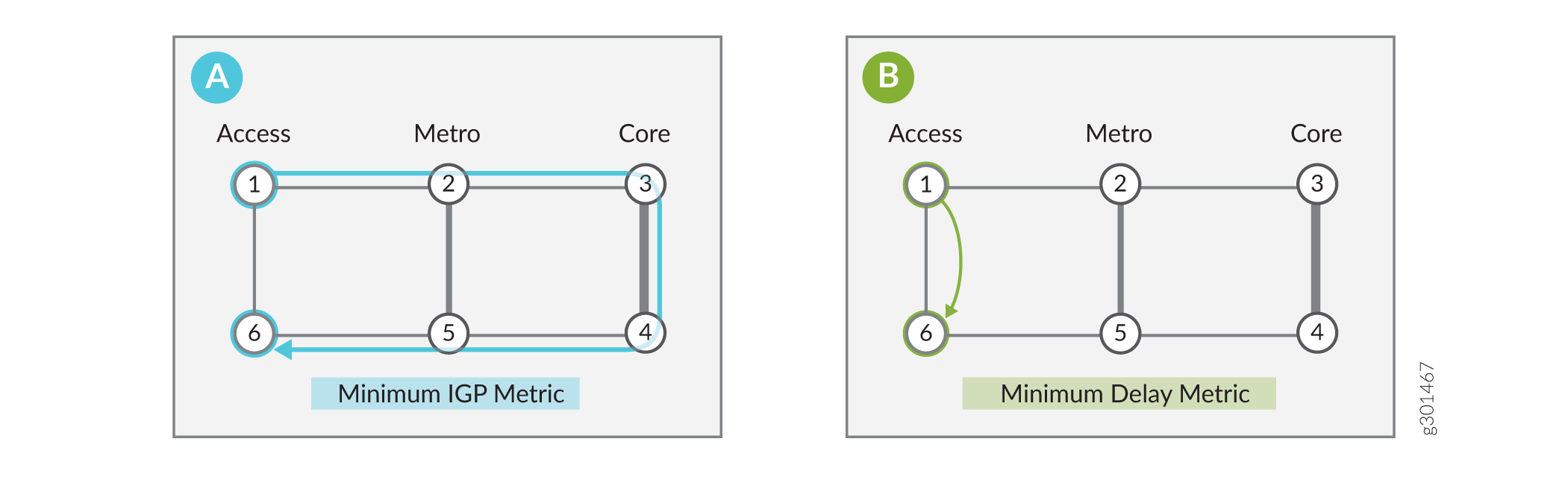
在这种情况下,核心网络更便宜,但延迟更长。访问快捷方式,延迟最低,成本高昂。由于核心网络成本较低,大多数流量通常使用最小IGP指标从 1>2>3>4>5> 到 6。如场景 a 所示),您可以通过运行 IS-IS 并配置适当的成本并将默认 IS-IS 算法设置为零来实现最低 IGP 要求。在超低延迟至关重要的企业中,数据包需要从 1 扩展到 6。如方案 b) 所示,您可以通过定义具有最小延迟的 IS-IS flex 算法来实现最小延迟指标,从而最大限度地减少到端点的延迟。此 flex 算法仅包含节点 1 和节点 6。
链路延迟规范化概述
延迟归一化功能计算归一化延迟值,并使用归一化值而不是测量的延迟值。在灵活算法计算期间,此值将被通告并用作指标。当从延迟测量组件接收延迟时,将执行归一化。收到下一个值时,对其进行归一化,并与之前保存的归一化值进行比较。如果值不同,则会触发 LSP 生成。
默认情况下,延迟规范化处于禁用状态。要在 IGP 实例之间启用和配置延迟规范化,请使用 delay-measurement 命令。
set protocols isis interface interface-name delay-measurement normalize interval value offset value
set protocols ospf area aread interface interface-name delay-measurement normalize interval value offset value
也可以看看
示例:在第 3 层虚拟专用网络 (VPN) 中使用网络中的源数据包路由 (SPRING) 启用 IS-IS 链路延迟
此示例说明如何在第 3 层 VPN 场景中使用 SPRING 配置 IS-IS 链路延迟。在此示例中,您可以在 PE1 和 PE2 之间创建两个 VPN。VPN1 可优化链路延迟,VPN2 可优化 IGP 指标。虽然您可以将该功能配置为在测试拓扑中启用双向流量,但我们在本例中重点关注单向流量场景。具体而言,您的任务是控制 PE1 向 PE2 播发的目标的第 3 层 VPN 流量的转发路径。
要求
此示例使用以下硬件和软件组件:
-
四台 MX 系列路由器
-
在所有设备上运行 Junos OS 21.1R1 或更高版本
拓扑结构
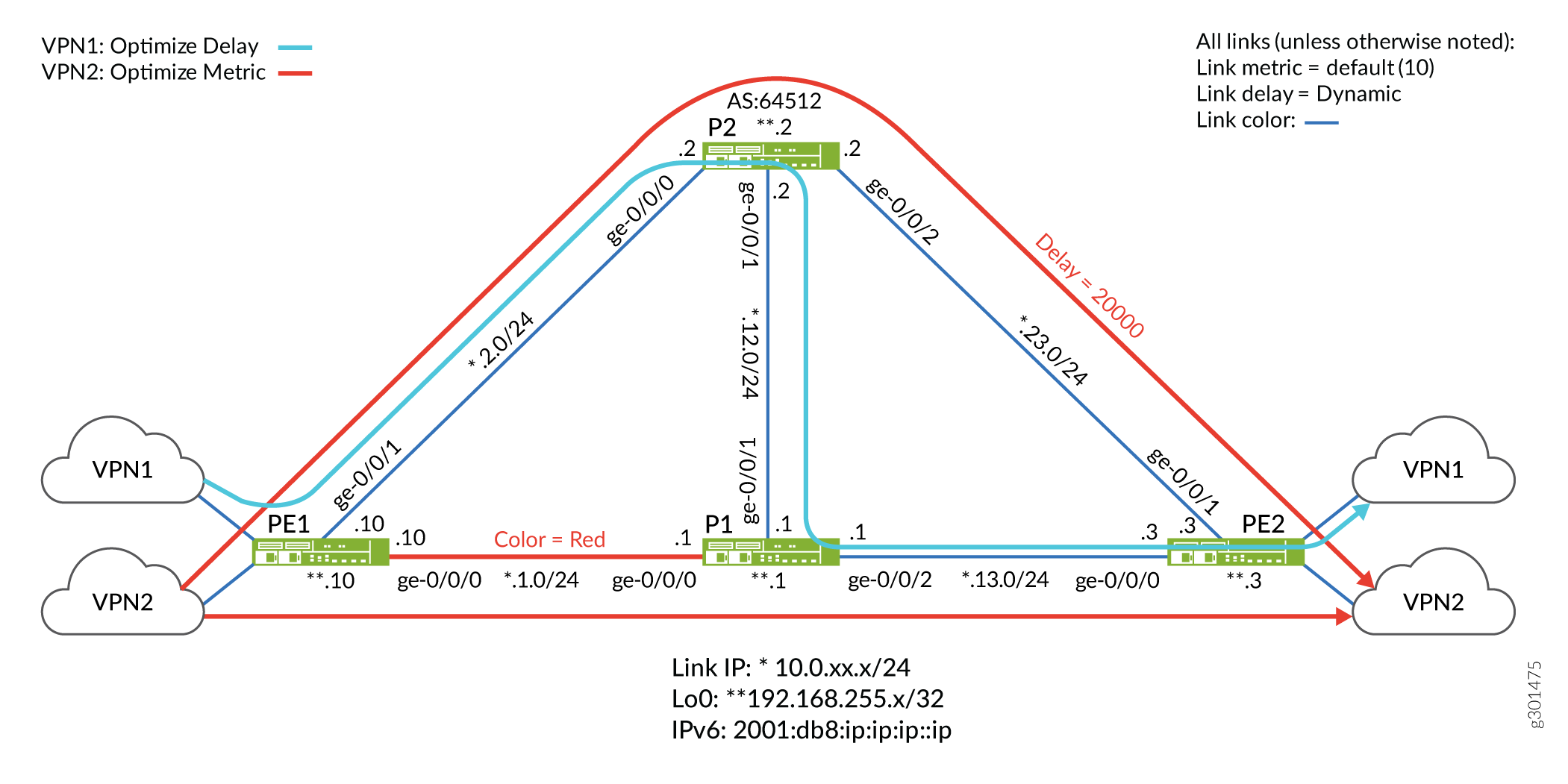
在拓扑中,大多数链路的(默认)IGP 指标为 10、动态延迟测量值和蓝色。PE1 和 P1 之间的红色路径以及 P2 到 PE2 链路上的静态延迟配置除外。
我们已将测试拓扑配置为支持 IPv4 和 IPv6 的 IS-IS 链路延迟。我们已将 P2 路由器配置为路由反射器,并将 PE 设备作为其客户端。为了使拓扑结构简单,我们在 PE2 路由器的 VRF 中使用静态路由。这样就无需客户边缘设备和 PE-客户边缘路由协议,例如 EBGP。
您的目标是配置网络,以便 PE2 为 VPN1 播发的路由采用可优化延迟的路径,同时仅限于使用蓝色链路。相反,发送到与 VPN2 关联的路由的流量可以采用蓝色或红色链路,并根据其 IGP 指标进行路径优化。
- VPN1 的 Flex 算法定义 (FAD) 使用算法 128。我们已将其配置为仅在经过优化以减少延迟的路径上使用蓝色链路 (PE1>P2>P1>PE2)。为了帮助演示路径选择是否正确,您可以在 P2 和 PE2 之间配置 20000 微秒的静态延迟。此延迟明显高于在其余链路上测得的动态延迟。因此,您期望 flex 算法 128 流量避开 P2 到 PE2 链路,而是首选沿蓝色路径 (PE1>P2>P1>PE2) 的其他跃点。
- VPN2 的 Flex 算法定义 (FAD) 使用算法 129。我们已将其配置为采用蓝色或红色链路(PE1>P1>PE2 或 PE1>P2>PE2),并根据IGP指标优化路径。因此,使用 flex 算法 129 的流量在 PE1 和 PE2 之间有两条等价路径,均产生两个跃点和最终指标 20。
概述
在 IP 网络中,大部分流量通常通过核心网络,这降低了成本,但可能会导致延迟增加。然而,业务流量通常受益于根据其他性能指标(如路径延迟)做出路径选择决策的能力,而不是仅仅根据 IGP 指标中继传统的路径优化。优化路径以减少延迟可以极大地使实时语音和视频等应用受益。它还可以实现对金融市场数据的高性能访问,毫秒级可以转化为重大收益或损失。
您可以在 IP 网络中启用 IS-IS 链路延迟。使用默认 IS-IS 算法 (0) 配置具有适当链路成本的 IS-IS,可以实现最小 IGP 度量路径。这样做可以严格基于链路指标的总和优化到端点的路径。通过使用 IS-IS 延迟弹性算法,可以根据路径的端到端延迟来优化路径。
可以使用双向有源测量探头 (TWAMP) 动态测量链路延迟。然后,路由器会淹没其链路延迟参数。该区域中的路由器将这些参数存储在共享链路状态数据库 (LSDB) 中。入口节点针对 LSDB 运行 SPF 算法,以计算在各种属性上优化的路径,例如链路颜色、IGP 指标、流量工程 (流量工程) 指标,或如本例所示,链路延迟。
链路延迟以微秒级为单位。在一个通知中可能是 1000 微秒,在下一个通知中可能是 4000 微秒。以微秒计算,变化幅度为 400%。就微秒而言,这是一个巨大的变化,但就毫秒而言,这并不是一个明显的变化。因此,根据要求,您可以设置最佳值,否则每隔几分钟就会通告一次新的延迟,这可能导致频繁的 SPF 计算和路由计算。
在定期通告间隔(默认为120秒)期间,检查最大单向链路延迟测量参数是否超过周期性阈值,然后向注册模块报告相同的值。
设置协议 ISIS 接口<interface_name>延迟测量通告周期性阈值< 0-100>。默认阈值为 10%,范围为 0 到 100。
出口路由器通过将关联的颜色社区连接到通过 BGP 播发的路由,发出所需的 flex 算法信号。在发送端(已接收远程 PE 播发的标记路由的本地 PE),这些颜色社区用于索引到颜色表中,该颜色表将远程协议下一跃点(PE 的环路地址)解析为 flex 算法标识符。在第 3 层 VPN 的环境中,入口节点会使用颜色映射策略来选择哪些前缀应通过颜色表解析其下一跃点。
然后,本地 PE 使用其本地 Flex 算法定义 (FAD) 将 flex 算法标识符映射到一组路径选择标准中,例如“使用蓝色链路并在延迟时进行优化”。入口 PE 根据 LSDB 中的值计算最佳路径,将相关的 MPLS 标签堆栈推送到数据包上,并将其发送到关联的下一跃点。这会导致流量工程 MPLS 路径使用 IS-IS 作为信令协议。
配置
CLI 快速配置
要快速配置此示例,请复制以下命令,将其粘贴到文本文件中,移除所有换行符,更改任何必要的详细信息以匹配您的网络配置,然后将命令复制粘贴到 [edit] 层级的 CLI 中。
根据 MX 系列路由器中的 MPC 类型,您可能需要显式启用增强型 IP 服务以支持 IS-IS 延迟功能。提交 set chassis network-services enhanced-ip configuration 语句时,系统将提示您重新启动系统。
PE1
set system host-name PE1
set chassis network-services enhanced-ip
set services rpm twamp server authentication-mode none
set services rpm twamp server light
set interfaces ge-0/0/0 description To_R1
set interfaces ge-0/0/0 unit 0 family inet address 10.0.1.10/24
set interfaces ge-0/0/0 unit 0 family iso
set interfaces ge-0/0/0 unit 0 family inet6 address 2001:db8:10:0:1::10/80
set interfaces ge-0/0/0 unit 0 family mpls maximum-labels 16
set interfaces ge-0/0/1 description To_R2
set interfaces ge-0/0/1 unit 0 family inet address 10.0.2.10/24
set interfaces ge-0/0/1 unit 0 family iso
set interfaces ge-0/0/1 unit 0 family inet6 address 2001:db8:10:0:2::10/80
set interfaces ge-0/0/1 unit 0 family mpls maximum-labels 16
set interfaces lo0 unit 0 family inet address 192.168.255.10/32
set interfaces lo0 unit 0 family inet address 127.0.0.1/32
set interfaces lo0 unit 0 family iso address 49.0001.000a.0a0a.0a00
set interfaces lo0 unit 0 family inet6 address 2001:db8:192:168:255::10/128
set interfaces lo0 unit 1 family inet address 172.16.10.1/32
set interfaces lo0 unit 1 family inet6 address 2001:db8:172:16:10::1/128
set interfaces lo0 unit 2 family inet address 172.16.10.2/32
set interfaces lo0 unit 2 family inet6 address 2001:db8:172:16:10::2/128
set policy-options policy-statement pplb then load-balance per-packet
set policy-options policy-statement prefix-sid term 1 from route-filter 192.168.255.10/32 exact
set policy-options policy-statement prefix-sid term 1 then prefix-segment algorithm 128 index 1280
set policy-options policy-statement prefix-sid term 1 then prefix-segment algorithm 128 node-segment
set policy-options policy-statement prefix-sid term 1 then prefix-segment algorithm 129 index 1290
set policy-options policy-statement prefix-sid term 1 then prefix-segment algorithm 129 node-segment
set policy-options policy-statement prefix-sid term 1 then prefix-segment index 1000
set policy-options policy-statement prefix-sid term 1 then prefix-segment node-segment
set policy-options policy-statement prefix-sid term 1 then accept
set policy-options policy-statement prefix-sid term 2 from route-filter 2001:db8:192:168:255::10/128 exact
set policy-options policy-statement prefix-sid term 2 then prefix-segment algorithm 128 index 4280
set policy-options policy-statement prefix-sid term 2 then prefix-segment algorithm 128 node-segment
set policy-options policy-statement prefix-sid term 2 then prefix-segment algorithm 129 index 4290
set policy-options policy-statement prefix-sid term 2 then prefix-segment algorithm 129 node-segment
set policy-options policy-statement prefix-sid term 2 then prefix-segment index 4000
set policy-options policy-statement prefix-sid term 2 then prefix-segment node-segment
set policy-options policy-statement prefix-sid term 2 then accept
set policy-options policy-statement v6vpn1_res_map1 from route-filter 2001:db8:172:16:1::/80 orlonger
set policy-options policy-statement v6vpn1_res_map1 then accept
set policy-options policy-statement v6vpn1_res_map1 then resolution-map map1
set policy-options policy-statement v6vpn2_res_map1 from route-filter 2001:db8:172:16:2::/80 orlonger
set policy-options policy-statement v6vpn2_res_map1 then accept
set policy-options policy-statement v6vpn2_res_map1 then resolution-map map1
set policy-options policy-statement vpn1_res_map1 term 1 from route-filter 172.16.1.0/24 orlonger
set policy-options policy-statement vpn1_res_map1 term 1 then accept
set policy-options policy-statement vpn1_res_map1 term 1 then resolution-map map1
set policy-options policy-statement vpn2_res_map1 term 1 from route-filter 172.16.2.0/24 orlonger
set policy-options policy-statement vpn2_res_map1 term 1 then accept
set policy-options policy-statement vpn2_res_map1 term 1 then resolution-map map1
set policy-options resolution-map map1 mode ip-color
set routing-instances vpn1 instance-type vrf
set routing-instances vpn1 interface lo0.1
set routing-instances vpn1 route-distinguisher 64512:1
set routing-instances vpn1 vrf-target target:64512:1
set routing-instances vpn1 vrf-table-label
set routing-instances vpn2 instance-type vrf
set routing-instances vpn2 interface lo0.2
set routing-instances vpn2 route-distinguisher 64512:2
set routing-instances vpn2 vrf-target target:64512:2
set routing-instances vpn2 vrf-table-label
set protocols bgp group to-RRv6 type internal
set protocols bgp group to-RRv6 local-address 2001:db8:192:168:255::10
set protocols bgp group to-RRv6 import v6vpn1_res_map1
set protocols bgp group to-RRv6 import v6vpn2_res_map1
set protocols bgp group to-RRv6 family inet6 unicast extended-nexthop-color
set protocols bgp group to-RRv6 family inet6-vpn unicast
set protocols bgp group to-RRv6 neighbor 2001:db8:192:168:255::2
set protocols bgp group to-RR type internal
set protocols bgp group to-RR local-address 192.168.255.10
set protocols bgp group to-RR import vpn1_res_map1
set protocols bgp group to-RR import vpn2_res_map1
set protocols bgp group to-RR family inet unicast extended-nexthop-color
set protocols bgp group to-RR family inet-vpn unicast
set protocols bgp group to-RR family traffic-engineering unicast
set protocols bgp group to-RR neighbor 192.168.255.2
set protocols bgp group to-RR vpn-apply-export
set protocols isis interface ge-0/0/0.0 level 2 post-convergence-lfa node-protection
set protocols isis interface ge-0/0/0.0 delay-measurement advertisement periodic threshold 100
set protocols isis interface ge-0/0/0.0 point-to-point
set protocols isis interface ge-0/0/1.0 level 2 post-convergence-lfa node-protection
set protocols isis interface ge-0/0/1.0 delay-measurement advertisement periodic threshold 100
set protocols isis interface ge-0/0/1.0 point-to-point
set protocols isis interface lo0.0 passive
set protocols isis source-packet-routing srgb start-label 80000
set protocols isis source-packet-routing srgb index-range 5000
set protocols isis source-packet-routing flex-algorithm 128
set protocols isis source-packet-routing flex-algorithm 129
set protocols isis level 1 disable
set protocols isis backup-spf-options use-post-convergence-lfa maximum-backup-paths 8
set protocols isis backup-spf-options use-source-packet-routing
set protocols isis traffic-engineering l3-unicast-topology
set protocols isis traffic-engineering advertisement always
set protocols isis export prefix-sid
set protocols mpls traffic-engineering
set protocols mpls admin-groups RED 0
set protocols mpls admin-groups BLUE 1
set protocols mpls icmp-tunneling
set protocols mpls interface all
set protocols mpls interface fxp0.0 disable
set protocols mpls interface ge-0/0/0.0 admin-group RED
set protocols mpls interface ge-0/0/1.0 admin-group BLUE
set routing-options flex-algorithm 128 definition metric-type delay-metric
set routing-options flex-algorithm 128 definition spf
set routing-options flex-algorithm 128 definition admin-group include-any BLUE
set routing-options flex-algorithm 129 definition metric-type igp-metric
set routing-options flex-algorithm 129 definition spf
set routing-options flex-algorithm 129 definition admin-group include-any RED
set routing-options flex-algorithm 129 definition admin-group include-any BLUE
set routing-options router-id 192.168.255.10
set routing-options autonomous-system 64512
set routing-options forwarding-table export pplb
set routing-options forwarding-table ecmp-fast-reroute
set routing-options forwarding-table chained-composite-next-hop ingress l3vpn
P1
set system host-name P1
set chassis network-services enhanced-ip
set services rpm twamp server authentication-mode none
set services rpm twamp server light
set interfaces ge-0/0/0 description To_R0
set interfaces ge-0/0/0 unit 0 family inet address 10.0.1.1/24
set interfaces ge-0/0/0 unit 0 family iso
set interfaces ge-0/0/0 unit 0 family inet6 address 2001:db8:10:0:1::1/80
set interfaces ge-0/0/0 unit 0 family mpls maximum-labels 16
set interfaces ge-0/0/1 description To_R2
set interfaces ge-0/0/1 unit 0 family inet address 10.0.12.1/24
set interfaces ge-0/0/1 unit 0 family iso
set interfaces ge-0/0/1 unit 0 family inet6 address 2001:db8:10:0:12::1/80
set interfaces ge-0/0/1 unit 0 family mpls maximum-labels 16
set interfaces ge-0/0/2 description To_R3
set interfaces ge-0/0/2 unit 0 family inet address 10.0.13.1/24
set interfaces ge-0/0/2 unit 0 family iso
set interfaces ge-0/0/2 unit 0 family inet6 address 2001:db8:10:0:13::1/80
set interfaces ge-0/0/2 unit 0 family mpls maximum-labels 16
set interfaces lo0 unit 0 family inet address 192.168.255.1/32
set interfaces lo0 unit 0 family iso address 49.0001.0005.0505.0500
set interfaces lo0 unit 0 family inet6 address 2001:db8:192:168:255::1/128
set policy-options policy-statement pplb then load-balance per-packet
set policy-options policy-statement prefix-sid term 1 from route-filter 192.168.255.1/32 exact
set policy-options policy-statement prefix-sid term 1 then prefix-segment algorithm 128 index 1281
set policy-options policy-statement prefix-sid term 1 then prefix-segment algorithm 128 node-segment
set policy-options policy-statement prefix-sid term 1 then prefix-segment algorithm 129 index 1291
set policy-options policy-statement prefix-sid term 1 then prefix-segment algorithm 129 node-segment
set policy-options policy-statement prefix-sid term 1 then prefix-segment index 1001
set policy-options policy-statement prefix-sid term 1 then prefix-segment node-segment
set policy-options policy-statement prefix-sid term 1 then accept
set policy-options policy-statement prefix-sid term 2 from route-filter 2001:db8:192:168:255::1/128 exact
set policy-options policy-statement prefix-sid term 2 then prefix-segment algorithm 128 index 4281
set policy-options policy-statement prefix-sid term 2 then prefix-segment algorithm 128 node-segment
set policy-options policy-statement prefix-sid term 2 then prefix-segment algorithm 129 index 4291
set policy-options policy-statement prefix-sid term 2 then prefix-segment algorithm 129 node-segment
set policy-options policy-statement prefix-sid term 2 then prefix-segment index 4001
set policy-options policy-statement prefix-sid term 2 then prefix-segment node-segment
set policy-options policy-statement prefix-sid term 2 then accept
set protocols isis interface ge-0/0/0.0 level 2 post-convergence-lfa node-protection
set protocols isis interface ge-0/0/0.0 delay-measurement advertisement periodic threshold 100
set protocols isis interface ge-0/0/0.0 point-to-point
set protocols isis interface ge-0/0/1.0 level 2 post-convergence-lfa node-protection
set protocols isis interface ge-0/0/1.0 delay-measurement advertisement periodic threshold 100
set protocols isis interface ge-0/0/1.0 point-to-point
set protocols isis interface ge-0/0/2.0 level 2 post-convergence-lfa node-protection
set protocols isis interface ge-0/0/2.0 delay-measurement advertisement periodic threshold 100
set protocols isis interface ge-0/0/2.0 point-to-point
set protocols isis interface lo0.0 passive
set protocols isis source-packet-routing srgb start-label 80000
set protocols isis source-packet-routing srgb index-range 5000
set protocols isis source-packet-routing flex-algorithm 128
set protocols isis source-packet-routing flex-algorithm 129
set protocols isis level 1 disable
set protocols isis backup-spf-options use-post-convergence-lfa maximum-backup-paths 8
set protocols isis backup-spf-options use-source-packet-routing
set protocols isis traffic-engineering l3-unicast-topology
set protocols isis traffic-engineering advertisement always
set protocols isis export prefix-sid
set protocols mpls admin-groups RED 0
set protocols mpls admin-groups BLUE 1
set protocols mpls icmp-tunneling       set protocols mpls interface all
set protocols mpls interface fxp0.0 disable
set protocols mpls interface ge-0/0/0.0 admin-group RED
set protocols mpls interface ge-0/0/1.0 admin-group BLUE
set protocols mpls interface ge-0/0/2.0 admin-group BLUE
set routing-options router-id 192.168.255.1
set routing-options autonomous-system 65412
set routing-options forwarding-table export pplb
P2
set system host-name P2
set chassis network-services enhanced-ip
set services rpm twamp server authentication-mode none
set services rpm twamp server light
set interfaces ge-0/0/0 unit 0 family inet address 10.0.2.2/24
set interfaces ge-0/0/0 unit 0 family iso
set interfaces ge-0/0/0 unit 0 family inet6 address 2001:db8:10:0:2::2/80
set interfaces ge-0/0/0 unit 0 family mpls maximum-labels 16
set interfaces ge-0/0/1 description To_R1
set interfaces ge-0/0/1 unit 0 family inet address 10.0.12.2/24
set interfaces ge-0/0/1 unit 0 family iso
set interfaces ge-0/0/1 unit 0 family inet6 address 2001:db8:10:0:12::2/80
set interfaces ge-0/0/1 unit 0 family mpls maximum-labels 16
set interfaces ge-0/0/2 description To_R3
set interfaces ge-0/0/2 unit 0 family inet address 10.0.23.2/24
set interfaces ge-0/0/2 unit 0 family iso
set interfaces ge-0/0/2 unit 0 family inet6 address 2001:db8:10:0:23::2/80
set interfaces ge-0/0/2 unit 0 family mpls maximum-labels 16
set interfaces lo0 unit 0 family inet address 192.168.255.2/32
set interfaces lo0 unit 0 family iso address 49.0001.0002.0202.0200
set interfaces lo0 unit 0 family inet6 address 2001:db8:192:168:255::2/128
set policy-options policy-statement pplb then load-balance per-packet
set policy-options policy-statement prefix-sid term 1 from route-filter 192.168.255.2/32 exact
set policy-options policy-statement prefix-sid term 1 then prefix-segment algorithm 128 index 1282
set policy-options policy-statement prefix-sid term 1 then prefix-segment algorithm 128 node-segment
set policy-options policy-statement prefix-sid term 1 then prefix-segment algorithm 129 index 1292
set policy-options policy-statement prefix-sid term 1 then prefix-segment algorithm 129 node-segment
set policy-options policy-statement prefix-sid term 1 then prefix-segment index 1002
set policy-options policy-statement prefix-sid term 1 then prefix-segment node-segment
set policy-options policy-statement prefix-sid term 1 then accept
set policy-options policy-statement prefix-sid term 2 from route-filter 2001:db8:192:168:255::2/128 exact
set policy-options policy-statement prefix-sid term 2 then prefix-segment algorithm 128 index 4282
set policy-options policy-statement prefix-sid term 2 then prefix-segment algorithm 128 node-segment
set policy-options policy-statement prefix-sid term 2 then prefix-segment algorithm 129 index 4292
set policy-options policy-statement prefix-sid term 2 then prefix-segment algorithm 129 node-segment
set policy-options policy-statement prefix-sid term 2 then prefix-segment index 4002
set policy-options policy-statement prefix-sid term 2 then prefix-segment node-segment
set policy-options policy-statement prefix-sid term 2 then accept
set policy-options policy-statement ted2nlri_igp term 1 from family traffic-engineering
set policy-options policy-statement ted2nlri_igp term 1 from protocol isis
set policy-options policy-statement ted2nlri_igp term 1 then accept
set protocols bgp group to-RRv6 type internal
set protocols bgp group to-RRv6 local-address 2001:db8:192:168:255::2
set protocols bgp group to-RRv6 family inet6 unicast
set protocols bgp group to-RRv6 family inet6-vpn unicast
set protocols bgp group to-RRv6 neighbor 2001:db8:192:168:255::10
set protocols bgp group to-RRv6 neighbor 2001:db8:192:168:255::3
set protocols bgp group to-RR type internal
set protocols bgp group to-RR local-address 192.168.255.2
set protocols bgp group to-RR family inet unicast
set protocols bgp group to-RR family inet-vpn unicast
set protocols bgp group to-RR neighbor 192.168.255.10
set protocols bgp group to-RR neighbor 192.168.255.3
set protocols bgp cluster 192.168.255.2
set protocols isis interface ge-0/0/0.0 level 2 post-convergence-lfa node-protection
set protocols isis interface ge-0/0/0.0 delay-measurement advertisement periodic threshold 100
set protocols isis interface ge-0/0/0.0 point-to-point
set protocols isis interface ge-0/0/1.0 level 2 post-convergence-lfa node-protection
set protocols isis interface ge-0/0/1.0 delay-measurement advertisement periodic threshold 100
set protocols isis interface ge-0/0/1.0 point-to-point
set protocols isis interface ge-0/0/2.0 level 2 post-convergence-lfa node-protection
set protocols isis interface ge-0/0/2.0 delay-metric 20000
set protocols isis interface ge-0/0/2.0 delay-measurement advertisement periodic threshold 100
set protocols isis interface ge-0/0/2.0 point-to-point
set protocols isis interface lo0.0 passive
set protocols isis source-packet-routing srgb start-label 80000
set protocols isis source-packet-routing srgb index-range 5000
set protocols isis source-packet-routing flex-algorithm 128
set protocols isis source-packet-routing flex-algorithm 129
set protocols isis level 1 disable
set protocols isis backup-spf-options use-post-convergence-lfa maximum-backup-paths 8
set protocols isis backup-spf-options use-source-packet-routing
set protocols isis traffic-engineering l3-unicast-topology
set protocols isis traffic-engineering advertisement always
set protocols isis export prefix-sid
set protocols mpls traffic-engineering
set protocols mpls admin-groups RED 0
set protocols mpls admin-groups BLUE 1
set protocols mpls icmp-tunneling       set protocols mpls interface all
set protocols mpls interface fxp0.0 disable
set protocols mpls interface ge-0/0/0.0 admin-group BLUE
set protocols mpls interface ge-0/0/1.0 admin-group BLUE
set protocols mpls interface ge-0/0/2.0 admin-group BLUE
set routing-options router-id 192.168.255.2
set routing-options autonomous-system 64512
set routing-options forwarding-table export pplb
PE2
set system host-name PE2
set chassis network-services enhanced-ip
set services rpm twamp server authentication-mode none
set services rpm twamp server light
set interfaces ge-0/0/0 description To_R1
set interfaces ge-0/0/0 unit 0 family inet address 10.0.13.3/24
set interfaces ge-0/0/0 unit 0 family iso
set interfaces ge-0/0/0 unit 0 family inet6 address 2001:db8:10:0:13::3/80
set interfaces ge-0/0/0 unit 0 family mpls maximum-labels 16
set interfaces ge-0/0/1 description To_R2
set interfaces ge-0/0/1 unit 0 family inet address 10.0.23.3/24
set interfaces ge-0/0/1 unit 0 family iso
set interfaces ge-0/0/1 unit 0 family inet6 address 2001:db8:10:0:23::364/128
set interfaces ge-0/0/1 unit 0 family mpls maximum-labels 16
set interfaces lo0 unit 0 family inet address 192.168.255.3/32
set interfaces lo0 unit 0 family inet address 127.0.0.1/32
set interfaces lo0 unit 0 family iso address 49.0001.0007.0707.0700
set interfaces lo0 unit 0 family inet6 address 2001:db8:192:168:255::3/128
set interfaces lo0 unit 1 family inet address 172.16.3.1/32
set interfaces lo0 unit 1 family inet6 address 2001:db8:172:16:3::1/128
set interfaces lo0 unit 2 family inet address 172.16.3.2/32
set interfaces lo0 unit 2 family inet6 address 2001:db8:172:16:3::2/128
set policy-options policy-statement pplb then load-balance per-packet
set policy-options policy-statement prefix-sid term 1 from route-filter 192.168.255.3/32 exact
set policy-options policy-statement prefix-sid term 1 then prefix-segment algorithm 128 index 1283
set policy-options policy-statement prefix-sid term 1 then prefix-segment algorithm 128 node-segment
set policy-options policy-statement prefix-sid term 1 then prefix-segment algorithm 129 index 1293
set policy-options policy-statement prefix-sid term 1 then prefix-segment algorithm 129 node-segment
set policy-options policy-statement prefix-sid term 1 then prefix-segment index 1003
set policy-options policy-statement prefix-sid term 1 then prefix-segment node-segment
set policy-options policy-statement prefix-sid term 1 then accept
set policy-options policy-statement prefix-sid term 2 from route-filter 2001:db8:192:168:255::3/128 exact
set policy-options policy-statement prefix-sid term 2 then prefix-segment algorithm 128 index 4283
set policy-options policy-statement prefix-sid term 2 then prefix-segment algorithm 128 node-segment
set policy-options policy-statement prefix-sid term 2 then prefix-segment algorithm 129 index 4293
set policy-options policy-statement prefix-sid term 2 then prefix-segment algorithm 129 node-segment
set policy-options policy-statement prefix-sid term 2 then prefix-segment index 4003
set policy-options policy-statement prefix-sid term 2 then prefix-segment node-segment
set policy-options policy-statement prefix-sid term 2 then accept
set policy-options policy-statement vpn_1_export term 1 from route-filter 172.16.1.0/24 orlonger
set policy-options policy-statement vpn_1_export term 1 then community add color128
set policy-options policy-statement vpn_1_export term 1 then next-hop 192.168.255.3
set policy-options policy-statement vpn_1_export term 1 then accept
set policy-options policy-statement vpn_1_export_v6 term 1 from route-filter 2001:db8:172:16:1::/80 orlonger
set policy-options policy-statement vpn_1_export_v6 term 1 then community add color128
set policy-options policy-statement vpn_1_export_v6 term 1 then next-hop 2001:db8:192:168:255::3
set policy-options policy-statement vpn_1_export_v6 term 1 then accept
set policy-options policy-statement vpn_1_export_v6 term 2 from route-filter 2001:db8:172:16:3::1/128 exact
set policy-options policy-statement vpn_1_export_v6 term 2 then community add color128
set policy-options policy-statement vpn_1_export_v6 term 2 then next-hop 2001:db8:192:168:255::3
set policy-options policy-statement vpn_1_export_v6 term 2 then accept
set policy-options policy-statement vpn_2_export term 1 from route-filter 172.16.2.0/24 orlonger
set policy-options policy-statement vpn_2_export term 1 then community add color129
set policy-options policy-statement vpn_2_export term 1 then next-hop 192.168.255.3
set policy-options policy-statement vpn_2_export term 1 then accept
set policy-options policy-statement vpn_2_export_v6 term 1 from route-filter 2001:db8:172:16:2::/80 orlonger
set policy-options policy-statement vpn_2_export_v6 term 1 then community add color129
set policy-options policy-statement vpn_2_export_v6 term 1 then next-hop 2001:db8:192:168:255::3
set policy-options policy-statement vpn_2_export_v6 term 1 then accept
set policy-options community color128 members color:0:128
set policy-options community color129 members color:0:129
set policy-options resolution-map map1 mode ip-color
set routing-instances vpn1 instance-type vrf
set routing-instances vpn1 routing-options rib vpn1.inet6.0 static route 2001:db8:172:16:1::/80 receive
set routing-instances vpn1 routing-options static route 172.16.1.0/24 receive
set routing-instances vpn1 interface lo0.1
set routing-instances vpn1 route-distinguisher 64512:1
set routing-instances vpn1 vrf-target target:64512:1
set routing-instances vpn1 vrf-table-label
set routing-instances vpn2 instance-type vrf
set routing-instances vpn2 routing-options rib vpn2.inet6.0 static route 2001:db8:172:16:2::/80 receive
set routing-instances vpn2 routing-options static route 172.16.2.0/24 receive
set routing-instances vpn2 interface lo0.2
set routing-instances vpn2 route-distinguisher 64512:2
set routing-instances vpn2 vrf-target target:64512:2
set routing-instances vpn2 vrf-table-label
set protocols bgp group to-RRv6 type internal
set protocols bgp group to-RRv6 local-address 2001:db8:192:168:255::3
set protocols bgp group to-RRv6 family inet6 unicast extended-nexthop-color
set protocols bgp group to-RRv6 family inet6-vpn unicast
set protocols bgp group to-RRv6 export vpn_1_export_v6
set protocols bgp group to-RRv6 export vpn_2_export_v6
set protocols bgp group to-RRv6 neighbor 2001:db8:192:168:255::2
set protocols bgp group to-RRv6 vpn-apply-export
set protocols bgp group to-RR type internal
set protocols bgp group to-RR local-address 192.168.255.3
set protocols bgp group to-RR family inet unicast extended-nexthop-color
set protocols bgp group to-RR family inet-vpn unicast
set protocols bgp group to-RR export vpn_1_export
set protocols bgp group to-RR export vpn_2_export
set protocols bgp group to-RR neighbor 192.168.255.2
set protocols bgp group to-RR vpn-apply-export
set protocols isis interface ge-0/0/0.0 level 2 post-convergence-lfa node-protection
set protocols isis interface ge-0/0/0.0 delay-measurement advertisement periodic threshold 100
set protocols isis interface ge-0/0/0.0 point-to-point
set protocols isis interface ge-0/0/1.0 level 2 post-convergence-lfa node-protection
set protocols isis interface ge-0/0/1.0 delay-measurement advertisement periodic threshold 100
set protocols isis interface ge-0/0/1.0 point-to-point
set protocols isis interface ge-0/0/2.0 delay-metric 20000
set protocols isis interface lo0.0 passive
set protocols isis source-packet-routing srgb start-label 80000
set protocols isis source-packet-routing srgb index-range 5000
set protocols isis source-packet-routing flex-algorithm 128
set protocols isis source-packet-routing flex-algorithm 129
set protocols isis level 1 disable
set protocols isis backup-spf-options use-post-convergence-lfa maximum-backup-paths 8
set protocols isis backup-spf-options use-source-packet-routing
set protocols isis traffic-engineering l3-unicast-topology
set protocols isis traffic-engineering advertisement always
set protocols isis export prefix-sid
set protocols mpls admin-groups RED 0
set protocols mpls admin-groups BLUE 1
set protocols mpls icmp-tunneling       set protocols mpls interface all
set protocols mpls interface fxp0.0 disable
set protocols mpls interface ge-0/0/0.0 admin-group BLUE
set protocols mpls interface ge-0/0/1.0 admin-group BLUEset routing-options router-id 192.168.255.3
set routing-options autonomous-system 64512
set routing-options forwarding-table export pplb
set routing-options forwarding-table ecmp-fast-reroute
set routing-options forwarding-table chained-composite-next-hop ingress l3vpn
分步过程
-
配置主机名、IPv4、IPv6 地址、环路接口地址、
enhanced-ip模式等基本设备设置,并在所有 4 台路由器的所有接口上启用 ISO 和 MPLS 协议家族。user@PE1# set system host-name PE1 set chassis network-services enhanced-ip set interfaces ge-0/0/0 description To_R1 set interfaces ge-0/0/0 unit 0 family inet address 10.0.1.10/24 set interfaces ge-0/0/0 unit 0 family iso set interfaces ge-0/0/0 unit 0 family inet6 address 2001:db8:10:0:1::10/80 set interfaces ge-0/0/0 unit 0 family mpls maximum-labels 16 set interfaces ge-0/0/1 description To_R2 set interfaces ge-0/0/1 unit 0 family inet address 10.0.2.10/24 set interfaces ge-0/0/1 unit 0 family iso set interfaces ge-0/0/1 unit 0 family inet6 address 2001:db8:10:0:2::10/80 set interfaces ge-0/0/1 unit 0 family mpls maximum-labels 16 set interfaces lo0 unit 0 family inet address 192.168.255.10/32 set interfaces lo0 unit 0 family inet address 127.0.0.1/32 set interfaces lo0 unit 0 family iso address 49.0001.000a.0a0a.0a00 set interfaces lo0 unit 0 family inet6 address 2001:db8:192:168:255::10/128 set interfaces lo0 unit 1 family inet address 172.16.10.1/32 set interfaces lo0 unit 1 family inet6 address 2001:db8:172:16:10::1/128 set interfaces lo0 unit 2 family inet address 172.16.10.2/32 set interfaces lo0 unit 2 family inet6 address 2001:db8:172:16:10::2/128
-
配置路由器 ID 和自治系统 (AS) 编号,并将负载平衡导出策略应用到所有路由器上的转发表,以实现流量的负载平衡。
user@PE1#
set routing-options router-id 192.168.255.10
set routing-options autonomous-system 64512
set routing-options forwarding-table export pplb
-
在 PE1 和 PE2 上,配置等价多路径 (ECMP) 以启用快速重新路由保护。此外,还可以配置链式复合下一跃点,以允许路由器将共享相同目的地的路由指向公共转发下一跃点。此选项可改进转发信息库 (FIB) 的扩展。
user@PE1#
set routing-options forwarding-table ecmp-fast-reroute
set routing-options forwarding-table chained-composite-next-hop ingress l3vpn
-
在所有路由器上的所有接口上启用 MPLS 协议处理。还能启用流量工程。
user@PE1#
set protocols mpls interface fxp0.0 disable
set protocols mpls interface all
set protocols mpls traffic-engineering
-
在所有路由器上启用 TWAMP 探测。这些探针支持动态测量每对路由器之间的链路延迟。
user@PE1#
set services rpm twamp server authentication-mode none
set services rpm twamp server light
-
配置 IS-IS 协议以进行点对点作(多点链路不支持基于 TWAMP 的延迟测量),并为所有接口上的独立于拓扑的无环路备用 (TILFA)作启用节点保护模式。您还可以在环路接口上启用被动模式 IS-IS,并禁用 IS-IS 级别 1,以仅使用 IS-IS 级别 2。使用第 3 层单播拓扑启用流量工程,将 IGP 拓扑下载到 TED 中。配置 IS-IS 以支持 SPRING 路由路径。 prefix-sid 导出策略在后续步骤中定义。此策略用于让本地节点通过映射到一个或多个 flex 算法来播发其环路地址。
user@PE1#
set protocols isis level 1 disable
set protocols isis interface ge-0/0/0.0 point-to-point
set protocols isis interface ge-0/0/0.0 level 2 post-convergence-lfa node-protection
set protocols isis interface ge-0/0/1.0 point-to-point
set protocols isis interface ge-0/0/1.0 level 2 post-convergence-lfa node-protection
set protocols isis interface lo0.0 passive
set protocols isis backup-spf-options use-post-convergence-lfa maximum-backup-paths 8
set protocols isis backup-spf-options use-source-packet-routing
set protocols isis traffic-engineering l3-unicast-topology
set protocols isis traffic-engineering advertisement always
set protocols isis export prefix-sid
-
在所有路由器的所有 IS-IS 接口上使用 TWAMP 探针配置动态 IS-IS 链路延迟测量(P2 和 PE2 之间的链路除外,在本例中使用静态延迟值)。
user@PE1#
set protocols isis interface ge-0/0/0.0 delay-measurement advertisement periodic threshold 100
set protocols isis interface ge-0/0/1.0 delay-measurement advertisement periodic threshold 100
user@P1#
set protocols isis interface ge-0/0/0.0 delay-measurement advertisement periodic threshold 100
set protocols isis interface ge-0/0/1.0 delay-measurement advertisement periodic threshold 100
set protocols isis interface ge-0/0/2.0 delay-measurement advertisement periodic threshold 100
user@P2#
set protocols isis interface ge-0/0/0.0 delay-measurement advertisement periodic threshold 100
set protocols isis interface ge-0/0/1.0 delay-measurement advertisement periodic threshold 100
set protocols isis interface ge-0/0/2.0 delay-measurement advertisement periodic threshold 100
user@PE2#
set protocols isis interface ge-0/0/0.0 delay-measurement advertisement periodic threshold 100
set protocols isis interface ge-0/0/1.0 delay-measurement advertisement periodic threshold 100
-
在 P2 和 PE2 之间的链路上配置静态延迟度量。
user@P2#
set protocols isis interface ge-0/0/2.0 delay-metric 20000
user@PE2#
set protocols isis interface ge-0/0/1.0 delay-metric 20000
-
将 PE1 和 PE2 配置为支持两个第 3 层 VPN(VPN1 和 VPN2)。
user@PE1#
set routing-instances vpn1 instance-type vrf
set routing-instances vpn1 interface lo0.1
set routing-instances vpn1 route-distinguisher 64512:1
set routing-instances vpn1 vrf-target target:64512:1
set routing-instances vpn1 vrf-table-label

set routing-instances vpn2 instance-type vrf
set routing-instances vpn2 interface lo0.2
set routing-instances vpn2 route-distinguisher 64512:2
set routing-instances vpn2 vrf-target target:64512:2
set routing-instances vpn2 vrf-table-label
注意:请注意,PE2 的路由实例配置了 IPv4 和 IPv6 静态路由。这些路由配置了
receive允许您使用 ping 测试连接的选项。如果第 3 层 VPN 在 PE 和连接的客户边缘设备之间使用动态路由协议,则 IS-IS 延迟功能的工作方式相同。在本例中,我们使用静态路由来保持拓扑简单,以便专注于 IS-IS 延迟优化功能。user@PE2# set routing-instances vpn1 instance-type vrf set routing-instances vpn1 routing-options rib vpn1.inet6.0 static route 2001:db8:172:16:1::/80 receive set routing-instances vpn1 routing-options static route 172.16.1.0/24 receive set routing-instances vpn1 interface lo0.1 set routing-instances vpn1 route-distinguisher 64512:1 set routing-instances vpn1 vrf-target target:64512:1 set routing-instances vpn1 vrf-table-label set routing-instances vpn2 instance-type vrf set routing-instances vpn2 routing-options rib vpn2.inet6.0 static route 2001:db8:172:16:2::/80 receive set routing-instances vpn2 routing-options static route 172.16.2.0/24 receive set routing-instances vpn2 interface lo0.2 set routing-instances vpn2 route-distinguisher 64512:2 set routing-instances vpn2 vrf-target target:64512:2 set routing-instances vpn2 vrf-table-label
-
在 PE1 上配置映射策略,以启用 VPN 路由解析,以便将前缀与 BGP 颜色表进行匹配。这允许您基于每个前缀调用 flex 路径转发算法。 map1 解析策略设置为
ip-color解析模式。注意:在第 3 层 VPN 环境中,需要映射策略来选择允许在色表中解析其下一跃点的前缀。除非使用映射策略,否则仅附加具有扩展下一跃点和颜色社区的路由不会导致使用颜色表。
user@PE1#
set policy-options policy-statement vpn1_res_map1 term 1 from route-filter 172.16.1.0/24 orlonger
set policy-options policy-statement vpn1_res_map1 term 1 then accept
set policy-options policy-statement vpn1_res_map1 term 1 then resolution-map map1
set policy-options policy-statement vpn2_res_map1 term 1 from route-filter 172.16.2.0/24 orlonger
set policy-options policy-statement vpn2_res_map1 term 1 then accept
set policy-options policy-statement vpn2_res_map1 term 1 then resolution-map map1
set policy-options policy-statement v6vpn1_res_map1 from route-filter 2001:db8:172:16:1::/80 orlonger
set policy-options policy-statement v6vpn1_res_map1 then accept
set policy-options policy-statement v6vpn1_res_map1 then resolution-map map1
set policy-options policy-statement v6vpn2_res_map1 from route-filter 2001:db8:172:16:2::/80 orlonger
set policy-options policy-statement v6vpn2_res_map1 then accept
set policy-options policy-statement v6vpn2_res_map1 then resolution-map map1
set policy-options resolution-map map1 mode ip-color
-
在 PE2 配置 VPN 路由导出策略,以将所需的颜色社区附加到其播发到 PE1 的 VPN 路由(通过路由反射器)。这里重要的是,来自 VPN1 的路由如何附加了 flex 路径 128(优化延迟)的颜色社区,而从 VPN2 播发的路由如何附加了 129 颜色社区(优化 IGP 指标)。
user@PE2#
set policy-options policy-statement vpn_1_export term 1 from route-filter 172.16.1.0/24 orlonger
set policy-options policy-statement vpn_1_export term 1 then community add color128
set policy-options policy-statement vpn_1_export term 1 then next-hop 192.168.255.3
set policy-options policy-statement vpn_1_export term 1 then accept

set policy-options policy-statement vpn_2_export term 1 from route-filter 172.16.2.0/24 orlonger
set policy-options policy-statement vpn_2_export term 1 then community add color129
set policy-options policy-statement vpn_2_export term 1 then next-hop 192.168.255.3
set policy-options policy-statement vpn_2_export term 1 then accept

set policy-options policy-statement vpn_1_export_v6 term 1 from route-filter 2001:db8:172:16:1::/80 orlonger
set policy-options policy-statement vpn_1_export_v6 term 1 then community add color128
set policy-options policy-statement vpn_1_export_v6 term 1 then next-hop 2001:db8:192:168:255::3
set policy-options policy-statement vpn_1_export_v6 term 1 then accept
set policy-options policy-statement vpn_2_export_v6 term 1 from route-filter 2001:db8:172:16:2::/80 orlonger
set policy-options policy-statement vpn_2_export_v6 term 1 then community add color129
set policy-options policy-statement vpn_2_export_v6 term 1 then next-hop 2001:db8:192:168:255::3
set policy-options policy-statement vpn_2_export_v6 term 1 then accept

set policy-options community color128 members color:0:128
set policy-options community color129 members color:0:129
-
在 PE 设备和路由反射器之间配置 BGP 对等互连。配置单播网络层可达性信息 (NLRI),以支持在 PE 设备上扩展颜色下一跃点。启用此选项允许具有颜色社区的路由通过颜色表解析其下一跃点。如果没有扩展下一跳设置路由,则颜色社区将进行正常的下一跳解析,并且不会使用 flex 算法路径。
-
您还可以启用对 IPv4 和 IPv6 第 3 层 VPN 单播路由的支持。在 PE1 上,您可以将颜色映射策略作为导入应用,以便它可以对从远程 PE 设备接收的路由进行作。
user@PE1#
set protocols bgp group to-RR type internal
set protocols bgp group to-RR local-address 192.168.255.10
set protocols bgp group to-RR neighbor 192.168.255.2
set protocols bgp group to-RR family inet unicast extended-nexthop-color
set protocols bgp group to-RR family inet-vpn unicast
set protocols bgp group to-RR family traffic-engineering unicast
set protocols bgp group to-RR import vpn1_res_map1
set protocols bgp group to-RR import vpn2_res_map1
set protocols bgp group to-RRv6 type internal
set protocols bgp group to-RRv6 local-address 2001:db8:192:168:255::10
set protocols bgp group to-RRv6 neighbor 2001:db8:192:168:255::2
set protocols bgp group to-RRv6 family inet6 unicast extended-nexthop-color
set protocols bgp group to-RRv6 family inet6-vpn unicast
set protocols bgp group to-RRv6 import v6vpn1_res_map1
set protocols bgp group to-RRv6 import v6vpn2_res_map1
user@P2#
set protocols bgp group to-RR type internal
set protocols bgp group to-RR local-address 192.168.255.2
set protocols bgp group to-RR neighbor 192.168.255.10
set protocols bgp group to-RR neighbor 192.168.255.3
set protocols bgp cluster 192.168.255.2
set protocols bgp group to-RR family inet unicast
set protocols bgp group to-RR family inet-vpn unicast
在 PE 2 上,您可以应用导出策略将所需的颜色社区附加到发送至 PE1 的 VPN 路由播发。PE2 需要该
vpn-apply-export选项,以允许导出策略对向远程 PE 播发的 VPN 路由起作用。user@PE2# set protocols bgp group to-RR type internal set protocols bgp group to-RR local-address 192.168.255.3 set protocols bgp group to-RR neighbor 192.168.255.2 set protocols bgp group to-RR family inet unicast extended-nexthop-color set protocols bgp group to-RR family inet-vpn unicast set protocols bgp group to-RR export vpn_1_export set protocols bgp group to-RR export vpn_2_export set protocols bgp group to-RR vpn-apply-export set protocols bgp group to-RRv6 type internal set protocols bgp group to-RRv6 local-address 2001:db8:192:168:255::3 set protocols bgp group to-RRv6 neighbor 2001:db8:192:168:255::2 set protocols bgp group to-RRv6 family inet6 unicast extended-nexthop-color set protocols bgp group to-RRv6 family inet6-vpn unicast set protocols bgp group to-RRv6 export vpn_1_export_v6 set protocols bgp group to-RRv6 export vpn_2_export_v6 set protocols bgp group to-RRv6 vpn-apply-export
-
在所有路由器上定义按数据包的负载平衡策略。
user@PE1#
set policy-options policy-statement pplb then load-balance per-packet
-
在所有路由器上使用两种灵活算法(128 和 129)配置对分段路由的支持。
user@PE1#
set protocols isis source-packet-routing srgb start-label 80000
set protocols isis source-packet-routing srgb index-range 5000
set protocols isis source-packet-routing flex-algorithm 128
set protocols isis source-packet-routing flex-algorithm 129
-
配置所有路由器以通告其环路地址,同时支持 128 和 129 flex 算法。该
prefix-segment index选项为每个路由器的环路地址设置基本标签。在此示例中,IPv4 基本索引和 IPv6 基本索引设置为反映路由器编号。因此,R0 (PE1) 将 1000 用于 IPv4,而 R1 (P1) 使用 1001。user@PE1# set policy-options policy-statement prefix-sid term 1 from route-filter 192.168.255.10/32 exact set policy-options policy-statement prefix-sid term 1 then prefix-segment algorithm 128 index 1280 set policy-options policy-statement prefix-sid term 1 then prefix-segment algorithm 128 node-segment set policy-options policy-statement prefix-sid term 1 then prefix-segment algorithm 129 index 1290 set policy-options policy-statement prefix-sid term 1 then prefix-segment algorithm 129 node-segment set policy-options policy-statement prefix-sid term 1 then prefix-segment index 1000 set policy-options policy-statement prefix-sid term 1 then prefix-segment node-segment set policy-options policy-statement prefix-sid term 1 then accept set policy-options policy-statement prefix-sid term 2 from route-filter 2001:db8:192:168:255::10/128 exact set policy-options policy-statement prefix-sid term 2 then prefix-segment algorithm 128 index 4280 set policy-options policy-statement prefix-sid term 2 then prefix-segment algorithm 128 node-segment set policy-options policy-statement prefix-sid term 2 then prefix-segment algorithm 129 index 4290 set policy-options policy-statement prefix-sid term 2 then prefix-segment algorithm 129 node-segment set policy-options policy-statement prefix-sid term 2 then prefix-segment index 4000 set policy-options policy-statement prefix-sid term 2 then prefix-segment node-segment set policy-options policy-statement prefix-sid term 2 then accept
user@P1#
set policy-options policy-statement prefix-sid term 1 from route-filter 192.168.255.1/32 exact
set policy-options policy-statement prefix-sid term 1 then prefix-segment algorithm 128 index 1281
set policy-options policy-statement prefix-sid term 1 then prefix-segment algorithm 128 node-segment
set policy-options policy-statement prefix-sid term 1 then prefix-segment algorithm 129 index 1291
set policy-options policy-statement prefix-sid term 1 then prefix-segment algorithm 129 node-segment
set policy-options policy-statement prefix-sid term 1 then prefix-segment index 1001
set policy-options policy-statement prefix-sid term 1 then prefix-segment node-segment
set policy-options policy-statement prefix-sid term 1 then accept

set policy-options policy-statement prefix-sid term 2 from route-filter 2001:db8:192:168:255::1/128 exact
set policy-options policy-statement prefix-sid term 2 then prefix-segment algorithm 128 index 4281
set policy-options policy-statement prefix-sid term 2 then prefix-segment algorithm 128 node-segment
set policy-options policy-statement prefix-sid term 2 then prefix-segment algorithm 129 index 4291
set policy-options policy-statement prefix-sid term 2 then prefix-segment algorithm 129 node-segment
set policy-options policy-statement prefix-sid term 2 then prefix-segment index 4001
set policy-options policy-statement prefix-sid term 2 then prefix-segment node-segment
set policy-options policy-statement prefix-sid term 2 then accept
user@P2#
set policy-options policy-statement prefix-sid term 1 from route-filter 192.168.255.2/32 exact
set policy-options policy-statement prefix-sid term 1 then prefix-segment algorithm 128 index 1282
set policy-options policy-statement prefix-sid term 1 then prefix-segment algorithm 128 node-segment
set policy-options policy-statement prefix-sid term 1 then prefix-segment algorithm 129 index 1292
set policy-options policy-statement prefix-sid term 1 then prefix-segment algorithm 129 node-segment
set policy-options policy-statement prefix-sid term 1 then prefix-segment index 1002
set policy-options policy-statement prefix-sid term 1 then prefix-segment node-segment
set policy-options policy-statement prefix-sid term 1 then accept

set policy-options policy-statement prefix-sid term 2 from route-filter 2001:db8:192:168:255::2/128 exact
set policy-options policy-statement prefix-sid term 2 then prefix-segment algorithm 128 index 4282
set policy-options policy-statement prefix-sid term 2 then prefix-segment algorithm 128 node-segment
set policy-options policy-statement prefix-sid term 2 then prefix-segment algorithm 129 index 4292
set policy-options policy-statement prefix-sid term 2 then prefix-segment algorithm 129 node-segment
set policy-options policy-statement prefix-sid term 2 then prefix-segment index 4002
set policy-options policy-statement prefix-sid term 2 then prefix-segment node-segment
set policy-options policy-statement prefix-sid term 2 then accept
user@PE2#
set policy-options policy-statement prefix-sid term 1 from route-filter 192.168.255.3/32 exact
set policy-options policy-statement prefix-sid term 1 then prefix-segment algorithm 128 index 1283
set policy-options policy-statement prefix-sid term 1 then prefix-segment algorithm 128 node-segment
set policy-options policy-statement prefix-sid term 1 then prefix-segment algorithm 129 index 1293
set policy-options policy-statement prefix-sid term 1 then prefix-segment algorithm 129 node-segment
set policy-options policy-statement prefix-sid term 1 then prefix-segment index 1003
set policy-options policy-statement prefix-sid term 1 then prefix-segment node-segment
set policy-options policy-statement prefix-sid term 1 then accept

set policy-options policy-statement prefix-sid term 2 from route-filter 2001:db8:192:168:255::3/128 exact
set policy-options policy-statement prefix-sid term 2 then prefix-segment algorithm 128 index 4283
set policy-options policy-statement prefix-sid term 2 then prefix-segment algorithm 128 node-segment
set policy-options policy-statement prefix-sid term 2 then prefix-segment algorithm 129 index 4293
set policy-options policy-statement prefix-sid term 2 then prefix-segment algorithm 129 node-segment
set policy-options policy-statement prefix-sid term 2 then prefix-segment index 4003
set policy-options policy-statement prefix-sid term 2 then prefix-segment node-segment
set policy-options policy-statement prefix-sid term 2 then accept
-
在所有路由器上,定义 RED BLUE 和 MPLS 管理组,并为每个接口分配所需的颜色。您还可以启用 ICMP 隧道,以允许在基于 MPLS 的第 3 层 VPN 环境中支持追踪路由。
user@PE1#
set protocols mpls admin-groups RED 0
set protocols mpls admin-groups BLUE 1
set protocols mpls icmp-tunneling set protocols mpls interface ge-0/0/0.0 admin-group RED
set protocols mpls interface ge-0/0/1.0 admin-group BLUE
user@P1#
set protocols mpls admin-groups RED 0
set protocols mpls admin-groups BLUE 1
set protocols mpls icmp-tunneling       set protocols mpls interface ge-0/0/0.0 admin-group RED
set protocols mpls interface ge-0/0/1.0 admin-group BLUE
set protocols mpls interface ge-0/0/2.0 admin-group BLUE
user@P2#
set protocols mpls admin-groups RED 0
set protocols mpls admin-groups BLUE 1
set protocols mpls icmp-tunneling       set protocols mpls interface ge-0/0/0.0 admin-group BLUE
set protocols mpls interface ge-0/0/1.0 admin-group BLUE
set protocols mpls interface ge-0/0/2.0 admin-group BLUE
user@PE2#
set protocols mpls admin-groups RED 0
set protocols mpls admin-groups BLUE 1
set protocols mpls icmp-tunneling       set protocols mpls interface ge-0/0/0.0 admin-group BLUE
set protocols mpls interface ge-0/0/1.0 admin-group BLUE
-
在层次结构下的
routing-options入口 PE 设备 (PE1) 上配置 FAD。在这种情况下,您分配 flex 算法 128 以基于 优化delay-metric路径,分配 129 以igp-metric优化 。在此示例中,flex算法128必须仅采用蓝色路径,而flex算法129可以采用蓝色或红色路径。在此示例中,您仅在 PE1 上定义 FAD,因为我们仅关注从 PE1 到 PE2 的转发路径。要支持双向 Flex 路径转发,您需要在 PE2 设备上定义所需的 FAD。P 路由器不需要 FAD 定义,因为只有入口节点在计算到出口节点的路径时才会使用该 FAD。
user@PE1#
set routing-options flex-algorithm 128 definition metric-type delay-metric
set routing-options flex-algorithm 128 definition spf
set routing-options flex-algorithm 128 definition admin-group include-any BLUE

set routing-options flex-algorithm 129 definition metric-type igp-metric
set routing-options flex-algorithm 129 definition spf
set routing-options flex-algorithm 129 definition admin-group include-any RED
set routing-options flex-algorithm 129 definition admin-group include-any BLUE
-
从配置模式进入
commit。
结果
检查配置结果:
user@PE1# show interfaces
ge-0/0/0 {
    description To_R1;
    unit 0 {
        family inet {
            address 10.0.1.10/24;
        }
        family iso;
        family inet6 {
            address 2001:db8:10:0:1::10/80;
        }
        family mpls {
            maximum-labels 16;
        }
    }
}
ge-0/0/1 {
    description To_R2;
    unit 0 {
        family inet {
            address 10.0.2.10/24;
        }
        family iso;
        family inet6 {
            address 2001:db8:10:0:2::10/80;
        }
        family mpls {
            maximum-labels 16;
        }
    }
}
lo0 {
    unit 0 {
        family inet {
            address 192.168.255.10/32;
            address 127.0.0.1/32;
        }
        family iso {
            address 49.0001.000a.0a0a.0a00;
        }
        family inet6 {
            address 2001:db8:192:168:255::10/128;
        }
    }
    unit 1 {
        family inet {
            address 172.16.10.1/32;
        }
        family inet6 {
            address 2001:db8:172:16:10::1/128;
        }
    }
    unit 2 {
        family inet {
            address 172.16.10.2/32;
        }
        family inet6 {
            address 2001:db8:172:16:10::2/128;
        }
    }
}
user@PE1# show policy-options
policy-statement pplb {
    then {
        load-balance per-packet;
    }
}
policy-statement prefix-sid {
    term 1 {
        from {
            route-filter 192.168.255.10/32 exact;
        }
        then {
            prefix-segment {
                algorithm 128 index 1280 node-segment;
                algorithm 129 index 1290 node-segment;
                index 1000;
                node-segment;
            }
            accept;
        }
    }
    term 2 {
        from {
            route-filter 2001:db8:192:168:255::10/128 exact;
        }
        then {
            prefix-segment {
                algorithm 128 index 4280 node-segment;
                algorithm 129 index 4290 node-segment;
                index 4000;
                node-segment;
            }
            accept;
        }
    }
}
policy-statement v6vpn1_res_map1 {
    from {
        route-filter 2001:db8:172:16:1::/80 orlonger;
    }
    then {
        accept;
        resolution-map map1;
    }
}
policy-statement v6vpn2_res_map1 {
    from {
        route-filter 2001:db8:172:16:2::/80 orlonger;
    }
    then {
        accept;
        resolution-map map1;
    }
}
policy-statement vpn1_res_map1 {
    term 1 {
        from {
            route-filter 172.16.1.0/24 orlonger;
        }
        then {
            accept;
            resolution-map map1;
        }
    }
}
policy-statement vpn2_res_map1 {
    term 1 {
        from {
            route-filter 172.16.2.0/24 orlonger;
        }
        then {
            accept;
            resolution-map map1;
        }
    }
}
resolution-map map1 {
    mode ip-color;
}
user@PE1# show protocols
bgp {
    group to-RRv6 {
        type internal;
        local-address 2001:db8:192:168:255::10;
        import [ v6vpn1_res_map1 v6vpn2_res_map1 ];
        family inet6 {
            unicast {
                extended-nexthop-color;
            }
        }
        family inet6-vpn {
            unicast;
        }
        neighbor 2001:db8:192:168:255::2;
    }
    group to-RR {
        type internal;
        local-address 192.168.255.10;
        import [ vpn1_res_map1 vpn2_res_map1 ];
        family inet {
            unicast {
                extended-nexthop-color;
            }
        }
        family inet-vpn {
            unicast;
        }
        family traffic-engineering {
            unicast;
        }
        neighbor 192.168.255.2;
    }
}
isis {
    interface ge-0/0/0.0 {
        level 2 {
            post-convergence-lfa {
                node-protection;
            }
        }
        delay-measurement {
            advertisement {
                periodic {
                    threshold 100;
                }
            }
        }
        point-to-point;
    }
    interface ge-0/0/1.0 {
        level 2 {
            post-convergence-lfa {
                node-protection;
            }
        }
        delay-measurement {
            advertisement {
                periodic {
                    threshold 100;
                }
            }
        }
        point-to-point;
    }
    interface lo0.0 {
        passive;
    }
    source-packet-routing {
        srgb start-label 80000 index-range 5000;
        flex-algorithm [ 128 129 ];
    }
    level 1 disable;
    backup-spf-options {
        use-post-convergence-lfa maximum-backup-paths 8;
        use-source-packet-routing;
    }
    traffic-engineering {
        l3-unicast-topology;
        advertisement always;
    }
    export prefix-sid;
}
mpls {
    traffic-engineering;
    admin-groups {
        RED 0;
        BLUE 1;
    }
    icmp-tunneling;
    interface all;
    interface fxp0.0 {
        disable;
    }
    interface ge-0/0/0.0 {
        admin-group RED;
    }
    interface ge-0/0/1.0 {
        admin-group BLUE;
    }
}
user@PE1# show routing-options
flex-algorithm 128 {
    definition {
        metric-type delay-metric;
        spf;
        admin-group include-any BLUE;
    }
}
flex-algorithm 129 {
    definition {
        metric-type igp-metric;
        spf;
        admin-group include-any [ RED BLUE ];
    }
}
router-id 192.168.255.10;
autonomous-system 64512;
forwarding-table {
    export pplb;
    ecmp-fast-reroute;
    chained-composite-next-hop {
        ingress {
            l3vpn;
        }
    }
}
user@PE1# show routing-instances
vpn1 {
    instance-type vrf;
    interface lo0.1;
    route-distinguisher 64512:1;
    vrf-target target:64512:1;
    vrf-table-label;
}
vpn2 {
    instance-type vrf;
    interface lo0.2;
    route-distinguisher 64512:2;
    vrf-target target:64512:2;
    vrf-table-label;
}
user@PE1# show services rpm
twamp {
    server {
        authentication-mode none;
        light;
    }
}
验证
- 验证 IS-IS 邻接
- 验证 IS-IS 数据库
- 验证 BGP 对等互连
- 验证 VPN 路由上的颜色社区
- 验证 junos-rti-tc-<color>.inet.0 路由表
- 验证 TWAMP作
- 验证路由解析
- 验证转发路径
验证 IS-IS 邻接
验证 IS-IS 数据库
目的
验证 IS-IS 数据库中是否存在链路延迟参数。
行动
使用 show isis database extensive | match delay 作命令。
user@PE1> show isis database extensive | match delay
Unidirectional link delay: 1041
        Min unidirectional link delay: 841
        Max unidirectional link delay: 1885
        Unidirectional delay variation: 71
        Unidirectional link delay: 2469
        Min unidirectional link delay: 766
        Max unidirectional link delay: 15458
        Unidirectional delay variation: 129
        Unidirectional link delay: 20000
        Min unidirectional link delay: 20000
        Max unidirectional link delay: 20000
        Unidirectional delay variation: 20000
        Unidirectional link delay: 1272
        Min unidirectional link delay: 628
        Max unidirectional link delay: 3591
        Unidirectional delay variation: 1559
        Unidirectional link delay: 8470
        Min unidirectional link delay: 855
        Max unidirectional link delay: 52934
        Unidirectional delay variation: 7900
        Unidirectional link delay: 5736
        Min unidirectional link delay: 3650
        Max unidirectional link delay: 7946
        Unidirectional delay variation: 4416
        Unidirectional link delay: 2312
        Min unidirectional link delay: 740
        Max unidirectional link delay: 14227
        Unidirectional delay variation: 3144
        Unidirectional link delay: 1233
        Min unidirectional link delay: 711
        Max unidirectional link delay: 2833
        Unidirectional delay variation: 366
        Unidirectional link delay: 928
        Min unidirectional link delay: 844
        Max unidirectional link delay: 1042
        Unidirectional delay variation: 143
        Unidirectional link delay: 7570
        Min unidirectional link delay: 761
        Max unidirectional link delay: 61926
        Unidirectional delay variation: 27290
意义
输出显示与拓扑中各种接口关联的动态延迟。输出的突出显示部分指定在 P2 到 PE2 链路上配置的 20000 微秒静态延迟。静态配置的延迟值明显高于任何动态延迟测量值。配置这种较大的延迟是为了便于预测通过网络的延迟优化蓝色路径。
验证 BGP 对等互连
目的
验证两个 PE 是否已成功建立到路由反射器的 IPv4 和 IPv6 对等会话。
行动
使用 show bgp summary 作命令。在本例中,我们在路由反射器 P2 上运行命令,因为它提供了一个方便的位置,以便使用单个命令来确认来自两个 PE 的两个对等会话。
user@P2 show bgp summary
Threading mode: BGP I/O
Default eBGP mode: advertise - accept, receive - accept
Groups: 2 Peers: 4 Down peers: 0
Table          Tot Paths  Act Paths Suppressed    History Damp State    Pending
inet6.0
                       0          0          0          0          0          0
bgp.l3vpn-inet6.0
                       6          6          0          0          0          0
inet.0
                       0          0          0          0          0          0
bgp.l3vpn.0
                       6          6          0          0          0          0
Peer                     AS      InPkt     OutPkt    OutQ   Flaps Last Up/Dwn State|#Active/Received/Accepted/Damped...
192.168.255.3         64512       2511       2489       0       0    18:49:42 Establ
  inet.0: 0/0/0/0
  bgp.l3vpn.0: 4/4/4/0
192.168.255.10        64512       2511       2491       0       0    18:49:46 Establ
  inet.0: 0/0/0/0
  bgp.l3vpn.0: 2/2/2/0
2001:db8:192:168:255::3       64512       2512       2490       0       0    18:49:46 Establ
  inet6.0: 0/0/0/0
  bgp.l3vpn-inet6.0: 4/4/4/0
2001:db8:192:168:255::10       64512       2510       2490       0       0    18:49:42 Establ
  inet6.0: 0/0/0/0
  bgp.l3vpn-inet6.0: 2/2/2/0
意义
输出确认所有 BGP 对等会话均已正确建立。显示屏还确认正在通过这些对等会话播发/学习第 3 层 VPN 路由。
验证 VPN 路由上的颜色社区
目的
验证 PE2 播发的 VPN 路由是否正确标记了颜色社区。
行动
在 PE1 处使用 show route detail <prefix> table <table-name> 作命令显示有关从 PE2 获知的第 3 层 VPN 路由的详细信息。
user@PE1 show route detail 172.16.1.0 table vpn1
vpn1.inet.0: 3 destinations, 3 routes (3 active, 0 holddown, 0 hidden)
172.16.1.0/24 (1 entry, 1 announced)
        *BGP    Preference: 170/-101
                Route Distinguisher: 64512:1
                Next hop type: Indirect, Next hop index: 0
                Address: 0xc5b9d5c
                Next-hop reference count: 3
                Source: 192.168.255.2
                Next hop type: Router, Next hop index: 0
                Next hop: 10.0.2.2 via ge-0/0/1.0 weight 0x1, selected
                Label operation: Push 81282
                Label TTL action: prop-ttl
                Load balance label: Label 81282: None;
                Label element ptr: 0xcbf1440
                Label parent element ptr: 0x0
                Label element references: 2
                Label element child references: 0
                Label element lsp id: 0
                Session Id: 0x0
                Protocol next hop: 192.168.255.3-128<c>
                Label operation: Push 16
                Label TTL action: prop-ttl
                Load balance label: Label 16: None;
                Composite next hop: 0xbd50440 665 INH Session ID: 0x0
                Indirect next hop: 0xc74e684 1048588 INH Session ID: 0x0
                State: <Secondary Active Int Ext ProtectionCand>
                Local AS: 64512 Peer AS: 64512
                Age: 19:10:35   Metric2: 2204
                Validation State: unverified
                ORR Generation-ID: 0
                Task: BGP_64512.192.168.255.2
                Announcement bits (1): 0-KRT
                AS path: I  (Originator)
                Cluster list:  192.168.255.2
                Originator ID: 192.168.255.3
                Communities: target:64512:1 color:0:128
                Import Accepted
                VPN Label: 16
                Localpref: 100
                Router ID: 192.168.255.2
                Primary Routing Table: bgp.l3vpn.0
                Thread: junos-main
意义
输出确认 VPN1 路由实例中的 VPN 前缀附加了颜色社区 color:0:128 。此外,您可以确认此路由的协议下一跃点是具有扩展下一跃点的 PE2 路由器的环路地址,该下一跃点会为颜色表中的匹配条目编制索引。
虽然未显示,但您可以对 VPN2 表中的前缀重复此命令。您希望找到这些路由已 color:0:129 附加。
验证 junos-rti-tc-<color>.inet.0 路由表
目的
验证 junos-rti-tc-<color>.inet.0 路由表是否正确填充了显示对 128 和 129 flex 算法支持的所有路由器 ID(环路地址)。
表支持 junos-rti-tc-<color>.inet6.0 IPv6 路由。您可以使用与本节中所示的 IPv4 颜色表相同的方法验证此表。
行动
使用 show route table junos-rti-tc-<color>.inet.0 作命令。
user@PE1> show route table junos-rti-tc-<color>.inet.0
junos-rti-tc-<color>.inet.0: 6 destinations, 6 routes (6 active, 0 holddown, 0 hidden)
+ = Active Route, - = Last Active, * = Both

192.168.255.1-128<c>/64
                   *[L-ISIS/14] 6d 14:40:37, metric 1527
                    >  to 10.0.2.2 via ge-0/0/1.0, Push 81281
192.168.255.1-129<c>/64
                   *[L-ISIS/14] 6d 14:40:35, metric 10
                    >  to 10.0.1.1 via ge-0/0/0.0
                       to 10.0.2.2 via ge-0/0/1.0, Push 81291
192.168.255.2-128<c>/64
                   *[L-ISIS/14] 6d 14:40:40, metric 761
                    >  to 10.0.2.2 via ge-0/0/1.0
192.168.255.2-129<c>/64
                   *[L-ISIS/14] 6d 14:40:35, metric 10
                    >  to 10.0.2.2 via ge-0/0/1.0
                       to 10.0.1.1 via ge-0/0/0.0, Push 81292
192.168.255.3-128<c>/64
                   *[L-ISIS/14] 6d 14:40:37, metric 2382
                    >  to 10.0.2.2 via ge-0/0/1.0, Push 81283


                  192.168.255.3-129<c>/64
                   *[L-ISIS/14] 6d 14:40:35, metric 20
                    >  to 10.0.1.1 via ge-0/0/0.0, Push 81293
                       to 10.0.2.2 via ge-0/0/1.0, Push 81293
意义
输出显示路由表中的 junos-rti-tc-<color>.inet.0 路由。突出显示的部分表示这两条路由源自 PE2。路由 192.168.255.3-128<c> 只有一个可能路径,并将 ge-0/0/1.0 P2 的接口作为下一跃点。回想一下,128 flex 算法必须使用蓝色链路,从 PE1 的角度来看,它只留下蓝色 ge-0/0/1 接口作为可行路径。
相反,路由 192.168.255.3-129<c> 能够通过接口到 ge-0/0/0.0 P1 和接口 ge-0/0/1.0 到 P2 进行负载均衡。回想一下,flex算法的此路径可以采用任何蓝色或红色路径,因此在转发到其关联目标时可以使用其任一接口。
验证 TWAMP作
目的
验证 TWAMP 探针是否在配置了动态链路延迟的路由器之间运行。
行动
使用 show services rpm twamp client 作模式命令。
user@PE1> show services rpm twamp client
Connection      Session         Sender           Sender Reflector        Reflector
Name            Name            address          port   address          port
__r__8          __r__9          10.0.1.10         56570 10.0.1.1            862
__r__10         __r__11         10.0.2.10         64074 10.0.2.2            862
意义
输出的突出显示部分表示 PE1 有两个 TWAMP 邻接方:P2 (10.0.1.2) 和 P1 (10.0.1.1)。
如果需要,请使用 show services rpm twamp client probe-results 作模式命令查看当前和历史延迟测量值。
user@PE1> show services rpm twamp client probe-results
root@PE1# run show services rpm twamp client probe-results
    Owner: __r__12, Test: __r__13
    TWAMP-Server-Status: Light, Number-Of-Retries-With-TWAMP-Server: 0
    Reflector address: 10.0.2.2, Reflector port: 862, Sender address: 10.0.2.10, sender-port: 57270
    Test size: 10 probes
    Probe results:
      Response received
      Probe sent time: Thu May  6 14:43:26 2021
      Probe rcvd/timeout time: Thu May  6 14:43:26 2021
      Rtt: 1931 usec, Egress jitter: 259 usec, Ingress jitter: 96 usec, Round trip jitter: 353 usec
      Egress interarrival jitter: 5489 usec, Ingress interarrival jitter: 855 usec, Round trip interarrival jitter: 6076 usec
    Results over current test:
      Probes sent: 8, Probes received: 8, Loss percentage: 0.000000
      Measurement: Round trip time
        Samples: 8, Minimum: 1576 usec, Maximum: 13289 usec, Average: 6100 usec, Peak to peak: 11713 usec, Stddev: 4328 usec,
        Sum: 48797 usec
      Measurement: Ingress delay
        Samples: 2, Minimum: 8466 usec, Maximum: 8488 usec, Average: 8477 usec, Peak to peak: 22 usec, Stddev: 11 usec,
        Sum: 16954 usec
      Measurement: Egress delay
        Samples: 2, Minimum: 118 usec, Maximum: 4801 usec, Average: 2460 usec, Peak to peak: 4683 usec, Stddev: 2342 usec,
        Sum: 4919 usec
      Measurement: Positive egress jitter
        Samples: 4, Minimum: 259 usec, Maximum: 11250 usec, Average: 4465 usec, Peak to peak: 10991 usec, Stddev: 4225 usec,
        Sum: 17859 usec
      Measurement: Negative egress jitter
        Samples: 4, Minimum: 201 usec, Maximum: 6564 usec, Average: 4467 usec, Peak to peak: 6363 usec, Stddev: 2566 usec,
        Sum: 17869 usec
      Measurement: Positive ingress jitter
        Samples: 5, Minimum: 96 usec, Maximum: 4954 usec, Average: 1431 usec, Peak to peak: 4858 usec, Stddev: 1843 usec,
        Sum: 7155 usec
      Measurement: Negative ingress jitter
        Samples: 3, Minimum: 202 usec, Maximum: 4990 usec, Average: 2340 usec, Peak to peak: 4788 usec, Stddev: 1988 usec,
        Sum: 7021 usec
      Measurement: Positive round trip jitter
        Samples: 4, Minimum: 353 usec, Maximum: 11585 usec, Average: 5827 usec, Peak to peak: 11232 usec, Stddev: 4797 usec,
        Sum: 23309 usec
      Measurement: Negative round trip jitter
        Samples: 4, Minimum: 2056 usec, Maximum: 9734 usec, Average: 5831 usec, Peak to peak: 7678 usec, Stddev: 2776 usec,
        Sum: 23325 usec
    Results over last test:
. . .
验证路由解析
目的
验证 VPN1 和 VPN2 的路由是否通过预期的 flex 算法路径解析。
行动
使用 show route 作模式命令。
user@PE1> show route 172.16.1.0
inet.0: 18 destinations, 18 routes (17 active, 0 holddown, 1 hidden)
+ = Active Route, - = Last Active, * = Both
. . .
vpn1.inet.0: 3 destinations, 3 routes (3 active, 0 holddown, 0 hidden)
+ = Active Route, - = Last Active, * = Both

172.16.1.0/24      *[BGP/170] 6d 16:32:32, localpref 100, from 192.168.255.2
                      AS path: I, validation-state: unverified
                    >  to 10.0.2.2 via ge-0/0/1.0, Push 16, Push 81287(top)
user@PE1> show route 172.16.2.0
inet.0: 18 destinations, 18 routes (17 active, 0 holddown, 1 hidden)
+ = Active Route, - = Last Active, * = Both. . .

vpn2.inet.0: 3 destinations, 3 routes (3 active, 0 holddown, 0 hidden)
+ = Active Route, - = Last Active, * = Both

172.16.2.0/24      *[BGP/170] 6d 16:36:02, localpref 100, from 192.168.255.2
                      AS path: I, validation-state: unverified
                       to 10.0.1.1 via ge-0/0/0.0, Push 17, Push 81297(top)
                    >  to 10.0.2.2 via ge-0/0/1.0, Push 17, Push 81297(top)
意义
突出显示的输出表示,在 PE1 设备上,VPN1 的 172.16.1.0 路由使用 FAD 128,仅采用蓝色路径,这使得 P1 (10.0.2.2) 成为其下一跃点,而 VPN2 的路由 172.16.2.0 使用 FAD 129,这意味着它可以通过红色路径通过 ge-0/0/0.0 接口到达 P1>PE2,也可以通过 ge-0/0/1.0 接口到达 P2> PE2。IPv6 路由也是如此,如下所示的 VPN1:
user@PE1> show route 2001:db8:172:16:1::/80
vpn1.inet6.0: 5 destinations, 5 routes (5 active, 0 holddown, 0 hidden)
+ = Active Route, - = Last Active, * = Both

2001:db8:172:16:1::/80
                   *[BGP/170] 01:26:27, localpref 100, from 2001:db8:192:168:255::2
                      AS path: I, validation-state: unverified
                    >  to fe80::5668:a5ff:fed1:21d9 via ge-0/0/1.0, Push 16, Push 84287(top)
来自 VPN1 的 IPv6 路由解析到与其 IPv4 对应路由相同的转发路径,这是有道理的,因为它们都使用 flex 算法 128 强制使用具有延迟优化功能的蓝色链路。回想一下,您已将 PE2(这些路由的源)配置为对 IPv4 路由使用 1287 的标签库,对 IPv6 路由使用 4287,然后到 source-packet-routing srgb start-label 8000。因此,来自 VPN1 的 IPv4 路由的标签为 81287,而来自 VPN1 的 IPv6 路由使用 84287。
验证转发路径
目的
验证 VPN1 和 VPN2 的路由是否通过预期的 flex 算法路径进行转发。
行动
使用 和 trace route作模式命令验证ping可访问性,并确认 PE1 在以 PE2 身份向 VPN 目标发送流量时使用的 IPv4 转发路径。
在 PE2 使用带有接收下一跃点的静态路由,可以对远程路由使用 Ping 命令。但是,跟踪路由的最后一跃将超时,因为当以 IPv4 静态接收路由为目标时,不支持跟踪路由处理。
user@PE1> ping 172.16.1.0 routing-instance vpn1 count 2
PING 172.16.1.0 (172.16.1.0): 56 data bytes
64 bytes from 172.16.1.0: icmp_seq=0 ttl=63 time=6.617 ms
64 bytes from 172.16.1.0: icmp_seq=1 ttl=63 time=33.849 ms

--- 172.16.1.0 ping statistics ---
2 packets transmitted, 2 packets received, 0% packet loss
round-trip min/avg/max/stddev = 6.617/20.233/33.849/13.616 ms
user@PE1> traceroute 172.16.1.0 routing-instance vpn1 no-resolve
traceroute to 172.16.1.0 (172.16.1.0), 30 hops max, 52 byte packets
 1  10.0.2.2 (10.0.2.2)  4.729 ms  4.698 ms  4.559 ms
     MPLS Label=81282 CoS=0 TTL=1 S=0
     MPLS Label=16 CoS=0 TTL=1 S=1
 2  10.0.12.1 (10.0.12.1)  8.524 ms  7.780 ms  4.338 ms
     MPLS Label=81282 CoS=0 TTL=1 S=0
     MPLS Label=16 CoS=0 TTL=2 S=1
 3  * * *
*^C
user@PE1>
user@PE1> ping 172.16.2.0 routing-instance vpn1 count 2
PING 172.16.2.0 (172.16.2.0): 56 data bytes
64 bytes from 172.16.2.0: icmp_seq=0 ttl=63 time=31.723 ms
64 bytes from 172.16.2.0: icmp_seq=1 ttl=63 time=3.873 ms

--- 172.16.2.0 ping statistics ---
2 packets transmitted, 2 packets received, 0% packet loss
round-trip min/avg/max/stddev = 3.873/17.798/31.723/13.925 ms
user@PE1> traceroute 172.16.2.0 routing-instance vpn2 no-resolve
traceroute to 172.16.2.0 (172.16.2.0), 30 hops max, 52 byte packets
 1  10.0.1.1  7.102 ms  8.746 ms  7.820 ms
     MPLS Label=81292 CoS=0 TTL=1 S=0
     MPLS Label=17 CoS=0 TTL=1 S=1
 2  * * *
*^C
user@PE1>
意义
输出指示使用了预期的转发路径。例如,VPN1 中 172.16.1.0/24 路由的追踪路由显示使用了蓝色路径,并避免了 P2 和 PE2 之间的高延迟链路。这证实了 flex 算法如果可以减少端到端路径延迟,则会首选具有额外跃点的路径。在这种情况下,使用 P2 和 P1 之间的 10.0.12.0 链路,同时避免 P2 和 PE2 之间的直接链路。
相比之下,与 VPN2 和 flex 算法 129 关联的 172.16.2.0/24 路由所采用的路径能够采用 PE1 和 PE2 之间的任一直接路径。在这种情况下,转发路径是从 PE1 到 P1,然后到目标 (PE2),如前所述,最后一个跃点超时。指向客户边缘设备的路由不会发生最后一跃点的超时(与此示例中使用的静态接收路由相反)。
虽然为简洁起见,此处未显示,但您希望到 IPv6 VPN 路由的追踪路由具有相同的转发路径,具体取决于这些路由是否映射到 flex 算法 128 或 129,在此示例中,这分别表示与 VPN1 和 VPN2 相关联。
在 OSPF 接口上配置 OSPF 链路延迟和延迟规范化
在 IP 网络中,大部分流量通常通过核心网络,这降低了成本,但可能会导致延迟增加。然而,业务流量通常受益于根据其他性能指标(如路径延迟)做出路径选择决策的能力,而不是仅仅根据 IGP 指标中继传统的路径优化。优化路径以减少延迟可以极大地使实时语音和视频等应用受益。它还可以实现对金融市场数据的高性能访问,毫秒级可以转化为重大收益或损失。
您可以在 IP 网络中启用 OSPF 链路延迟。您可以使用默认 OSPF 算法将 OSPF 配置为具有适当链路成本,从而实现最小 IGP 度量路径。这样做可以严格基于链路指标的总和优化到端点的路径。通过使用 OSPF 延迟弹性算法,您可以根据路径的端到端延迟来优化路径。
可以使用双向有源测量探头 (TWAMP) 动态测量链路延迟。然后,路由器会淹没其链路延迟参数。该区域中的路由器将这些参数存储在共享链路状态数据库 (LSDB) 中。入口节点针对 LSDB 运行 SPF 算法,以计算在各种属性上优化的路径,例如链路颜色、IGP 指标、流量工程 (流量工程) 指标。
要为 OSPF 接口配置链路延迟测量,请执行以下作:
要为 OSPF 接口配置延迟度量:
[edit protocols ospf area 0.0.0.0 interface ge-0/0/0.0]
user@host#set delay-metric microseconds
例如:
[edit protocols ospf area 0.0.0.0 interface ge-0/0/0.0]
user@host#set delay-metric 20000
从配置模式进入。commit
要验证配置结果,请使用 show protocols 作命令。
user@host# show protocols
ospf {
          area 0.0.0.0
             interface ge-0/0/0.0 {
                    delay-measurement {
    advertisement {
       accelerated {
          threshold 100;
}
       periodic {
          interval 35;
          threshold 100;
    }
  }
     probe-count 10;
     probe-interval 100;
}
                delay-metric {
                  20000;
    )
}
     normalize interval 50 offset 10;
要验证 OSPF 数据库中是否存在链路延迟参数,请使用 show ospf database extensive | match delay 作命令。
user@host> show ospf database extensive | match delay
        Unidirectional link delay: 20000
        Min unidirectional link delay: 20000
        Max unidirectional link delay: 20000
        Unidirectional delay variation: 20000
输出显示接口上配置的 20000 微秒延迟。
要验证规范化延迟值,请使用 show ospf interface extensive 作命令。
user@host> show ospf interface extensive
root@R0# run show ospf interface ge-0/0/0.0 extensive
Interface           State   Area            DR ID           BDR ID          Nbrs
ge-0/0/0.0          PtToPt  0.0.0.0         0.0.0.0         0.0.0.0            1
  Type: P2P, Address: 21.0.1.1, Mask: 255.255.255.0, MTU: 1500, Cost: 1
  Adj count: 1
  Hello: 10, Dead: 40, ReXmit: 5, Not Stub
  Auth type: None
  Protection type: None
  Topology default (ID 0) -> Cost: 1
  Unidirectional link delay: 1616
  Min unidirectional link delay: 712
  Max unidirectional link delay: 8125
  Unidirectional delay variation: 2992
  Delay Normalization: Enabled (Interval: 50, Offset: 10)
  Normalized Delay: 860 (Last Normalized: Mon Jul 24 10:03:41)
输出显示,单向链路延迟 1616 微秒已规范化为值 (860),OSPF 在 SPF 计算中使用的值 (860) 以实现灵活的算法。上次规范化: Mon Jul 24 10:03:41 表示最近规范化计算的时间戳。
也可以看看
变更历史表
是否支持某项功能取决于您使用的平台和版本。使用 功能资源管理器 确定您的平台是否支持某个功能。