
VXLAN 安全策略
为 VXLAN 配置安全策略
使用此示例为 EVPN(以太网 VPN)、虚拟可扩展 LAN (VXLAN) 隧道检查配置安全策略。
要求
SRX 系列防火墙支持 VXLAN,可灵活地引入企业级防火墙来连接园区、数据中心、分支机构和公共云环境中的端点,同时提供嵌入式安全性。
此示例使用以下硬件和软件组件:
SRX4600设备
Junos OS 20.4R1 版
开始之前:
确保您了解 EVPN 和 VXLAN 的工作原理。
概述
EVPN 解决方案为大型企业提供了一个用于管理园区和数据中心网络的通用框架。EVPN-VXLAN 架构支持高效的第 2 层和第 3 层网络连接,具有可扩展性、简单性和敏捷性。 图 1 显示了简化的 VXLAN 流量拓扑。
拓扑学
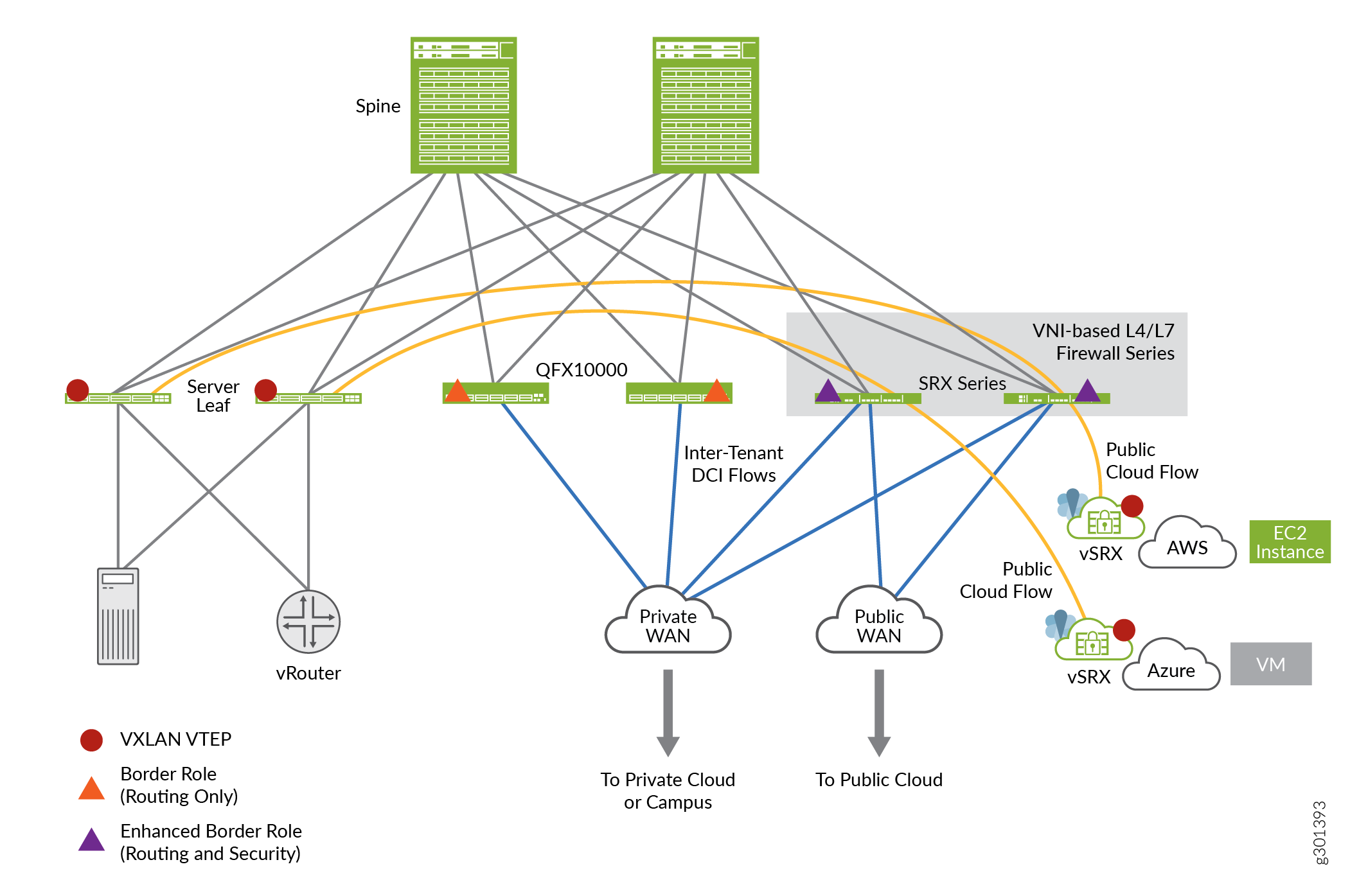
配置
CLI 快速配置
要快速配置此示例,请复制以下命令,将其粘贴到文本文件中,删除所有换行符,更改详细信息,以便与网络配置匹配,将命令复制并粘贴到层 [edit] 级的 CLI 中,然后从配置模式进入 commit 。
set security zones security-zone cloud-1
set security zones security-zone dc
set security tunnel-inspection inspection-profile ins-pf1 vxlan vx1 vni r1
set security tunnel-inspection inspection-profile ins-pf1 vxlan vx1 vni r2
set security tunnel-inspection inspection-profile ins-pf1 vxlan vx1 vni r3
set security tunnel-inspection inspection-profile ins-pf1 vxlan vx1 vni r4
set security tunnel-inspection inspection-profile ins-pf1 vxlan vx1 policy-set pset1
set security tunnel-inspection vni r1 vni-range 160 to 200
set security tunnel-inspection vni r2 vni-id 155
set security tunnel-inspection vni r3 vni-range 300 to 399
set security tunnel-inspection vni r4 vni-range 100 to 120
set security tunnel-inspection vni v1 vni-range 1 to 100
set security policies from-zone dc to-zone cloud-1 policy p1 match source-address any
set security policies from-zone dc to-zone cloud-1 policy p1 match destination-address any
set security policies from-zone dc to-zone cloud-1 policy p1 match application junos-vxlan
set security policies from-zone dc to-zone cloud-1 policy p1 then permit tunnel-inspection ins-pf1
set security policies from-zone cloud-1 to-zone dc policy p1 match source-address any
set security policies from-zone cloud-1 to-zone dc policy p1 match destination-address any
set security policies from-zone cloud-1 to-zone dc policy p1 match application junos-vxlan
set security policies from-zone cloud-1 to-zone dc policy p1 then permit tunnel-inspection ins-pf1
set security policies policy-set pset1 policy pset_p1 match source-address any
set security policies policy-set pset1 policy pset_p1 match destination-address any
set security policies policy-set pset1 policy pset_p1 match application any
set security policies policy-set pset1 policy pset_p1 then permit
set security policies default-policy deny-all
程序
分步过程
下面的示例要求您在各个配置层级中进行导航。有关作说明,请参阅《Junos OS CLI 用户指南》中的在配置模式下使用 CLI 编辑器。
要配置 VXLAN,请执行以下作:
定义安全区域。
[edit security zones]
user@host# set security-zone cloud-1
user@host# set zones security-zone dc
定义隧道检测配置文件。
[edit security tunnel-inspection]
user@host# set inspection-profile ins-pf1 vxlan vx1 vni r1
user@host# set inspection-profile ins-pf1 vxlan vx1 vni r2
user@host# set inspection-profile ins-pf1 vxlan vx1 vni r3
user@host# set inspection-profile ins-pf1 vxlan vx1 vni r4
user@host# set inspection-profile ins-pf1 vxlan vx1 policy-set pset1
user@host# set vni r1 vni-range 160 to 200
user@host# set vni r2 vni-id 155
user@host# set vni r3 vni-range 300 to 399
user@host# set vni r4 vni-range 100 to 120
user@host# set vni v1 vni-range 1 to 100
定义外部会话策略。
[edit security policies]
user@host# set from-zone dc to-zone cloud-1 policy p1 match source-address any
user@host# set from-zone dc to-zone cloud-1 policy p1 match destination-address any
user@host# set from-zone dc to-zone cloud-1 policy p1 match application junos-vxlan
user@host# set from-zone dc to-zone cloud-1 policy p1 then permit tunnel-inspection profile-1
user@host# set from-zone cloud-1 to-zone dc policy p1 match source-address any
user@host# set from-zone cloud-1 to-zone dc policy p1 match destination-address any
user@host# set from-zone cloud-1 to-zone dc policy p1 match application junos-vxlan
user@host# set from-zone cloud-1 to-zone dc policy p1 then permit tunnel-inspection ins-pf1
定义策略集。
[edit security policies]
user@host# set policy-set pset1 policy pset_p1 match source-address any
user@host# set policy-set pset1 policy pset_p1  destination-address any
user@host# set policy-set pset1 policy pset_p1  match application any
user@host# set policy-set pset1 policy pset_p1 then permit
user@host# set default-policy deny-all
结果
在配置模式下,输入 show security policies 命令以确认您的配置。如果输出未显示预期的配置,请重复此示例中的配置说明,以便进行更正。
user@host# show security policies
from-zone dc to-zone cloud-1 {
    policy p1 {
        match {
            source-address any;
            destination-address any;
            application junos-vxlan;
        }
        then {
            permit {
                tunnel-inspection {
                    ins-pf1;
                }
            }
        }
    }
}
from-zone cloud-1 to-zone dc {
    policy p1 {
        match {
            source-address any;
            destination-address any;
            application junos-vxlan;
        }
        then {
            permit {
                tunnel-inspection {
                    ins-pf1;
                }
            }
        }
    }
}
policy-set pset1 {
    policy pset_p1 {
        match {
            source-address any;
            destination-address any;
            application any;
        }
        then {
            permit;
        }
    }
}
default-policy {
    deny-all;
}
如果完成设备上的功能配置,请从配置模式输入 commit 。
验证
验证隧道检查配置文件和 VNI
目的
验证隧道构造配置文件和 VNI 是否已混淆。
行动
在作模式下,输入 show security tunnel-inspection profiles ins-pf1 和 show security tunnel-inspection vnis 命令。
user@host> show security tunnel-inspection profiles ins-pf1
node0:
--------------------------------------------------------------------------
Logical system: root-logical-system
  Profile count: 1
  Profile: ins-pf1
    Type: VXLAN
    Vxlan count: 1
    Vxlan name: vx1
    VNI count: 4
      VNI:r1, r2, r3, r4
      Policy set: pset1
      Inspection level: 1
user@host> show security tunnel-inspection vnis
node0:
--------------------------------------------------------------------------
Logical system: root-logical-system
  VNI count: 5
  VNI name: r1
      VNI id count: 1
      [160 - 200]
  VNI name: r2
      VNI id count: 1
      [155 - 155]
  VNI name: r3
      VNI id count: 1
      [300 - 399]
  VNI name: r4
      VNI id count: 1
      [100 - 120]
  VNI name: v1
      VNI id count: 1
      [1 - 100]
意义
输出显示 VXLAN 功能已启用,并且没有安全搜索重定向和安全搜索重写。
验证安全搜索功能
目的
验证是否为内容安全 Web 过滤解决方案启用了安全搜索功能。
行动
在作模式下,输入 Show security flow tunnel-inspection statistic 命令以查看通道检测统计信息。
user@host> show security flow tunnel-inspection statistics
node0:
--------------------------------------------------------------------------

  Flow Tunnel-inspection statistics:
  Tunnel-inspection statistics of FPC4 PIC1:
  Tunnel-inspection type VXLAN:
    overlay session active:             0
    overlay session create:           269
    overlay session close:            269
    underlay session active:            0
    underlay session create:          566
    underlay session close:           566
    input packets:       349717
    input bytes:      363418345
    output packets:      348701
    output bytes:     363226339
    bypass packets:         501
    bypass bytes:         50890

  Tunnel-inspection statistics of FPC4 PIC2:
  Tunnel-inspection type VXLAN:
    overlay session active:             0
    overlay session create:           270
    overlay session close:            270
    underlay session active:            0
    underlay session create:          586
    underlay session close:           586
    input packets:       194151
    input bytes:      200171306
    output packets:      193221
    output bytes:     199987258
    bypass packets:         617
    bypass bytes:         92902

  Tunnel-inspection statistics of FPC4 PIC3:
  Tunnel-inspection type VXLAN:
    overlay session active:             0
    overlay session create:           275
    overlay session close:            275
    underlay session active:            0
    underlay session create:          615
    underlay session close:           615
    input packets:       216486
    input bytes:      222875066
    output packets:      213827
    output bytes:     222460378
    bypass packets:        2038
    bypass bytes:        270480

  Tunnel-inspection statistics summary:
  Tunnel-inspection type VXLAN:
    overlay session active:             0
    overlay session create:           814
    overlay session close:            814
    underlay session active:            0
    underlay session create:         1767
    underlay session close:          1767
    input packets:       760354
    input bytes:      786464717
    output packets:      755749
    output bytes:     785673975
    bypass packets:        3156
    bypass bytes:        414272

node1:
--------------------------------------------------------------------------

  Flow Tunnel-inspection statistics:
  Tunnel-inspection statistics of FPC4 PIC1:
  Tunnel-inspection type VXLAN:
    overlay session active:             0
    overlay session create:           269
    overlay session close:            269
    underlay session active:            0
    underlay session create:          566
    underlay session close:           566
    input packets:            0
    input bytes:              0
    output packets:           0
    output bytes:             0
    bypass packets:           0
    bypass bytes:             0

  Tunnel-inspection statistics of FPC4 PIC2:
  Tunnel-inspection type VXLAN:
    overlay session active:             0
    overlay session create:           270
    overlay session close:            270
    underlay session active:            0
    underlay session create:          586
    underlay session close:           586
    input packets:            0
    input bytes:              0
    output packets:           0
    output bytes:             0
    bypass packets:           0
    bypass bytes:             0

  Tunnel-inspection statistics of FPC4 PIC3:
  Tunnel-inspection type VXLAN:
    overlay session active:             0
    overlay session create:           275
    overlay session close:            275
    underlay session active:            0
    underlay session create:          615
    underlay session close:           615
    input packets:            0
    input bytes:              0
    output packets:           0
    output bytes:             0
    bypass packets:           0
    bypass bytes:             0

  Tunnel-inspection statistics summary:
  Tunnel-inspection type VXLAN:
    overlay session active:             0
    overlay session create:           814
    overlay session close:            814
    underlay session active:            0
    underlay session create:         1767
    underlay session close:          1767
    input packets:            0
    input bytes:              0
    output packets:           0
    output bytes:             0
    bypass packets:           0
    bypass bytes:             0
意义
输出显示 VXLAN 功能已启用,并且没有安全搜索重定向和安全搜索重写。