
示例:使用分段路由配置 OSPFv2 的多个独立实例
使用此示例可以使用分段路由配置 OSPFv2 的多个 IGP 实例。
我们的内容测试团队已经验证并更新了此示例。
| 阅读时间 |
30 分钟 |
| 配置时间 |
20 分钟 |
先决条件示例
| 硬件要求 |
三台 MX 系列路由器。 |
| 软件要求 |
在所有设备上运行 Junos OS 24.4R1 或更高版本。 |
准备工作
| 好处 |
使用分段路由配置 OSPFv2 的多个独立实例可增强网络灵活性、可扩展性和对流量工程的控制,特别是在大型和复杂网络中。 |
| 了解更多 |
功能概述
| 使用的技术 |
|
| 主要验证任务 |
|
拓扑概览
此配置示例描述了三个设备 R1、R2 和 R3。设备 R1 和设备 R2 之间以及设备 R2 和设备 R3 之间配置了两个子接口。每个设备运行多个启用分段路由的 OSPF 实例。我们配置 SR-MPLS 以通过网络提供路径控制。设备的两个子接口上每个子接口上都有正在运行的名为 metro-edge OSPF 的实例。
| 主机名 |
角色 |
功能 |
|---|---|---|
| R1、R2 和 R3 |
设备在子接口上配置了多实例 OSPF,并启用了分段路由。 |
这些设备参与 OSPF 多实例、播发路由,并使用前缀 SID 将流量转发到其他设备。 |
拓扑图示
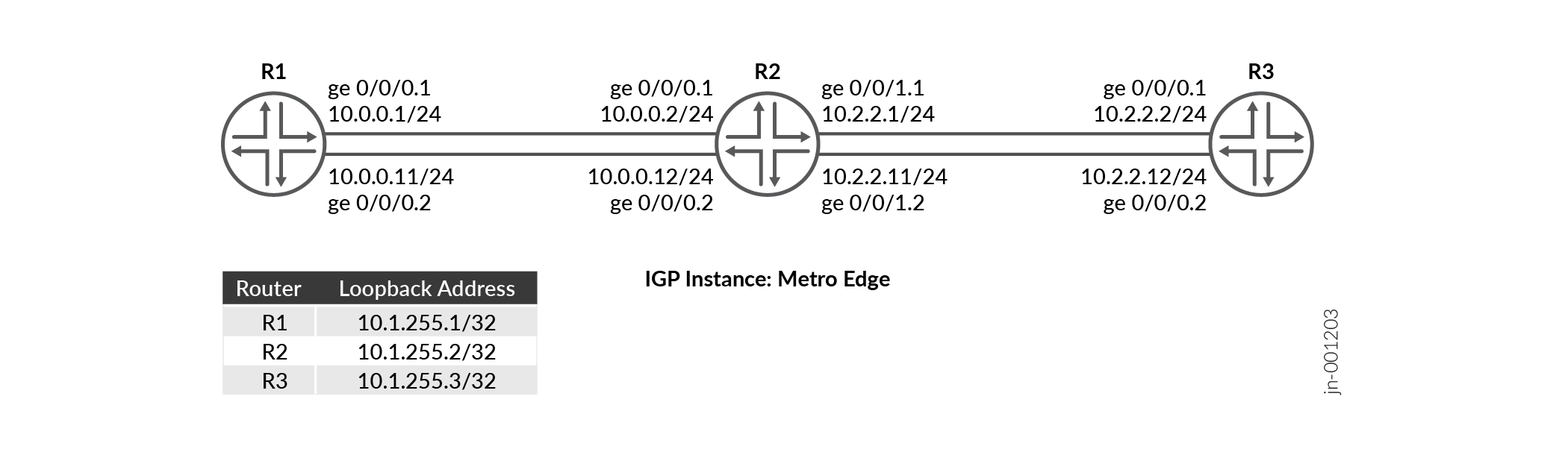
R2 配置步骤
有关 R2 上的完整示例配置,请参阅: 附录 1:在所有设备上设置命令
本节重点介绍在此示例中配置 R0 设备所需的主要配置任务。
-
在设备接口的逻辑单元上配置基本设备设置,例如主机名、
enhanced-ip模式、IPv4 地址。使用 IP 地址配置环路接口并启用 MPLS。
配置路由器 ID 和自治系统 (AS) 编号,以便在属于同一 AS 的一组路由设备中传播路由信息。
启用 VLAN 标记,并使用不同的 VLAN ID 配置两个接口的逻辑单元。
在每个逻辑单元上启用 MPLS。配置可应用于每个接口的逻辑单元上的传出数据包的最大 MPLS 标签数。
定义一个策略来对数据包进行负载平衡,并应用每个数据包的策略来启用流量的负载平衡。
配置基于确切前缀匹配路由的策略语句,并为匹配的路由分配一个分段标识符。
在层次结构级别配置 MPLS 流量工程、分段路由全局块 (SRGB) 标签范围
edit protocol mpls以确保标签在分段路由域中更加可预测,MPLS 标签范围用于从配置的 SRGB 标签中为链路分配标签。[edit] set system host-name R2 set chassis network-services enhanced-ip set interfaces ge-0/0/0 unit 1 family inet address 10.0.0.2/24 set interfaces ge-0/0/0 unit 2 family inet address 10.0.0.12/24 set interfaces ge-0/0/1 unit 1 family inet address 10.2.2.1/24 set interfaces ge-0/0/1 unit 2 family inet address 10.2.2.11/24
[edit]
set interfaces lo0 unit 0 family inet address 10.1.255.2/32
set interfaces lo0 unit 0 family mpls
[edit]
set routing-options router-id 10.1.255.2
set routing-options autonomous-system 100
[edit]
set interfaces ge-0/0/0 vlan-tagging
set interfaces ge-0/0/0 unit 1 vlan-id 1
set interfaces ge-0/0/0 unit 2 vlan-id 2
set interfaces ge-0/0/1 vlan-tagging
set interfaces ge-0/0/1 unit 1 vlan-id 1
set interfaces ge-0/0/1 unit 2 vlan-id 2
[edit]
set interfaces ge-0/0/0 unit 1 family mpls maximum-labels 5
set interfaces ge-0/0/0 unit 2 family mpls maximum-labels 5
set interfaces ge-0/0/1 unit 1 family mpls maximum-labels 5
set interfaces ge-0/0/1 unit 2 family mpls maximum-labels 5
[edit]
set policy-options policy-statement pplb then load-balance per-packet
set policy-options policy-statement pplb then accept
set routing-options forwarding-table export pplb
[edit]
set policy-options policy-statement prefix-sid term 1 from route-filter 10.1.255.2/32 exact
set policy-options policy-statement prefix-sid term 1 then prefix-segment index 1001
set policy-options policy-statement prefix-sid term 1 then accept
[edit]
set protocols mpls traffic-engineering
set protocols mpls label-range srgb-label-range 800000 879999
set protocols mpls label-range static-label-range 60001 100000
set protocols mpls interface all
set protocols mpls interface fxp0.0 disable
在子接口上配置(
ospf-instancemetro-edge从 R2 连接到 R1 以及从 R2 连接到 R3)。[edit] set protocols ospf-instance metro-edge area 0.0.0.0 interface all
使 OSPF
metro-edge实例能够通过前缀 sids 使用分段路由。[edit] set protocols ospf-instance metro-edge source-packet-routing prefix-segment prefix-sid
- 配置节点分段的 IPv4 索引值。
[edit]
set protocols ospf-instance metro-edge source-packet-routing node-segment ipv4-index 1
将OSPF
metro-edge实例的环路地址配置为被动地址并禁用管理接口(fxp0.0)。[edit] set protocols ospf-instance metro-edge area 0.0.0.0 interface lo0.0 passive set protocols ospf-instance metro-edge area 0.0.0.0 interface fxp0.0 disable
验证
| 命令 | 验证任务 |
|---|---|
| 显示路由协议 OSPF 表 inet.0 广泛 |
|
| 显示 OSPF spring sid-database igp-instance igp-instance | 验证 OSPF 实例的 OSPF 分段路由数据库。 |
| show ospf neighbor igp-instance igp-instance | 验证特定 OSPF 实例的邻接方。 |
| show ospf database igp-instance igp-instance | 验证 IGP 实例关联的 OSPF 链路状态数据库 (LSDB) 中的 OSPF 通告条目。 |
| show ospf interface igp-instance igp-instance | 验证映射到 IGP 实例的接口。 |
| 显示 OSPF 路由 IGP 实例 igp-instance | 验证R1和R3的路由和OSPF实例映射信息。 |
验证路由表
目的
验证路由表中的路由条目
行动
在作模式下,运行 show route table inet.0 route-destination address extensive 命令。
user@R2>show route protocol ospf table inet.0 10.1.255.1 extensive
inet.0: 19 destinations, 21 routes (19 active, 0 holddown, 0 hidden)
10.1.255.1/32 (1 entry, 1 announced)
TSI:
KRT in-kernel 10.1.255.1/32 -> {list:10.0.0.1, 10.0.0.11}
        *OSPF   Preference: 10/10
                Next hop type: Router, Next hop index: 0
                Address: 0x8b32234
                Next-hop reference count: 2, Next-hop session id: 0
                Kernel Table Id: 0
                Next hop: 10.0.0.1 via ge-0/0/0.1, selected
                Session Id: 0
                Next hop: 10.0.0.11 via ge-0/0/0.2
                Session Id: 0
                State: <Active Int>
                Local AS:   100
                Age: 1w4d 16:01:19      Metric: 1
                Validation State: unverified
                Area: 0.0.0.0
                Task: OSPF-metro-edge
                Announcement bits (1): 0-KRT
                AS path: I
                Thread: junos-main

user@R2>show route protocol ospf table inet.0 10.1.255.3 extensive
inet.0: 19 destinations, 21 routes (19 active, 0 holddown, 0 hidden)
10.1.255.3/32 (1 entry, 1 announced)
TSI:
KRT in-kernel 10.1.255.3/32 -> {list:10.2.2.2, 10.2.2.12}
        *OSPF   Preference: 10/10
                Next hop type: Router, Next hop index: 0
                Address: 0x8b316f4
                Next-hop reference count: 2, Next-hop session id: 0
                Kernel Table Id: 0
                Next hop: 10.2.2.2 via ge-0/0/1.1, selected
                Session Id: 0
                Next hop: 10.2.2.12 via ge-0/0/1.2
                Session Id: 0
                State: <Active Int>
                Local AS:   100
                Age: 1w4d 16:13:55      Metric: 1
                Validation State: unverified
                Area: 0.0.0.0
                Task: OSPF-metro-edge
                Announcement bits (1): 0-KRT
                AS path: I
                Thread: junos-main
意义
输出说明 R1 的环路地址 (10.1.255.1) 和 R3 的环路地址 (10.1.255.2) 映射到 R2 中配置的 OSPF igp 实例城 域网边缘 。
验证 OSPF 通告
目的
验证 IGP 实例关联的 OSPF 链路状态数据库 (LSDB) 中的 OSPF 通告条目。
行动
在作模式下,运行 show ospf database igp-instance igp-instance 命令。
user@R2>show ospf database igp-instance metro-edge
    OSPF database, Area 0.0.0.0
Type       ID               Adv Rtr           Seq      Age  Opt  Cksum  Len
Router   10.1.255.1       10.1.255.1       0x80000013  1110  0x22 0xe6e9  72
Router  *10.1.255.2       10.1.255.2       0x80000015  1084  0x22 0x7be2  96
Router   10.1.255.3       10.1.255.3       0x80000013  1585  0x22 0x491   72
Network *10.0.0.2         10.1.255.2       0x80000010  2959  0x22 0x6791  32
Network *10.0.0.12        10.1.255.2       0x80000010  2209  0x22 0x3eb   32
Network  10.2.2.2         10.1.255.3       0x80000010  2085  0x22 0x4ba6  32
Network  10.2.2.12        10.1.255.3       0x80000010  1085  0x22 0xe601  32
OpaqArea 7.0.0.1          10.1.255.1       0x80000012   193  0x22 0x8c0   44
OpaqArea*7.0.0.1          10.1.255.2       0x80000012   511  0x22 0x2a9b  44
OpaqArea 7.0.0.1          10.1.255.3       0x80000012   585  0x22 0x4c76  44
OpaqArea 8.0.0.1          10.1.255.1       0x80000010  2610  0x22 0x4683  48
OpaqArea*8.0.0.1          10.1.255.2       0x80000010  2584  0x22 0xac01  52
OpaqArea 8.0.0.1          10.1.255.3       0x80000010  2584  0x22 0x7d06  52
OpaqArea 8.0.0.2          10.1.255.1       0x80000010  1860  0x22 0x4f55  48
OpaqArea*8.0.0.2          10.1.255.2       0x80000011   334  0x22 0xf393  52
OpaqArea 8.0.0.2          10.1.255.3       0x80000011    84  0x22 0xc498  52
OpaqArea*8.0.0.3          10.1.255.2       0x80000010  1834  0x22 0x445a  48
OpaqArea*8.0.0.4          10.1.255.2       0x80000010  1459  0x22 0x4d2c  48
意义
验证 OSPF 路由表中的路由
目的
验证 OSPF 路由表中的路由
行动
在作模式下,运行 show ospf route 命令。
user@R2>show ospf route igp-instance metro-edge
Topology default Route Table:

Prefix             Path  Route      NH       Metric NextHop       Nexthop
                   Type  Type       Type            Interface     Address/LSP
10.1.255.1         Intra Router     IP            1 ge-0/0/0.1    10.0.0.1
                                                    ge-0/0/0.2    10.0.0.11
10.1.255.3         Intra Router     IP            1 ge-0/0/1.1    10.2.2.2
                                                    ge-0/0/1.2    10.2.2.12
10.0.0.0/24        Intra Network    IP            1 ge-0/0/0.1
                                                    ge-0/0/0.2
10.1.255.1/32      Intra Network    IP            1 ge-0/0/0.1    10.0.0.1
                                                    ge-0/0/0.2    10.0.0.11
10.1.255.2/32      Intra Network    IP            0 lo0.0
10.1.255.3/32      Intra Network    IP            1 ge-0/0/1.1    10.2.2.2
                                                    ge-0/0/1.2    10.2.2.12
10.2.2.0/24        Intra Network    IP            1 ge-0/0/1.1
                                                    ge-0/0/1.2
299840             Intra Network    Mpls          0 ge-0/0/0.2    10.0.0.11
299840 (S=0)       Intra Network    Mpls          0 ge-0/0/0.2    10.0.0.11
299856             Intra Network    Mpls          0 ge-0/0/0.1    10.0.0.1
299856 (S=0)       Intra Network    Mpls          0 ge-0/0/0.1    10.0.0.1
299904             Intra Network    Mpls          0 ge-0/0/1.2    10.2.2.12
299904 (S=0)       Intra Network    Mpls          0 ge-0/0/1.2    10.2.2.12
299920             Intra Network    Mpls          0 ge-0/0/1.1    10.2.2.2
299920 (S=0)       Intra Network    Mpls          0 ge-0/0/1.1    10.2.2.2
意义
R2 上的输出显示了 R1 和 R3 的环路地址和 OSPF 实例映射信息。
验证 OSPF 分段路由数据库
目的
验证 OSPF 实例 Metro-edge 的 OSPF 分段路由数据库。
行动
在作模式下,运行 show ospf spring sid-database igp-instance igp-instance 命令。
user@R2>show ospf spring sid-database igp-instance metro-edge
    OSPF database, Area 0.0.0.0
SID     Prefix             Advertised-by    Route-type
1000    10.1.255.1/32      10.1.255.1       Intra-Area
1001    10.1.255.2/32      10.1.255.2       Intra-Area
1002    10.1.255.3/32      10.1.255.3       Intra-Area
意义
输出说明了 OSPF(城域网边缘)的多个实例播发不同的前缀 SID。
验证 OSPF 接口
目的
验证支持 OSPF 实例的接口的状态信息。
行动
在作模式下,运行 show ospf interface igp-instance igp-instance 命令。
user@R2>show ospf interface igp-instance metro-edge
Interface           State   Area            DR ID           BDR ID          Nbrs
ge-0/0/0.1          DR      0.0.0.0         10.1.255.2      10.1.255.1         1
ge-0/0/0.2          DR      0.0.0.0         10.1.255.2      10.1.255.1         1
ge-0/0/1.1          DR      0.0.0.0         10.1.255.2      10.1.255.3         1
ge-0/0/1.2          DR      0.0.0.0         10.1.255.2      10.1.255.3         1
lo0.0               DRother 0.0.0.0         0.0.0.0         0.0.0.0            0
lo0.0               DRother 0.0.0.0         0.0.0.0         0.0.0.0            0
意义
输出显示映射到 OSPF 实例(城域网边缘)的 R2 的子接口。
验证 OSPF 邻接方
目的
验证配置链路之间的邻接关系。
行动
在作模式下,运行 show ospf neighbor igp-instance igp-instance 命令。
user@R2>show ospf neighbor igp-instance metro-edge
Address          Interface              State           ID               Pri  Dead
10.0.0.1         ge-0/0/0.1             Full            10.1.255.1       128    35
10.0.0.11        ge-0/0/0.2             Full            10.1.255.1       128    39
10.2.2.2         ge-0/0/1.1             Full            10.1.255.3       128    33
10.2.2.12        ge-0/0/1.2             Full            10.1.255.3       128    36
意义
设备 R2 已与设备 R1 和设备 R3 建立邻接关系,如“状态输出”字段所示,该字段为 Full。
附录 1:在所有设备上设置命令
要快速配置此示例,请复制以下命令,将其粘贴到文本文件中,删除所有换行符,更改详细信息,以便与网络配置匹配,然后将命令复制并粘贴到 [编辑] 层次结构级别的 CLI 中。
R1
set system host-name R1
set interfaces ge-0/0/0 unit 1 family inet address 10.0.0.1/24
set interfaces ge-0/0/0 unit 2 family inet address 10.0.0.11/24
set interfaces ge-0/0/0 unit 2 enable
set interfaces ge-0/0/0 vlan-tagging
set interfaces ge-0/0/0 unit 1 vlan-id 1
set interfaces ge-0/0/0 unit 2 vlan-id 2
set interfaces ge-0/0/0 unit 1 family mpls maximum-labels 5
set interfaces ge-0/0/0 unit 2 family mpls maximum-labels 5
set interfaces lo0 unit 0 family inet address 10.1.255.1/32
set interfaces lo0 unit 0 family mpls
set policy-options policy-statement pplb then load-balance per-packet
set policy-options policy-statement pplb then accept
set policy-options policy-statement prefix-sid term 1 from route-filter 10.1.255.1/32 exact
set policy-options policy-statement prefix-sid term 1 then prefix-segment index 1000
set policy-options policy-statement prefix-sid term 1 then accept
set routing-options router-id 10.1.255.1
set routing-options autonomous-system 100
set routing-options forwarding-table export pplb
set protocols mpls traffic-engineering
set protocols mpls label-range srgb-label-range 800000 879999
set protocols mpls label-range static-label-range 60001 100000
set protocols mpls interface all
set protocols mpls interface fxp0.0 disable
set protocols ospf-instance metro-edge source-packet-routing prefix-segment prefix-sid
set protocols ospf-instance metro-edge source-packet-routing node-segment ipv4-index 0
set protocols ospf-instance metro-edge area 0.0.0.0 interface all
set protocols ospf-instance metro-edge area 0.0.0.0 interface lo0.0 passive
set protocols ospf-instance metro-edge area 0.0.0.0 interface fxp0.0 disable
R2
set system host-name R2
set interfaces ge-0/0/0 unit 1 family inet address 10.0.0.2/24
set interfaces ge-0/0/0 unit 2 family inet address 10.0.0.12/24
set interfaces ge-0/0/1 unit 1 family inet address 10.2.2.1/24
set interfaces ge-0/0/1 unit 2 family inet address 10.2.2.11/24
set interfaces ge-0/0/0 vlan-tagging
set interfaces ge-0/0/0 unit 1 vlan-id 1
set interfaces ge-0/0/0 unit 2 vlan-id 2
set interfaces ge-0/0/1 vlan-tagging
set interfaces ge-0/0/1 unit 1 vlan-id 1
set interfaces ge-0/0/1 unit 2 vlan-id 2
set interfaces ge-0/0/0 unit 1 family mpls maximum-labels 5
set interfaces ge-0/0/0 unit 2 family mpls maximum-labels 5
set interfaces ge-0/0/1 unit 1 family mpls maximum-labels 5
set interfaces ge-0/0/1 unit 2 family mpls maximum-labels 5
set interfaces lo0 unit 0 family inet address 10.1.255.2/32
set interfaces lo0 unit 0 family mpls
set policy-options policy-statement pplb then load-balance per-packet
set policy-options policy-statement pplb then accept
set policy-options policy-statement prefix-sid term 1 from route-filter 10.1.255.2/32 exact
set policy-options policy-statement prefix-sid term 1 then prefix-segment index 1001
set policy-options policy-statement prefix-sid term 1 then accept
set routing-options router-id 10.1.255.2
set routing-options autonomous-system 100
set routing-options forwarding-table export pplb
set protocols mpls traffic-engineering
set protocols mpls label-range srgb-label-range 800000 879999
set protocols mpls label-range static-label-range 60001 100000
set protocols mpls interface all
set protocols mpls interface fxp0.0 disable
set protocols ospf-instance metro-edge source-packet-routing prefix-segment prefix-sid
set protocols ospf-instance metro-edge source-packet-routing node-segment ipv4-index 1
set protocols ospf-instance metro-edge area 0.0.0.0 interface all
set protocols ospf-instance metro-edge area 0.0.0.0 interface lo0.0 passive
set protocols ospf-instance metro-edge area 0.0.0.0 interface fxp0.0 disable
R3
set system host-name R3
set interfaces ge-0/0/0 unit 1 family inet address 10.2.2.2/24
set interfaces ge-0/0/0 unit 2 family inet address 10.2.2.12/24
set interfaces ge-0/0/0 vlan-tagging
set interfaces ge-0/0/0 unit 1 vlan-id 1
set interfaces ge-0/0/0 unit 2 vlan-id 2
set interfaces ge-0/0/0 unit 1 family mpls maximum-labels 5
set interfaces ge-0/0/0 unit 2 family mpls maximum-labels 5
set interfaces lo0 unit 0 family inet address 10.1.255.3/32
set interfaces lo0 unit 0 family mpls
set policy-options policy-statement pplb then load-balance per-packet
set policy-options policy-statement pplb then accept
set policy-options policy-statement prefix-sid term 1 from route-filter 10.1.255.3/32 exact
set policy-options policy-statement prefix-sid term 1 then prefix-segment index 1002
set policy-options policy-statement prefix-sid term 1 then accept
set routing-options router-id 10.1.255.3
set routing-options autonomous-system 100
set routing-options forwarding-table export pplb
set protocols mpls traffic-engineering
set protocols mpls label-range srgb-label-range 800000 879999
set protocols mpls label-range static-label-range 60001 100000
set protocols mpls interface all
set protocols mpls interface fxp0.0 disable
set protocols ospf-instance metro-edge source-packet-routing prefix-segment prefix-sid
set protocols ospf-instance metro-edge source-packet-routing node-segment ipv4-index 2
set protocols ospf-instance metro-edge area 0.0.0.0 interface lo0.0 passive
set protocols ospf-instance metro-edge area 0.0.0.0 interface all
set protocols ospf-instance metro-edge area 0.0.0.0 interface fxp0.0 disable