
示例:配置多拓扑路由,为单独网络路径上的组播流量提供冗余
此示例说明如何使用多拓扑路由 (MTR) 为通过单独网络路径的组播流量提供冗余。也就是说,两个组播源发送相同的组播流,但在链路发生故障时出于冗余目的,两个流使用不相交的路径。
请注意,目前没有定义使用 PIM 的 MTR 扩展的标准。
要求
配置此示例之前,不需要除设备初始化之外的特殊配置。
概述
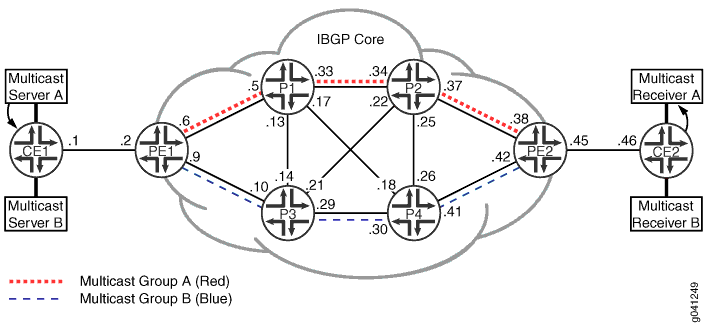
配置
CLI 快速配置
要快速配置此示例,请复制以下命令,将其粘贴到文本文件中,删除所有换行符,更改详细信息,以便与网络配置匹配,然后将命令复制并粘贴到层次结构级别的 [edit] CLI 中。
设备 CE1
set interfaces fe-0/1/0 fastether-options loopback
set interfaces fe-0/1/0 unit 0 family inet address 11.19.130.1/24
set interfaces fe-0/1/0 unit 0 family inet address 11.19.131.1/24
set interfaces fe-0/1/0 unit 0 family inet address 11.19.132.1/24
set interfaces ge-1/2/0 unit 1 description to-PE1
set interfaces ge-1/2/0 unit 1 family inet address 10.0.0.1/30
set interfaces lo0 unit 97 family inet address 10.255.165.97/32 primary
set protocols bgp group ebgp type external
set protocols bgp group ebgp local-address 10.0.0.1
set protocols bgp group ebgp family inet unicast
set protocols bgp group ebgp family inet multicast
set protocols bgp group ebgp export set_community
set protocols bgp group ebgp export inject_directs
set protocols bgp group ebgp peer-as 100
set protocols bgp group ebgp neighbor 10.0.0.2
set protocols pim interface fe-0/1/0.0 mode sparse
set protocols pim interface ge-1/2/0.1 mode sparse
set policy-options policy-statement inject_directs term a from protocol direct
set policy-options policy-statement inject_directs term a from interface fe-0/1/0.0
set policy-options policy-statement inject_directs term a then next policy
set policy-options policy-statement inject_directs term a then accept
set policy-options policy-statement inject_directs term b then reject
set policy-options policy-statement set_community term a from route-filter 11.19.130.0/24 exact
set policy-options policy-statement set_community term a from route-filter 11.19.131.0/24 exact
set policy-options policy-statement set_community term a then community add red
set policy-options policy-statement set_community term a then accept
set policy-options policy-statement set_community term b from route-filter 11.19.132.0/24 exact
set policy-options policy-statement set_community term b from route-filter 11.19.133.0/24 exact
set policy-options policy-statement set_community term b then community add blue
set policy-options policy-statement set_community term b then accept
set policy-options policy-statement set_community term default then accept
set policy-options community blue members target:50:50
set policy-options community red members target:40:40
set routing-options interface-routes rib-group inet if-rib
set routing-options static route 10.0.0.0/16 next-hop 10.0.0.2
set routing-options rib-groups inet.2 import-rib inet.0
set routing-options rib-groups if-rib import-rib inet.0
set routing-options rib-groups if-rib import-rib inet.2
set routing-options rib-groups if-rib import-policy inject_directs
set routing-options autonomous-system 101
设备 CE2
set interfaces fe-0/1/1 unit 0
set interfaces ge-1/2/0 unit 46 description to-PE2
set interfaces ge-1/2/0 unit 46 family inet address 10.0.0.46/30
set interfaces lo0 unit 20 family inet address 10.255.165.20/32 primary
set protocols bgp group ebgp type external
set protocols bgp group ebgp local-address 10.0.0.46
set protocols bgp group ebgp peer-as 100
set protocols bgp group ebgp neighbor 10.0.0.45
set routing-options autonomous-system 102
设备 PE1
set interfaces ge-1/2/0 unit 2 description to-CE1
set interfaces ge-1/2/0 unit 2 family inet address 10.0.0.2/30
set interfaces ge-1/2/1 unit 6 description to-P1
set interfaces ge-1/2/1 unit 6 family inet address 10.0.0.6/30
set interfaces ge-1/2/2 unit 9 description to-P3
set interfaces ge-1/2/2 unit 9 family inet address 10.0.0.9/30
set interfaces lo0 unit 93 family inet address 10.255.165.93/32 primary
set interfaces lo0 unit 93 family inet address 1.1.1.30/32
set interfaces lo0 unit 93 family inet address 2.2.2.30/32
set protocols bgp group ibgp type internal
set protocols bgp group ibgp local-address 10.255.165.93
set protocols bgp group ibgp family inet unicast
set protocols bgp group ibgp family inet multicast
set protocols bgp group ibgp export nhs_test
set protocols bgp group ibgp export nhs_inet0_self
set protocols bgp group ibgp neighbor 10.255.165.111
set protocols bgp group ibgp neighbor 10.255.165.203
set protocols bgp group ibgp neighbor 10.255.165.113
set protocols bgp group ibgp neighbor 10.255.165.95
set protocols bgp group ibgp neighbor 10.255.165.99
set protocols bgp group ebgp type external
set protocols bgp group ebgp local-address 10.0.0.2
set protocols bgp group ebgp family inet unicast
set protocols bgp group ebgp family inet multicast
set protocols bgp group ebgp peer-as 101
set protocols bgp group ebgp neighbor 10.0.0.1
set protocols ospf topology red topology-id 126
set protocols ospf topology blue topology-id 52
set protocols ospf area 0.0.0.0 interface ge-1/2/1.6 metric 10
set protocols ospf area 0.0.0.0 interface ge-1/2/1.6 topology blue metric 1
set protocols ospf area 0.0.0.0 interface ge-1/2/1.6 topology red
set protocols ospf area 0.0.0.0 interface ge-1/2/2.9 metric 10
set protocols ospf area 0.0.0.0 interface ge-1/2/2.9 topology red metric 1
set protocols ospf area 0.0.0.0 interface ge-1/2/2.9 topology blue
set protocols ospf area 0.0.0.0 interface lo0.93 passive
set protocols ospf area 0.0.0.0 interface 1.1.1.30 topology red
set protocols ospf area 0.0.0.0 interface 1.1.1.30 topology blue disable
set protocols ospf area 0.0.0.0 interface 2.2.2.30 topology blue
set protocols ospf area 0.0.0.0 interface 2.2.2.30 topology red disable
set protocols pim rib-group inet mcast-rib
set protocols pim interface ge-1/2/0.2 mode sparse
set protocols pim interface ge-1/2/1.6 mode sparse
set protocols pim interface ge-1/2/2.9 mode sparse
set policy-options policy-statement nhs_inet0_self term a from protocol bgp
set policy-options policy-statement nhs_inet0_self term a from rib inet.0
set policy-options policy-statement nhs_inet0_self term a then next-hop self
set policy-options policy-statement nhs_test term a from protocol bgp
set policy-options policy-statement nhs_test term a from community red
set policy-options policy-statement nhs_test term a then next-hop 1.1.1.30
set policy-options policy-statement nhs_test term a then next policy
set policy-options policy-statement nhs_test term a then accept
set policy-options policy-statement nhs_test term b from protocol bgp
set policy-options policy-statement nhs_test term b from community blue
set policy-options policy-statement nhs_test term b then next-hop 2.2.2.30
set policy-options policy-statement nhs_test term b then next policy
set policy-options policy-statement nhs_test term b then accept
set policy-options policy-statement nhs_test term c then next-hop self
set policy-options community blue members target:50:50
set policy-options community red members target:40:40
set routing-options rib-groups mcast-rib import-rib inet.2
set routing-options autonomous-system 100
set routing-options resolution rib inet.2 resolution-ribs :red.inet.0
set routing-options resolution rib inet.2 resolution-ribs :blue.inet.0
set routing-options topologies family inet topology red
set routing-options topologies family inet topology blue
设备 PE2
set interfaces ge-1/2/0 unit 38 description to-P2
set interfaces ge-1/2/0 unit 38 family inet address 10.0.0.38/30
set interfaces ge-1/2/1 unit 42 description to-P4
set interfaces ge-1/2/1 unit 42 family inet address 10.0.0.42/30
set interfaces ge-1/2/2 unit 45 description to-CE2
set interfaces ge-1/2/2 unit 45 family inet address 10.0.0.45/30
set interfaces lo0 unit 203 family inet address 10.255.165.203/32 primary
set interfaces lo0 unit 203 family inet address 1.1.1.40/32
set interfaces lo0 unit 203 family inet address 2.2.2.40/32
set protocols bgp group ibgp type internal
set protocols bgp group ibgp local-address 10.255.165.203
set protocols bgp group ibgp family inet unicast
set protocols bgp group ibgp family inet multicast
set protocols bgp group ibgp export nhs_test
set protocols bgp group ibgp export nhs_inet0_self
set protocols bgp group ibgp neighbor 10.255.165.111
set protocols bgp group ibgp neighbor 10.255.165.93
set protocols bgp group ibgp neighbor 10.255.165.113
set protocols bgp group ibgp neighbor 10.255.165.95
set protocols bgp group ibgp neighbor 10.255.165.99
set protocols bgp group ebgp type external
set protocols bgp group ebgp local-address 10.0.0.45
set protocols bgp group ebgp family inet unicast
set protocols bgp group ebgp family inet multicast
set protocols bgp group ebgp peer-as 102
set protocols bgp group ebgp neighbor 10.0.0.46
set protocols ospf topology red topology-id 126
set protocols ospf topology blue topology-id 52
set protocols ospf area 0.0.0.0 interface ge-1/2/0.38 metric 10
set protocols ospf area 0.0.0.0 interface ge-1/2/0.38 topology blue metric 1
set protocols ospf area 0.0.0.0 interface ge-1/2/0.38 topology red
set protocols ospf area 0.0.0.0 interface ge-1/2/1.42 metric 10
set protocols ospf area 0.0.0.0 interface ge-1/2/1.42 topology red metric 1
set protocols ospf area 0.0.0.0 interface ge-1/2/1.42 topology blue
set protocols ospf area 0.0.0.0 interface lo0.203 passive
set protocols ospf area 0.0.0.0 interface 1.1.1.40 topology red
set protocols ospf area 0.0.0.0 interface 1.1.1.40 topology blue disable
set protocols ospf area 0.0.0.0 interface 2.2.2.40 topology red disable
set protocols ospf area 0.0.0.0 interface 2.2.2.40 topology blue
set protocols pim rib-group inet mcast-rib
set protocols pim interface ge-1/2/0.38 mode sparse
set protocols pim interface ge-1/2/1.42 mode sparse
set protocols pim interface ge-1/2/2.45 mode sparse
set policy-options policy-statement nhs then next-hop self
set policy-options policy-statement nhs_inet0_self term a from protocol bgp
set policy-options policy-statement nhs_inet0_self term a from rib inet.0
set policy-options policy-statement nhs_inet0_self term a then next-hop self
set policy-options policy-statement nhs_test term a from protocol bgp
set policy-options policy-statement nhs_test term a from community red
set policy-options policy-statement nhs_test term a then next-hop 1.1.1.40
set policy-options policy-statement nhs_test term a then next policy
set policy-options policy-statement nhs_test term a then accept
set policy-options policy-statement nhs_test term b from protocol bgp
set policy-options policy-statement nhs_test term b from community blue
set policy-options policy-statement nhs_test term b then next-hop 2.2.2.40
set policy-options policy-statement nhs_test term b then next policy
set policy-options policy-statement nhs_test term b then accept
set policy-options policy-statement nhs_test term c then next-hop self
set policy-options community blue members target:50:50
set policy-options community red members target:40:40
set routing-options rib-groups mcast-rib import-rib inet.2
set routing-options autonomous-system 100
set routing-options resolution rib inet.2 resolution-ribs :red.inet.0
set routing-options resolution rib inet.2 resolution-ribs :blue.inet.0
set routing-options topologies family inet topology red
set routing-options topologies family inet topology blue
设备 P1
set interfaces ge-1/2/0 unit 5 description to-PE1
set interfaces ge-1/2/0 unit 5 family inet address 10.0.0.5/30
set interfaces ge-1/2/1 unit 13 description to-P3
set interfaces ge-1/2/1 unit 13 family inet address 10.0.0.13/30
set interfaces ge-1/2/2 unit 17 description to-P4
set interfaces ge-1/2/2 unit 17 family inet address 10.0.0.17/30
set interfaces ge-1/2/3 unit 33 description to-P2
set interfaces ge-1/2/3 unit 33 family inet address 10.0.0.33/30
set interfaces lo0 unit 99 family inet address 10.255.165.99/32 primary
set protocols bgp group ibgp type internal
set protocols bgp group ibgp local-address 10.255.165.99
set protocols bgp group ibgp family inet unicast
set protocols bgp group ibgp family inet multicast
set protocols bgp group ibgp neighbor 10.255.165.93
set protocols bgp group ibgp neighbor 10.255.165.111
set protocols bgp group ibgp neighbor 10.255.165.203
set protocols bgp group ibgp neighbor 10.255.165.95
set protocols bgp group ibgp neighbor 10.255.165.113
set protocols ospf topology red topology-id 126
set protocols ospf topology blue topology-id 52
set protocols ospf area 0.0.0.0 interface ge-1/2/3.33 metric 10
set protocols ospf area 0.0.0.0 interface ge-1/2/3.33 topology red
set protocols ospf area 0.0.0.0 interface ge-1/2/3.33 topology blue metric 1
set protocols ospf area 0.0.0.0 interface ge-1/2/2.17
set protocols ospf area 0.0.0.0 interface ge-1/2/1.13
set protocols ospf area 0.0.0.0 interface ge-1/2/0.5 metric 10
set protocols ospf area 0.0.0.0 interface ge-1/2/0.5 topology red
set protocols ospf area 0.0.0.0 interface ge-1/2/0.5 topology blue metric 1
set protocols ospf area 0.0.0.0 interface lo0.99 passive
set protocols pim rib-group inet mcast-rib
set protocols pim interface ge-1/2/3.33 mode sparse
set protocols pim interface ge-1/2/2.17 mode sparse
set protocols pim interface ge-1/2/1.13 mode sparse
set protocols pim interface ge-1/2/0.5 mode sparse
set routing-options rib-groups mcast-rib import-rib inet.2
set routing-options autonomous-system 100
set routing-options topologies family inet topology red
set routing-options topologies family inet topology blue
设备 P2
set interfaces ge-1/2/0 unit 22 description to-P3
set interfaces ge-1/2/0 unit 22 family inet address 10.0.0.22/30
set interfaces ge-1/2/1 unit 25 description to-P4
set interfaces ge-1/2/1 unit 25 family inet address 10.0.0.25/30
set interfaces ge-1/2/2 unit 34 description to-P1
set interfaces ge-1/2/2 unit 34 family inet address 10.0.0.34/30
set interfaces ge-1/2/3 unit 37 description to-PE2
set interfaces ge-1/2/3 unit 37 family inet address 10.0.0.37/30
set interfaces lo0 unit 113 family inet address 10.255.165.113/32 primary
set protocols bgp group ibgp type internal
set protocols bgp group ibgp local-address 10.255.165.113
set protocols bgp group ibgp family inet unicast
set protocols bgp group ibgp family inet multicast
set protocols bgp group ibgp neighbor 10.255.165.93
set protocols bgp group ibgp neighbor 10.255.165.111
set protocols bgp group ibgp neighbor 10.255.165.203
set protocols bgp group ibgp neighbor 10.255.165.95
set protocols bgp group ibgp neighbor 10.255.165.99
set protocols ospf topology red topology-id 126
set protocols ospf topology blue topology-id 52
set protocols ospf area 0.0.0.0 interface ge-1/2/2.34 metric 10
set protocols ospf area 0.0.0.0 interface ge-1/2/2.34 topology red
set protocols ospf area 0.0.0.0 interface ge-1/2/2.34 topology blue metric 1
set protocols ospf area 0.0.0.0 interface ge-1/2/0.22
set protocols ospf area 0.0.0.0 interface ge-1/2/1.25
set protocols ospf area 0.0.0.0 interface ge-1/2/3.37 metric 10
set protocols ospf area 0.0.0.0 interface ge-1/2/3.37 topology red
set protocols ospf area 0.0.0.0 interface ge-1/2/3.37 topology blue metric 1
set protocols ospf area 0.0.0.0 interface lo0.113 passive
set protocols pim rib-group inet mcast-rib
set protocols pim interface ge-1/2/2.34 mode sparse
set protocols pim interface ge-1/2/0.22 mode sparse
set protocols pim interface ge-1/2/1.25 mode sparse
set protocols pim interface ge-1/2/3.37 mode sparse
set routing-options rib-groups mcast-rib import-rib inet.2
set routing-options autonomous-system 100
set routing-options topologies family inet topology red
set routing-options topologies family inet topology blue
设备 P3
set interfaces ge-1/2/0 unit 10 description to-PE1
set interfaces ge-1/2/0 unit 10 family inet address 10.0.0.10/30
set interfaces ge-1/2/1 unit 14 description to-P1
set interfaces ge-1/2/1 unit 14 family inet address 10.0.0.14/30
set interfaces ge-1/2/2 unit 21 description to-P2
set interfaces ge-1/2/2 unit 21 family inet address 10.0.0.21/30
set interfaces ge-1/2/3 unit 29 description to-P4
set interfaces ge-1/2/3 unit 29 family inet address 10.0.0.29/30
set interfaces lo0 unit 111 family inet address 10.255.165.111/32 primary
set protocols bgp group ibgp type internal
set protocols bgp group ibgp local-address 10.255.165.111
set protocols bgp group ibgp family inet unicast
set protocols bgp group ibgp family inet multicast
set protocols bgp group ibgp neighbor 10.255.165.93
set protocols bgp group ibgp neighbor 10.255.165.113
set protocols bgp group ibgp neighbor 10.255.165.203
set protocols bgp group ibgp neighbor 10.255.165.95
set protocols bgp group ibgp neighbor 10.255.165.99
set protocols ospf topology red topology-id 126
set protocols ospf topology blue topology-id 52
set protocols ospf area 0.0.0.0 interface ge-1/2/3.29 metric 10
set protocols ospf area 0.0.0.0 interface ge-1/2/3.29 topology red metric 1
set protocols ospf area 0.0.0.0 interface ge-1/2/3.29 topology blue
set protocols ospf area 0.0.0.0 interface ge-1/2/2.21
set protocols ospf area 0.0.0.0 interface ge-1/2/1.14
set protocols ospf area 0.0.0.0 interface ge-1/2/0.10 metric 10
set protocols ospf area 0.0.0.0 interface ge-1/2/0.10 topology red metric 1
set protocols ospf area 0.0.0.0 interface ge-1/2/0.10 topology blue
set protocols ospf area 0.0.0.0 interface lo0.111 passive
set protocols pim rib-group inet mcast-rib
set protocols pim interface ge-1/2/3.29 mode sparse
set protocols pim interface ge-1/2/2.21 mode sparse
set protocols pim interface ge-1/2/1.14 mode sparse
set protocols pim interface ge-1/2/0.10 mode sparse
set routing-options rib-groups mcast-rib import-rib inet.2
set routing-options autonomous-system 100
set routing-options topologies family inet topology red
set routing-options topologies family inet topology blue
设备 P4
set interfaces ge-1/2/0 unit 18 description to-P1
set interfaces ge-1/2/0 unit 18 family inet address 10.0.0.18/30
set interfaces ge-1/2/1 unit 26 description to-P2
set interfaces ge-1/2/1 unit 26 family inet address 10.0.0.26/30
set interfaces ge-1/2/2 unit 30 description to-P3
set interfaces ge-1/2/2 unit 30 family inet address 10.0.0.30/30
set interfaces ge-1/2/3 unit 41 description to-PE2
set interfaces ge-1/2/3 unit 41 family inet address 10.0.0.41/30
set interfaces lo0 unit 95 family inet address 10.255.165.95/32 primary
set protocols bgp group ibgp type internal
set protocols bgp group ibgp local-address 10.255.165.95
set protocols bgp group ibgp family inet unicast
set protocols bgp group ibgp family inet multicast
set protocols bgp group ibgp neighbor 10.255.165.93
set protocols bgp group ibgp neighbor 10.255.165.113
set protocols bgp group ibgp neighbor 10.255.165.203
set protocols bgp group ibgp neighbor 10.255.165.111
set protocols bgp group ibgp neighbor 10.255.165.99
set protocols ospf topology red topology-id 126
set protocols ospf topology blue topology-id 52
set protocols ospf area 0.0.0.0 interface ge-1/2/2.30 metric 10
set protocols ospf area 0.0.0.0 interface ge-1/2/2.30 topology red metric 1
set protocols ospf area 0.0.0.0 interface ge-1/2/2.30 topology blue
set protocols ospf area 0.0.0.0 interface ge-1/2/0.18
set protocols ospf area 0.0.0.0 interface ge-1/2/1.26
set protocols ospf area 0.0.0.0 interface ge-1/2/3.41 metric 10
set protocols ospf area 0.0.0.0 interface ge-1/2/3.41 topology red metric 1
set protocols ospf area 0.0.0.0 interface ge-1/2/3.41 topology blue
set protocols ospf area 0.0.0.0 interface lo0.95 passive
set protocols pim rib-group inet mcast-rib
set protocols pim interface ge-1/2/2.30 mode sparse
set protocols pim interface ge-1/2/0.18 mode sparse
set protocols pim interface ge-1/2/1.26 mode sparse
set protocols pim interface ge-1/2/3.41 mode sparse
set routing-options rib-groups mcast-rib import-rib inet.2
set routing-options autonomous-system 100
set routing-options topologies family inet topology red
set routing-options topologies family inet topology blue
配置设备 CE1
分步程序
下面的示例要求您在各个配置层级中进行导航。有关导航CLI的信息,请参阅《Junos OS CLI 用户指南》中的在配置模式下使用CLI编辑器。
要配置设备 CE1:
配置接口。
出于演示目的,此示例将以太网接口置于环路模式,并在此环路接口上配置多个地址。然后,这些地址将作为直接路由公布给网络。这些路由模拟一组附加了社区的 BGP 路由。
[edit interfaces]
user@CE1# set fe-0/1/0 fastether-options loopback
user@CE1# set fe-0/1/0 unit 0 family inet address 11.19.130.1/24
user@CE1# set fe-0/1/0 unit 0 family inet address 11.19.131.1/24
user@CE1# set fe-0/1/0 unit 0 family inet address 11.19.132.1/24
user@CE1# set ge-1/2/0 unit 1 description to-PE1
user@CE1# set ge-1/2/0 unit 1 family inet address 10.0.0.1/30
user@CE1# set lo0 unit 97 family inet address 10.255.165.97/32 primary
配置到设备 PE1 的外部 BGP (EBGP) 连接。
距离组播服务器最近的客户边缘路由器使用 EBGP 向 PE 路由器通告组播源 IP 地址。源地址通过 家族 inet 单播 和 家族 inet 组播通告,从而导致 BGP 路由被添加到默认路由表 inet.0 和组播路由表 inet.2 中。两组路由都由 PE 路由器注入到 IBGP 中。
[edit protocols bgp group ebgp]
user@CE1# set type external
user@CE1# set local-address 10.0.0.1
user@CE1# set family inet unicast
user@CE1# set family inet multicast
user@CE1# set peer-as 100
user@CE1# set neighbor 10.0.0.2
在接口上配置 PIM。
[edit protocols pim]
user@CE1# set interface fe-0/1/0.0 mode sparse
user@CE1# set interface ge-1/2/0.1 mode sparse
配置通告接口 fe-0/1/0 上配置的地址的路由策略。
[edit policy-options policy-statement inject_directs]
user@CE1# set term a from protocol direct
user@CE1# set term a from interface fe-0/1/0.0
user@CE1# set term a then next policy
user@CE1# set term a then accept
user@CE1# set term b then reject
配置路由策略,使用红色社区属性标记某些路由,使用蓝色社区属性标记其他路由。
客户边缘路由器通过 EBGP 将路由播发至 PE 路由器。这些路由播发为 BGP 系列 inet 组播 路由,并为两个不同的组设置了社区。策略标识两组 BGP 路由。
[edit policy-options policy-statement set_community term a]
user@CE1# set from route-filter 11.19.130.0/24 exact
user@CE1# set from route-filter 11.19.131.0/24 exact
user@CE1# set then community add red
user@CE1# set then accept
[edit policy-options policy-statement set_community term b]
user@CE1# set from route-filter 11.19.132.0/24 exact
user@CE1# set from route-filter 11.19.133.0/24 exact
user@CE1# set then community add blue
user@CE1# set then accept
[edit policy-options policy-statement set_community term default]
user@CE1# set then accept
[edit policy-options]
user@CE1# set community blue members target:50:50
user@CE1# set community red members target:40:40
应用 set_community 导出策略,以便将直接路由导出到 BGP。
应用 inject_directs 导出策略以通告接口 fe-0/1/0 上配置的地址。
[edit protocols bgp group ebgp]
user@CE1# set export set_community
user@CE1# set export inject_directs
使用 RIB 组 模拟一组 BGP 路由,其中社区附加并宣布为组播路由。
此配置将创建一个组播路由表,并使 PIM 使用组播路由表 inet.2。
[edit routing-options]
user@CE1# set interface-routes rib-group inet if-rib
user@CE1# set static route 10.0.0.0/16 next-hop 10.0.0.2
[edit routing-options rib-groups]
user@CE1# set inet.2 import-rib inet.0
user@CE1# set if-rib import-rib inet.0
user@CE1# set if-rib import-rib inet.2
user@CE1# set if-rib import-policy inject_directs
配置自治系统 (AS) 编号。
[edit routing-options]
user@CE1# set autonomous-system 101
结果
在配置模式下,输入 show interfaces、 show protocols、 show policy-options和 show routing-options 命令以确认您的配置。如果输出未显示预期的配置,请重复此示例中的说明以更正配置。
user@CE1# show interfaces
fe-0/1/0 {
    fastether-options {
        loopback;
    }
    unit 0 {
        family inet {
            address 11.19.130.1/24;
            address 11.19.131.1/24;
            address 11.19.132.1/24;
        }
    }
}
ge-1/2/0 {
    unit 1 {
        description to-PE1;
        family inet {
            address 10.0.0.1/30;
        }
    }
}
lo0 {
    unit 97 {
        family inet {
            address 10.255.165.97/32 {
                primary;
            }
        }
    }
}
user@CE1# show protocols
bgp {
    group ebgp {
        type external;
        local-address 10.0.0.1;
        family inet {
            unicast;
            multicast;
        }
        export [ set_community inject_directs ];
        peer-as 100;
        neighbor 10.0.0.2;
    }
}
pim {
    interface fe-0/1/0.0 {
        mode sparse;
    }
    interface ge-1/2/0.1 {
        mode sparse;
    }
}
user@CE1# show policy-options
policy-statement inject_directs {
    term a {
        from {
            protocol direct;
            interface fe-0/1/0.0;
        }
        then {
            next policy;
            accept;
        }
    }
    term b {
        then reject;
    }
}
policy-statement set_community {
    term a {
        from {
            route-filter 11.19.130.0/24 exact;
            route-filter 11.19.131.0/24 exact;
        }
        then {
            community add red;
            accept;
        }
    }
    term b {
        from {
            route-filter 11.19.132.0/24 exact;
            route-filter 11.19.133.0/24 exact;
        }
        then {
            community add blue;
            accept;
        }
    }
    term default {
        then accept;
    }
}
community blue members target:50:50;
community red members target:40:40;
user@CE1# show routing-options
interface-routes {
    rib-group inet if-rib;
}
static {
    route 10.0.0.0/16 next-hop 10.0.0.2;
}
rib-groups {
    inet.2 {
        import-rib inet.0;
    }
    if-rib {
        import-rib [ inet.0 inet.2 ];
        import-policy inject_directs;
    }
}
autonomous-system 101;
如果完成设备配置,请从配置模式输入 commit 。
配置设备 PE1
分步程序
下面的示例要求您在各个配置层级中进行导航。有关导航CLI的信息,请参阅《Junos OS CLI 用户指南》中的在配置模式下使用CLI编辑器。
要配置设备 PE1:
配置接口。
[edit interfaces]
user@PE1# set ge-1/2/0 unit 2 description to-CE1
user@PE1# set ge-1/2/0 unit 2 family inet address 10.0.0.2/30
user@PE1# set ge-1/2/1 unit 6 description to-P1
user@PE1# set ge-1/2/1 unit 6 family inet address 10.0.0.6/30
user@PE1# set ge-1/2/2 unit 9 description to-P3
user@PE1# set ge-1/2/2 unit 9 family inet address 10.0.0.9/30
user@PE1# set lo0 unit 93 family inet address 10.255.165.93/32 primary
配置辅助地址 1.1.1.30 和 2.2.2.30。
对于注入 IBGP 路由的每个路由器上的每个拓扑,都需要特定的协议下一跃点 IP 地址。您可以在路由器上配置多个辅助环路 IP 地址,用作协议下一跃点地址。此配置显示在环路接口 lo0 上配置的非主 IP 地址 1.1.1.30/32 和 2.2.2.30/32,分别用于红色和蓝色拓扑。
与路由拓扑关联的一组 BGP 路由使用相同的唯一协议下一跃点。例如,如果将 PE 路由器配置为处理两个路由拓扑,则还需要在环路接口 lo0 下配置两个唯一的非主地址。
[edit interfaces]
user@PE1# set lo0 unit 93 family inet address 1.1.1.30/32
user@PE1# set lo0 unit 93 family inet address 2.2.2.30/32
将每个非主环路 IP 地址与拓扑相关联,以便包含在关联的拓扑路由表中。
在 OSPF 接口语句下配置环路 IP 地址和拓扑。由于两个原因,您必须专门禁用 OSPF 已知的所有其他拓扑。首先,特定于拓扑的环路地址只能驻留在一个拓扑路由表中。其次,将拓扑添加到 OSPF 后,拓扑默认在 OSPF 下的所有后续接口上启用。
设备 PE1 配置将环路地址 1.1.1.30/32 作为此路由器的 OSPF 路由器-LSA 下的末节路由放入 OSPF 数据库中。它属于红色拓扑和默认拓扑,但不属于蓝色拓扑。环路地址 1.1.1.30/32 安装在远程核心路由器拓扑路由表 inet.0 和 :red.inet.0 中(但不安装在 :blue.inet.0 中)。对蓝色环路地址 2.2.2.30/32 使用类似的配置。
[edit protocols ospf]
user@PE1# set topology red topology-id 126
user@PE1# set topology blue topology-id 52
[edit protocols ospf area 0.0.0.0]
user@PE1# set interface 1.1.1.30 topology red
user@PE1# set interface 1.1.1.30 topology blue disable
user@PE1# set interface 2.2.2.30 topology blue
user@PE1# set interface 2.2.2.30 topology red disable
在接口上启用 OSPF,并在拓扑上配置特定的 OSPF 链路指标,以识别路径并构建到不同服务器的树。
链路可以支持所有路由拓扑,以便在主组播路径出现故障时提供备份。
当通过指向源的 PIM 联接消息构建组播树时,它遵循最首选的路径。指向不同组播源(在不同路由拓扑中)的组播树可以沿不同的路径创建另一棵树。
[edit protocols ospf area 0.0.0.0]
user@PE1# set interface ge-1/2/1.6 metric 10
user@PE1# set interface ge-1/2/1.6 topology blue metric 1
user@PE1# set interface ge-1/2/1.6 topology red
user@PE1# set interface ge-1/2/2.9 metric 10
user@PE1# set interface ge-1/2/2.9 topology red metric 1
user@PE1# set interface ge-1/2/2.9 topology blue
user@PE1# set interface lo0.93 passive
创建组播路由表 inet.2,并将 PIM 配置为使用 inet.2 路由表。
为组播查找设置单独的路由表。它填充了来自 inet.2 的路由。 inet.2 路由表由组播类型的路由填充。
[edit routing-options]
user@PE1# set rib-groups mcast-rib import-rib inet.2
将 PIM 配置为使用 inet.2 中的路由。
[edit protocols pim]
user@PE1# set rib-group inet mcast-rib
在接口上启用 PIM。
[edit protocols pim]
user@PE1# set interface ge-1/2/0.2 mode sparse
user@PE1# set interface ge-1/2/1.6 mode sparse
user@PE1# set interface ge-1/2/2.9 mode sparse
将路由器配置为使用指定的路由表在协议下一跃点上执行路由解析。
协议下一跃点用于确定转发 PIM 加入消息的转发下一跃点接口。此配置指示 inet.2 路由解析使用拓扑路由表 :red.inet.0 和 :blue.inet.0 进行协议下一跃点 IP 地址查找。
在解析配置中最多可以指定两个路由表。此解决方案的一个关键要素是,协议下一跃点地址仅驻留在一个拓扑路由表中。也就是说,协议下一跃点属于远程PE辅助环路地址,并且仅注入到一个拓扑路由表中。路由解析方案首先检查路由表 :red.inet.0 以获取协议下一跃点地址。如果找到地址,它将使用此条目。如果未找到,解析方案将检查路由表 :blue.inet.0。因此,每个协议下一跃点地址仅使用一个拓扑路由表。
[edit routing-options resolution rib inet.2]
user@PE1# set resolution-ribs :red.inet.0
user@PE1# set resolution-ribs :blue.inet.0
配置自治系统 (AS) 编号。
[edit routing-options]
user@PE1# set autonomous-system 100
配置 BGP。
[edit protocols bgp group ibgp]
user@PE1# set type internal
user@PE1# set local-address 10.255.165.93
user@PE1# set family inet unicast
user@PE1# set family inet multicast
user@PE1# set neighbor 10.255.165.111
user@PE1# set neighbor 10.255.165.203
user@PE1# set neighbor 10.255.165.113
user@PE1# set neighbor 10.255.165.95
user@PE1# set neighbor 10.255.165.99
[edit protocols bgp group ebgp]
user@PE1# set type external
user@PE1# set local-address 10.0.0.2
user@PE1# set family inet unicast
user@PE1# set family inet multicast
user@PE1# set peer-as 101
user@PE1# set neighbor 10.0.0.1
设置将 EBGP 路由导出到 IBGP 时的协议下一跃点。
配置入口设备 PE1 路由器,以便在将路由导出到 IBGP 时设置 BGP 路由的协议下一跃点地址。
在将 EBGP 路由注入 IBGP 时,BGP 使用导出策略来设置下一跃点。
此配置是一种导出策略,其中设置下一跃点有三种可能性。路由 1.1.1.30 与红色拓扑相关联。路由 2.2.2.30 与蓝色拓扑相关联。对于默认下一跃点自策略,使用设备 PE1 上的主环路地址 10.255.165.93。
nhs_test策略根据BGP更新中的社区设置协议下一跃点。
[edit policy-options]
user@PE1# set community blue members target:50:50
user@PE1# set community red members target:40:40
[edit policy-options policy-statement nhs_test term a]
user@PE1# set from protocol bgp
user@PE1# set from community red
user@PE1# set then next-hop 1.1.1.30
user@PE1# set then next policy
user@PE1# set then accept
[edit policy-options policy-statement nhs_test term b]
user@PE1# set from protocol bgp
user@PE1# set from community blue
user@PE1# set then next-hop 2.2.2.30
user@PE1# set then next policy
user@PE1# set then accept
user@PE1# set policy-options policy-statement nhs_test term c then next-hop self
[edit policy-options policy-statement nhs_inet0_self term a]
user@PE1# set from protocol bgp
user@PE1# set from rib inet.0
user@PE1# set then next-hop self
将下一跃点自策略应用于 IBGP 会话。
[edit protocols bgp group ibgp]
user@PE1# set export nhs_test
user@PE1# set export nhs_inet0_self
配置语音和视频拓扑,以便将这些拓扑与 OSPF 和 BGP 配合使用。
名称语音和视频对于路由器是本地的。这些名称不会传播到此路由器之外。但是,出于管理目的,在多拓扑环境中跨路由器使用一致的命名方案会很方便。
[edit routing-options topologies family inet]
user@PE1# set topology red
user@PE1# set topology blue
结果
在配置模式下,输入 show interfaces、 show protocols、 show routing-options以及 show policy-options 和 命令以确认您的配置。如果输出未显示预期的配置,请重复此示例中的说明以更正配置。
user@PE1# show interfaces
ge-1/2/0 {
    unit 2 {
        description to-CE1;
        family inet {
            address 10.0.0.2/30;
        }
    }
}
ge-1/2/1 {
    unit 6 {
        description to-P1;
        family inet {
            address 10.0.0.6/30;
        }
    }
}
ge-1/2/2 {
    unit 9 {
        description to-P3;
        family inet {
            address 10.0.0.9/30;
        }
    }
}
lo0 {
    unit 93 {
        family inet {
            address 10.255.165.93/32 {
                primary;
            }
            address 1.1.1.30/32;
            address 2.2.2.30/32;
        }
    }
}
user@PE1# show protocols
bgp {
    group ibgp {
        type internal;
        local-address 10.255.165.93;
        family inet {
            unicast;
            multicast;
        }
        export [ nhs_test nhs_inet0_self ];
        neighbor 10.255.165.111;
        neighbor 10.255.165.203;
        neighbor 10.255.165.113;
        neighbor 10.255.165.95;
        neighbor 10.255.165.99;
    }
    group ebgp {
        type external;
        local-address 10.0.0.2;
        family inet {
            unicast;
            multicast;
        }
        peer-as 101;
        neighbor 10.0.0.1;
    }
}
ospf {
    topology red topology-id 126;
    topology blue topology-id 52;
    area 0.0.0.0 {
        interface ge-1/2/1.6 {
            metric 10;
            topology blue metric 1;
            topology red;
        }
        interface ge-1/2/2.9 {
            metric 10;
            topology red metric 1;
            topology blue;
        }
        interface lo0.93 {
            passive;
        }
        interface 1.1.1.30 {
            topology red;
            topology blue disable;
        }
        interface 2.2.2.30 {
            topology blue;
            topology red disable;
        }
    }
}
pim {
    rib-group inet mcast-rib;
    interface ge-1/2/0.2 {
        mode sparse;
    }
    interface ge-1/2/1.6 {
        mode sparse;
    }
    interface ge-1/2/2.9 {
        mode sparse;
    }
}
user@PE1# show policy-options
policy-statement nhs_inet0_self {
    term a {
        from {
            protocol bgp;
            rib inet.0;
        }
        then {
            next-hop self;
        }
    }
}
policy-statement nhs_test {
    term a {
        from {
            protocol bgp;
            community red;
        }
        then {
            next-hop 1.1.1.30;
            next policy;
            accept;
        }
    }
    term b {
        from {
            protocol bgp;
            community blue;
        }
        then {
            next-hop 2.2.2.30;
            next policy;
            accept;
        }
    }
    term c {
        then {
            next-hop self;
        }
    }
}
community blue members target:50:50;
community red members target:40:40;
user@PE1# show routing-options
rib-groups {
    mcast-rib {
        import-rib inet.2;
    }
}
autonomous-system 100;
resolution {
    rib inet.2 {
        resolution-ribs [ :red.inet.0 :blue.inet.0 ];
    }
}
topologies {
    family inet {
        topology red;
        topology blue;
    }
}
如果完成设备配置,请从配置模式输入 commit 。
验证
确认配置工作正常。
检查 inet.2 中的 IBGP 路由
目的
确保设备 PE1 注入 IBGP 的路由具有基于其所属拓扑的下一跃点。
行动
在作模式下,输入命令 show route table extensive 。
user@PE1> show route 11.19.130.0/24 table inet.2 extensive
inet.2: 3 destinations, 3 routes (3 active, 0 holddown, 0 hidden)
11.19.130.0/24 (1 entry, 1 announced)
TSI:
Page 0 idx 0 Type 1 val 93e9768
    Flags: Nexthop Change
    Nexthop: 1.1.1.30
    Localpref: 100
    AS path: [100] 101 I
    Communities: target:40:40
Path 11.19.130.0 from 10.0.0.1 Vector len 4.  Val: 0
        *BGP    Preference: 170/-101
                Next hop type: Router, Next hop index: 1180
                Address: 0x94003ec
                Next-hop reference count: 16
                Source: 10.0.0.1
                Next hop: 10.0.0.1 via lt-1/2/0.2, selected
                Session Id: 0x380004
                State: <Active Ext>
                Local AS:   100 Peer AS:   101
                Age: 22
                Validation State: unverified
                Task: BGP_101.10.0.0.1+58346
                Announcement bits (1): 0-BGP_RT_Background
                AS path: 101 I
                Communities: target:40:40
                Accepted
                Localpref: 100
                Router ID: 10.255.165.97
意义
此输出显示 inet.2 路由表中的 IBGP 路由,如设备 PE1 所示。路由最初由设备 PE1 注入 IBGP,其中下一跃点是根据路由所属的拓扑设置的。BGP 社区值确定了拓扑关联。
路由 11.19.130/24 属于红色拓扑,因为它的社区值为 target:40:40。协议下一跃点为 1.1.1.30,转发下一跃点为 ge-1/2/1.42。
验证路由
目的
请确保路由在预期的路由表中,并且预期的社区已连接到路由。
行动
在作模式下,对设备 PE1 输入 show route detail 命令。
user@PE1> show route 11.19.130.0/24 detail
inet.0: 29 destinations, 30 routes (29 active, 0 holddown, 0 hidden)
11.19.130.0/24 (1 entry, 1 announced)
        *BGP    Preference: 170/-101
                Next hop type: Router, Next hop index: 812
                Address: 0xb9f064c
                Next-hop reference count: 22
                Source: 10.0.0.1
                Next hop: 10.0.0.1 via fe-1/2/0.2, selected
                Session Id: 0x600004
                State: <Active Ext>
                Local AS:   100 Peer AS:   101
                Age: 3d 21:44:07
                Task: BGP_101.10.0.0.1+51873
                Announcement bits (3): 0-KRT 3-BGP_RT_Background 4-Resolve tree 3
                AS path: 101 I
                Communities: target:40:40
                Accepted
                Localpref: 100
                Router ID: 10.255.165.97
                Secondary Tables: :voice.inet.0

:voice.inet.0: 16 destinations, 16 routes (16 active, 0 holddown, 0 hidden)

11.19.130.0/24 (1 entry, 1 announced)
        *BGP    Preference: 170/-101
                Next hop type: Router, Next hop index: 812
                Address: 0xb9f064c
                Next-hop reference count: 22
                Source: 10.0.0.1
                Next hop: 10.0.0.1 via fe-1/2/0.2, selected
                Session Id: 0x600004
                State: <Secondary Active IndepResolution Ext>
                Local AS:   100 Peer AS:   101
                Age: 3d 21:44:07
                Task: BGP_101.10.0.0.1+51873
                Announcement bits (2): 0-KRT 1-Resolve tree 1
                AS path: 101 I
                Communities: target:40:40
                Accepted
                Localpref: 100
                Router ID: 10.255.165.97
                Primary Routing Table inet.0
意义
此输出显示 BGP 路由 11.19.130.0/24,社区值 target:40:40。由于路由与语音拓扑的条件匹配,因此会将其添加到默认和语音拓扑路由表(inet.0 和 :voice.inet.0)中。设备 PE1 通过 EBGP 从设备 CE1 学习路由,然后将路由注入 IBGP。
检查解析 BGP 下一跃点
目的
检查协议下一跃点和转发下一跃点。
行动
在作模式下,对设备 PE2 输入 show route detail 命令。
user@PE2> show route 11.19.130.0/24 detail
inet.0: 29 destinations, 30 routes (29 active, 0 holddown, 0 hidden)
11.19.130.0/24 (1 entry, 1 announced)
        *BGP    Preference: 170/-101
                Next hop type: Indirect
                Address: 0xb9f0e04
                Next-hop reference count: 12
                Source: 10.255.165.93
                Next hop type: Router, Next hop index: 262153
                Next hop: 10.0.0.37 via fe-1/2/0.38
                Session Id: 0x700004
                Next hop: 10.0.0.41 via fe-1/2/1.42, selected
                Session Id: 0x700005
                Protocol next hop: 10.255.165.93
                Indirect next hop: bb8c000 262154 INH Session ID: 0x700007
                State: <Active Int Ext>
                Local AS:   100 Peer AS:   100
                Age: 3d 4:27:40         Metric2: 30
                Task: BGP_100.10.255.165.93+179
                Announcement bits (3): 0-KRT 3-BGP_RT_Background 4-Resolve tree 3
                AS path: 101 I
                Communities: target:40:40
                Accepted
                Localpref: 100
                Router ID: 10.255.165.93
                Secondary Tables: :voice.inet.0

:voice.inet.0: 16 destinations, 16 routes (16 active, 0 holddown, 0 hidden)

11.19.130.0/24 (1 entry, 1 announced)
        *BGP    Preference: 170/-101
                Next hop type: Indirect
                Address: 0xb9f0f34
                Next-hop reference count: 6
                Source: 10.255.165.93
                Next hop type: Router, Next hop index: 1188
                Next hop: 10.0.0.37 via fe-1/2/0.38, selected
                Session Id: 0x700004
                Protocol next hop: 10.255.165.93
                Indirect next hop: bb8c1d8 262177 INH Session ID: 0x700007
                State: <Secondary Active IndepResolution Int Ext>
                Local AS:   100 Peer AS:   100
                Age: 3d 2:00:20         Metric2: 30
                Task: BGP_100.10.255.165.93+179
                Announcement bits (2): 0-KRT 1-Resolve tree 1
                AS path: 101 I
                Communities: target:40:40
                Accepted
                Localpref: 100
                Router ID: 10.255.165.93
                Primary Routing Table inet.0
意义
典型的 IBGP 核心具有带有协议下一跃点的 BGP 路由,这些跃点使用底层 IGP 路由进行解析。拓扑路由表中的 IBGP 路由具有协议下一跃点 IP 地址。默认情况下,同一拓扑路由表用于查找协议下一跃点 IP 地址并将其解析为转发下一跃点。设备 PE2 的此输出显示与上一个示例中所示相同的 BGP 路由:11.19.130.0/24。路由将从不同的视角显示,即从设备 PE2 作为 IBGP 路由显示。同样,此 IBGP 路由会添加到设备 PE2 上的 inet.0 和 :voice.inet.0 中。但是,尽管每个路由具有相同的协议下一跃点,但每个路由具有不同的转发下一跃点(ge-0/0/3.0 而不是 ge-0/1/4.0)。造成这种差异的原因是,当协议下一跃点 IP 地址 10.255.165.93 被解析时,它会使用相应的路由表(inet.0 或 :voice.inet.0)来查找协议下一跃点。
检查协议下一跳
目的
检查协议下一跃点和转发下一跃点。
行动
在作模式下,对设备 PE2 输入 show route 命令。
user@PE2> show route 10.255.165.93
inet.0: 29 destinations, 30 routes (29 active, 0 holddown, 0 hidden)
+ = Active Route, - = Last Active, * = Both

10.255.165.93/32   *[OSPF/10] 3d 04:37:26, metric 30
                    > to 10.0.0.37 via fe-1/2/0.38
                      to 10.0.0.41 via fe-1/2/1.42

:voice.inet.0: 16 destinations, 16 routes (16 active, 0 holddown, 0 hidden)
+ = Active Route, - = Last Active, * = Both

10.255.165.93/32   *[OSPF/10] 3d 02:10:04, metric 30
                    > to 10.0.0.37 via fe-1/2/0.38

:video.inet.0: 16 destinations, 16 routes (16 active, 0 holddown, 0 hidden)
+ = Active Route, - = Last Active, * = Both

10.255.165.93/32   *[OSPF/10] 3d 02:03:16, metric 30
                    > to 10.0.0.41 via fe-1/2/1.42
意义
设备 PE2 的此输出显示协议下一跃点 11.19.130.0/24,即 IP 地址 10.255.165.93,从而进一步演示 IBGP 路由 11.19.130.0/24 如何解析其协议下一跃点。如上例所示,10.255.165.93 的转发下一跃点与路由 11.19.130/24 的 IBGP 转发下一跃点匹配。请注意,IP地址10.255.165.93也在路由表 :video.inet.0中。此地址是设备 PE1 的环路地址,因此驻留在所有三个路由表中。此示例还显示,进入设备 PE2(发往 11.19.130.0/24)的流量如何根据其关联的拓扑退出不同接口。实际流量的标记方式是,防火墙过滤器可以将流量定向使用特定的拓扑路由表。
验证 OSPF 邻接方
目的
确保在 OSPF 邻接方上启用了预期的拓扑。
行动
在作模式下,对设备 P2 输入 show (ospf | ospf3) neighbor extensive 命令。
user@P2> show ospf neighbor 10.0.0.21 extensive
Address          Interface              State     ID               Pri  Dead
10.0.0.21        fe-1/2/0.22            Full      10.255.165.111   128    39
  Area 0.0.0.0, opt 0x52, DR 10.0.0.22, BDR 10.0.0.21
  Up 3d 06:09:50, adjacent 3d 06:09:50
   Topology default (ID 0) -> Bidirectional
   Topology video (ID 52) -> Bidirectional
意义
此设备 P2 输出显示 OSPF 邻接方 PE2 (10.0.0.21),其中多拓扑 OSPF 默认值和视频是参与方。 双向 标志表示,邻接方配置了相同的多拓扑 OSPF ID。
检查路由器 LSA
目的
检查启用视频和语音拓扑的链接。
行动
在作模式下,对设备 P2 输入 show ospf database extensive 命令。
user@P2> show ospf database lsa-id 10.255.165.203 extensive

    OSPF database, Area 0.0.0.0
 Type       ID               Adv Rtr           Seq      Age  Opt  Cksum  Len
Router   10.255.165.203   10.255.165.203   0x80000063  1552  0x22 0xdff3  80
  bits 0x0, link count 3
  id 10.255.165.203, data 255.255.255.255, Type Stub (3)
    Topology count: 2, Default metric: 0
    Topology video (ID 52) -> Metric: 0
    Topology voice (ID 126) -> Metric: 0
  id 10.0.0.38, data 10.0.0.38, Type Transit (2)
    Topology count: 2, Default metric: 10
    Topology video (ID 52) -> Metric: 200
    Topology voice (ID 126) -> Metric: 10
  id 10.0.0.42, data 10.0.0.42, Type Transit (2)
    Topology count: 1, Default metric: 10
    Topology video (ID 52) -> Metric: 10
  Topology default (ID 0)
    Type: Transit, Node ID: 10.0.0.42
      Metric: 10, Bidirectional
    Type: Transit, Node ID: 10.0.0.38
      Metric: 10, Bidirectional
  Topology video (ID 52)
    Type: Transit, Node ID: 10.0.0.42
      Metric: 10, Bidirectional
    Type: Transit, Node ID: 10.0.0.38
      Metric: 200, Bidirectional
  Topology voice (ID 126)
    Type: Transit, Node ID: 10.0.0.38
      Metric: 10, Bidirectional
  Aging timer 00:34:08
  Installed 00:25:49 ago, expires in 00:34:08, sent 00:25:47 ago
  Last changed 3d 01:45:51 ago, Change count: 10
意义
此设备 P2 输出显示源自设备 PE2 的路由器 LSA。LSA 显示启用了视频和语音拓扑的链路(除了默认拓扑)。
检查流量如何遍历网络
目的
请确保使用预期的路径。
行动
在作模式下,对设备 CE1 输入 traceroute 命令。
第一个示例输出显示,语音拓扑上的跟踪路由从设备 CE1 转到设置了 DSCP 的设备 CE2。路由通过 :voice.inet.0 解析。此 traceroute 路径遵循语音路径 CE1-PE1-P1-P2-PE2-CE2。
user@CE1> traceroute 11.19.140.1 source 11.19.130.1 tos 160
traceroute to 11.19.140.1 (11.19.140.1) from 11.19.130.1, 30 hops max, 40 byte packets
 1  10.0.0.2 (10.0.0.2)  2.015 ms  1.924 ms  1.770 ms
 2  10.0.0.5 (10.0.0.5)  1.890 ms  1.010 ms  0.974 ms
 3  10.0.0.34 (10.0.0.34)  0.986 ms  1.031 ms  0.973 ms
 4  10.0.0.38 (10.0.0.38)  1.213 ms  1.065 ms  1.154 ms
 5  11.19.140.1 (11.19.140.1)  1.696 ms  4.286 ms  1.332 ms
此输出显示从设备 CE1 到设备 CE2 的语音跟踪路由,用于未设置 DSCP。路由通过 inet.0 解析,生成的路径与之前设置 DSCP 的情况不同。此 traceroute 路径遵循默认路径 CE1-PE1-P4-PE2-CE2。
user@CE1> traceroute 11.19.140.1 source 11.19.130.1

traceroute to 11.19.140.1 (11.19.140.1) from 11.19.130.1, 30 hops max, 40 byte packets
 1  10.0.0.2 (10.0.0.2)  1.654 ms  1.710 ms  1.703 ms
 2  10.0.0.5 (10.0.0.5)  1.790 ms  1.045 ms  0.975 ms
 3  10.0.0.18 (10.0.0.18)  0.989 ms  1.041 ms  0.983 ms
 4  10.0.0.42 (10.0.0.42)  0.994 ms  1.036 ms  1.002 ms
 5  11.19.140.1 (11.19.140.1)  1.329 ms  2.248 ms  2.225 ms
此输出显示了从设备 CE1 到设备 CE2 的视频流量的跟踪路由,其中防火墙过滤器基于目标地址。路由通过 :video.inet.0 解析。此跟踪路由遵循视频路径 CE1-PE1-P3-P4-PE2-CE2。
user@CE1> traceroute 11.19.142.1 source 11.19.132.1

traceroute to 11.19.142.1 (11.19.142.1) from 11.19.132.1, 30 hops max, 40 byte packets
 1  10.0.0.2 (10.0.0.2)  1.126 ms  1.300 ms  0.995 ms
 2  10.0.0.10 (10.0.0.10)  0.981 ms  1.018 ms  0.991 ms
 3  10.0.0.30 (10.0.0.30)  0.997 ms  1.886 ms  1.952 ms
 4  10.0.0.42 (10.0.0.42)  1.800 ms  1.038 ms  0.980 ms
 5  11.19.142.1 (11.19.142.1)  1.367 ms  1.352 ms  1.328 ms
此输出显示了从设备 CE1 到设备 CE2 的视频的跟踪路由,其中设置了 DSCP。DSCP 位指示设备 PE1 使用拓扑表 :voice.inet.0。由于语音路由表中没有视频路由的条目,因此流量将被丢弃。
user@CE1> traceroute 11.19.142.1 source 11.19.132.1 tos 160

traceroute to 11.19.142.1 (11.19.142.1) from 11.19.132.1, 30 hops max, 40 byte packets
 1  10.0.0.2 (10.0.0.2)  1.135 ms !N  1.007 ms !N  0.954 ms !N