使用 Junos XML 协议仅替换配置数据中的更新元素
在与运行 Junos OS 的设备进行 Junos XML 协议会话中,只有当已加载的配置和现有配置之间存在差异时,应用程序才会发出 <load-configuration> 带有标记元素 action="update" 中属性的 <rpc> 标记元素。
<rpc>
    <!-- For a file -->
        <load-configuration action="update" url="file" [format="format"]/>

    <!-- For a data stream -->
        <load-configuration action="update" [format="format"]>
            <!-- configuration data -->
    </load-configuration>
</rpc>
有关这些和属性的更多信息,请参阅在 Junos XML 协议会话中上传和格式化配置数据。format url
注意:
从 Junos OS 21.1R1 版开始,临时配置数据库支持 action="update" 受支持的平台上的属性。
此操作等同于 Junos OS CLI load update 配置模式命令。Junos OS 配置管理软件对两种完整配置进行比较。在已加载的配置中,每个配置元素都会替换其现有配置中的相应元素。两种配置中相同的元素保持不变。稍后提交配置后,只有受更改配置元素影响的系统进程才会解析新配置。
要表示替换元素,应用程序使用与对新元素相同的语法,如 使用 Junos XML 协议在配置数据中创建新元素中的说明。在以下 Junos XML 和 JSON 配置表示中,对象标识符称为 name。
Junos XML 元素:
<configuration>
    <!-- opening tag for each parent of the element -->
        <container-tag>
            <name>identifier</name>
            <!-- tag elements for other children, if any -->
        </container-tag>
    <!-- closing tag for each parent of the element -->
</configuration>
ASCII 文本:
<configuration-text>
    /* statements for parent levels of the element */
        element identifier {
            /* child statements if any */
        }
    /* closing braces for parent levels of the element */
</configuration-text>
Json:
<configuration-json>
{
    "configuration" : {
        /* JSON objects for parent levels of the element */
            "container-tag" : {
                "object" : [
                {
                    "name" : "identifier",
                    "statement-name" : "statement-value",   # if any
                    /* additional data and child objects */   # if any
                }
                ],
                /* data and child objects */   # if any
            }
        /* closing braces for parent levels of  the element */
    }
}
</configuration-json>
注意:
您可以从 Junos OS 16.1 版开始加载使用 JavaScript 对象符号 (JSON) 格式的配置数据。
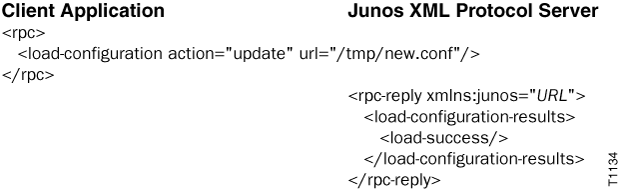
以下示例说明如何用文件 /tmp/new.conf (驻留在设备上)的内容更新候选配置。该文件包含以 Junos XML 标记元素(默认)表示的完整配置, format 因此省略属性。