
MS-MIC 和 MS-MPC(15.1 及更早版本)的机箱间高可用性
本主题适用于 Junos OS 15.1 及更低版本。(对于 Junos OS 16.1 及更高版本,请参阅适用于 长期 NAT 和有状态防火墙流(MS-MPC、MS-MIC)的机箱间有状态同步概述(16.1 及更高版本)。)
机箱间高可用性支持使用切换到不同机箱上的备份服务 PIC 来实现有状态的服务同步。本主题适用于 Junos OS 15.1 及更低版本。(对于 Junos OS 16.1 及更高版本,请参阅适用于 长期 NAT 和有状态防火墙流(MS-MPC、MS-MIC)的机箱间有状态同步概述(16.1 及更高版本)。)以下主题中介绍了该功能:
机箱间高可用性,实现有状态防火墙和 NAPT44 概述(MS-MIC、MS-MPC)
运营商级 NAT (CGN) 部署可以使用双机箱实施,为路由器中的关键组件提供冗余数据路径和冗余。虽然机箱内高可用性可用于双机箱环境,但它仅处理服务 PIC 故障。如果由于路由器中的其他故障而将流量切换到备用路由器,则状态将丢失。与机箱内高可用性相比,机箱间高可用性可保留状态并使用更少的服务 PIC 提供冗余。高可用性对中的主机箱和备份机箱之间仅同步长期流量。在发出显式 CLI 命令 request services redundancy (synchronize | no-synchronize)以启动或停止状态复制之前,服务 PIC 不会复制状态。可以同步状态防火墙、NAPT44 和 APP 状态信息。
当主 PIC 和备份 PIC 都已启动时,复制会在发出时 request services redundancy command 立即开始。
要使用机箱间高可用性,必须使用为下一跳点服务接口配置的服务集。机箱间高可用性可与在 MS-MIC 或 MS-MPC 接口卡上配置的 MS 服务接口配合使用。必须使用该 ip-address-owner service-plane 选项配置单元 0 以外的单元。
以下限制适用:
NAPT44 是唯一受支持的转换类型。
ALG、PBA 端口块分配 (PBA)、端点无关映射 (EIM) 或端点无关过滤器 (EIF) 不支持检查点。
图 1 显示了机箱间高可用性拓扑。
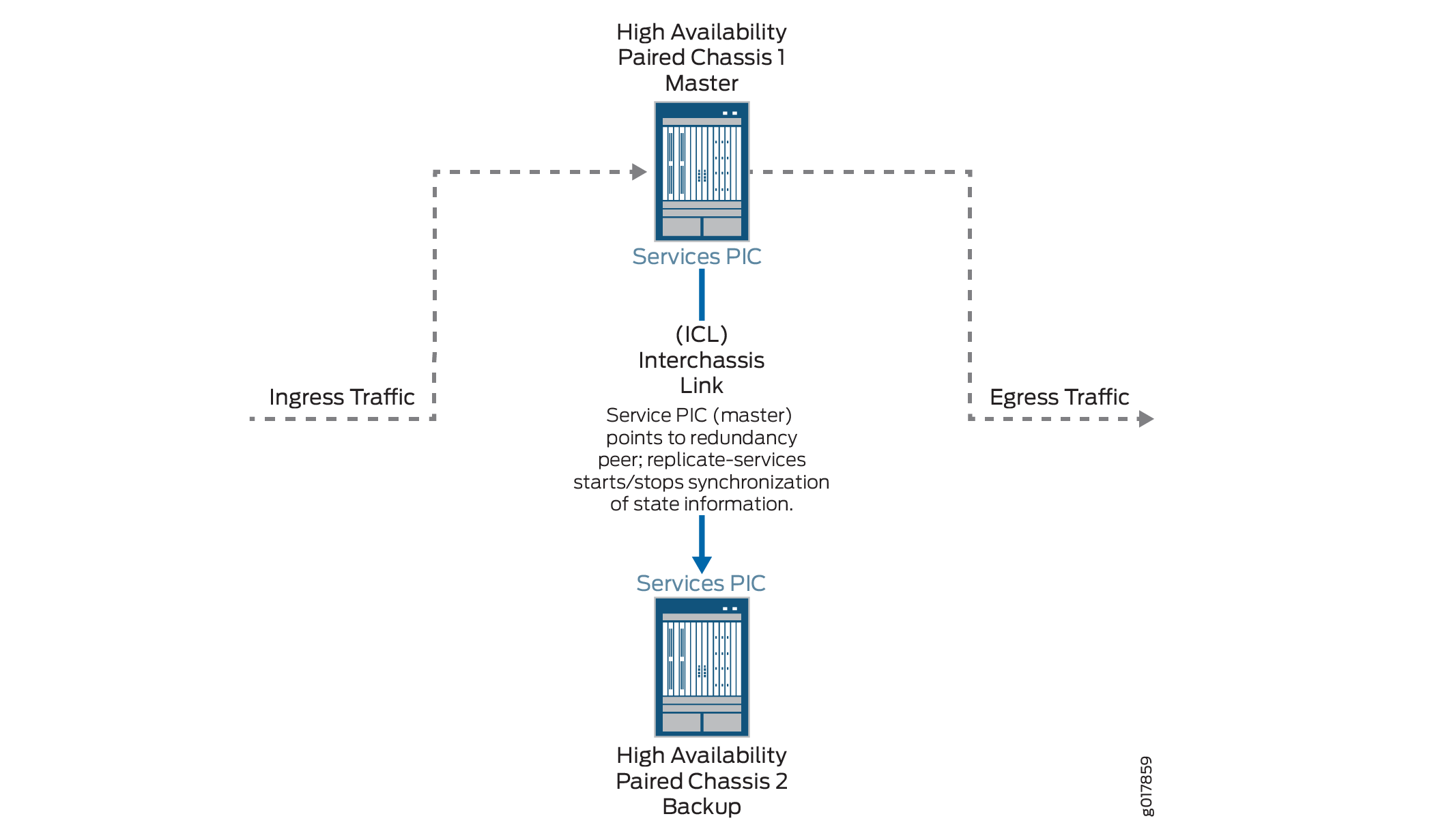
为有状态防火墙和 NAPT44(MS-MPC、MS-MIC)配置机箱间高可用性
要在 MS-MIC 或 MS-MPC 服务 PIC 上为有状态防火墙和 NAPT44 配置机箱间可用性,请在高可用性对的每个机箱上执行以下配置步骤:
示例:机箱间 NAT 和有状态防火墙(MS-MIC、MS-MPC)的有状态高可用性
此示例说明如何为状态防火墙和 NAT 服务配置机箱间高可用性。
要求
此示例使用以下硬件和软件组件:
两台带有 MS-MPC 线卡的 MX480 路由器
Junos OS 13.3 或更高版本
概述
两台 MX 3D 路由器的配置相同,以便在机箱发生故障时促进防火墙和 NAT 服务的有状态故障切换。
配置
要为此示例配置机箱间高可用性,请执行以下作:
CLI 快速配置
要在路由器上快速配置此示例,请在删除换行符并替换特定于您站点的接口信息后,复制以下命令并将其粘贴到路由器终端窗口中。
以下配置适用于机箱 1。
[edit]
set interfaces ms-4/0/0 redundancy-options redundancy-peer ipaddress 5.5.5.2
set interfaces ms-4/0/0 redundancy-options routing-instance HA
set interfaces ms-4/0/0 unit 10 ip-address-owner service-plane
set interfaces ms-4/0/0 unit 10 family inet address 5.5.5.1/32
set interfaces ms-4/0/0 unit 20 family inet
set interfaces ms-4/0/0 unit 20 service-domain inside
set interfaces ms-4/0/0 unit 30 family inet
set interfaces ms-4/0/0 unit 30 service-domain outside
set interfaces ge-2/0/0 vlan-tagging
set interfaces ge-2/0/0 unit 0 vlan-id 100 family inet address 20.1.1.1/24
set routing-instances HA instance-type vrf
set routing-instances HA interface ge-2/0/0.0
set routing-instances HA interface ms-4/0/0.10
set routing-instances HA route-distinguisher 1:1
set policy-options policy-statement dummy term 1 then reject
set routing-instances HA vrf-import dummy
set routing-instances HA vrf-export dummy
set routing-instances HA routing-options static route route 5.5.5.1/32 next-hop ms-4/0/0.10
set routing-instances HA routing-options static route route 5.5.5.2/32 next-hop 20.1.1.2
set services nat pool p2 address 32.0.0.0/24
set services nat pool p2 port automatic random-allocation
set services nat pool p2 address-allocation round-robin
set services nat rule r2 match-direction input
set services nat rule r2 term t1 from source-address 129.0.0.0/8
set services nat rule r2 term t1 from source-address 128.0.0.0/8
set services nat rule r2 term t1 then translated source-pool p2
set services nat rule r2 term t1 then translated translation-type napt-44
set services nat rule r2 term t1 then translated address-pooling paired
set services nat rule r2 term t1 then syslog
set services stateful-firewall rule r2 match-direction input
set services stateful-firewall rule r2 term t1 from source-address any-unicast
set services stateful-firewall rule r2 term t1 then accept
set services stateful-firewall rule r2 term t1 then syslog
set services service-set ss2 replicate-services replication-threshold 180
set services service-set ss2 replicate-services stateful-firewall
set services service-set ss2 replicate-services nat
set services service-set ss2 stateful-firewall-rules r2
set services service-set ss2 nat-rules r2
set services service-set ss2 next-hop-service inside-service-interface ms-4/0/0.20
set services service-set ss2 next-hop-service outside-service-interface ms-4/0/0.30
set services service-set ss2 syslog host local class session-logs
set services service-set ss2 syslog host local class stateful-firewall-logs
set services service-set ss2 syslog host local class nat-logs
以下配置适用于机箱 2。机箱 1 和 2 的 NAT、状态防火墙和服务集信息必须相同。
set interfaces ms-4/0/0 redundancy-options routing-instance HA
set interfaces ms-4/0/0 unit 10 ip-address-owner service-plane
set interfaces ms-4/0/0 unit 10 family inet address 5.5.5.2/32
set interfaces ms-4/0/0 unit 20 family inet
set interfaces ms-4/0/0 unit 20 service-domain inside
set interfaces ms-4/0/0 unit 30 family inet
set interfaces ms-4/0/0 unit 30 service-domain outside
set interfaces ge-2/0/0 vlan-tagging
set interfaces ge-2/0/0 unit 0 vlan-id 100 family inet address 20.1.1.2/24
set routing-instances HA instance-type vrf
set routing-instances HA interface ge-2/0/0.0
set routing-instances HA interface ms-4/0/0.10
set routing-instances HA route-distinguisher 1:1
set routing-instances HA vrf-import dummy
set routing-instances HA vrf-export dummy
set routing-instances HA routing-options static route 5.5.5.2/32 next-hop ms-4/0/0.10
set routing-instances HA routing-options static route 5.5.5.1/32 next-hop 20.1.1.1
set services nat pool p2 address 32.0.0.0/24
set services nat pool p2 port automatic random-allocation
set services nat pool p2 address-allocation round-robin
set services nat rule r2 match-direction input
set services nat rule r2 term t1 from source-address 129.0.0.0/8
set services nat rule r2 term t1 from source-address 128.0.0.0/8
set services nat rule r2 term t1 then translated source-pool p2
set services nat rule r2 term t1 then translated translation-type napt-44
set services nat rule r2 term t1 then translated address-pooling paired
set services nat rule r2 term t1 then syslog
set services stateful-firewall rule r2 match-direction input
set services stateful-firewall rule r2 term t1 from source-address any-unicast
set services stateful-firewall rule r2 term t1 then accept
set services stateful-firewall rule r2 term t1 then syslog
set services service-set ss2 replicate-services replication-threshold 180
set services service-set ss2 replicate-services stateful-firewall
set services service-set ss2 replicate-services nat
set services service-set ss2 stateful-firewall-rules r2
set services service-set ss2 nat-rules r2
set services service-set ss2 next-hop-service inside-service-interface ms-4/0/0.20
set services service-set ss2 next-hop-service outside-service-interface ms-4/0/0.30
set services service-set ss2 syslog host local class session-logs
set services service-set ss2 syslog host local class stateful-firewall-logs
set services service-set ss2 syslog host local class nat-logs
为机箱 1 配置接口。
分步程序
每个 高可用性路由器对的接口配置相同,但以下服务 PIC 选项除外:
redundancy-options redundancy-peer ipaddress addressunit unit-number family inet address address的单元(0 除外)包含选项ip-address-owner service-plane
要配置接口:
在机箱 1 上配置冗余服务 PIC。
[edit interfaces}
user@host# set interfaces ms-4/0/0 redundancy-options redundancy-peer ipaddress 5.5.5.2
user@host# set interfaces ms-4/0/0 redundancy-options routing-instance HA
user@host# set interfaces ms-4/0/0 unit 10 ip-address-owner service-plane
user@host# set interfaces ms-4/0/0 unit 10 family inet address 5.5.5.1/32
user@host# set interfaces ms-4/0/0 unit 20 family inet
user@host# set interfaces ms-4/0/0 unit 20 service-domain inside
user@host# set interfaces ms-4/0/0 unit 30 family inet
user@host# set interfaces ms-4/0/0 unit 30 service-domain outside
配置机箱 1 的接口,用作同步流量的机箱间链路。
user@host# set interfaces ge-2/0/0 vlan-tagging
user@host# set interfaces ge-2/0/0 unit 0 vlan-id 100 family inet address 20.1.1.1/24
根据需要配置其余接口。
结果
user@host# show interfaces
ge-2/0/0 {
                vlan-tagging;
        unit 0 {
            vlan-id 100;
            family inet {
                 address 20.1.1.1/24;
            }
        }
            }
ms-4/0/0 {
        redundancy-options {
            redundancy-peer {
                ipaddress 5.5.5.2;
            }
            routing-instance HA;
        }
        unit 10 {
            ip-address-owner service-plane;
            family inet {
                address 5.5.5.1/32;
            }
        }
        unit 20 {
            family inet;
            family inet6;
            service-domain inside;
        }
        unit 30 {
            family inet;
            family inet6;
            service-domain outside;
        }
            }
}
配置机箱 1 的路由信息
分步程序
此示例不包含详细的路由配置。机箱之间的高可用性同步流量需要路由实例,如下所示:
为机箱 1 配置路由实例。
user@host# set routing-instances HA instance-type vrf
user@host# set routing-instances HA interface ge-2/0/0.0
user@host# set routing-instances HA interface ms-4/0/0.10
user@host# set routing-instances HA route-distinguisher 1:1
user@host# set policy-options policy-statement dummy term 1 then reject
user@host# set routing-instances HA vrf-import dummy
user@host# set routing-instances HA vrf-export dummy
user@host# set routing-instances HA routing-options static route route 5.5.5.1/32 next-hop ms-4/0/0.10
user@host# set routing-instances HA routing-options static route route 5.5.5.2/32 next-hop 20.1.1.2
结果
user@host# show routing-instances
HA {
        instance-type vrf;
        interface ge-2/0/0.0;
        interface ms-4/0/0.10;
        route-distinguisher 1:1;
        vrf-import dummy;
        vrf-export dummy;
        routing-options {
            static {
                route 5.5.5.1/32 next-hop ms-4/0/0.10;
                route 5.5.5.2/32 next-hop 20.1.1.2;
                            }
        }
    }
为机箱 1 配置 NAT 和有状态防火墙
分步程序
在两台路由器上以相同的方式配置 NAT 和状态防火墙。要配置 NAT 和状态防火墙,请执行以下作:
根据需要配置 NAT。
user@host# set services nat pool p2 address 32.0.0.0/24
user@host# set services nat pool p2 port automatic random-allocation
user@host# set services nat pool p2 address-allocation round-robin
user@host# set services nat rule r2 match-direction input
user@host# set services nat rule r2 term t1 from source-address 129.0.0.0/8
user@host# set services nat rule r2 term t1 from source-address 128.0.0.0/8
user@host# set services nat rule r2 term t1 then translated source-pool p2
user@host# set services nat rule r2 term t1 then translated translation-type napt-44
user@host# set services nat rule r2 term t1 then translated address-pooling paired
user@host# set services nat rule r2 term t1 then syslog
根据需要配置有状态防火墙。
user@host# set services stateful-firewall rule r2 match-direction input
user@host# set services stateful-firewall rule r2 term t1 from source-address any-unicast
user@host# set services stateful-firewall rule r2 term t1 then accept
user@host# set services stateful-firewall rule r2 term t1 then syslog
结果
user@host# show services nat
nat {
        pool p2 {
            address 32.0.0.0/24;
            port {
                automatic {
                    random-allocation;
                }
            }
            address-allocation round-robin;
        }
        rule r2 {
            match-direction input;
            term t1 {
                from {
                    source-address {
                        129.0.0.0/8;
                        128.0.0.0/8;
                    }
                }
                then {
                    translated {
                        source-pool p2;
                        translation-type {
                            napt-44;
                        }
                        address-pooling paired;
                    }
                    syslog;
                }
            }
        }
    }
}
user@host show services stateful-firewell
rule r2 {
    match-direction input;
    term t1 {
        from {
            source-address {
                any-unicast;
            }
        }
        then {
            accept;
            syslog;
        }
    }
}
配置服务集
分步程序
在两台路由器上以相同的方式配置服务集。要配置服务集:
配置服务集复制选项。
user@host# set services service-set ss2 replicate-services replication-threshold 180
user@host# set services service-set ss2 replicate-services stateful-firewall
user@host# set services service-set ss2 replicate-services nat
为服务集配置对 NAT 和状态防火墙规则的引用。
user@host# set services service-set ss2 stateful-firewall-rules r2
user@host# set services service-set ss2 nat-rules r2
在 MS-PIC 上配置下一跃点服务接口。
user@host# set services service-set ss2 next-hop-service inside-service-interface ms-4/0/0.20
user@host# set services service-set ss2 next-hop-service outside-service-interface ms-4/0/0.30
配置所需的日志记录选项。
user@host# set services service-set ss2 syslog host local class session-logs
user@host# set services service-set ss2 syslog host local class stateful-firewall-logs
user@host# set services service-set ss2 syslog host local class nat-logs
结果
user@host# show services service-set ss2
syslog {
            host local {
                class {
                    session-logs;
                    inactive: stateful-firewall-logs;
                    nat-logs;
                }
            }
        }
        replicate-services {
            replication-threshold 180;
            stateful-firewall;
            nat;
        }
        stateful-firewall-rules r2;
        inactive: nat-rules r2;
        next-hop-service {
            inside-service-interface ms-3/0/0.20;
            outside-service-interface ms-3/0/0.30;
        }
    }
为机箱 2 配置接口
分步程序
每个 高可用性路由器对的接口配置相同,但以下服务 PIC 选项除外:
redundancy-options redundancy-peer ipaddress addressunit unit-number family inet address address的单元(0 除外)包含选项ip-address-owner service-plane
在机箱 2 上配置冗余服务 PIC。
指向
redundancy-peer ipaddress机ip-address-owner service-plane箱 1 上机箱上 ms-4/0/0 上包含语句的单元(单元 10)地址。[edit interfaces} set interfaces ms-4/0/0 redundancy-options redundancy-peer ipaddress 5.5.5.1 user@host# set interfaces ms-4/0/0 redundancy-options routing-instance HA user@host# set interfaces ms-4/0/0 unit 10 ip-address-owner service-plane user@host# set interfaces ms-4/0/0 unit 10 family inet address 5.5.5.2/32 user@host# set interfaces ms-4/0/0 unit 20 family inet user@host# set interfaces ms-4/0/0 unit 20 service-domain inside user@host# set interfaces ms-4/0/0 unit 30 family inet user@host# set interfaces ms-4/0/0 unit 30 service-domain outside
配置机箱 2 的接口,用作同步流量的机箱间链路
user@host# set interfaces ge-2/0/0 vlan-tagging
user@host# set interfaces ge-2/0/0 unit 0 vlan-id 100 family inet address 20.1.1.2/24
根据需要配置机箱 2 的其余接口。
结果
user@host# show interfaces
ms-4/0/0 {
        redundancy-options {
            redundancy-peer {
                ipaddress 5.5.5.1;
            }
            routing-instance HA;
        }
        unit 0 {
            family inet;
        }
        unit 10 {
            ip-address-owner service-plane;
            family inet {
                address 5.5.5.2/32;
            }
        }
ge-2/0/0 {
        vlan-tagging;
        unit 0 {
            vlan-id 100;
            family inet {
                 address 20.1.1.2/24;
            }
        }
        unit 10 {
            vlan-id 10;
            family inet {
                address 2.10.1.2/24;
            }
配置机箱 2 的路由信息
分步程序
此示例不包含详细的路由配置。两个机箱之间的高可用性同步流量需要路由实例,此处包含。
为机箱 2 配置路由实例。
user@host# set routing-instances HA instance-type vrf
user@host# set routing-instances HA interface ge-2/0/0.0
user@host# set routing-instances HA interface ms-4/0/0.10
user@host# set routing-instances HA route-distinguisher 1:1
user@host# set policy-options policy-statement dummy term 1 then reject
user@host# set routing-instances HA vrf-import dummy
user@host# set routing-instances HA vrf-export dummy
user@host# set routing-instances HA routing-options static route 5.5.5.2/32 next-hop ms-4/0/0.10
user@host# set routing-instances HA routing-options static route 5.5.5.1/32 next-hop 20.1.1.1
注意:以下配置步骤与机箱 1 显示的步骤 相同 。
配置 NAT 和有状态防火墙
配置服务集
结果
user@host# show services routing-instances
HA {
        instance-type vrf;
        interface xe-2/2/0.0;
        interface ms-4/0/0.10;
        route-distinguisher 1:1;
        vrf-import dummy;
        vrf-export dummy;
        routing-options {
            static {
                route 5.5.5.2/32 next-hop ms-4/0/0.10;
                route 5.5.5.1/32 next-hop 20.1.1.1;
            }
        }