
示例:MX 系列路由器上的被动流监控配置
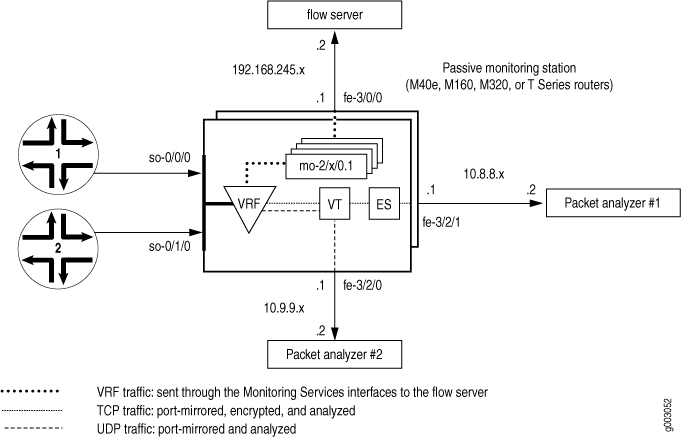
在 图 1 中,流量通过接口 so-0/0/0 和 so-0/1/0 进入监控站。防火墙过滤器接受要监控的流量后,数据包将进入 VRF 实例。
原始数据包在 VRF 实例内传输到监控服务 PIC 进行流处理。最终流数据包从监控服务接口通过 fe-3/0/0 接口发送到流服务器。
已接受流量的副本将端口镜像到隧道 PIC。复制的数据包进入隧道接口时,第二个防火墙过滤器会将 TCP 和 UDP 数据包分离,并将它们放入两个基于过滤器的转发实例中。UDP 实例将 UDP 数据包定向到连接到 fe-3/2/0 的数据包分析器。TCP 实例将 TCP 数据包发送到 ES PIC 进行加密,ES PIC 将数据包发送到连接到 fe-3/2/1 的第二个数据包分析器。
第一步是定义防火墙过滤器以选择要监控的数据包。必须接受所有过滤后的流量,并且 port-mirror 层次结构级别的 [edit firewall family inet filter filter-name term term-name then] 语句有助于端口镜像。
接下来,配置输入 SONET/SDH 接口并应用刚才定义的防火墙过滤器。该 passive-monitor-mode 语句会禁用 SONET/SDH 接口上的 SONET 激活功能,并启用被动流量监控。
配置将用于监控应用程序的所有其他接口,包括监控服务接口、导出接口、隧道接口和 ES 接口。接口就位后,配置 VRF 实例和监控组,以将原始数据包从输入接口定向到监控服务接口进行处理。生成的流描述数据包退出 fe-3/0/0 以到达流服务器。
接下来,配置语句以将受监控的流量端口镜像到隧道接口。设计一个防火墙过滤器,用于选择其中部分复制的流量进行进一步分析,以及部分流量进行丢弃。在这种情况下,隔离 TCP 和 UDP 流量,并将这两个流量引导至基于过滤器的单独转发路由实例。请记住将过滤器应用于隧道接口,以便将 TCP 流量与 UDP 流量分离。此外,还可以使用路由表组将接口路由导入转发实例。
在基于过滤器的转发实例中,定义静态路由下一跃点。TCP 实例的下一跃点是 ES 接口,UDP 实例的下一跃点是连接到 fe-3/2/0 的数据数据包分析器。最后,配置 IPSec,使 TCP 流量的下一跃点是连接到 fe-3/2/1 的第二个数据包分析器。
[edit]
interfaces {
                   so-0/0/0 { # Traffic enters the router on this interface.
        description “ input interface”;
        encapsulation ppp;
        unit 0 {
                             passive-monitor-mode; # Disables SONET keepalives.
            family inet {
                filter {
                                         input input-monitoring-filter; # The firewall filter is applied here.
                }
            }
        }
    }
                   so-0/1/0 { # Traffic enters the router on this interface.
        description “ input interface”;
        encapsulation ppp;
        unit 0 {
                             passive-monitor-mode;  # Disables SONET keepalives.
            family inet {
                filter {
                                         input input-monitoring-filter;  # The firewall filter is applied here.
                }
            }
        }
    }
                   es-3/1/0 {  # This is where the TCP traffic enters the ES PIC.
        unit 0 {
            tunnel {
                source 10.8.8.1;
                destination 10.8.8.2;
            }
            family inet {
                ipsec-sa sa-esp;
                address 192.0.2.1/32 {
                    destination 192.0.2.2;
                }
            }
        }
    }
                   fe-3/0/0 { # Flow records exit here and travel to the flow server.
        description “ export interface to the flow server”;
        unit 0 {
            family inet;
            address 192.168.245.1/30;
        }
    }
                   fe-3/2/0 { # This export interface for UDP traffic leads to a packet analyzer.
        description “ export interface to the packet analyzer”;
        unit 0 {
            family inet {
                address 10.9.9.1/30;
            }
        }
    }
                   fe-3/2/1 {  # This IPSec tunnel source exports TCP traffic to a packet analyzer.
        unit 0 {
            family inet {
                address 10.8.8.1/30;
            }
        }
    }
                   mo-4/0/0 { # This marks the beginning of the monitoring services interfaces.
        unit 0 { # Unit 0 is part of the inet.0 routing table and generates flow records.
            family inet;
        }
                         unit 1 { # Unit 1 receives monitored traffic and is part of the VRF instance.
            family inet;
        }
    }
                   mo-4/1/0 {
        unit 0 { # Unit 0 is part of the inet.0 routing table and generates flow records.
            family inet;
        }
                         unit 1 { # Unit 1 receives monitored traffic and is part of the VRF instance.
            family inet;
        }
    }
                   mo-4/2/0 {
        unit 0 { # Unit 0 is part of the inet.0 routing table and generates flow records.
            family inet;
        }
                         unit 1 { # Unit 1 receives monitored traffic and is part of the VRF instance.
            family inet;
        }
    }
                   mo-4/3/0 {
        unit 0 { # Unit 0 is part of the inet.0 routing table and generates flow records.
            family inet;
        }
                         unit 1 { # Unit 1 receives monitored traffic and is part of the VRF instance.
            family inet;
        }
    }
                   vt-0/2/0 {  # The tunnel services interface receives the port-mirrored traffic.
        unit 0 {
            family inet {
                filter {
                                         input tunnel-interface-filter;  # The filter splits traffic into TCP and UDP
                }
            }
        }
    }
}
forwarding-options {
                   monitoring group1 {  # Monitored traffic is processed by the monitoring services
        family inet { # interfaces and flow records are sent to the flow server.
                               output {
                export-format cflowd-version-5;
                flow-active-timeout 60;
                flow-inactive-timeout 30;
                                   flow-server 192.168.245.2 port 2055; # IP address and port for server.
                                     interface mo-4/0/0.1 {  # Use monitoring services interfaces for output.
                    engine-id 1; # engine and interface-index statements are optional.
                    engine-type 1;
                    input-interface-index 44;
                    output-interface-index 54;
                                         source-address 192.168.245.1; # This is the IP address of fe-3/0/0.
                }
                interface mo-4/1/0.1 {
                    engine-id 2; # engine and interface-index statements are optional.
                    engine-type 1;
                    input-interface-index 45;
                    output-interface-index 55;
                    source-address 192.168.245.1; # This is the IP address of fe-3/0/0.
                }
                interface mo-4/2/0.1 {
                    engine-id 3; # engine and interface-index statements are optional.
                    engine-type 1;
                    input-interface-index 46;
                    output-interface-index 56;
                    source-address 192.168.245.1; # This is the IP address of fe-3/0/0.
                }
                interface mo-4/3/0.1 {
                    engine-id 4; # engine and interface-index statements are optional.
                    engine-type 1;
                    input-interface-index 47;
                    output-interface-index 57;
                                         source-address 192.168.245.1; # This is the IP address of fe-3/0/0.
                }
            }
        }
    }
                   port-mirroring {  # Copies the traffic and sends it to the Tunnel Services PIC.
        family inet {
            input {
                rate 1;
                run-length 1;
            }
            output {
                                   interface vt-0/2/0.0;
                no-filter-check;
            }
        }
    }
}
             routing-options { # This installs the interface routes into the forwarding instances.
                   interface-routes {


         rib-group inet bc-vrf;
    }
    rib-groups {


         bc-vrf {


         import-rib [inet.0 tcp-routing-table.inet.0 udp-routing-table.inet.0];
        }
    }
    forwarding-table {
        export pplb; # Applies per-packet load balancing to the forwarding table.
    }
}
policy-options {
    policy-statement monitoring-vrf-import {
        then reject;
    }
    policy-statement monitoring-vrf-export {
        then reject;
    }
    policy-statement pplb {
        then {
            load-balance per-packet;
        }
    }
}
             security { # This sets IPSec options for the ES PIC.
    ipsec {
        proposal esp-sha1-3des {
            protocol esp;
            authentication-algorithm hmac-sha1-96;
            encryption-algorithm 3des-cbc;
            lifetime-seconds 180;
        }
        policy esp-group2 {
            perfect-forward-secrecy {
                keys group2;
            }
            proposals esp-sha1-3des;
        }
        security-association sa-esp {
            mode tunnel;
            dynamic {
                ipsec-policy esp-group2;
            }
        }
    }
    ike {
        proposal ike-esp {
            authentication-method pre-shared-keys;
            dh-group group2;
            authentication-algorithm sha1;
            encryption-algorithm 3des-cbc;
            lifetime-seconds 180;
        }
        policy 10.8.8.2 {
            mode aggressive;
            proposals ike-esp;
            pre-shared-key ascii-text "$ABC123";
        }
    }
}
firewall {
    family inet {
        filter input-monitoring-filter { # This filter selects traffic to send into the VRF
            term 1 { # instance and prepares the traffic for port mirroring.
                from {
                    destination-address {
                        10.7.0.0/16;
                    }
                }
                then {
                    port-mirror;
                    accept;
                }
            }
            term 2 {
                from {
                    destination-address {
                        10.6.0.0/16;
                    }
                }
                then accept;
            }
        }
                         filter tunnel-interface-filter {  # This filter breaks the port-mirrored traffic into two
            term tcp { # filter-based forwarding instances: TCP packets and UDP packets.
                from {
                    protocol tcp;
                }
                then { # This counts TCP packets and sends them into a TCP instance.
                    count tcp;
                    routing-instance tcp-routing-table;
                }
            }
            term udp {
                from {
                    protocol udp;
                }
                then { # This counts UDP packets and sends them into a UDP instance.
                    count udp;
                    routing-instance udp-routing-table;
                }
            }
            term rest {
                then {
                    count rest;
                    discard;
                }
            }
        }
    }
}
routing-instances {
                   monitoring-vrf { # This is the VRF instance where you send the traffic. It contains
        instance-type vrf; # the input interface and the monitoring services interfaces.
                       interface so-0/0/0.0; # Traffic enters the router on these input interfaces.
        interface so-0/1/0.0;


         interface mo-4/0/0.1;


         interface mo-4/1/0.1; # These are output interfaces (use them as
        interface mo-4/2/0.1; # output interfaces in your monitoring group).
        interface mo-4/3/0.1;
        route-distinguisher 69:1;
        vrf-import monitoring-vrf-import;
        vrf-export monitoring-vrf-export;
        routing-options { # Sends traffic to a group of monitoring services interfaces.
            static {


         route 0.0.0.0/0 next-hop [mo-4/0/0.1 mo-4/1/0.1
mo-4/2/0.1 mo-4/3/0.1];
            }
        }
    }
                   tcp-routing-table {  # This is the filter-based forwarding instance for TCP traffic.
        instance-type forwarding;
                         routing-options {  # The next hop is the ES PIC.
            static {


         route 0.0.0.0/0 next-hop es-3/1/0.0;
            }
        }
    }
    udp-routing-table { # This is the filter-based forwarding instance for UDP traffic.
        instance-type forwarding;
        routing-options { # The next hop is the second packet analyzer.
            static {


         route 0.0.0.0/0 next-hop 10.9.1.2;
            }
        }
    }
}
验证您的工作
要验证配置是否正确,请在配置为被动流监控的监控站上使用以下命令:
-
show route 0/0 -
show passive-monitoring error -
show passive-monitoring flow -
show passive-monitoring memory -
show passive-monitoring status -
show passive-monitoring usage
要清除 和 show passive-monitoring error show passive-monitoring flow 命令的统计信息,请发出命令 clear passive-monitoring (all | interface-name) 。
您还可以使用简单网络管理协议 (SNMP) 查看被动流监控状态。支持以下管理信息库 (MIB) 表:
-
jnxPMonErrorTable — 与
show passive-monitoring error命令相对应。 -
jnxPMonFlowTable — 与
show passive-monitoring flow命令相对应。 -
jnxPMonMemoryTable — 对应于
show passive-monitoring memory命令。
以下部分显示了配置示例中使用的命令的 show 输出:
user@host> show route 0/0
 <skip inet.0>
# 我们只关注路由实例路由。
bc-vrf.inet.0:  1 destinations, 1 routes (1 active, 0 holddown, 0 hidden)
bc-vrf.inet.0:+ = Active Route, - = Last Active, * = Both
0.0.0.0/0          *[Static/5] 5d 17:34:57
                      via mo-4/0/0.1
                    > via mo-4/1/0.1
                      via mo-4/2/0.1
                      via mo-4/3/0.1
tcp-rt.inet.0: 13 destinations, 13 routes (12 active, 0 holddown, 1
hidden)
+ = Active Route, - = Last Active, * = Both
0.0.0.0/0          *[Static/5] 19:24:39
                    > via es-3/1/0.0
  : <other interface routes>
udp-rt.inet.0: 13 destinations, 13 routes (12 active, 0 holddown, 1
hidden)
+ = Active Route, - = Last Active, * = Both
0.0.0.0/0          *[Static/5] 19:24:39
                    > to 10.9.1.2 via fe-3/2/0.0
  : <other interface routes>
对于所有 show passive-monitoring 命令,使用通配符(如 *)或 all 选项时获得的输出基于层次结构级别上 [edit forwarding-options monitoring group-name] 列出的配置接口。在配置示例的输出中,您只能看到已配置接口 mo-4/0/0、 mo-4/1/0、 mo-4/2/0 和 mo-4/3/0的信息。
您可以在监控组中配置的许多语句(如 engine-id 和 engine-type)在命令的 show passive-monitoring 输出中可见。
| 字段 |
解释 |
|---|---|
| 丢 包数(无内存) |
因内存原因丢弃的数据包数。 |
| 丢弃的数据包(非 IP) |
丢弃的非 IP 数据包数。 |
| 丢 弃的数据包(非 IPv4) |
由于未通过 IPv4 检查而丢弃的数据包数。 |
| 丢包数(标头太小) |
由于数据包长度或 IP 报头长度太短而丢弃的数据包数。 |
| 内存分配失败 |
流记录内存分配失败的次数。一小部分反映了无法补充可用列表。数字较大表示监控站的内存空间几乎不足。 |
| 内存可用故障 |
释放的流记录内存数。 |
| 内存可用列表故障 |
从空闲列表中接收的失败的流记录数。内存即将耗尽,或者一秒钟内创建太多大于 128K 的新流量。 |
| 内存警告 |
监控服务 PIC 上的流量已超过 100 万个数据包/秒 (Mpps),或监控服务 II PIC 上的流量已超过 2 Mpps。回答可以是或否。 |
| 内存过载 |
内存已过载。回答是 “是” 或 “否”。 |
| PPS 过载 |
以每秒数据包数为单位,确定 PIC 接收的流量是否超过配置的阈值。回答可以是或否。 |
| BPS 过载 |
以字节数/秒为单位,用于 PIC 接收的流量是否超过配置的阈值。回答可以是或否。 |
user@host> show passive-monitoring error all
Passive monitoring interface: mo-4/0/0, Local interface index: 44
  Error information
    Packets dropped (no memory): 0, Packets dropped (not IP): 0
    Packets dropped (not IPv4): 0, Packets dropped (header too small): 0
    Memory allocation failures: 0, Memory free failures: 0
    Memory free list failures: 0
    Memory warning: No, Memory overload: No, PPS overload: No, BPS overload: No

Passive monitoring interface: mo-4/1/0, Local interface index: 45
  Error information
    Packets dropped (no memory): 0, Packets dropped (not IP): 0
    Packets dropped (not IPv4): 0, Packets dropped (header too small): 0
    Memory allocation failures: 0, Memory free failures: 0
    Memory free list failures: 0
    Memory warning: No, Memory overload: No, PPS overload: No, BPS overload: No

Passive monitoring interface: mo-4/2/0, Local interface index: 46
  Error information
    Packets dropped (no memory): 0, Packets dropped (not IP): 0
    Packets dropped (not IPv4): 0, Packets dropped (header too small): 0
    Memory allocation failures: 0, Memory free failures: 0
    Memory free list failures: 0
    Memory warning: No, Memory overload: No, PPS overload: No, BPS overload: No

Passive monitoring interface: mo-4/3/0, Local interface index: 47
  Error information
    Packets dropped (no memory): 0, Packets dropped (not IP): 0
    Packets dropped (not IPv4): 0, Packets dropped (header too small): 0
    Memory allocation failures: 0, Memory free failures: 0
    Memory free list failures: 0
    Memory warning: No, Memory overload: No, PPS overload: No, BPS overload: No
| 字段 |
解释 |
|---|---|
| 流数据包 |
作 PIC 接收的数据包数。 |
| 流字节 |
作 PIC 接收的字节数。 |
| 流数据包 10 秒速率 |
PIC 每秒处理的数据包数,显示为 10 秒平均值。 |
| 流字节 10 秒速率 |
PIC 处理的每秒字节数,显示为 10 秒平均值。 |
| 活动流 |
PIC 跟踪的当前活动流量数。 |
| 总流量 |
作 PIC 接收的流总数。 |
| 导出的流 |
作 PIC 导出的流量总数。 |
| 流 导出的数据包 |
作 PIC 导出的流数据包总数。 |
| 非活动流超时 |
由于不活动而导出的流总数。 |
| 活动流量超时 |
由于活动超时而导出的长期流总数。 |
user@host> show passive-monitoring flow all
Passive monitoring interface: mo-4/0/0, Local interface index: 44
  Flow information
    Flow packets: 6533434, Flow bytes: 653343400
    Flow packets 10-second rate: 0, Flow bytes 10-second rate: 0
    Active flows: 0, Total flows: 1599
    Flows exported: 1599, Flows packets exported: 55
    Flows inactive timed out: 1599, Flows active timed out: 0

Passive monitoring interface: mo-4/1/0, Local interface index: 45
  Flow information
    Flow packets: 6537780, Flow bytes: 653778000
    Flow packets 10-second rate: 0, Flow bytes 10-second rate: 0
    Active flows: 0, Total flows: 1601
    Flows exported: 1601, Flows packets exported: 55
    Flows inactive timed out: 1601, Flows active timed out: 0

Passive monitoring interface: mo-4/2/0, Local interface index: 46
  Flow information
    Flow packets: 6529259, Flow bytes: 652925900
    Flow packets 10-second rate: 0, Flow bytes 10-second rate: 0
    Active flows: 0, Total flows: 1599
    Flows exported: 1599, Flows packets exported: 55
    Flows inactive timed out: 1599, Flows active timed out: 0

Passive monitoring interface: mo-4/3/0, Local interface index: 47
  Flow information
    Flow packets: 6560741, Flow bytes: 656074100
    Flow packets 10-second rate: 0, Flow bytes 10-second rate: 0
    Active flows: 0, Total flows: 1598
    Flows exported: 1598, Flows packets exported: 55
    Flows inactive timed out: 1598, Flows active timed out: 0
| 字段 |
解释 |
|---|---|
| 分配计数 |
分配的流记录数。 |
| 空闲计数 |
释放的流记录数。 |
| 最大分配数 |
自监控站启动以来分配的最大流记录数。此数字表示一次分配的流记录的峰值数。 |
| 每秒分配 |
在 PIC 上的最后一个统计信息间隔内每秒分配的流记录。 |
| 每秒释放数 |
在 PIC 上的最后一个统计时间间隔内每秒释放的流记录。 |
| 已用总内存 |
当前使用的内存总量(以字节为单位)。 |
| 可用 内存总数 |
当前可用内存总量(以字节为单位)。 |
user@host> show passive-monitoring memory all
Passive monitoring interface: mo-4/0/0, Local interface index: 44
  Memory utilization
    Allocation count: 1600, Free count: 1599, Maximum allocated: 1600
    Allocations per second: 3200, Frees per second: 1438
    Total memory used (in bytes): 103579176, Total memory free (in bytes): 163914184

Passive monitoring interface: mo-4/1/0, Local interface index: 45
  Memory utilization
    Allocation count: 1602, Free count: 1601, Maximum allocated: 1602
    Allocations per second: 3204, Frees per second: 1472
    Total memory used (in bytes): 103579176, Total memory free (in bytes): 163914184

Passive monitoring interface: mo-4/2/0, Local interface index: 46
  Memory utilization
    Allocation count: 1600, Free count: 1599, Maximum allocated: 1600
    Allocations per second: 3200, Frees per second: 1440
    Total memory used (in bytes): 103579176, Total memory free (in bytes): 163914184

Passive monitoring interface: mo-4/3/0, Local interface index: 47
  Memory utilization
    Allocation count: 1599, Free count: 1598, Maximum allocated: 1599
    Allocations per second: 3198, Frees per second: 1468
    Total memory used (in bytes): 103579176, Total memory free (in bytes): 163914184
| 字段 |
解释 |
|---|---|
| 接口状态 |
指示接口是否正在监控(运行正常)、禁用(管理禁用)或未监控(未配置)。 |
| 组索引 |
整数,表示 PIC 所属的监控组。(这并不表示监控组的数量。 |
| 导出间隔 |
为流记录配置的导出间隔(以秒为单位)。 |
| 导出格式 |
配置的导出格式(目前仅支持 v5)。 |
| 协议 |
PIC 配置为监控的协议(当前仅支持 IPv4)。 |
| 发动机类型 |
插入输出流数据包中的已配置引擎类型。 |
| 引擎 ID |
插入输出流数据包中的配置引擎 ID。 |
| 路由记录计数 |
记录的路由数。 |
| IFL 到 SNMP 索引计数 |
映射到 SNMP 索引的逻辑接口数。 |
| AS 计数 |
流量已穿过的 AS 边界数。 |
| 时间设置 |
指示时间戳是否就位。 |
| 配置集 |
指示是否设置了监控配置。 |
| 路由记录集 |
指示是否正在记录路由。 |
| IFL SNMP 映射集 |
指示逻辑接口是否映射到 SNMP 索引。 |
user@host> show passive-monitoring status all
Passive monitoring interface: mo-4/0/0, Local interface index: 44
  Interface state: Monitoring
  Group index: 0
  Export interval: 15 secs, Export format: cflowd v5
  Protocol: IPv4, Engine type: 1, Engine ID: 1
  Route record count: 13, IFL to SNMP index count: 30, AS count: 1
  Time set: Yes, Configuration set: Yes
  Route record set: Yes, IFL SNMP map set: Yes

Passive monitoring interface: mo-4/1/0, Local interface index: 45
  Interface state: Monitoring
  Group index: 0
  Export interval: 15 secs, Export format: cflowd v5
  Protocol: IPv4, Engine type: 1, Engine ID: 2
  Route record count: 13, IFL to SNMP index count: 30, AS count: 1
  Time set: Yes, Configuration set: Yes
  Route record set: Yes, IFL SNMP map set: Yes

Passive monitoring interface: mo-4/2/0, Local interface index: 46
  Interface state: Monitoring
  Group index: 0
  Export interval: 15 secs, Export format: cflowd v5
  Protocol: IPv4, Engine type: 1, Engine ID: 3
  Route record count: 13, IFL to SNMP index count: 30, AS count: 1
  Time set: Yes, Configuration set: Yes
  Route record set: Yes, IFL SNMP map set: Yes

Passive monitoring interface: mo-4/3/0, Local interface index: 47
  Interface state: Monitoring
  Group index: 0
  Export interval: 15 secs, Export format: cflowd v5
  Protocol: IPv4, Engine type: 1, Engine ID: 4
  Route record count: 13, IFL to SNMP index count: 30, AS count: 1
  Time set: Yes, Configuration set: Yes
  Route record set: Yes, IFL SNMP map set: Yes
| 字段 |
解释 |
|---|---|
| 正常运行时间 |
PIC 开始运行的时间(以毫秒为单位)。 |
| 中断时间 |
自上次 PIC 重置以来,PIC 处理数据包所花费的累计时间。 |
| 负载(5 秒) |
PIC 上的 CPU 负载平均超过 5 秒。该数字是将活动任务所花费的时间除以总经过时间得出的百分比。 |
| 加载(1 分钟) |
PIC 上的 CPU 负载平均超过 1 分钟。该数字是将活动任务所花费的时间除以总经过时间得出的百分比。 |
user@host> show passive-monitoring usage *
Passive monitoring interface: mo-4/0/0, Local interface index: 44
  CPU utilization
    Uptime: 653155 milliseconds, Interrupt time: 40213754 microseconds
    Load (5 second): 20%, Load (1 minute): 17%

Passive monitoring interface: mo-4/1/0, Local interface index: 45
  CPU utilization
    Uptime: 652292 milliseconds, Interrupt time: 40223178 microseconds
    Load (5 second): 22%, Load (1 minute): 15%

Passive monitoring interface: mo-4/2/0, Local interface index: 46
  CPU utilization
    Uptime: 649491 milliseconds, Interrupt time: 40173645 microseconds
    Load (5 second): 22%, Load (1 minute): 10098862%

Passive monitoring interface: mo-4/3/0, Local interface index: 47
  CPU utilization
    Uptime: 657328 milliseconds, Interrupt time: 40368704 microseconds
    Load (5 second): 1%, Load (1 minute): 15%