
将 EVPN 主动-备用多宿主配置到单个 PE 设备
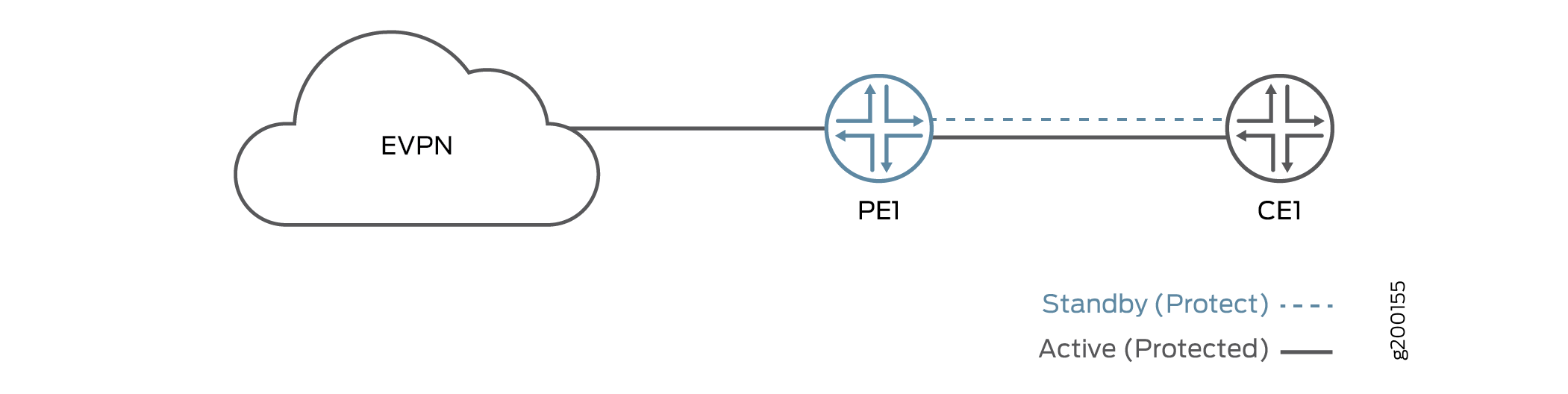
您可以通过配置备用(保护)接口为主动(受保护)接口提供冗余,从而在单个 PE 设备上配置 EVPN 主动-备用多宿主。 图 1 展示了一个 EVPN 拓扑,该拓扑将主动-备用多宿主连接到单个 PE 设备。保护接口可以在发生故障时为受保护的主接口提供备份。当主接口正常运行时,PE 设备将主接口用于网络流量。如果主接口发生故障,保护接口将变为活动状态,流量会切换至保护接口。当主接口返回时,主接口将再次成为活动接口。
注意:
如果启用了连接故障管理 (CFM),保护接口将触发 CFM 向客户边缘设备发送类型、长度和值 (TLV) 或远程缺陷指示 (RDI) 接口状态
在以下情况下,Junos OS 不支持保护接口:
-
EVPN-VXLAN
-
PBB-EVPN系列
-
在 EVPN 多宿主中已配置为 ESI 的接口上
图 1:单个 PE 设备上的 EVPN 主动-备用多宿主
要在路由实例中配置保护接口,请在路由实例中为 EVPN 配置保护接口和主接口,并将语句包含在 protect-interface 主接口层次结构中。
routing-instances {
    routing-instance-name{
        instance-type type;
        interface primary-interface-name {
            protect-interface protect-interface-name
        }
        interface protect-interface-name
    }
    route-distinguisher (as-number:number | ip-address:number);
    vrf-target community;
}
要在路由实例中配置保护接口,请为 EVPN-VPWS 在路由实例中同时配置保护接口和主接口,并将语句包含在 protect-interface 协议层次结构中 evpn 。
routing-instances {
routing-instance-name {
    instance-type evpn-vpws;
    interface primary-interface-name ;
    interface protect-interface-name;
    route-distinguisher (as-number:number | ip-address:number);
    vrf-target community;
    protocols {
        evpn {
            interface primary-interface-name {
                vpws-service-id {
                    local service-id;
                    remote service-id;
                    }
                protect-interface protect-interface-name
            }
        }
    }
}
}
要在网桥域中配置保护接口,请在网桥域中同时配置保护接口和主接口,并将语 protect-interface 句包含在主接口层次结构中。
bridge-domains {
    bridge-domain-name{
        domain-type bridge;
        vlan-id number;
        interface primary-interface-name {
            protect-interface protect-interface-name
            }
        interface protect-interface-name
    }
}
要显示保护接口,请使用 show evpn instance extensive 作命令。
user@PE1> show evpn instance extensive
Instance: blue
Route Distinguisher: 10.255.255.1:100
Per-instance MAC route label: 299776
MAC database status Local Remote
MAC advertisements: 0 0
MAC+IP advertisements: 0 0
Default gateway MAC advertisements: 0 0
Number of local interfaces: 5 (5 up)
Interface name ESI Mode Status AC-Role
ae0.0 00:11:22:33:44:55:66:77:88:99 all-active Up Root
ge-0/0/3.0 00:00:00:00:00:00:00:00:00:00 single-homed Up Root
ge-0/0/4.0 00:11:11:11:44:55:66:77:88:99 all-active Up Root
ge-0/0/4.1 00:22:22:22:44:55:66:77:88:99 all-active Up Root
ge-0/0/4.50 00:00:00:00:00:00:00:00:00:00 single-homed Up Root
Number of IRB interfaces: 1 (0 up)
Interface name VLAN VNI Status L3 context
irb.1 25 Down vrf
Number of protect interfaces: 1
Interface name Protect Interface name Status
ge-0/0/3.1 ge-0/0/4.50 Protect-inactive
show interfaces detail命令显示保护接口的状态为 CCC-DOWN。
user@PE1> show interfaces ae0.0 detail
  Logical interface ae80.0 (Index 399) (SNMP ifIndex 612) (Generation 223)
    Flags: Up SNMP-Traps CCC-Down 0x20004000 VLAN-Tag [ 0x8100.10 ]  Encapsulation: VLAN-Bridge
    Statistics        Packets        pps         Bytes          bps
    Bundle:
        Input :             0          0             0            0
        Output:             0          0             0            0
    Adaptive Statistics:
        Adaptive Adjusts:          0
        Adaptive Scans  :          0
        Adaptive Updates:          0
    Link:
      ge-0/1/8.0
        Input :             0          0             0            0
        Output:             0          0             0            0


    Aggregate member links: 1

    Marker Statistics:   Marker Rx     Resp Tx   Unknown Rx   Illegal Rx
      ge-0/1/8.0                 0           0            0            0
    Protocol bridge, MTU: 1522, Generation: 263, Route table: 11, Mesh Group: __all_ces__