
了解 EVPN 网络中自动生成的 ESI
从 Junos OS (18.4R1) 版开始,您可以配置聚合以太网接口和聚合以太网逻辑接口,以从链路聚合控制协议 (LACP) 配置自动派生以太网段标识符 (ESI)。 图 1 显示了一个简单的多宿主网络,其中,一个客户边缘 (CE) 设备通过链路聚合控制协议 (LACP) 多宿主到两个提供商边缘 (PE) 设备。此功能会自动从 LACP 链路 (actor) 中本地 PE 设备上的系统 ID 和管理密钥派生 ESI。从 Junos OS 22.2R1 版开始,我们支持其他自动 ESI 派生方法。请参阅 自动派生 ESI 的其他方法。
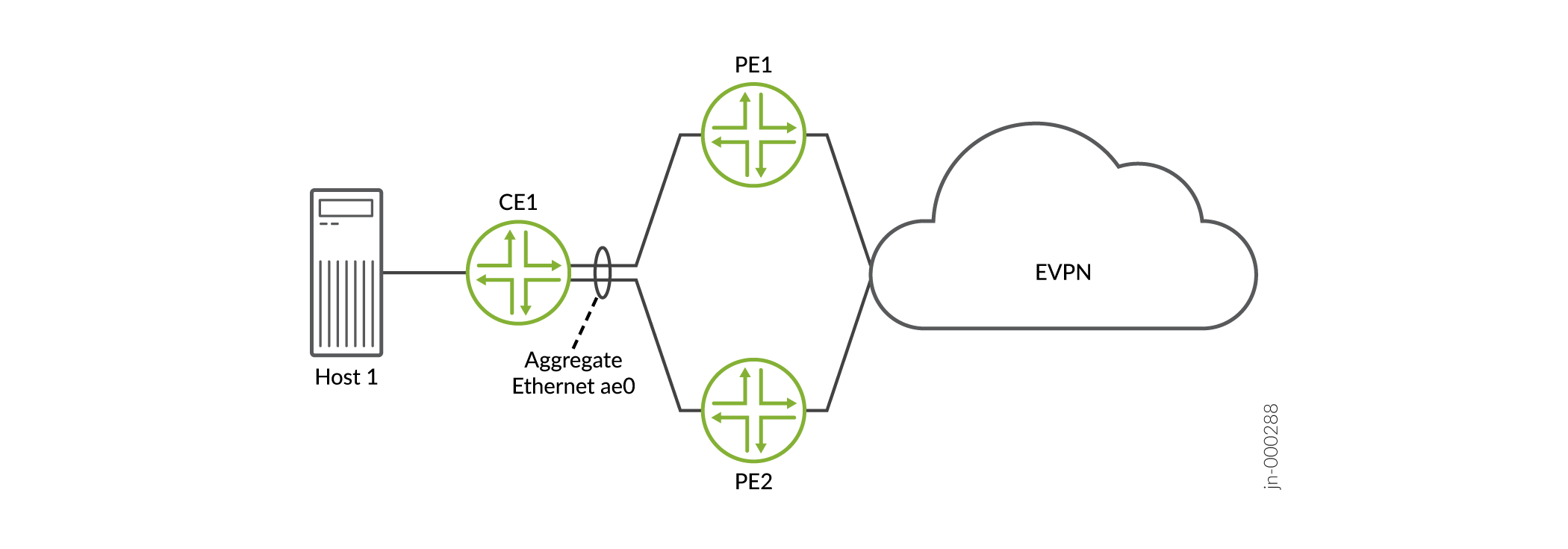
我们支持在多宿主设备上使用此功能:
在 EVPN-VXLAN 叠加网络中处于全活动模式。
在 EVPN-MPLS 叠加网络中处于主动-备用或全主动模式。
本主题包含以下信息:
好处
让您无需在大型 EVPN-VXLAN 和 EVPN-MPLS 叠加网络中手动配置 ESI
消除了无意中为多个以太网网段配置相同 ESI 的可能性。
自动 ESI 配置
通常,您可以使用以下方法在聚合以太网接口和聚合以太网逻辑接口上配置 ESI:
Method 1—您可以在启用了 LACP 的聚合以太网接口上配置自动 ESI。在这种情况下,将生成一个 ESI,并将该特定 ESI 分配给聚合以太网接口上的所有逻辑接口。
Method 2—您可以在配置了 LACP 的聚合以太网接口的一个或多个逻辑接口上配置自动 ESI。在这种情况下,将为启用该功能并分配给该特定逻辑接口的每个逻辑接口生成 ESI。
Method 3—在启用了 LACP 的聚合以太网接口上,您可以使用层次结构级别的配置语句
[edit interfaces aeX]手动配置 ESIesi identifier。在该特定聚合以太网接口上的一个或多个逻辑接口上,您可以配置自动 ESI。在这种情况下,将为启用该功能并分配给该特定逻辑接口的每个逻辑接口生成 ESI。
表 1 概述了自动 ESI 配置选项、每个选项的配置方式以及如何为每个选项派生 ESI。
配置选项 |
如何配置自动 ESI |
ESI 是如何派生的 |
|---|---|---|
在启用了 LACP 的聚合以太网接口上配置自动 ESI。 |
在 |
ESI 派生自层次结构级别和 |
在聚合以太网逻辑接口上配置自动 ESI。LACP 在父聚合以太网接口上启用。 |
在 |
ESI 派生自层级配置语句和层级配置语句 |
从 Junos OS 22.2R1 版开始,lacp层次结构级别和[edit interfaces interface-name unit logical-unit-number esi auto-derive]层次结构级别的配置语句[edit interfaces interface-name esi auto-derive]已重命名。这些层次结构级别的新语句名称为 lacp-pe-system-id-and-admin-key。CLI 会将旧名称别名为新名称,因此您仍然可以提交使用旧语句名称lacp的配置,尽管您只能在 CLI 中看到新名称。
实施自动 ESI 功能时,请记住以下几点:
在 EVPN-VXLAN 或 EVPN-MPLS 叠加网络中,您可以混合使用方法 1、2 和 3 配置用例来配置自动 ESI。
如果本地设备多宿主到两个远程设备,我们建议聚合以太网和聚合以太网逻辑接口启用自动 ESI 功能,通过这三个设备进行多宿主。如果其中一个接口未启用自动 ESI 功能,则在指定转发器 (DF) 选择过程中不会考虑该接口。
自动生成的 ESI 在模作和基于偏好的 DF 选择过程中均受支持。
如果启用自动 ESI 功能并在特定聚合以太网接口或聚合以太网逻辑接口上手动配置 ESI,则在尝试提交配置时将收到错误。
如果在聚合以太网接口以及该特定聚合以太网接口上的一个或多个逻辑接口上启用自动 ESI 功能,则在尝试提交配置时将收到错误。
方法 1 示例配置 — 聚合以太网接口上的自动 ESI
以下示例显示了在聚合以太网接口 ae0(在全活动模式下多宿主)上的自动 ESI 配置。此配置将生成一个基于 LACP 配置自动生成的 ESI,并分配给逻辑接口 ae0.0、ae0.100、ae0.101 和 ae0.102。
user@mx240> show configuration interfaces
ae0
flexible-vlan-tagging;
encapsulation flexible-ethernet-services;
esi {
    auto-derive { ### Automatic ESI configuration.###
        lacp; ### Automatic ESI configuration.###
    }
    all-active;
}
aggregated-ether-options {
    lacp {
        active;
        system-id 00:00:00:00:11:01; ### ESI derived from this value.###
        admin-key 40; ### ESI derived from this value.###
    }
}
unit 0 {
    encapsulation vlan-bridge;
    vlan-id 10;
}
unit 100 {
    family bridge {
        interface-mode trunk;
        vlan-id-list 100;
    }
}
unit 101 {
    family bridge {
        interface-mode trunk;
        vlan-id-list 101;
    }
}
unit 102 {
    family bridge {
        interface-mode trunk;
        vlan-id-list 102;
    }
}
...
方法 2 示例配置 — 聚合以太网逻辑接口上的自动 ESI
以下示例显示了在聚合以太网逻辑接口 ae0.0、ae0.100、ae0.101 和 ae0.102 上的自动 ESI 配置,所有这些接口均在全活动模式下多宿主。此配置可根据 LACP 和 VLAN ID 配置自动生成 ESI,并将其分配给各个相应的逻辑接口。
user@mx240> show configuration interfaces
ae0
flexible-vlan-tagging;
encapsulation flexible-ethernet-services;
aggregated-ether-options {
    lacp {
        active;
        system-id 00:00:00:00:11:01; ### ESI derived from this value.###
    }
}
unit 0 {
    encapsulation vlan-bridge;
    vlan-id 10; ### ESI derived from this value.###
    esi {
        auto-derive { ### Automatic ESI configuration.###
            lacp; ### Automatic ESI configuration.###
        }
        all-active;
    }
}
unit 100 {
    esi {
        auto-derive { ### Automatic ESI configuration.###
            lacp; ### Automatic ESI configuration.###
        }
        all-active;
    }
    family bridge {
        interface-mode trunk;
        vlan-id-list 100; ### ESI derived from this value.###
    }
}
unit 101 {
    esi {
        auto-derive { ### Automatic ESI configuration.###
            lacp; ### Automatic ESI configuration.###
        }
        all-active;
    }
    family bridge {
        interface-mode trunk;
        vlan-id-list 101; ### ESI derived from this value.###
    }
}
unit 102 {
    esi {
        auto-derive { ### Automatic ESI configuration.###
            lacp; ### Automatic ESI configuration.###
        }
        all-active;
    }
    family bridge {
        interface-mode trunk;
        vlan-id-list 102; ### ESI derived from this value.###
    }
}
...
方法 3 示例配置 - 在聚合以太网接口上手动 ESI,在逻辑接口上自动 ESI
以下示例显示了在聚合以太网接口 ae0 上手动配置 ESI,以及在逻辑接口 ae0.0、ae0.100、ae0.101 和 ae0.102 上配置自动 ESI。所有接口在全活动模式下都是多宿主的。此配置会导致将 ESI 00:11:22:33:44:55:66:77:88:99 分配给 ae0,并根据 LACP 和 VLAN ID 配置自动生成并分配给相应逻辑接口的 ESI。
user@mx240> show configuration interfaces
ae0
flexible-vlan-tagging;
encapsulation flexible-ethernet-services;
esi 00:11:22:33:44:55:66:77:88:99; ### Manual ESI configuration.###
aggregated-ether-options {
    lacp {
        active;
        system-id 00:00:00:00:11:01; ### Logical interface ESI derived from this value.###
    }
}
unit 0 {
    encapsulation vlan-bridge;
    vlan-id 10; ### Logical interface ESI derived from this value.###
    esi {
        auto-derive { ### Automatic ESI configuration.###
            lacp; ### Automatic ESI configuration.###
        }
        all-active;
    }
}
unit 100 {
    esi {
        auto-derive { ### Automatic ESI configuration.###
            lacp; ### Automatic ESI configuration.###
        }
        all-active;
    }
    family bridge {
        interface-mode trunk;
        vlan-id-list 100; ### Logical interface ESI derived from this value.###
    }
}
unit 101 {
    esi {
        auto-derive { ### Automatic ESI configuration.###
            lacp; ### Automatic ESI configuration.###
        }
        all-active;
    }
    family bridge {
        interface-mode trunk;
        vlan-id-list 101; ### Logical interface ESI derived from this value.###
    }
}
unit 102 {
    esi {
        auto-derive { ### Automatic ESI configuration.###
            lacp; ### Automatic ESI configuration.###
        }
        all-active;
    }
    family bridge {
        interface-mode trunk;
        vlan-id-list 102; ### Logical interface ESI derived from this value.###
    }
}
...
自动派生 ESI 的其他方法
网络运营商可能无法管理 EVPN 网络中的所有设备,但他们仍必须确保 ESI 是唯一的。瞻博网络还提供了其他方法来自动派生 ESI。
在 [edit interfaces aeX aggregated-ether-options lacp] 层次结构级别包括以下语句。
type-1-lacp—类型 1 在 LACP 链路(伙伴)中使用远程 CE 设备上的系统 ID 和管理密钥。type-3-system-mac—类型 3 使用macPE 设备上配置的和local-discriminator值。
我们支持在 EVPN-VXLAN 和 EVPN-MPLS 网络中以全活动模式在多宿主设备上配置 1 类和 3 类自动派生的 ESI。
ESI 值格式
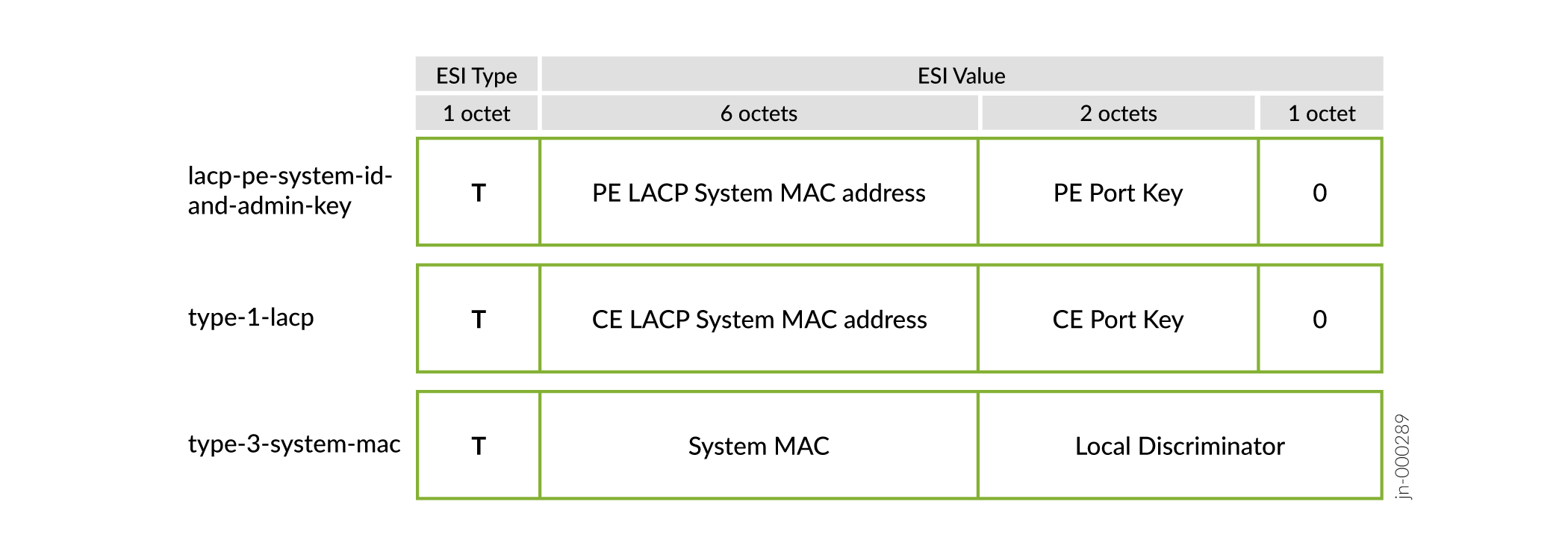
配置自动 ESI 功能后,聚合以太网和聚合以太网逻辑接口从聚合以太网接口上的各种配置派生 ESI。不同自动推导的 ESI 选项的 10 字节 ESI 值如 图 2 所示,并在 表 2 中描述。
| 自动推导的选项 | T(ESI 类型) | ESI 值 |
|---|---|---|
lacp-pe-system-id-and-admin-key |
类型 1 - 第一个八位位组编码为 0x01。 |
接下来的八个八位位组是从本地 PE 设备(actor)上的 LACP 配置生成的:
最后一个八位字节编码为 0x00。 |
type-1-lacp |
类型 1 - 第一个八位位组编码为 0x01。 |
接下来的八个八位位组由远程 CE 设备(合作伙伴)上的 LACP 配置生成:
注意:
最后一个八位字节编码为 0x00。 |
type-3-system-mac |
类型 3 - 第一个八位字节编码为 0x03。 |
剩余的八位位组是从层次结构级别的和 |
配置 1 类和 3 类自动推导
图 3 显示了一个简单的多宿主拓扑,其中 PE1 和 PE2 多宿主到 CE1。
使用 Type 1 配置自动推导
以下示例显示了 CE1 和一个 PE 设备上聚合以太网接口上的 1 类配置。结果就是从 CE1 上的 LACP 配置派生出的 ESI。
user@pe1 show configuration interfaces ae0
esi {
    auto-derive {
        type-1-lacp;
    }
    all-active;
}
aggregated-ether-options {
    minimum-links 1;
    lacp {
        active;
        system-id 00:11:22:33:44:55; ### system-id must be indentical on PE2
        admin-key 1234;  ### admin-key must be identical on PE2
    }
}
unit 0 {
    family ethernet-switching {
        interface-mode trunk;
        vlan {
            members [ v100 v200 ];
        }
    }
}
...
user@ce1# show interfaces ae0
flexible-vlan-tagging;
encapsulation flexible-ethernet-services;
aggregated-ether-options {
    lacp {
        active;
        system-id aa:bb:cc:dd:ee:22; ### ESI derived from this value
        admin-key 1234;   ### ESI derived from this value
    }
}
unit 1 {
    vlan-id 100;
    family inet {
        address 10.1.1.200/24;
    }
}
unit 2 {
    vlan-id 200;
    family inet {
        address 10.1.2.200/24;
    }
}
使用 Type 3 配置自动推导
以下示例显示了在使用 PE1 设备上的本地配置系统 MAC 和本地鉴别器选项的聚合以太网接口上的自动 ESI 配置。
user@pe1# show interfaces ae0
esi {
    auto-derive {
        type-3-system-mac {
            mac 00:aa:bb:cc:dd:ee;  ### ESI derived from this value
            local-discriminator 1000;  ### ESI derived from this value
        }
    }
    all-active;
}
aggregated-ether-options {
    minimum-links 1;
    lacp {
        system-id 00:11:22:33:44:55;
        admin-key 1234;
    }
}
unit 0 {
    family ethernet-switching {
        interface-mode trunk;
        vlan {
            members [ v100 v200 ];
        }
    }
}
变更历史表
是否支持某项功能取决于您使用的平台和版本。使用 功能浏览器 查看您使用的平台是否支持某项功能。