Help us improve your experience.

Let us know what you think.

Do you have time for a two-minute survey?


安装 AP63 接入点

您可以使用两种方法将 AP63 安装在墙上或杆上:嵌入式安装或铰接式安装。

用于 AP63 的安装支架

您也可以单独订购嵌入式安装和铰接式安装支架。 表 1 列出了安装支架的部件号。

表 1:AP63 安装支架的部件号
部件号 说明
APOUTBR-调频 齐平安装支架
APOUTBR-ART2 铰接式安装支架

用于嵌入式安装方法的安装支架

用于嵌入式安装的安装附件包括:

  • 一个嵌入式安装支架(部件号:APOUTBR-FM)

  • 两个软管夹

  • 四个 M6 螺丝

  • 四套 M6 螺钉、垫圈和弹簧垫圈

  • 五组锚栓和螺钉

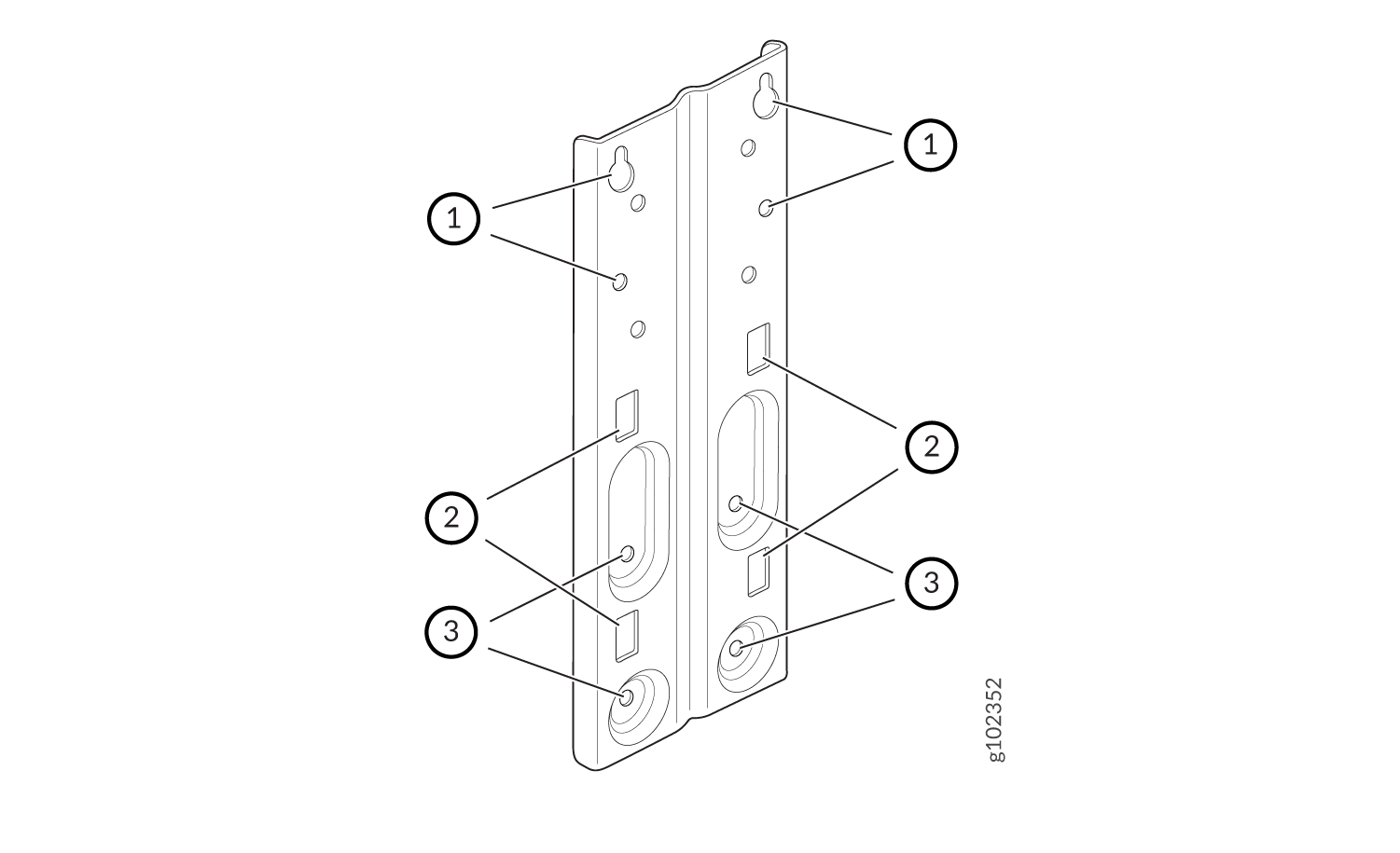
图 1 显示了用于安装在墙壁和杆上的螺丝孔。
图 1:APOUTBR-FM 嵌入式安装支架 Technical drawing of a metal bracket with keyhole-shaped cutouts for mounting, rectangular slots for alignment, and circular holes for fasteners.
1 - 用于将 AP63 安装在墙上的螺丝孔 2 - 用于连接软管夹的孔
3 - 用于将支架连接到 AP63 的螺丝孔  

用于铰接式安装方法的安装支架

用于铰接式安装的安装附件包括:

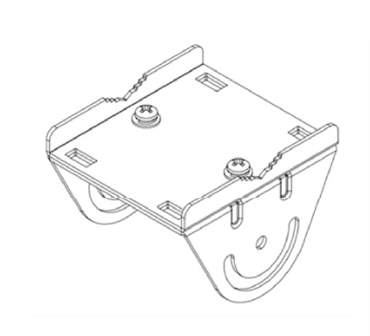
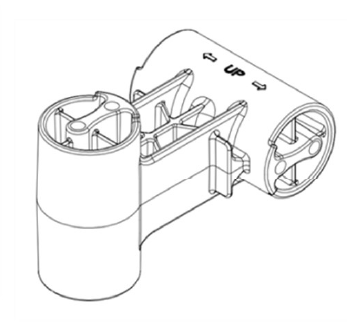
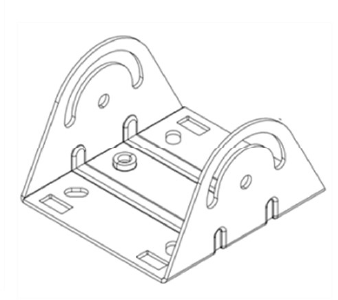
  • 三个安装支架(部件号:APOUTBR-ART2):

    • 安装支架 1

      Technical drawing of a bracket with screw holes and curved features for securing or supporting an object.
    • 安装支架 2

      LEGO Technic connector piece with arrows and UP label indicating assembly orientation.
    • 安装支架 3

      Technical drawing of a metal bracket with two vertical supports featuring curved slots and a flat base with mounting holes.
  • 四个 M6x10mm 螺丝

  • 四个螺栓和螺母

连接接地电缆

建议您在将 AP 安装到墙壁或电线杆上之前先将 AP 接地。AP63 的背面有一个单孔保护接地端子。使用此接地端子将 AP 接地。

将 AP63 接地:

  1. 拆下螺丝。
  2. 将连接到接地电缆的接地片放在接地端子上。
  3. 用螺钉将接地电缆接线片固定到接地端子上。

将 AP63 安装在墙上(嵌入式安装)

要将 AP63 齐平安装在墙上:
  1. 根据图 1 中标有标注 #1 的孔的位置,在墙上钻四个孔
  2. 将螺钉插入上部两个孔中。不要完全拧紧螺丝。
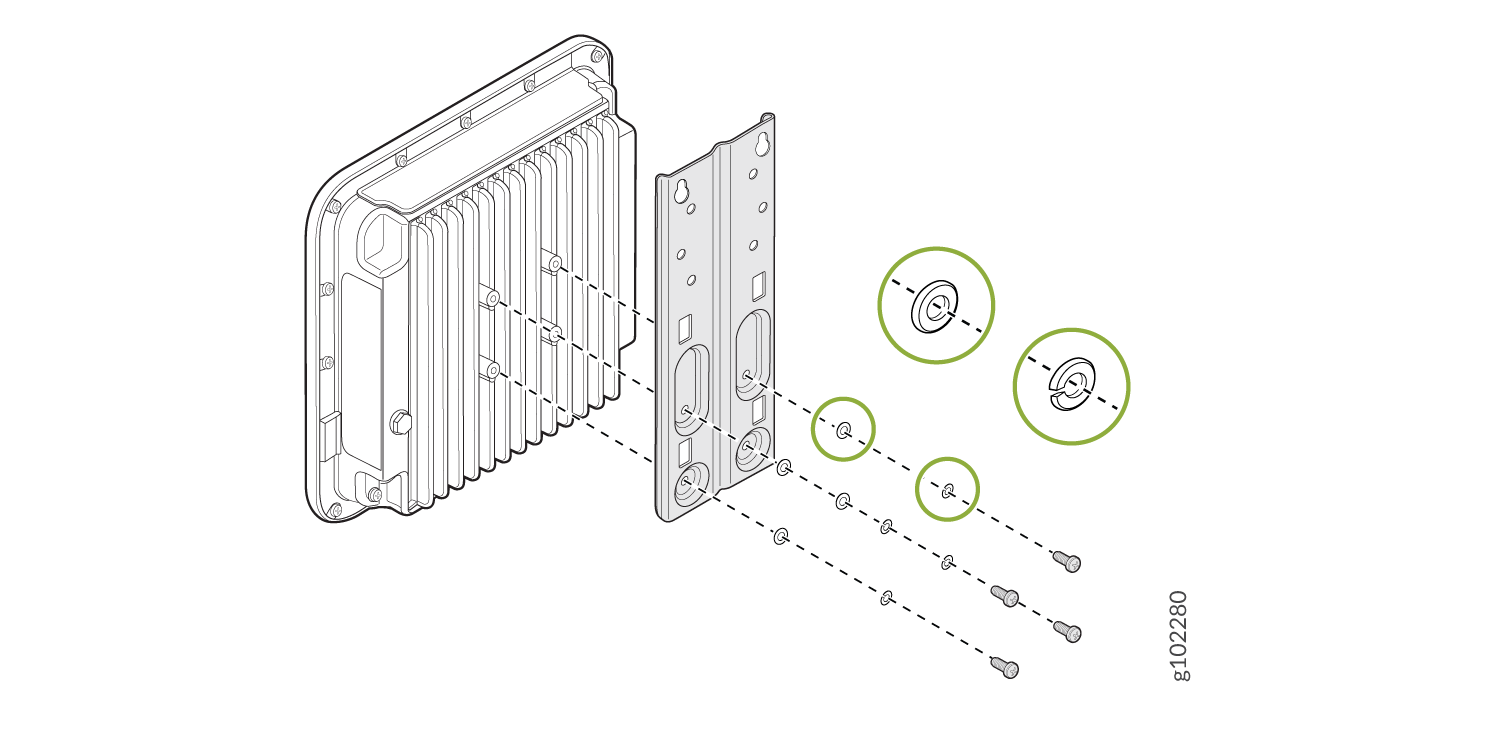
  3. 使用 AP 随附的四个螺钉、垫圈和锁紧垫圈,将 APOUTBR-FM 嵌入式安装支架连接到 AP。 使用图 3 中标有标注 #1 的支架螺钉孔。
    图 2:将 APOUTBR-FM 嵌入式安装支架连接到 AP63 Exploded view of a component assembly with ribbed housing, mounting plate, screws, washers, spacers, and highlighted important parts.
  4. 放置 AP,使您在步骤 1 中插入的两颗螺钉能够插入支架上的孔中。向下滑动接入点,使螺钉锁定到位。
    图 3:将 AP63 安装在墙上(嵌入式安装) Juniper Networks wireless access point installation guide showing device sliding into bracket on left and being secured with screws on right.
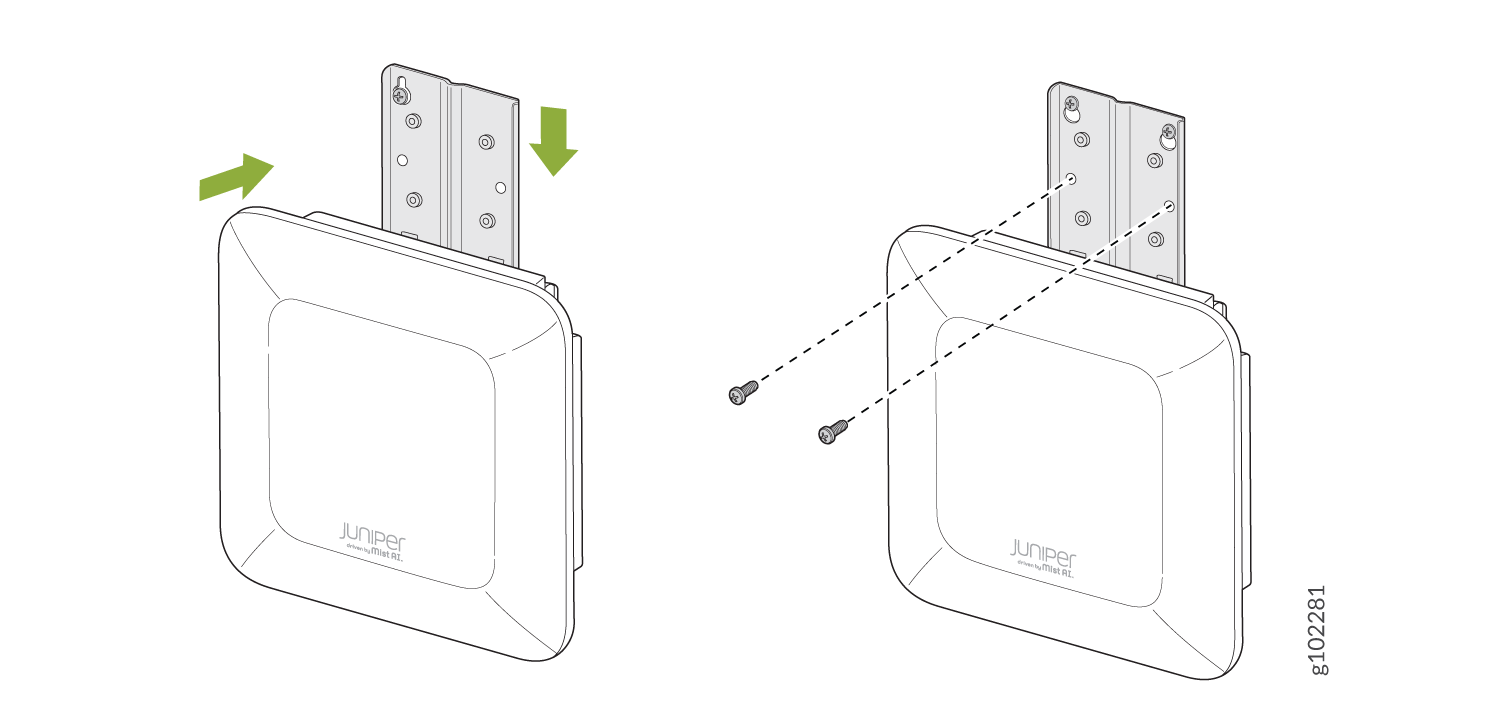
  5. 插入另外两个螺钉,然后拧紧所有四个螺钉。

将 AP63 安装在杆上(嵌入式安装)

要将 AP63 齐平安装在杆子上:
  1. 将软管夹连接到 APOUTBR-FM 嵌入式安装支架。使用螺丝刀松开软管夹,然后将软管夹穿过嵌入式安装支架中的插槽。
    图 4:将软管夹amps 连接到 APOUTBR-FM 嵌入式安装支架 Mounting bracket with two adjustable hose clamps for securing cylindrical objects to a flat surface.

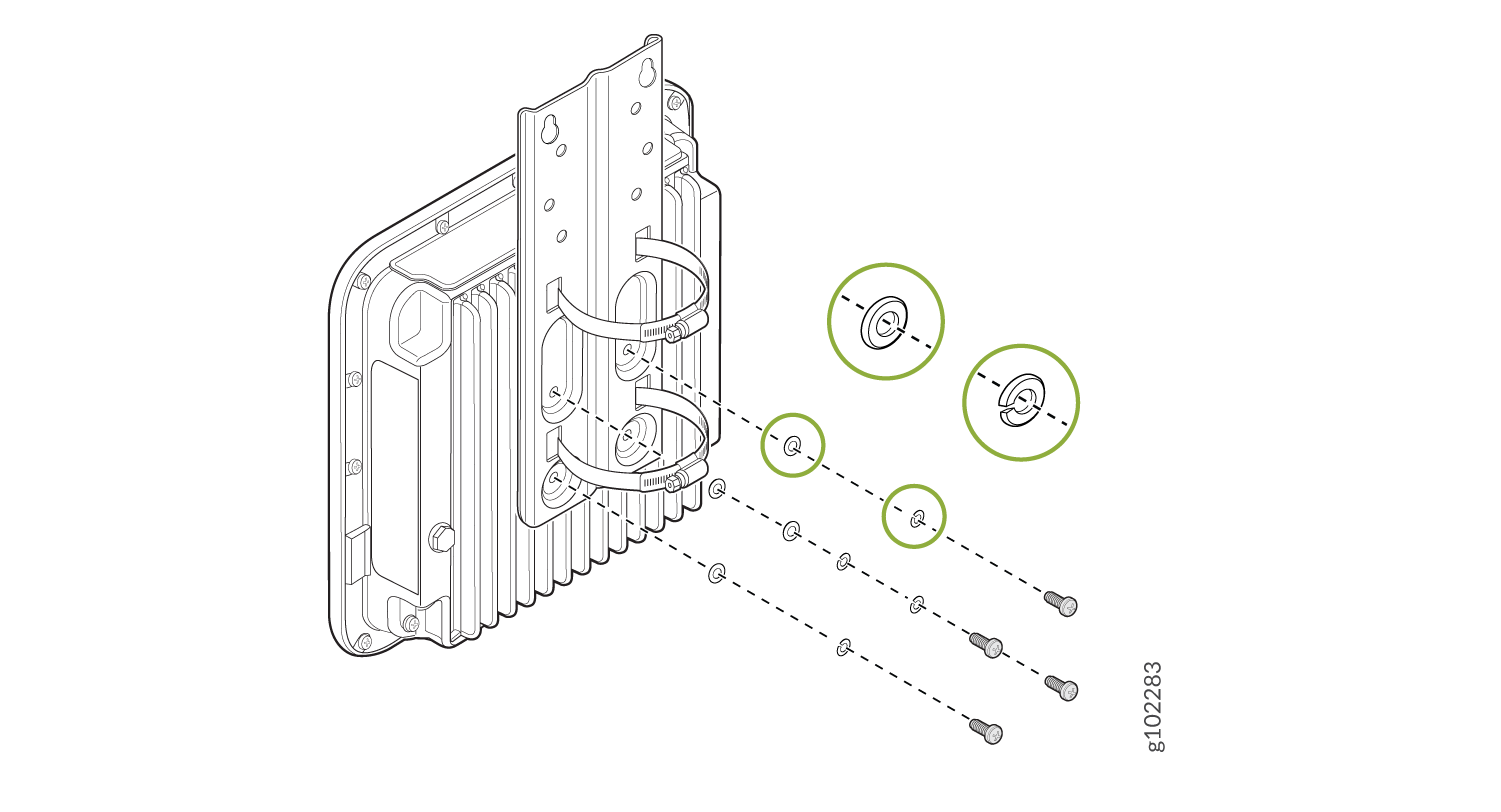
  2. 使用 AP 随附的四个螺钉、垫圈和锁紧垫圈,将 APOUTBR-FM 嵌入式安装支架连接到 AP。
    图 5:将 APOUTBR-FM 嵌入式安装支架连接到 AP63 Exploded diagram showing assembly of a mounting bracket for a device with fins, including metal plate, hose clamps, screws, and highlighted components.
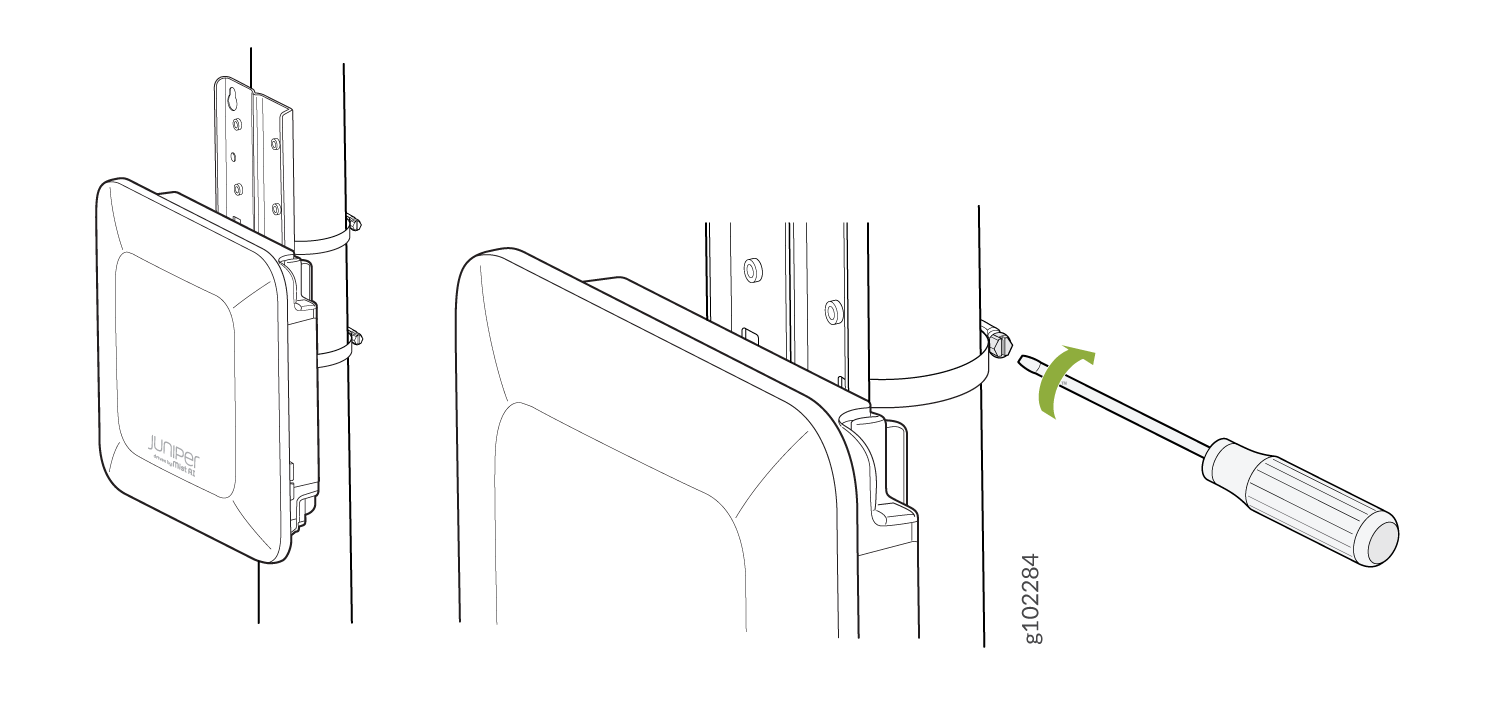
  3. 将 AP 安装在杆子上。将软管的开口端缠绕在杆上,然后用螺丝刀拧紧软管夹螺钉。拧紧螺钉,直到 AP 和支架组件固定到位。
    图 6:将 AP63 安装在杆上(嵌入式安装) Juniper device installation on a pole using a bracket and metal straps. A screwdriver tightens screws.
将 AP63 安装在墙上(铰接式安装)

要使用铰接式安装支架将 AP63 安装在墙上:
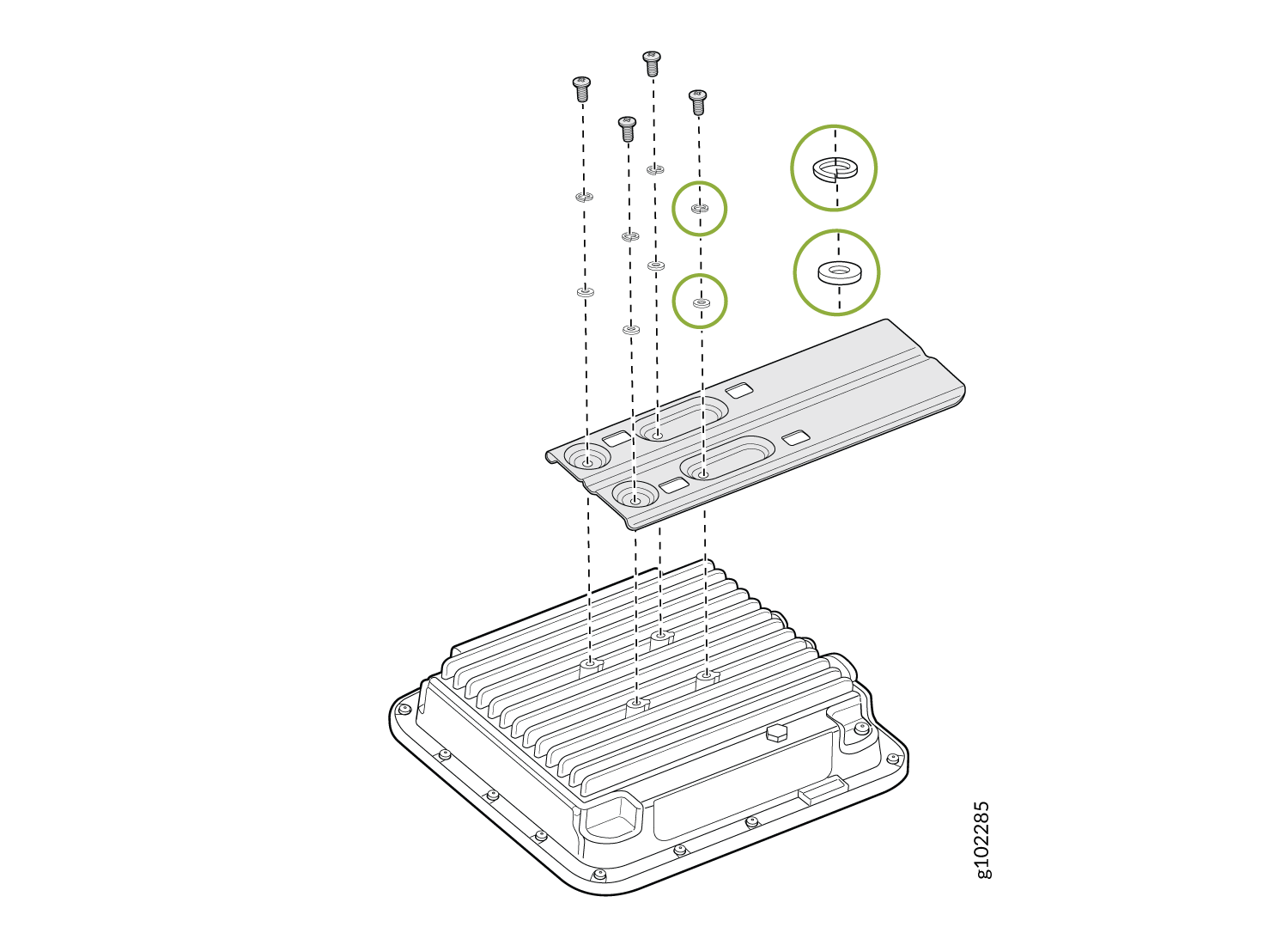
  1. 使用四个 M6x16mm 螺钉、垫圈和锁垫圈将齐平安装支架 APOUTBR-FM 连接到 AP。
    图 7:将 APOUTBR-FM 嵌入式安装支架连接到 AP63 Exploded view of a heat sink assembly showing components like screws, washers, and ribbed cover plate. Green circles highlight key parts.
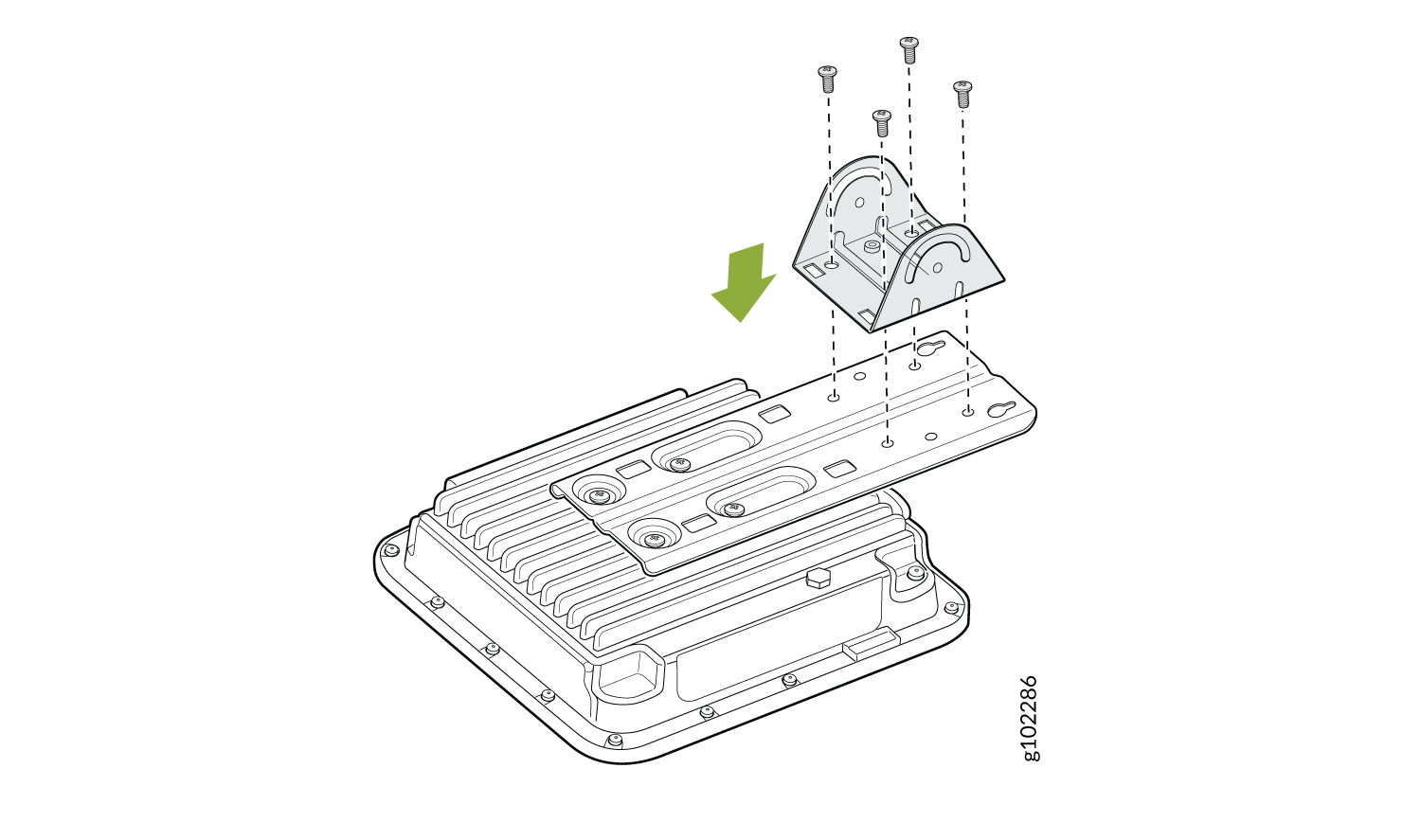
  2. 使用四个 M6x10mm 螺钉将 APOUTBR-ART2 安装支架 3 连接到齐平安装支架 APOUTBR-FM。
    图 8:将 APOUTBR-ART2 安装支架 3 连接到 APOUTBR-FM 嵌入式安装支架 Exploded view diagram showing assembly of a device with a finned base unit, mounting bracket, and screws. Arrow shows bracket placement.
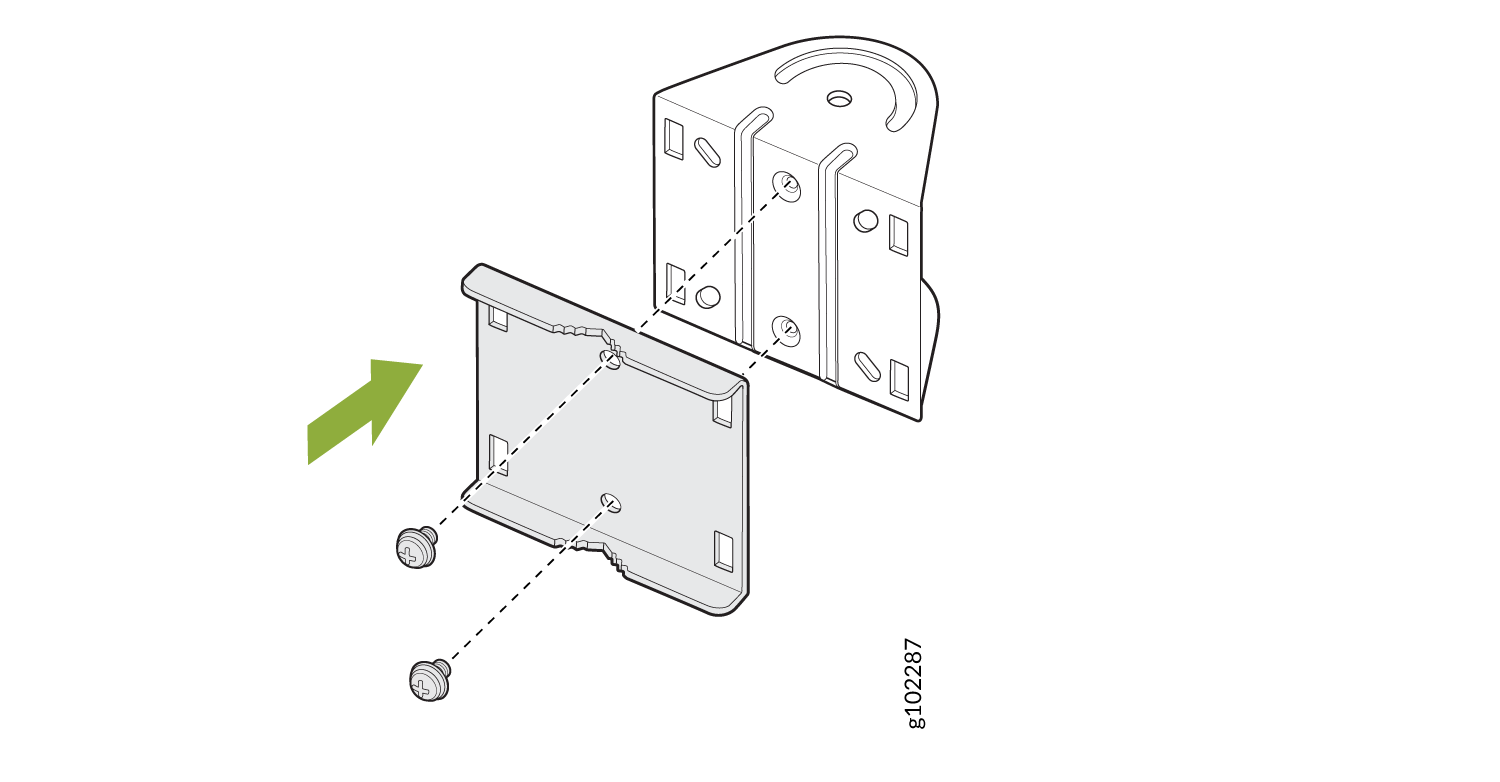
  3. 拆下两颗螺钉,拆卸 APOUTBR-ART2 安装支架 1。
    图 9:拆卸 APOUTBR-ART2 安装支架 1 Attach bracket to plate using screws. Follow green arrow direction for alignment. Dotted lines show screw placement.
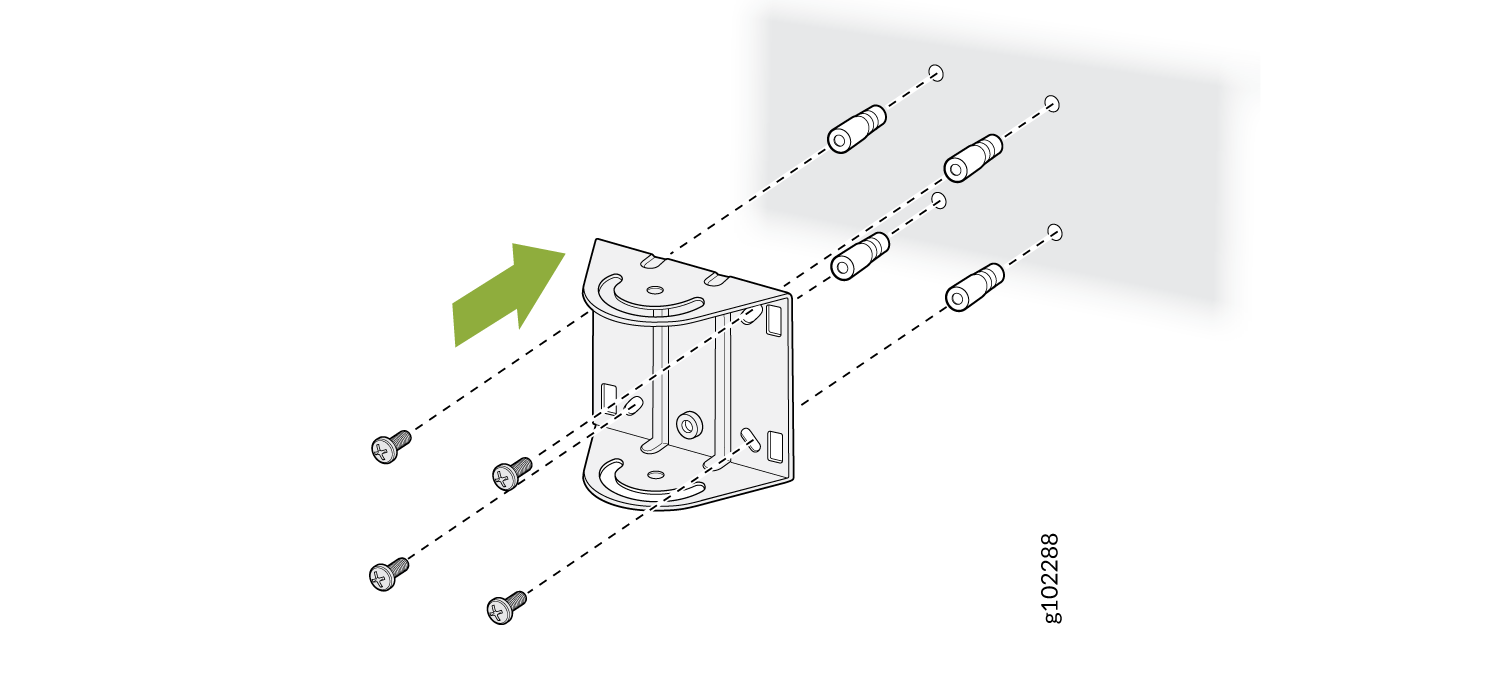
  4. 使用四个螺钉将 APOUTBR-ART2 安装支架 1 安装在墙上。
    图 10:将 APOUTBR-ART2 安装支架 1 安装在墙上 Assembly diagram for wall-mounted bracket with screws, wall anchors, and bracket. Dashed lines show screw and anchor placement. Green arrow indicates installation direction.
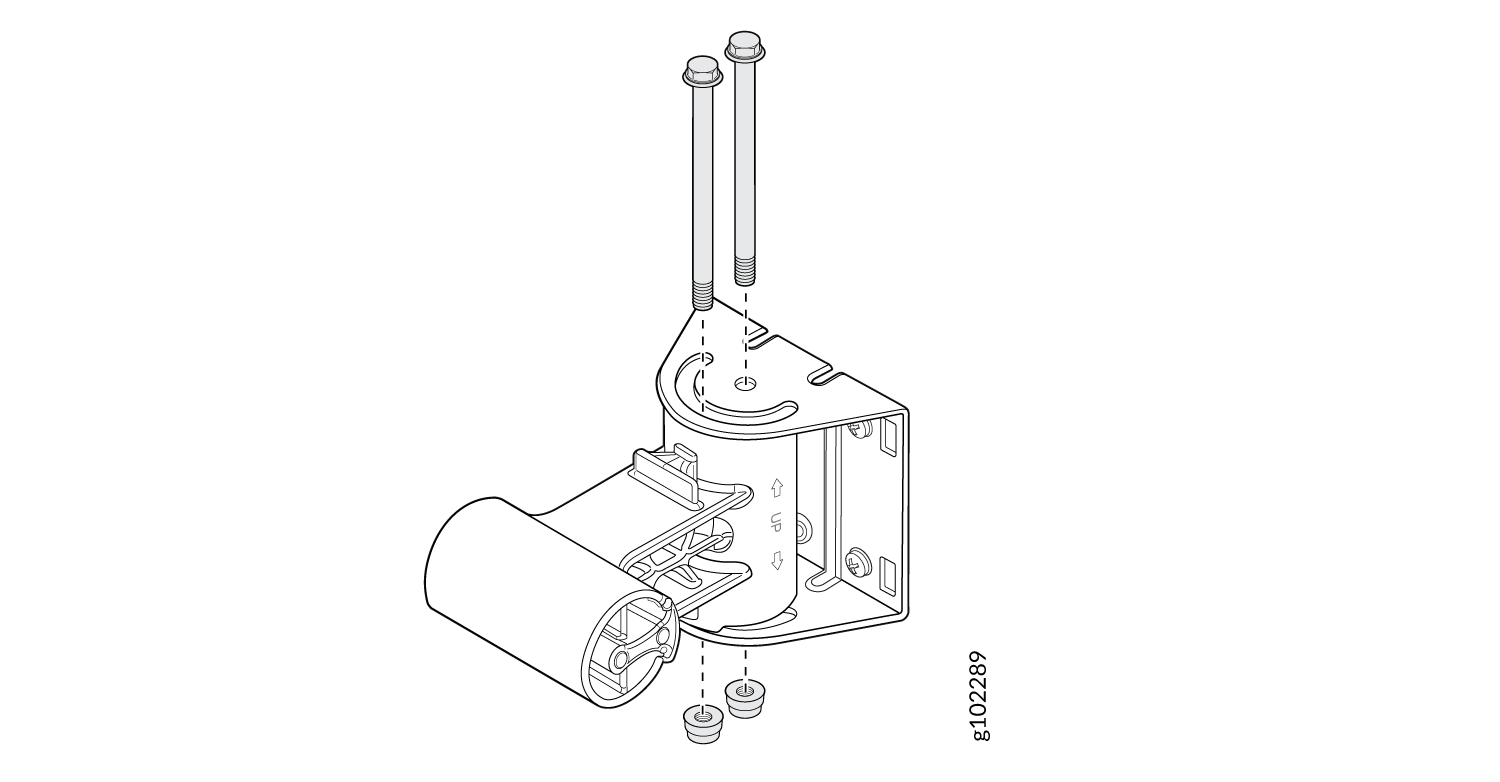
  5. 使用两个螺栓和螺母将 APOUTBR-ART2 安装支架 2 连接到安装支架 1。用“← UP →”定向侧面,如图 11 所示。
    图 11:将 APOUTBR-ART2 安装支架 2 连接到安装支架 1 Exploded diagram showing assembly of mechanical parts: bolts, washers, cylindrical roller, and bracket with arrows indicating assembly process.
  6. 使用两个螺栓和螺母将 APOUTBR-ART2 安装支架 3 连接到安装支架 2
    图 12:将 APOUTBR-ART2 安装支架 3 连接到安装支架 2 Technical drawing of a mechanical assembly with a finned heat sink mounted to a bracket system with a cylindrical roller and securing bolts.

将 AP63 安装在杆上(铰接式安装)

要使用铰接式安装支架将 AP63 安装在墙上:
  1. 使用四个 M6x16mm 螺钉、垫圈和锁垫圈将齐平安装支架 APOUTBR-FM 连接到 AP。
    图 13:将 APOUTBR-FM 嵌入式安装支架连接到 AP63 Attach the APOUTBR-FM Flush Mount Bracket to an AP63
  2. 使用四个 M6x10mm 螺钉将 APOUTBR-ART2 安装支架 3 连接到齐平安装支架 APOUTBR-FM。
    图 14:将 APOUTBR-ART2 安装支架 3 连接到 APOUTBR-FM 嵌入式安装支架 Attach the APOUTBR-ART2 Mounting Bracket 3 to the APOUTBR-FM Flush Mount Bracket
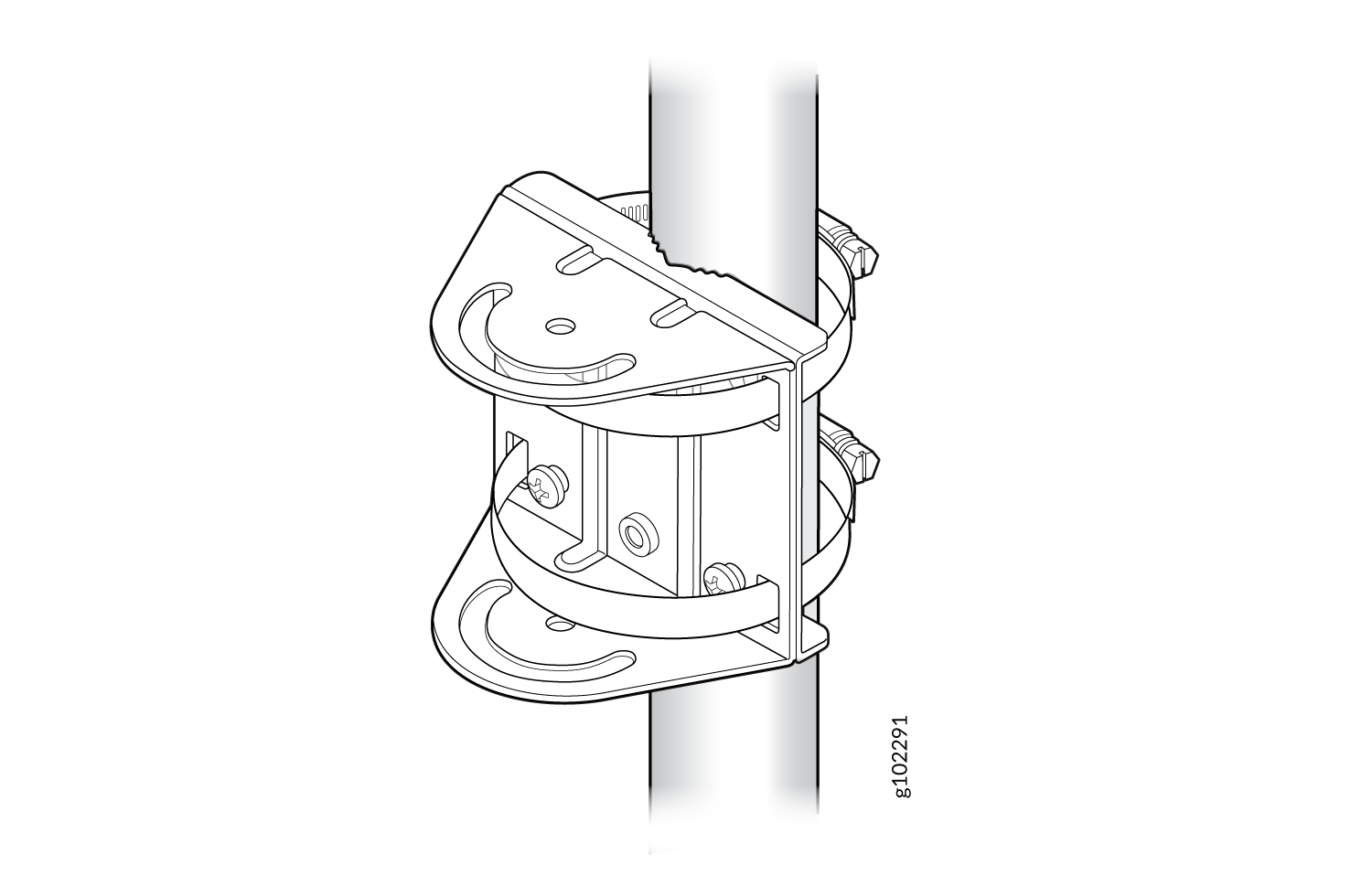
  3. 将软管夹amp 连接到 APOUTBR-ART2 安装支架 1。使用螺丝刀松开软管夹,然后将软管夹穿过支架上的插槽。
  4. 将 APOUTBR-ART2 安装支架 1 连接到杆上。将软管的开口端缠绕在杆上,然后用螺丝刀拧紧软管夹螺钉。拧紧螺钉,直到支架固定到位。
    图 15:将 APOUTBR-ART2 安装支架 1 连接到杆上 Technical drawing of a pipe clamp assembly designed to secure a cylindrical object with bolts, circular plates, and frame structure.
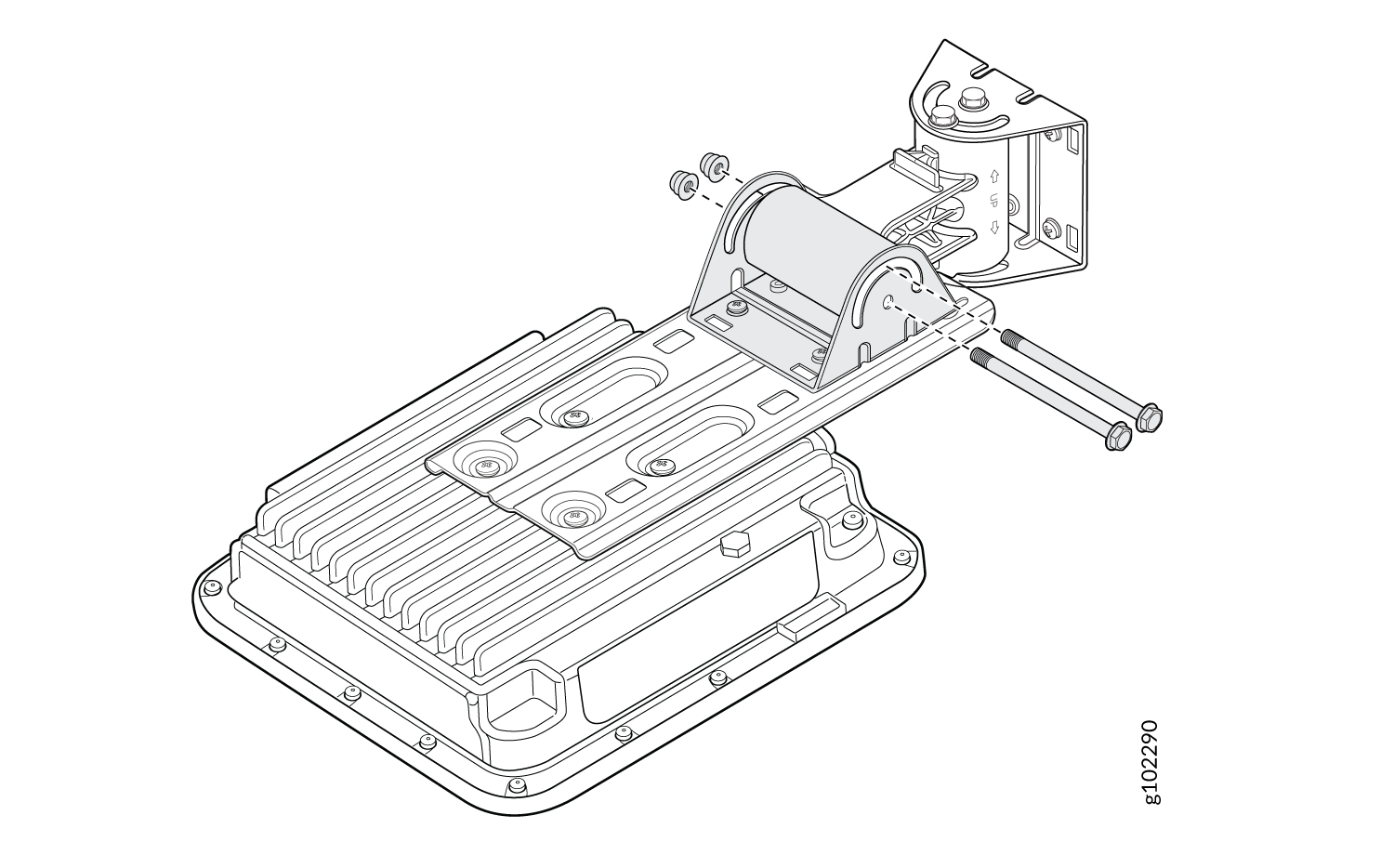
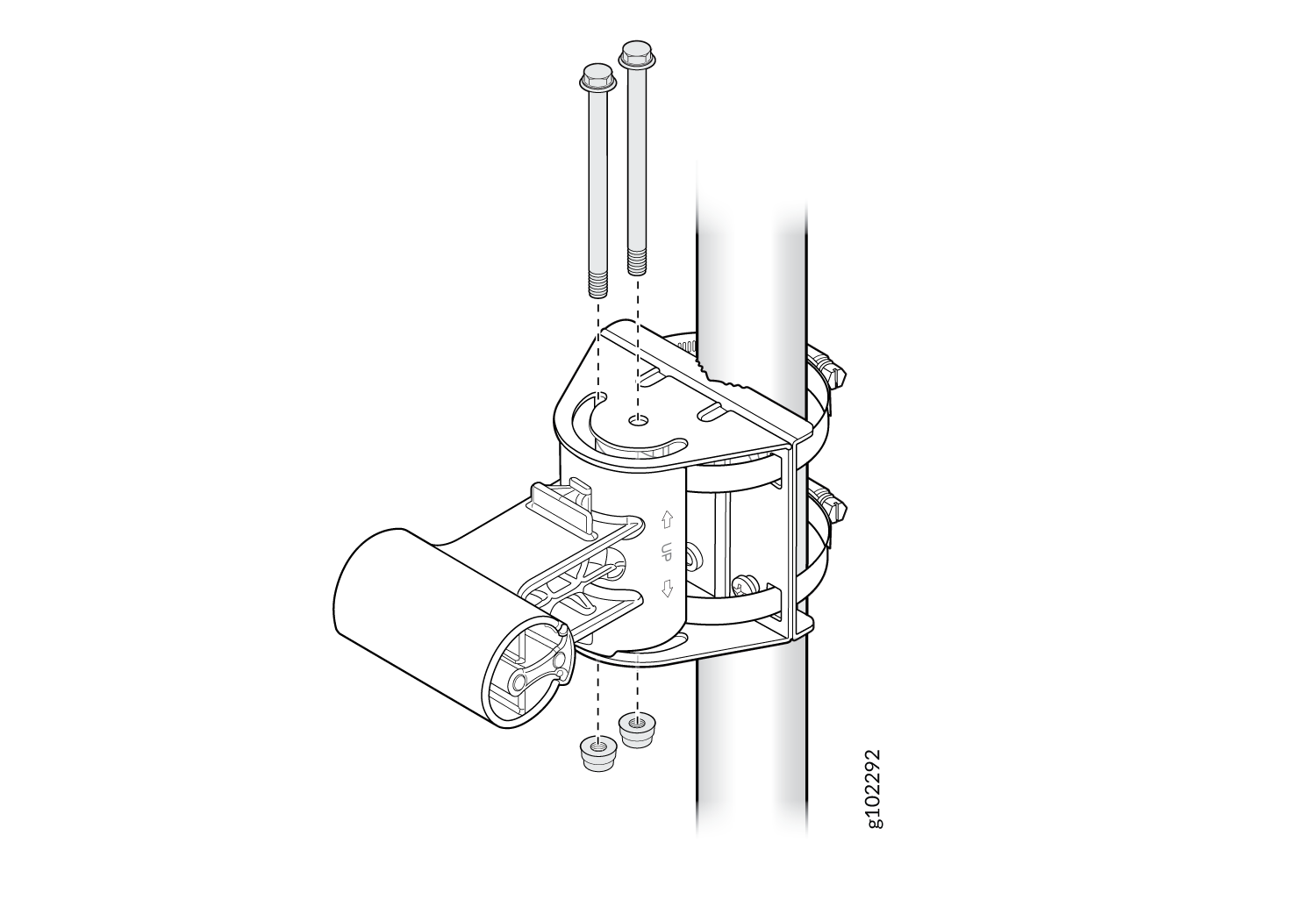
  5. 使用支架套件中包含的两个螺栓和螺母,将 APOUTBR-ART2 安装支架 2 连接到安装支架 1。如图 16 所示,将带有标签← UP →的一面定向。
    图 16:将 APOUTBR-ART2 安装支架 2 连接到安装支架 1 Mounting bracket assembly with a cylindrical component, vertical pole, bolts, nuts, and washers in exploded view.
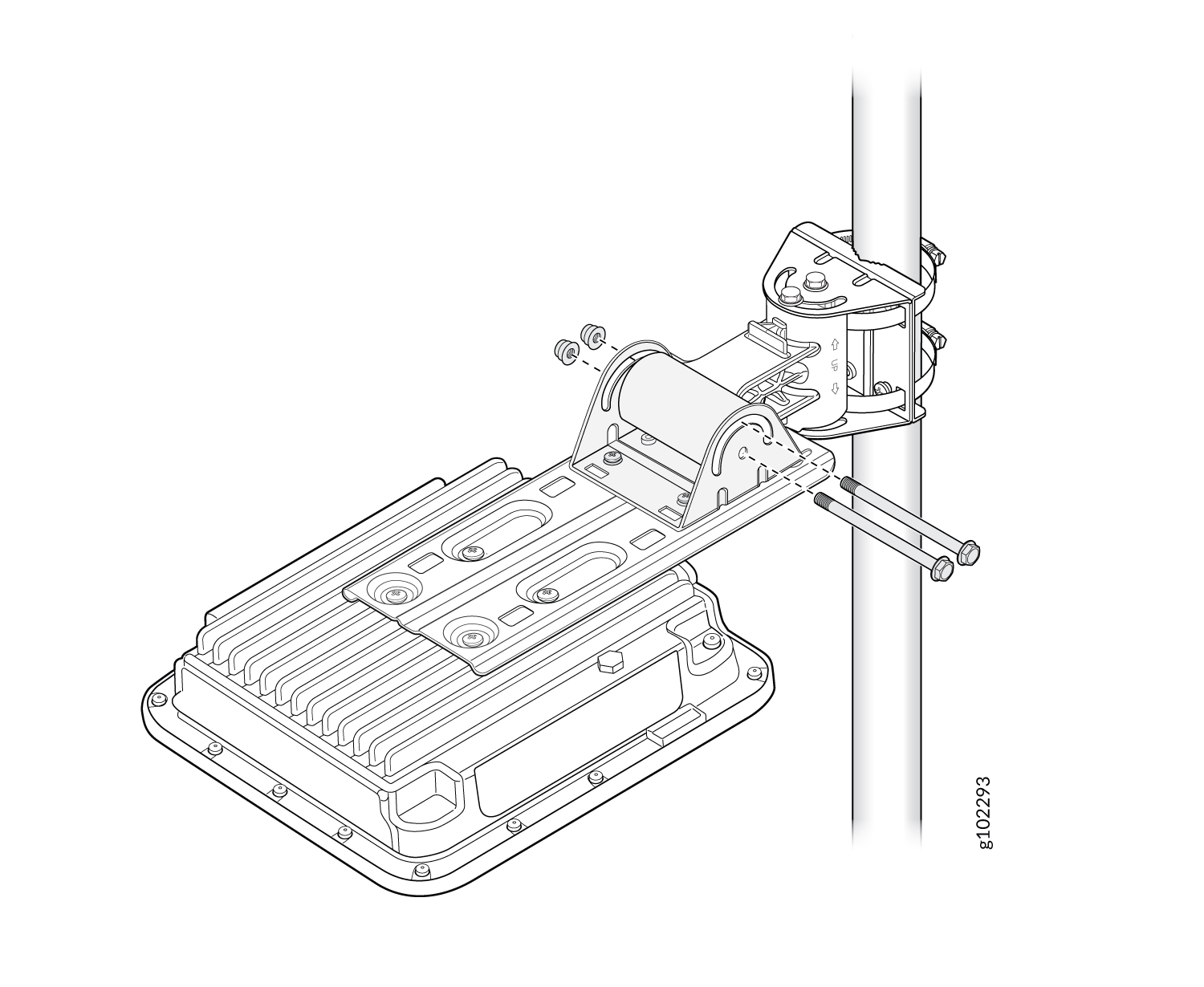
  6. 使用支架套件中包含的两个螺栓和螺母将 APOUTBR-ART2 安装支架 3 连接到安装支架 2。
    图 17:将 APOUTBR-ART2 安装支架 3 连接到安装支架 2 Mounting assembly for an outdoor electronic device on a pole, featuring a bracket with bolts and a ribbed design for heat dissipation.
连接 RJ-45 电缆密封套

将 RJ-45 电缆连接到 AP 时,请使用 RJ-45 电缆密封套。电缆密封套有助于固定 RJ-45 电缆并保护电缆免受损坏。要使用电缆接头连接 RJ-45 电缆:
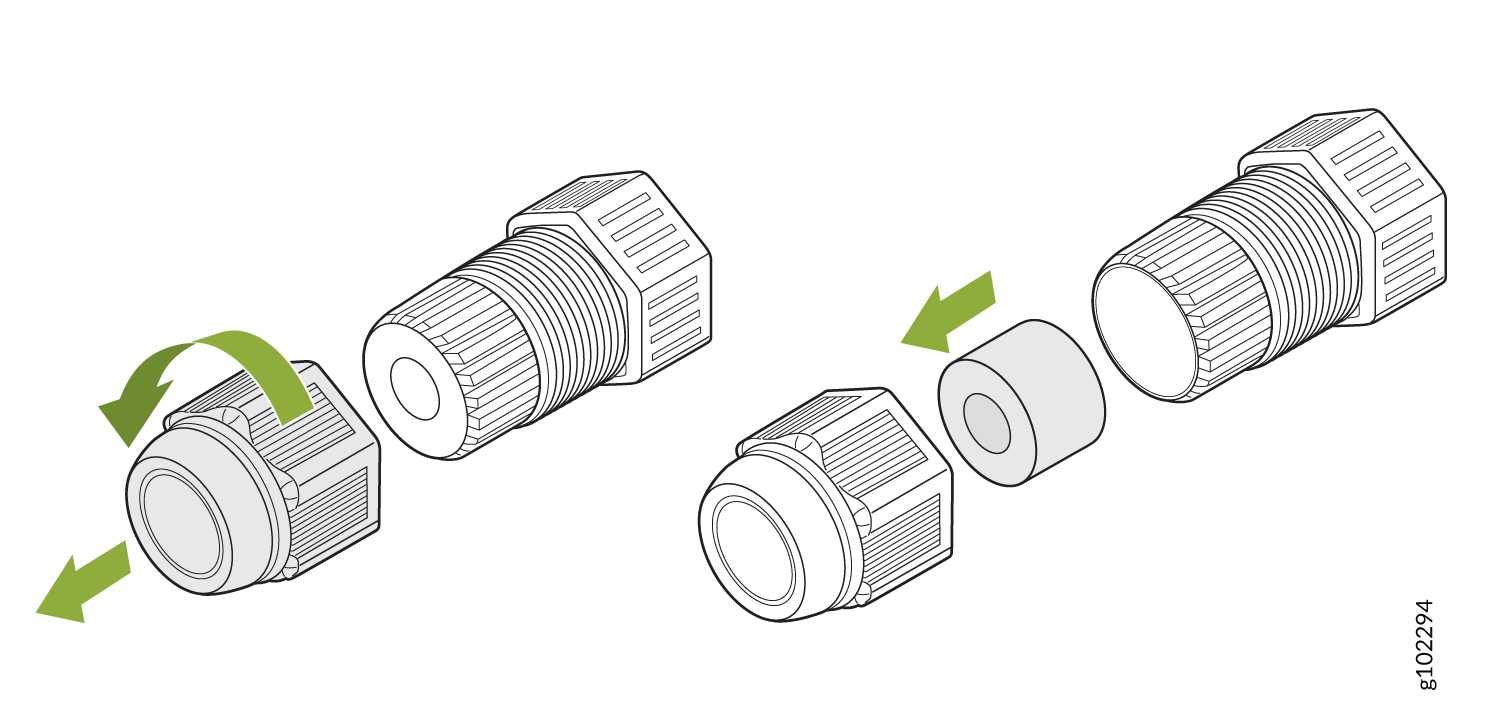
  1. 拆卸电缆密封套:
    1. 逆时针转动电缆密封套螺母,将其卸下。

    2. 取下蓝色封条。确保选择正确的密封件。电缆密封套有两个密封件:蓝色密封件(直径 7 mm 至 9.5 mm)和红色密封件(直径 5.5 mm 至 7 mm)。

    图 18:拆卸 RJ-45 电缆密封套 Disassembly diagram with green arrows showing steps to unscrew cap and remove internal filter element in a mechanical system.
  2. 通过电缆接头插入 RJ-45 电缆:
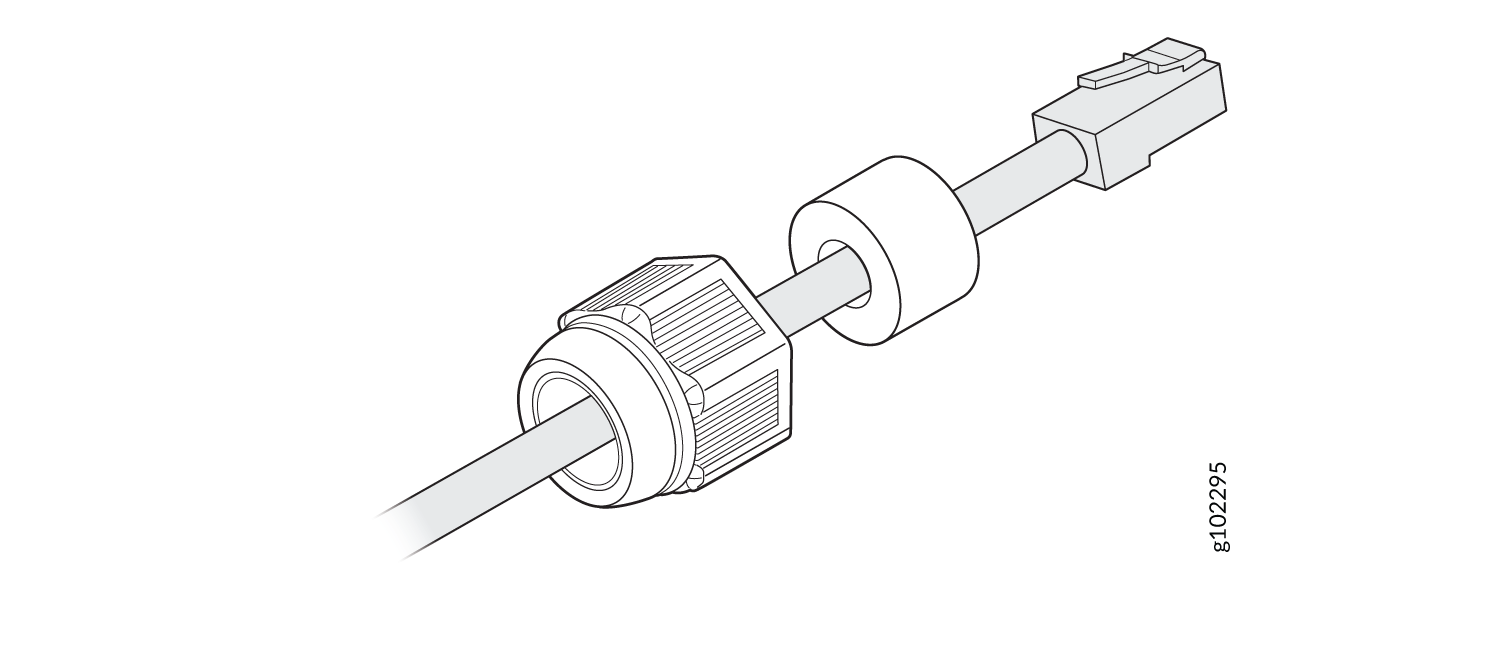
    1. 打开密封件,将 RJ-45 电缆穿过螺母和密封件。

      图 19:将 RJ-45 电缆插入电缆密封套的螺母和密封Cable assembly with RJ45 connector, ferrite bead for EMI reduction, and threaded coupling for secure connection in an electrical system.
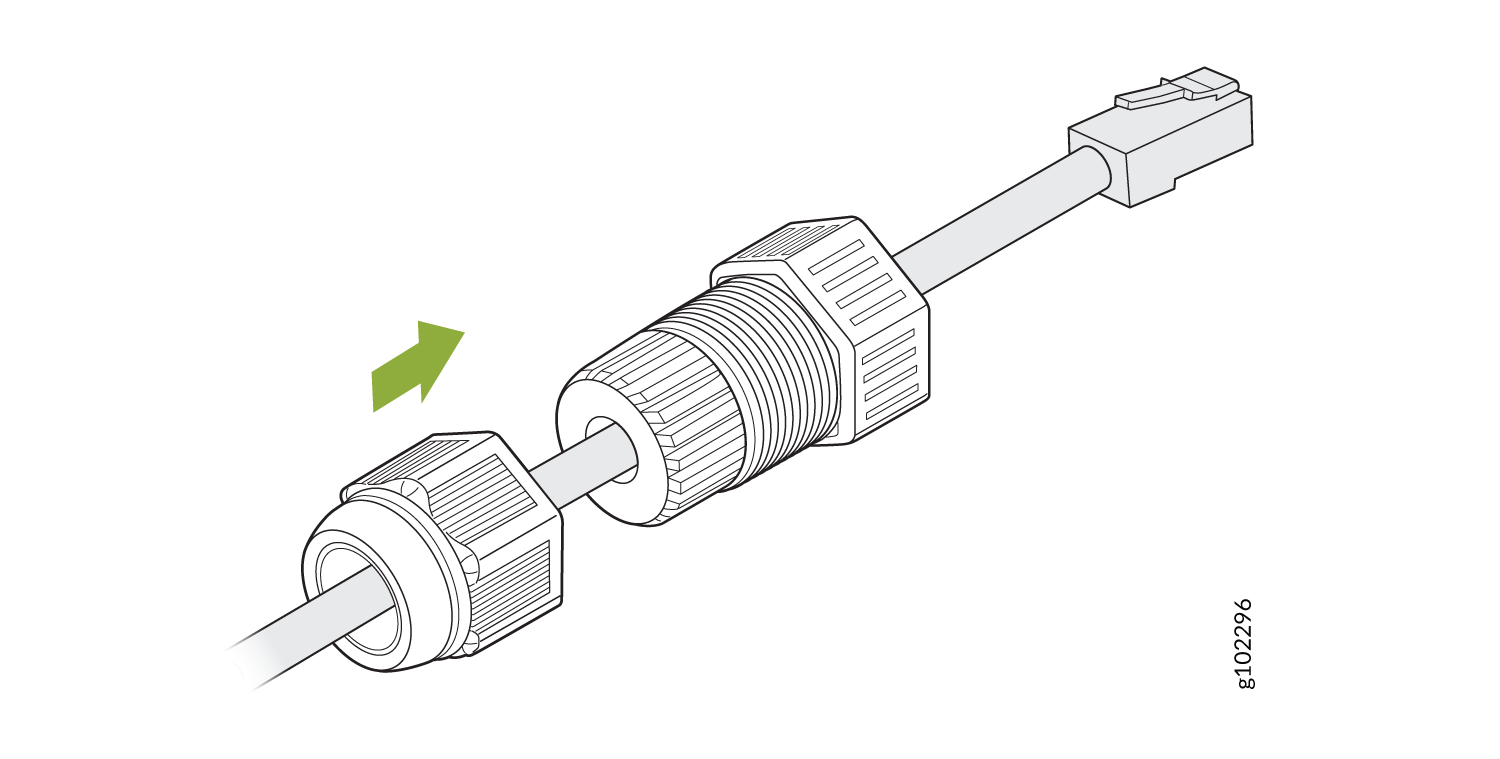
    2. 将 RJ-45 电缆穿过电缆密封套。将密封件推入电缆密封套并松松拧紧螺母。

      图 20:将 RJ-45 电缆穿过电缆密封套 Threaded connector being attached to cable with green arrow indicating tightening direction for electrical connection.
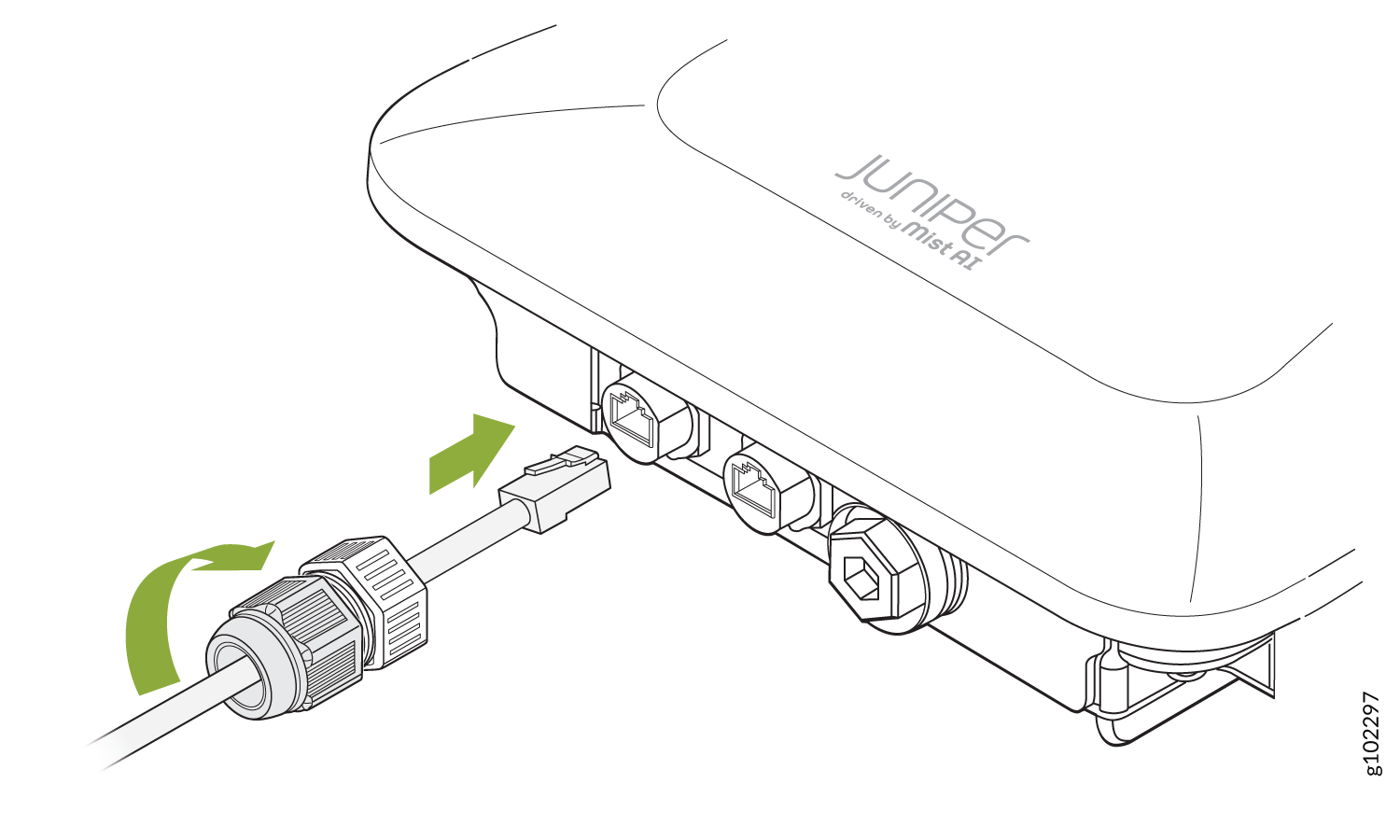
  3. 将 RJ-45 电缆连接到 AP 端口。将电缆接头连接到 AP 并以 10–12 kg-cm 的扭矩将其拧紧。然后,以 7-10 kg-cm 的扭矩将螺母完全拧紧到电缆密封套上。
    图 21:将电缆接头连接到 AP63 Diagram showing how to connect a cable to a Juniper device driven by Mist AI with arrows indicating plug-in and connector directions.