Help us improve your experience.

Let us know what you think.

Do you have time for a two-minute survey?


Veja seus tíquetes de suporte

Siga estas etapas para acessar seu painel de controle de suporte e visualizar o status de seus tickets.

Você pode visualizar seus tíquetes de suporte no portal da Juniper Mist™.
  1. Clique no ícone de pergunta próximo ao canto superior direito do portal da Juniper Mist e clique em Tíquetes de suporte.
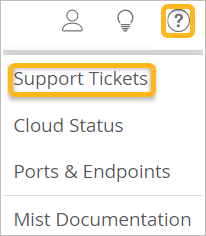
    Menu interface with highlighted Support Tickets option in yellow and a yellow-highlighted question mark icon in the top-right corner for help or support. Other menu options include Cloud Status, Ports Endpoints, and Mist Documentation. Top icons represent user actions, ideas, and help.
  2. (Opcional) Selecione o período de tempo.

    Support Tickets dashboard with a time range filter dropdown and a table listing tickets by number, type, created date, last update, requester, and status, showing two pending tickets.
  3. Clique no ticket que deseja visualizar.