
VPNs e VPLS
Uma VPN é uma conexão criptografada pela Internet de um dispositivo para uma rede que evita escutas de acesso não autorizadas no tráfego, e permite que o usuário realize o trabalho remotamente. Para obter mais informações, veja os seguintes tópicos:
Introdução ao VPLS
VPLS é uma VPN de Camada 2 baseada em Ethernet. Ele permite que você conecte sites de redes locais (LAN) Ethernet geograficamente dispersos entre si em um backbone MPLS. Para os clientes que implementam VPLS, todos os sites parecem estar na mesma LAN Ethernet, embora o tráfego viaje pela rede do provedor de serviços.
O VPLS, em sua implementação e configuração, tem muito em comum com uma VPN de Camada 2. No VPLS, um pacote originado na rede de um cliente provedor de serviços é enviado primeiro para um dispositivo de borda do cliente (CE) (por exemplo, um roteador ou switch Ethernet). Em seguida, ele é enviado para um roteador de borda (PE) de provedor dentro da rede do provedor de serviços. O pacote atravessa a rede do provedor de serviços por um caminho comutador de rótulos MPLS (LSP). Ele chega ao roteador PE de saída, que depois encaminha o tráfego para o dispositivo CE no local do cliente de destino.
Na documentação do VPLS, a palavra roteador em termos como roteador PE é usada para se referir a qualquer dispositivo que forneça funções de roteamento.
A diferença é que, para VPLS, os pacotes podem atravessar a rede do provedor de serviços de forma ponto a multiponto, o que significa que um pacote originado de um dispositivo CE pode ser transmitido para todos os roteadores PE que participam de uma instância de roteamento VPLS. Por outro lado, uma VPN de Camada 2 encaminha pacotes apenas de forma ponto a ponto.
Os caminhos que transportam tráfego VPLS entre cada roteador PE que participa de uma instância de roteamento são chamados de pseudowires. Os pseudowires são sinalizados usando BGP ou LDP.
Exemplo: usar sistemas lógicos para configurar roteadores provedores de borda e provedor em um cenário de VPN e VPLS de Camada 3
Este exemplo fornece procedimentos passo a passo para configurar roteadores de borda (PE) e provedores (P) em um cenário de VPN e VPLS usando sistemas lógicos.
Requisitos
Neste exemplo, nenhuma configuração especial além da inicialização do dispositivo é necessária.
Visão geral
Neste exemplo, as VPNs são usadas para separar o tráfego do cliente em um backbone do provedor.
Topologia
A Figura 1 mostra quatro pares de roteadores CE conectados em um backbone MPLS:
Os roteadores CE1 e CE5 fazem parte da VPN vermelha.
Os roteadores CE2 e CE6 estão na VPN azul.
Os roteadores CE3 e CE7 pertencem a um domínio VPLS.
Os roteadores CE4 e CE8 estão conectados com protocolos padrão.
Dois sistemas lógicos estão configurados nos roteadores PE1 e PE2 e no roteador principal P0 do provedor. Cada um desses três roteadores tem dois sistemas lógicos: LS1 e LS2. Para ilustrar o conceito de um sistema lógico, ambas as VPNs fazem parte do Logical System LS1, a instância VPLS pertence ao Logical System LS2 e os roteadores restantes usam a porção principal do roteador dos roteadores PE1, P0 e PE2.
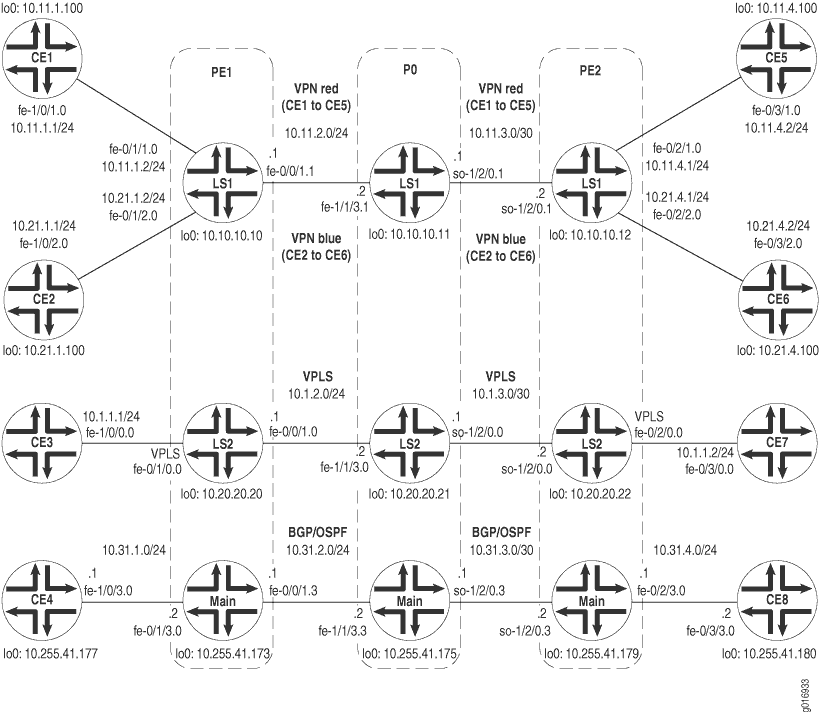
No Roteador PE1, duas instâncias de roteamento e encaminhamento de VPN (VRF) são criadas no Logical System LS1. As instâncias de roteamento são chamadas de vermelho e azul. O exemplo configura as interfaces lógicas voltadas para a borda do cliente (CE) para que o tráfego do Roteador CE1 seja colocado na VPN vermelha, e o tráfego do Roteador CE2 seja colocado na VPN azul. Uma interface lógica em fe-0/0/1.1 se conecta ao Logical System LS1 no roteador P0. Uma instância de roteamento VPLS está no Logical System LS2. A interface lógica está configurada para que o tráfego do Roteador CE3 seja enviado para o domínio VPLS. Essa interface lógica se conecta ao Logical System LS2 no roteador P0. O exemplo também contém um administrador para o Logical System LS1. O administrador de sistema lógico é responsável pela manutenção desse sistema lógico. Por fim, o exemplo mostra como configurar uma interface lógica para interconectar o Roteador CE4 com a porção principal do roteador PE1.
O roteador PE2 tem as duas instâncias de roteamento VRF no Logical System LS1: vermelho e azul. As interfaces lógicas voltadas para CE permitem que o tráfego do Roteador CE5 seja colocado na VPN vermelha e o tráfego do Roteador CE6 na VPN azul. Uma interface lógica no so-1/2/0.1 se conecta ao Logical System LS1 no roteador P0. A instância de roteamento VPLS está configurada no Logical System LS2. Uma interface lógica permite que o tráfego do Roteador CE7 seja enviado para o domínio VPLS e se conecte ao Sistema Lógico LS2 no roteador P0. O exemplo mostra como configurar uma interface lógica para interconectar o Roteador CE8 com a porção principal do roteador P0. Por fim, você pode criar opcionalmente um administrador de sistema lógico que tenha privilégios de configuração para o Logical System LS1 e privilégios de visualização para o Logical System LS2.
No roteador P0, o exemplo mostra como configurar sistemas lógicos LS1, LS2 e o roteador principal. Você deve configurar propriedades de interface física no nível da hierarquia do roteador [edit interfaces] principal. Em seguida, o exemplo mostra como configurar protocolos (como RSVP, MPLS, BGP e IS-IS), opções de roteamento e opções de política para sistemas lógicos. Por último, o exemplo mostra como configurar o mesmo administrador para o Logical System LS1 configurado no Roteador PE1. Este administrador de sistema do Logical System LS2 tem permissão para visualizar a configuração LS2, mas não alterar a configuração do Logical System LS2.
O Logical System LS1 transporta tráfego para a VPN vermelha que existe entre os roteadores CE1 e CE5. O Logical System LS1 também conecta a VPN azul que existe entre roteadores CE2 e CE6. O Logical System LS2 transporta tráfego VPLS entre roteadores CE3 e CE7. Para o roteador principal no Roteador P0, você pode configurar o roteador como de costume. O roteador principal transporta tráfego entre roteadores CE4 e CE8. O exemplo mostra como configurar as interfaces e os protocolos de roteamento (OSPF, BGP) para se conectar à porção principal do roteador dos roteadores PE1 e PE2.
Configuração
Configurar os roteadores PE e P em sistemas lógicos envolve realizar as seguintes tarefas:
- Configuração de interfaces nos dispositivos de borda do cliente
- Configuração do roteador PE1
- Configuração do roteador PE2
- Configuração do roteador P0
- Resultados
Configuração de interfaces nos dispositivos de borda do cliente
Procedimento passo a passo
O exemplo a seguir exige que você navegue por vários níveis na hierarquia de configuração. Para obter informações sobre como navegar pela CLI, consulte o uso do Editor de CLI no modo de configuração no guia de usuário da CLI.
No roteador CE1, configure o OSPF para se conectar à VPN vermelha no Logical System LS1 no Roteador PE1.
user@CE1# set interfaces fe-1/0/1 vlan-tagging
user@CE1# set interfaces fe-1/0/1 unit 0 description "routing-instance red CE"
user@CE1# set interfaces fe-1/0/1 unit 0 vlan-id 101
user@CE1# set interfaces fe-1/0/1 unit 0 family inet address 10.11.1.1/24
user@CE1# set interfaces lo0 unit 0 family inet address 10.11.1.100/32
user@CE1# set protocols ospf area 0.0.0.0 interface fe-1/0/1.0
user@CE1# set protocols ospf area 0.0.0.0 interface lo0.0
No roteador CE2, configure o BGP para se conectar à VPN azul no Logical System LS1 no Roteador PE1.
user@CE2# set interfaces fe-1/0/2 vlan-tagging
user@CE2# set interfaces fe-1/0/2 unit 0 description "routing-instance blue CE"
user@CE2# set interfaces fe-1/0/2 unit 0 vlan-id 102
user@CE2# set interfaces fe-1/0/2 unit 0 family inet address 10.21.1.1/24
user@CE2# set interfaces lo0 unit 0 family inet address 10.21.1.100/32
user@CE2# set policy-options policy-statement export_loopback from route-filter 10.21.1.100/32 exact
user@CE2# set policy-options policy-statement export_loopback then accept
user@CE2# set protocols bgp export export_loopback
user@CE2# set protocols bgp group to_PE type external
user@CE2# set protocols bgp group to_PE local-address 10.21.1.1
user@CE2# set protocols bgp group to_PE peer-as 100
user@CE2# set protocols bgp group to_PE neighbor 10.21.1.2
user@CE2# set routing-options autonomous-system 200
No roteador CE3, configure a interface Fast Ethernet no VLAN 600 para se conectar com a instância de roteamento VPLS no Logical System LS2 no Roteador PE1.
user@CE3# set interfaces fe-1/0/0 vlan-tagging
user@CE3# set interfaces fe-1/0/0 unit 0 description "vpls interface"
user@CE3# set interfaces fe-1/0/0 unit 0 vlan-id 600
user@CE3# set interfaces fe-1/0/0 unit 0 family inet address 10.1.1.1/24
No roteador CE4, configure a interface Fast Ethernet para se conectar com o roteador principal no Roteador PE1.
user@CE4# set interfaces fe-1/0/3 vlan-tagging
user@CE4# set interfaces fe-1/0/3 unit 0 description "main router interface"
user@CE4# set interfaces fe-1/0/3 unit 0 vlan-id 103
user@CE4# set interfaces fe-1/0/3 unit 0 family inet address 10.31.1.1/24
user@CE4# set interfaces lo0 unit 0 family inet address 10.255.41.177/32
No roteador CE5, configure o OSPF para se conectar à VPN vermelha no Logical System LS1 no Roteador PE2.
user@CE5# set interfaces fe-0/3/1 vlan-tagging
user@CE5# set interfaces fe-0/3/1 unit 0 description "routing-instance red CE"
user@CE5# set interfaces fe-0/3/1 unit 0 vlan-id 101
user@CE5# set interfaces fe-0/3/1 unit 0 family inet address 10.11.4.2/24
user@CE5# set interfaces lo0 unit 0 family inet address 10.11.4.100/32
user@CE5# set protocols ospf area 0.0.0.0 interface fe-0/3/1.0
user@CE5# set protocols ospf area 0.0.0.0 interface lo0.0
user@CE5# set system login class LS1admin logical-system LS1
user@CE5# set system login class LS1admin permissions all
user@CE5# set system login class LS1onlooker logical-system LS2
user@CE5# set system login class LS1onlooker permissions view
user@CE5# set system login user LS1admin class LS1admin
No roteador CE6, configure o BGP para se conectar à VPN azul no Logical System LS1 no Roteador PE2.
user@CE6# set interfaces fe-0/3/2 vlan-tagging
user@CE6# set interfaces fe-0/3/2 unit 0 description "routing-instance blue CE"
user@CE6# set interfaces fe-0/3/2 unit 0 vlan-id 102
user@CE6# set interfaces fe-0/3/2 unit 0 family inet address 10.21.4.2/24
user@CE6# set interfaces lo0 unit 0 family inet address 10.21.4.100/32
user@CE6# set routing-options autonomous-system 300
user@CE6# set protocols bgp export export_loopback
user@CE6# set protocols bgp group to_PE type external
user@CE6# set protocols bgp group to_PE local-address 10.21.4.2
user@CE6# set protocols bgp group to_PE peer-as 100
user@CE6# set protocols bgp group to_PE neighbor 10.21.4.1
user@CE6# set policy-options policy-statement export_loopback from route-filter 10.21.4.100/32 exact
user@CE6# set policy-options policy-statement export_loopback then accept
No roteador CE7, configure a interface Fast Ethernet no VLAN 600 para se conectar com a instância de roteamento VPLS no Logical System LS2 no Roteador PE2.
user@CE7# set interfaces fe-0/3/0 vlan-tagging
user@CE7# set interfaces fe-0/3/0 unit 0 description "vpls interface"
user@CE7# set interfaces fe-0/3/0 unit 0 vlan-id 600
user@CE7# set interfaces fe-0/3/0 unit 0 family inet address 10.1.1.2/24
No roteador CE8, configure a interface Fast Ethernet para se conectar com o roteador principal no Roteador PE2.
user@CE8# set interfaces fe-0/3/3 vlan-tagging
user@CE8# set interfaces fe-0/3/3 unit 0 description "main router interface"
user@CE8# set interfaces fe-0/3/3 unit 0 vlan-id 103
user@CE8# set interfaces fe-0/3/3 unit 0 family inet address 10.31.4.2/24
user@CE8# set interfaces lo0 unit 0 family inet address 10.255.41.180/32
Configuração do roteador PE1
Procedimento passo a passo
Configure o roteador principal no Roteador PE1.
user@PE1# set interfaces fe-0/0/1 vlan-tagging
user@PE1# set interfaces fe-0/0/1 unit 3 description "main router to P0"
user@PE1# set interfaces fe-0/0/1 unit 3 vlan-id 103
user@PE1# set interfaces fe-0/0/1 unit 3 family inet address 10.31.2.1/24
user@PE1# set interfaces fe-0/0/1 unit 3 family iso
user@PE1# set interfaces fe-0/0/1 unit 3 family mpls
user@PE1# set interfaces fe-0/1/0 vlan-tagging
user@PE1# set interfaces fe-0/1/0 encapsulation vlan-vpls
user@PE1# set interfaces fe-0/1/1 vlan-tagging
user@PE1# set interfaces fe-0/1/2 vlan-tagging
user@PE1# set interfaces fe-0/1/3 vlan-tagging
user@PE1# set interfaces fe-0/1/3 unit 0 description "main router to CE4"
user@PE1# set interfaces fe-0/1/3 unit 0 vlan-id 103
user@PE1# set interfaces fe-0/1/3 unit 0 family inet address 10.31.1.2/24
user@PE1# set interfaces lo0 unit 0 description "main router loopback"
user@PE1# set interfaces lo0 unit 0 family inet address 10.255.41.173/32
user@PE1# set protocols bgp group to_main_ls type internal
user@PE1# set protocols bgp group to_main_ls local-address 10.255.41.173
user@PE1# set protocols bgp group to_main_ls export export_address
user@PE1# set protocols bgp group to_main_ls neighbor 10.255.41.179
user@PE1# set protocols bgp group to_main_ls neighbor 10.255.41.175
user@PE1# set protocols ospf area 0.0.0.0 interface lo0.0
user@PE1# set protocols ospf area 0.0.0.0 interface fe-0/0/1.3
user@PE1# set routing-options static route 10.255.41.177/32 next-hop 10.31.1.1
user@PE1# set routing-options autonomous-system 500
user@PE1# set policy-options policy-statement export_address from route-filter 10.255.41.177/32 exact
user@PE1# set policy-options policy-statement export_address then accept
user@PE1# set system login class LS1-admin logical-system LS1
user@PE1# set system login class LS1-admin permissions all
user@PE1# set system login user LS1-admin class LS1-admin
user@PE1# set system login user LS1-admin authentication plain-text-password
New password:
Retype new password:
Configure o Sistema Lógico LS1 no roteador PE1.
user@PE1# set logical-systems LS1 interfaces fe-0/0/1 unit 1 description "LS1 interface"
user@PE1# set logical-systems LS1 interfaces fe-0/0/1 unit 1 vlan-id 101
user@PE1# set logical-systems LS1 interfaces fe-0/0/1 unit 1 family inet address 10.11.2.1/24
user@PE1# set logical-systems LS1 interfaces fe-0/0/1 unit 1 family iso
user@PE1# set logical-systems LS1 interfaces fe-0/0/1 unit 1 family mpls
user@PE1# set logical-systems LS1 interfaces fe-0/1/1 unit 0 description "routing-instance red interface"
user@PE1# set logical-systems LS1 interfaces fe-0/1/1 unit 0 vlan-id 101
user@PE1# set logical-systems LS1 interfaces fe-0/1/1 unit 0 family inet address 10.11.1.2/24
user@PE1# set logical-systems LS1 interfaces fe-0/1/2 unit 0 description "routing-instance blue interface"
user@PE1# set logical-systems LS1 interfaces fe-0/1/2 unit 0 vlan-id 102
user@PE1# set logical-systems LS1 interfaces fe-0/1/2 unit 0 family inet address 10.21.1.2/24
user@PE1# set logical-systems LS1 interfaces lo0 unit 1 description "LS1 loopback"
user@PE1# set logical-systems LS1 interfaces lo0 unit 1 family inet address 10.10.10.10/32
user@PE1# set logical-systems LS1 interfaces lo0 unit 1 family iso address 47.1111.1111.1111.1111.00
user@PE1# set logical-systems LS1 protocols rsvp interface all
user@PE1# set logical-systems LS1 protocols mpls label-switched-path to_10.10.10.12 to 10.10.10.12
user@PE1# set logical-systems LS1 protocols mpls interface all
user@PE1# set logical-systems LS1 protocols bgp group to_other_PE type internal
user@PE1# set logical-systems LS1 protocols bgp group to_other_PE local-address 10.10.10.10
user@PE1# set logical-systems LS1 protocols bgp group to_other_PE family inet-vpn any
user@PE1# set logical-systems LS1 protocols bgp group to_other_PE neighbor 10.10.10.12
user@PE1# set logical-systems LS1 protocols isis interface all
user@PE1# set logical-systems LS1 policy-options policy-statement from_bgp_to_ospf then accept
user@PE1# set logical-systems LS1 routing-instances blue instance-type vrf
user@PE1# set logical-systems LS1 routing-instances blue interface fe-0/1/2.0
user@PE1# set logical-systems LS1 routing-instances blue route-distinguisher 10.10.10.10:200
user@PE1# set logical-systems LS1 routing-instances blue vrf-target target:20:20
user@PE1# set logical-systems LS1 routing-instances blue protocols bgp group to_CE type external
user@PE1# set logical-systems LS1 routing-instances blue protocols bgp group to_CE local-address 10.21.1.2
user@PE1# set logical-systems LS1 routing-instances blue protocols bgp group to_CE peer-as 200
user@PE1# set logical-systems LS1 routing-instances blue protocols bgp group to_CE neighbor 10.21.1.1
user@PE1# set logical-systems LS1 routing-instances red instance-type vrf
user@PE1# set logical-systems LS1 routing-instances red interface fe-0/1/1.0
user@PE1# set logical-systems LS1 routing-instances red route-distinguisher 10.10.10.10:100
user@PE1# set logical-systems LS1 routing-instances red vrf-target target:10:10
user@PE1# set logical-systems LS1 routing-instances red protocols ospf export from_bgp_to_ospf
user@PE1# set logical-systems LS1 routing-instances red protocols ospf area 0.0.0.0 interface all
user@PE1# set logical-systems LS1 routing-options autonomous-system 100
Configure o Sistema Lógico LS2 no roteador PE1.
user@PE1# set logical-systems LS2 interfaces fe-0/0/1 unit 0 description "core-facing LS2 interface"
user@PE1# set logical-systems LS2 interfaces fe-0/0/1 unit 0 vlan-id 100
user@PE1# set logical-systems LS2 interfaces fe-0/0/1 unit 0 family inet address 10.1.2.1/24
user@PE1# set logical-systems LS2 interfaces fe-0/0/1 unit 0 family iso
user@PE1# set logical-systems LS2 interfaces fe-0/0/1 unit 0 family mpls
user@PE1# set logical-systems LS2 interfaces fe-0/1/0 unit 0 description "vpls interface to ce3"
user@PE1# set logical-systems LS2 interfaces fe-0/1/0 unit 0 encapsulation vlan-vpls
user@PE1# set logical-systems LS2 interfaces fe-0/1/0 unit 0 vlan-id 600
user@PE1# set logical-systems LS2 interfaces fe-0/1/0 unit 0 family vpls
user@PE1# set logical-systems LS2 interfaces lo0 unit 2 description "LS2 loopback"
user@PE1# set logical-systems LS2 interfaces lo0 unit 2 family inet address 10.20.20.20/32
user@PE1# set logical-systems LS2 interfaces lo0 unit 2 family iso address 47.2222.2222.2222.2222.00
user@PE1# set logical-systems LS2 protocols rsvp interface all
user@PE1# set logical-systems LS2 protocols mpls label-switched-path to_10.20.20.22 to 10.20.20.22
user@PE1# set logical-systems LS2 protocols mpls interface all
user@PE1# set logical-systems LS2 protocols bgp group to_VPLS_PE type internal
user@PE1# set logical-systems LS2 protocols bgp group to_VPLS_PE local-address 10.20.20.20
user@PE1# set logical-systems LS2 protocols bgp group to_VPLS_PE family l2vpn signaling
user@PE1# set logical-systems LS2 protocols bgp group to_VPLS_PE neighbor 10.20.20.22
user@PE1# set logical-systems LS2 protocols isis interface fe-0/0/1.0
user@PE1# set logical-systems LS2 protocols isis interface lo0.2
user@PE1# set logical-systems LS2 routing-instances new instance-type vpls
user@PE1# set logical-systems LS2 routing-instances new interface fe-0/1/0.0
user@PE1# set logical-systems LS2 routing-instances new route-distinguisher 10.20.20.20:100
user@PE1# set logical-systems LS2 routing-instances new vrf-target target:30:30
user@PE1# set logical-systems LS2 routing-instances new protocols vpls site-range 10
user@PE1# set logical-systems LS2 routing-instances new protocols vpls site newPE site-identifier 1
user@PE1# set logical-systems LS2 routing-options autonomous-system 400
Configuração do roteador PE2
Procedimento passo a passo
Configure o roteador principal no Roteador PE2.
user@PE2# set interfaces fe-0/2/0 vlan-tagging
user@PE2# set interfaces fe-0/2/0 encapsulation vlan-vpls
user@PE2# set interfaces fe-0/2/1 vlan-tagging
user@PE2# set interfaces fe-0/2/2 vlan-tagging
user@PE2# set interfaces fe-0/2/3 vlan-tagging
user@PE2# set interfaces fe-0/2/3 unit 0 description "main router to CE8"
user@PE2# set interfaces fe-0/2/3 unit 0 vlan-id 103
user@PE2# set interfaces fe-0/2/3 unit 0 family inet address 10.31.4.1/24
user@PE2# set interfaces so-1/2/0 encapsulation frame-relay
user@PE2# set interfaces so-1/2/0 unit 3 description "main router to P0"
user@PE2# set interfaces so-1/2/0 unit 3 dlci 103
user@PE2# set interfaces so-1/2/0 unit 3 family inet address 10.31.3.2/24
user@PE2# set interfaces so-1/2/0 unit 3 family iso
user@PE2# set interfaces so-1/2/0 unit 3 family mpls
user@PE2# set interfaces lo0 unit 0 description "main router loopback"
user@PE2# set interfaces lo0 unit 0 family inet address 10.155.41.179/32
user@PE2# set protocols bgp group to_main_ls type internal
user@PE2# set protocols bgp group to_main_ls local-address 10.255.41.179
user@PE2# set protocols bgp group to_main_ls export export_address
user@PE2# set protocols bgp group to_main_ls neighbor 10.255.41.173
user@PE2# set protocols bgp group to_main_ls neighbor 10.255.41.175
user@PE2# set protocols ospf area 0.0.0.0 interface so-1/2/0.3
user@PE2# set protocols ospf area 0.0.0.0 interface fe-0/2/3.0
user@PE2# set protocols ospf area 0.0.0.0 interface lo0.0
user@PE2# set routing-options static route 10.255.41.180/32 next-hop 10.31.4.2
user@PE2# set routing-options autonomous-system 500
user@PE2# set policy-options policy-statement export_address from route-filter 10.255.41.180/32 exact
user@PE2# set policy-options policy-statement export_address then accept
user@PE2# set system login class LS1-admin logical-system LS1
user@PE2# set system login class LS1-admin permissions all
user@PE2# set system login class LS1-onlooker logical-system LS2
user@PE2# set system login class LS1-onlooker permissions view
user@PE2# set system login user LS1-admin class LS1-admin
Configure o Sistema Lógico LS1 no roteador PE2.
user@PE2# set logical-systems LS1 interfaces fe-0/2/0 unit 1 description "routing-instance red interface connects to Router CE5"
user@PE2# set logical-systems LS1 interfaces fe-0/2/0 unit 1 vlan-id 101
user@PE2# set logical-systems LS1 interfaces fe-0/2/0 unit 1 family inet address 10.11.4.1/24
user@PE2# set logical-systems LS1 interfaces fe-0/2/0 unit 2 description "routing-instance blue interface connects to Router CE6"
user@PE2# set logical-systems LS1 interfaces fe-0/2/0 unit 2 vlan-id 102
user@PE2# set logical-systems LS1 interfaces fe-0/2/0 unit 2 family inet address 10.21.4.1/24
user@PE2# set logical-systems LS1 interfaces so-1/2/0 unit 1 description "core-facing LS1 interface"
user@PE2# set logical-systems LS1 interfaces so-1/2/0 unit 1 dlci 101
user@PE2# set logical-systems LS1 interfaces so-1/2/0 unit 1 family inet address 10.11.3.2/24
user@PE2# set logical-systems LS1 interfaces so-1/2/0 unit 1 family iso
user@PE2# set logical-systems LS1 interfaces so-1/2/0 unit 1 family mpls
user@PE2# set logical-systems LS1 interfaces lo0 unit 1 description "LS1 loopback"
user@PE2# set logical-systems LS1 interfaces lo0 unit 1 family inet address 10.10.10.12/32
user@PE2# set logical-systems LS1 interfaces lo0 unit 1 family iso address 47.1111.1111.1111.1113.00
user@PE2# set logical-systems LS1 protocols rsvp interface all
user@PE2# set logical-systems LS1 protocols mpls label-switched-path to_10.10.10.10 to 10.10.10.10
user@PE2# set logical-systems LS1 protocols mpls interface all
user@PE2# set logical-systems LS1 protocols bgp group to_other_PE type internal
user@PE2# set logical-systems LS1 protocols bgp group to_other_PE local-address 10.10.10.12
user@PE2# set logical-systems LS1 protocols bgp group to_other_PE family inet any
user@PE2# set logical-systems LS1 protocols bgp group to_other_PE family inet-vpn any
user@PE2# set logical-systems LS1 protocols bgp group to_other_PE neighbor 10.10.10.10
user@PE2# set logical-systems LS1 protocols isis interface all
user@PE2# set logical-systems LS1 policy-options policy-statement from_bgp_to_ospf then accept
user@PE2# set logical-systems LS1 routing-instances blue instance-type vrf
user@PE2# set logical-systems LS1 routing-instances blue interface fe-0/2/2.0
user@PE2# set logical-systems LS1 routing-instances blue route-distinguisher 10.10.10.12:200
user@PE2# set logical-systems LS1 routing-instances blue vrf-target target:20:20
user@PE2# set logical-systems LS1 routing-instances blue protocols bgp group to_CE local-address 10.21.4.1
user@PE2# set logical-systems LS1 routing-instances blue protocols bgp group to_CE peer-as 300
user@PE2# set logical-systems LS1 routing-instances blue protocols bgp group to_CE neighbor 10.21.4.2
user@PE2# set logical-systems LS1 routing-instances red instance-type vrf
user@PE2# set logical-systems LS1 routing-instances red interface fe-0/2/1.0
user@PE2# set logical-systems LS1 routing-instances red route-distinguisher 10.10.10.12:100
user@PE2# set logical-systems LS1 routing-instances red vrf-target target:10:10
user@PE2# set logical-systems LS1 routing-instances red protocols ospf export from_bgp_to_ospf
user@PE2# set logical-systems LS1 routing-instances red protocols ospf area 0.0.0.0 interface all
user@PE2# set logical-systems LS1 routing-options autonomous-system 100
Configure o Sistema Lógico LS2 no roteador PE2.
user@PE2# set logical-systems LS2 interfaces fe-0/2/0 unit 0 description "vpls interface connects to Router CE7"
user@PE2# set logical-systems LS2 interfaces fe-0/2/0 unit 0 encapsulation vlan-vpls
user@PE2# set logical-systems LS2 interfaces fe-0/2/0 unit 0 vlan-id 600
user@PE2# set logical-systems LS2 interfaces fe-0/2/0 unit 0 family vpls
user@PE2# set logical-systems LS2 interfaces so-1/2/0 unit 0 description "core-facing LS2 interface"
user@PE2# set logical-systems LS2 interfaces so-1/2/0 unit 0 dlci 100
user@PE2# set logical-systems LS2 interfaces so-1/2/0 unit 0 family inet address 10.1.3.2/24
user@PE2# set logical-systems LS2 interfaces so-1/2/0 unit 0 family iso
user@PE2# set logical-systems LS2 interfaces so-1/2/0 unit 0 family mpls
user@PE2# set logical-systems LS2 interfaces lo0 unit 2 description "LS2 loopback"
user@PE2# set logical-systems LS2 interfaces lo0 unit 2 family inet address 10.20.20.22/32
user@PE2# set logical-systems LS2 interfaces lo0 unit 2 family iso address 47.2222.2222.2222.2224.00
user@PE2# set logical-systems LS2 protocols rsvp interface all
user@PE2# set logical-systems LS2 protocols mpls label-switched-path to_10.20.20.20 to 10.20.20.20
user@PE2# set logical-systems LS2 protocols mpls interface all
user@PE2# set logical-systems LS2 protocols bgp group to_VPLS_PE type internal
user@PE2# set logical-systems LS2 protocols bgp group to_VPLS_PE local-address 10.20.20.22
user@PE2# set logical-systems LS2 protocols bgp group to_VPLS_PE family l2vpn signaling
user@PE2# set logical-systems LS2 protocols bgp group to_VPLS_PE neighbor 10.20.20.20
user@PE2# set logical-systems LS2 protocols isis interface so-1/2/0.0
user@PE2# set logical-systems LS2 protocols isis interface lo0.2
user@PE2# set logical-systems LS2 routing-instances new instance-type vpls
user@PE2# set logical-systems LS2 routing-instances new interface fe-0/2/0.0
user@PE2# set logical-systems LS2 routing-instances new route-distinguisher 10.20.20.22:100
user@PE2# set logical-systems LS2 routing-instances new vrf-target target:30:30
user@PE2# set logical-systems LS2 routing-instances new protocols vpls site-range 10
user@PE2# set logical-systems LS2 routing-instances new protocols vpls site newPE site-identifier 2
user@PE2# set logical-systems LS2 routing-options autonomous-system 400
Configuração do roteador P0
Procedimento passo a passo
Configure o roteador principal no roteador P0.
user@P0# set interfaces fe-1/1/3 vlan-tagging
user@P0# set interfaces fe-1/1/3 unit 3 description "connects to the main router on pe1"
user@P0# set interfaces fe-1/1/3 unit 3 vlan-id 103
user@P0# set interfaces fe-1/1/3 unit 3 family inet address 10.31.2.2/24
user@P0# set interfaces fe-1/1/3 unit 3 family iso
user@P0# set interfaces fe-1/1/3 unit 3 family mpls
user@P0# set interfaces so-1/2/0 dce
user@P0# set interfaces so-1/2/0 encapsulation frame-relay
user@P0# set interfaces so-1/2/0 unit 3 description "connects to the main router on pe2"
user@P0# set interfaces so-1/2/0 unit 3 dlci 103
user@P0# set interfaces so-1/2/0 unit 3 family inet address 10.31.3.1/24
user@P0# set interfaces so-1/2/0 unit 3 family iso
user@P0# set interfaces so-1/2/0 unit 3 family mpls
user@P0# set interfaces lo0 unit 0 description "main router loopback"
user@P0# set interfaces lo0 unit 0 family inet address 10.255.41.175/32
user@P0# set routing-options autonomous-system 500
user@P0# set protocols bgp group to_main_ls type internal
user@P0# set protocols bgp group to_main_ls local-address 10.255.41.175
user@P0# set protocols bgp group to_main_ls neighbor 10.255.41.179
user@P0# set protocols bgp group to_main_ls neighbor 10.255.41.173
user@P0# set protocols ospf area 0.0.0.0 interface lo0.0
user@P0# set protocols ospf area 0.0.0.0 interface fe-1/1/3.3
user@P0# set protocols ospf area 0.0.0.0 interface so-1/2/0.3
user@P0# set system login class LS1-admin logical-system LS1
user@P0# set system login class LS1-admin permissions all
user@P0# set system login class LS1-onlooker logical-system LS2
user@P0# set system login class LS1-onlooker permissions view
user@P0# set system login user LS1-admin class LS1-admin
Configure o Sistema Lógico LS1 no roteador P0.
user@P0# set logical-systems LS1 interfaces fe-1/1/3 unit 1 description "LS1 interface connects to LS1 on pe1"
user@P0# set logical-systems LS1 interfaces fe-1/1/3 unit 1 vlan-id 101
user@P0# set logical-systems LS1 interfaces fe-1/1/3 unit 1 family inet address 10.11.2.2/24
user@P0# set logical-systems LS1 interfaces fe-1/1/3 unit 1 family iso
user@P0# set logical-systems LS1 interfaces fe-1/1/3 unit 1 family mpls
user@P0# set logical-systems LS1 interfaces so-1/2/0 unit 1 description "LS1 interface connects to LS1 on pe2"
user@P0# set logical-systems LS1 interfaces so-1/2/0 unit 1 dlci 101
user@P0# set logical-systems LS1 interfaces so-1/2/0 unit 1 family inet address 10.11.3.1/24
user@P0# set logical-systems LS1 interfaces so-1/2/0 unit 1 family iso
user@P0# set logical-systems LS1 interfaces so-1/2/0 unit 1 family mpls
user@P0# set logical-systems LS1 interfaces lo0 unit 1 description "LS1 loopback"
user@P0# set logical-systems LS1 interfaces lo0 unit 1 family inet address 10.10.10.11/32
user@P0# set logical-systems LS1 interfaces lo0 unit 1 family iso address 47.1111.1111.1111.1112.00
user@P0# set logical-systems LS1 protocols rsvp interface all
user@P0# set logical-systems LS1 protocols mpls interface all
user@P0# set logical-systems LS1 protocols isis interface all
Configure o Sistema Lógico LS2 no roteador P0.
user@P0# set logical-systems LS2 interfaces fe-1/1/3 unit 0 description "LS2 interface connects to LS2 on pe1"
user@P0# set logical-systems LS2 interfaces fe-1/1/3 unit 0 vlan-id 100
user@P0# set logical-systems LS2 interfaces fe-1/1/3 unit 0 family inet address 10.1.2.2/24
user@P0# set logical-systems LS2 interfaces fe-1/1/3 unit 0 family iso
user@P0# set logical-systems LS2 interfaces fe-1/1/3 unit 0 family mpls
user@P0# set logical-systems LS2 interfaces so-1/2/0 unit 0 description "LS2 interface connects to LS2 on pe2"
user@P0# set logical-systems LS2 interfaces so-1/2/0 unit 0 dlci 100
user@P0# set logical-systems LS2 interfaces so-1/2/0 unit 0 family inet address 10.1.3.1/24
user@P0# set logical-systems LS2 interfaces so-1/2/0 unit 0 family iso
user@P0# set logical-systems LS2 interfaces so-1/2/0 unit 0 family mpls
user@P0# set logical-systems LS2 interfaces lo0 unit 2 description "LS2 loopback"
user@P0# set logical-systems LS2 interfaces lo0 unit 2 family inet address 10.20.20.21/32
user@P0# set logical-systems LS2 interfaces lo0 unit 2 family iso address 47.2222.2222.2222.2223.00
user@P0# set logical-systems LS2 protocols rsvp interface all
user@P0# set logical-systems LS2 protocols mpls interface all
user@P0# set logical-systems LS2 protocols isis interface fe-1/1/3.0
user@P0# set logical-systems LS2 protocols isis interface so-1/2/0.0
user@P0# set logical-systems LS2 protocols isis interface lo0.2
Resultados
No roteador CE1, configure o OSPF para se conectar à VPN vermelha no Logical System LS1 no roteador PE1:
Roteador CE1
[edit]
interfaces {
    fe-1/0/1 {
        vlan-tagging;
        unit 0 {
            description "routing-instance red CE";
            vlan-id 101;
            family inet {
                address 10.11.1.1/24;
            }
        }
    }
    lo0 {
        unit 0 {
            family inet {
                address 10.11.1.100/32;
            }
        }
    }
}
protocols {
    ospf {
        area 0.0.0.0 {
            interface fe-1/0/1.0;
            interface lo0.0;
        }
    }
}
No roteador CE2, configure o BGP para se conectar à VPN azul no Logical System LS1 no Roteador PE1:
Roteador CE2
[edit]
interfaces {
    fe-1/0/2 {
        vlan-tagging;
        unit 0 {
            description "routing-instance blue CE";
            vlan-id 102;
            family inet {
                address 10.21.1.1/24;
            }
        }
    }
    lo0 {
        unit 0 {
            family inet {
                address 10.21.1.100/32;
            }
        }
    }
}
routing-options {
    autonomous-system 200;
}
protocols {
    bgp {
        export export_loopback;
        group to_PE {
            type external;
            local-address 10.21.1.1;
            peer-as 100;
            neighbor 10.21.1.2;
        }
    }
}
policy-options {
    policy-statement export_loopback {
        from {
            route-filter 10.21.1.100/32 exact;
        }
        then accept;
    }
}
No roteador CE3, configure a interface Fast Ethernet no VLAN 600 para se conectar com a instância de roteamento VPLS no Logical System LS2 no Roteador PE1:
Roteador CE3
[edit]
interfaces {
    fe-1/0/0 {
        vlan-tagging;
        unit 0 {
            description "vpls interface";
            vlan-id 600;
            family inet {
                address 10.1.1.1/24;
            }
        }
    }
}
No Roteador CE4, configure a interface Fast Ethernet para se conectar com o roteador principal no Roteador PE1:
Roteador CE4
[edit]
interfaces {
    fe-1/0/3 {
        vlan-tagging;
        unit 0 {
            description "main router interface";
            vlan-id 103;
            family inet {
                address 10.31.1.1/24;
            }
        }
    }
    lo0 {
        unit 0 {
            family inet {
                address 10.255.41.177/32;
            }
        }
    }
}
No Roteador PE1, crie duas instâncias de roteamento e encaminhamento VPN (VRF) no Logical System LS1: vermelho e azul. Configure as interfaces lógicas voltadas para CE para que o tráfego do Roteador CE1 seja colocado na VPN vermelha, e o tráfego do Roteador CE2 seja colocado na VPN azul. Em seguida, crie uma interface lógica em fe-0/0/1.1 para se conectar ao Sistema Lógico LS1 no roteador P0.
Também no Roteador PE1, crie uma instância de roteamento VPLS no Logical System LS2. Configure uma interface lógica para que o tráfego do Roteador CE3 seja enviado para o domínio VPLS e se conecte ao Sistema Lógico LS2 no roteador P0.
Crie um administrador para o Logical System LS1. O administrador de sistema lógico pode ser responsável pela manutenção desse sistema lógico.
Por fim, configure uma interface lógica para interconectar o Roteador CE4 com a porção principal do roteador P0.
Roteador PE1
[edit]
logical-systems {
    LS1 { # The configuration for the first logical system begins here.
        interfaces {
            fe-0/0/1 {
                unit 1 {  # This is the core-facing interface for Logical System LS1.
                    description "LS1 interface";
                    vlan-id 101;
                    family inet {
                        address 10.11.2.1/24;
                    }
                    family iso;
                    family mpls;
                }
            }
            fe-0/1/1 {
                unit 0 {   # This logical interface connects to Router CE1.
                    description "routing-instance red interface";
                    vlan-id 101;
                    family inet {
                        address 10.11.1.2/24;
                    }
                }
            }
            fe-0/1/2 {
                unit 0 {   # This logical interface connects to Router CE2.
                    description "routing-instance blue interface";
                    vlan-id 102;
                    family inet {
                        address 10.21.1.2/24;
                    }
                }
            }
            lo0 {
                unit 1 {
                    description "LS1 loopback";
                    family inet {
                        address 10.10.10.10/32;
                    }
                    family iso {
                        address 47.1111.1111.1111.1111.00;
                    }
                }
            }
        }
         protocols { # You configure RSVP, MPLS, IS-IS, and BGP for Logical System LS1.
            rsvp  {
                interface all;
            }
            mpls    {
                label-switched-path to_10.10.10.12 {
                    to 10.10.10.12;
                }
                interface all;
            }
             bgp {
                group to_other_PE {
                    type internal;
                    local-address 10.10.10.10;
                    family inet-vpn {
                        any;
                    }
                    neighbor 10.10.10.12;
                }
            }
            isis {
                interface all;
            }
        }
        policy-options {
            policy-statement from_bgp_to_ospf {
                then accept;
            }
        }
        routing-instances {
            blue {
                instance-type vrf; # You configure instance blue within Logical System LS1.
                interface fe-0/1/2.0;
                route-distinguisher 10.10.10.10:200;
                vrf-target target:20:20;
                protocols {
                    bgp {   #BGP connects the blue instance with Router CE2.
                        group to_CE {
                            type external;
                            local-address 10.21.1.2;
                            peer-as 200;
                            neighbor 10.21.1.1;
                        }
                    }
                }
            }
            red {
                 instance-type vrf; # You configure instance red within Logical System LS1.
                interface fe-0/1/1.0;
                route-distinguisher 10.10.10.10:100;
                vrf-target target:10:10;
                protocols {
                    ospf {#OSPF connects the red instance with Router CE1.
                        export from_bgp_to_ospf;
                        area 0.0.0.0 {
                            interface all;
                        }
                    }
                }
            }
        }
        routing-options {
            autonomous-system 100;
        }
    }
    LS2 {  # The configuration for the second logical system begins here.
        interfaces {
            fe-0/0/1 {
                unit 0 {  # This is the core-facing interface for Logical System LS2.
                    description "LS2 interface";
                    vlan-id 100;
                    family inet {
                        address 10.1.2.1/24;
                    }
                    family iso;
                    family mpls;
                }
            }
            fe-0/1/0 {
                 unit 0 {  # This logical interface connects to Router CE3.
                    description "vpls interface";
                    encapsulation vlan-vpls;
                    vlan-id 600;
                    family vpls;
                }
            }
            lo0 {
                unit 2 {
                    description "LS2 loopback";
                    family inet {
                        address 10.20.20.20/32;
                    }
                    family iso {
                        address 47.2222.2222.2222.2222.00;
                    }
                }
            }
        }
        protocols { # You configure RSVP, MPLS, IS-IS, and BGP for Logical System LS2.
             rsvp {
                interface all;
            }
             mpls {
                label-switched-path to_10.20.20.22 {
                    to 10.20.20.22;
                }
                interface all;
            }
            bgp {
                group to_VPLS_PE {
                    type internal;
                    local-address 10.20.20.20;
                    family l2vpn {
                        signaling;
                    }
                    neighbor 10.20.20.22;
                }
            }
            isis {
                interface fe-0/0/1.0;
                interface lo0.2;
            }
        }
        routing-instances {
            new {
                instance-type vpls; # You configure VPLS within Logical System LS2.
                interface fe-0/1/0.0;
                route-distinguisher 10.20.20.20:100;
                vrf-target target:30:30;
                protocols {
                    vpls {
                        site-range 10;
                        site newPE {
                            site-identifier 1;
                        }
                    }
                }
            }
        }
        routing-options {
            autonomous-system 400;
        }
    }
}
interfaces {
    fe-0/0/1 {
        vlan-tagging;
        unit 3 { # This is the core-facing interface for the main router of PE1.
            description "main router to P0";
            vlan-id 103;
            family inet {
                address 10.31.2.1/24;
            }
            family iso;
            family mpls;
        }
    }
    fe-0/1/3 {
        vlan-tagging;
        unit 0 { # This logical interface in the main router of PE1 connects to CE4.
            description "main router to CE4";
            vlan-id 103;
            family inet {
                address 10.31.1.2/24;
            }
        }
    }
    fe-0/1/0 {  # You must always configure physical interface statements for
        vlan-tagging;  # logical system interfaces at the [edit interfaces] hierarchy level.
        encapsulation vlan-vpls;
    }
                     fe-0/1/1 {
        vlan-tagging;
    }
                     fe-0/1/2 {
        vlan-tagging;
    }
    lo0 {
        unit 0 {
            description "main router loopback";
            family inet {
                address 10.255.41.173/32;
            }
        }
    }
}
routing-options {
    static {
        route 10.255.41.177/32 next-hop 10.31.1.1;
    }
    autonomous-system 500;
}
protocols {
    bgp {  # The main router uses BGP as the exterior gateway protocol.
        group to_main_ls {
            type internal;
            local-address 10.255.41.173;
            export export_address;
            neighbor 10.255.41.179;
            neighbor 10.255.41.175;
        }
    }
    ospf {  # The main router uses OSPF as the interior gateway protocol.
        area 0.0.0.0 {
            interface lo0.0;
            interface fe-0/0/1.3;
        }
    }
}
policy-options {
    policy-statement export_address {
        from {
            route-filter 10.255.41.177/32 exact;
        }
        then accept;
    }
}
system {
    login {
        class LS1–admin {
            permissions all;
            logical-system LS1;
        }
        user LS1–admin {
            class LS1–admin;
            authentication plain-text password;
            New password: password
            Retype new password: password
        }
    }
}
No roteador P0, configure a Logical Systems LS1, LS2 e o roteador principal. Para o sistema lógico, você deve configurar propriedades de interface física no nível da hierarquia do roteador principal e atribuir [edit interfaces] as interfaces lógicas aos sistemas lógicos. Em seguida, você deve configurar protocolos (como RSVP, MPLS, BGP e IS-IS), opções de roteamento e opções de política para os sistemas lógicos. Por último, configure o mesmo administrador para Logical System LS1 configurado no Roteador PE1. Configure esse mesmo administrador para o Logical System LS2 para ter permissão para visualizar a configuração LS2, mas não alterar a configuração para LS2.
Neste exemplo, o Logical System LS1 transporta tráfego para a VPN vermelha que existe entre roteadores CE1 e CE5. O Logical System LS1 também conecta a VPN azul que existe entre roteadores CE2 e CE6. O Logical System LS2 transporta tráfego VPLS entre roteadores CE3 e CE7.
Para o roteador principal no Roteador P0, você pode configurar o roteador como de costume. Neste exemplo, o roteador principal transporta tráfego entre roteadores CE4 e CE8. Como resultado, configure as interfaces e os protocolos de roteamento (OSPF, BGP) para se conectar à porção principal do roteador dos roteadores PE1 e PE2.
Roteador P0
[edit]
logical-systems {
    LS1 { # The configuration for the first logical system begins here.
        interfaces {
            fe-1/1/3 {
                unit 1 {  # This logical interface connects to LS1 on Router PE1.
                    description "LS1 interface";
                    vlan-id 101;
                    family inet {
                        address 10.11.2.2/24;
                    }
                    family iso;
                    family mpls;
                }
            }
             so-1/2/0 {
                unit 1 { # This logical interface connects to LS1 on Router PE2.
                    description "LS1 interface";
                    dlci 101;
                    family inet {
                        address 10.11.3.1/24;
                    }
                    family iso;
                    family mpls;
                }
            }
            lo0 {
                unit 1 {
                    description "LS1 loopback";
                    family inet {
                        address 10.10.10.11/32;
                    }
                    family iso {
                        address 47.1111.1111.1111.1112.00;
                    }
                }
            }
        }
        protocols { # You configure RSVP, MPLS, and IS-IS for Logical System LS1.
            rsvp  {
                interface all;
            }
            mpls  {
                interface all;
            }
            isis  {
                interface all;
            }
        }
    }
                     LS2 {  # The configuration for the second logical system begins here.
        interfaces {
            fe-1/1/3 {
                unit 0 {  # This logical interface connects to LS2 on Router PE1.
                    description "LS2 interface";
                    vlan-id 100;
                    family inet {
                        address 10.1.2.2/24;
                    }
                    family iso;
                    family mpls;
                }
            }
            so-1/2/0 {
                 unit 0 { # This logical interface connects to LS2 on Router PE2.
                    description "LS2 interface";
                    dlci 100;
                    family inet {
                        address 10.1.3.1/24;
                    }
                    family iso;
                    family mpls;
                }
            }
            lo0 {
                unit 2 {
                    description "LS2 loopback";
                    family inet {
                        address 10.20.20.21/32;
                    }
                    family iso {
                        address 47.2222.2222.2222.2223.00;
                    }
                }
            }
        }
        protocols { # You configure RSVP, MPLS, and IS-IS for Logical System LS2.
            rsvp   {
                interface all;
            }
            mpls {
                interface all;
            }
            isis {
                interface fe-1/1/3.0;
                interface so-1/2/0.0;
                interface lo0.2;
            }
        }
    }
}
interfaces {
    fe-1/1/3 {
        vlan-tagging;
        unit 3 { # This logical interface connects to the main router on Router PE1.
            description "main router interface";
            vlan-id 103;
            family inet {
                address 10.31.2.2/24;
            }
            family iso;
            family mpls;
        }
    }
                     so-1/2/0 {
                         dce;  # You must configure all physical interface statements for logical
        encapsulation frame-relay; # routers at the [edit interfaces] hierarchy level.
                           unit 3 { # This logical interface connects to the main router on Router PE2.
            description "main router interface";
            dlci 103;
            family inet {
                address 10.31.3.1/24;
            }
            family iso;
            family mpls;
        }
    }
    lo0 {
        unit 0 {
            description "main router loopback";
            family inet {
                address 10.255.41.175/32;
            }
        }
    }
}
routing-options {
    autonomous-system 500;
}
protocols { # You configure BGP and OSPF for the main router.
                     bgp {
        group to_main_ls {
            type internal;
            local-address 10.255.41.175
            neighbor 10.255.41.179;
            neighbor 10.255.41.173;
        }
    }
                     ospf {
        area 0.0.0.0 {
            interface lo0.0;
            interface fe-1/1/3.3;
            interface so-1/2/0.3;
        }
    }
}
system {
    login {
        class LS1–admin {
            permissions all;
            logical-system LS1;
        }
        class LS1–onlooker {
            permissions view;
            logical-system LS2;
        }
        user LS1–admin {
            class LS1–admin;
        }
    }
}
No Roteador PE2, crie duas instâncias de roteamento VRF no Logical System LS1: vermelho e azul. Configure as interfaces lógicas voltadas para CE para que o tráfego do Roteador CE5 seja colocado na VPN vermelha e o tráfego do Roteador CE6 seja colocado na VPN azul. Em seguida, crie uma interface lógica no 1/2/0.1 para se conectar ao Sistema Lógico LS1 no roteador P0.
Também no Roteador PE2, crie uma instância de roteamento VPLS no Logical System LS2. Configure uma interface lógica para que o tráfego do Roteador CE7 seja enviado para o domínio VPLS e se conecte ao Sistema Lógico LS2 no roteador P0.
Configure uma interface lógica para interconectar o Roteador CE8 com a porção principal do roteador P0.
Por fim, você pode criar opcionalmente um administrador de sistema lógico que tenha privilégios de configuração para o Logical System LS1 e privilégios de visualização para o Logical System LS2.
Roteador PE2
[edit]
logical-systems {
    LS1 { # The configuration for the first logical system begins here.
        interfaces {
            fe-0/2/0 {
                unit 1 { # This logical interface connects to Router CE5.
                    description "routing-instance red interface";
                    vlan-id 101;
                    family inet {
                        address 10.11.4.1/24;
                    }
                }
                unit 2 { # This logical interface connects to Router CE6.
                    description "routing-instance blue interface";
                    vlan-id 102;
                    family inet {
                        address 10.21.4.1/24;
                    }
                }
            }
            so-1/2/0 {
                unit 1 {# This is the core-facing interface for Logical System LS1.
                    description "LS1 interface";
                    dlci 101;
                    family inet {
                        address 10.11.3.2/24;
                    }
                    family iso;
                    family mpls;
                }
            }
            lo0 {
                unit 1 {
                    description "LS1 loopback";
                    family inet {
                        address 10.10.10.12/32;
                    }
                    family iso {
                        address 47.1111.1111.1111.1113.00;
                    }
                }
            }
        }
        protocols {
                                 rsvp {# You configure RSVP, MPLS, IS-IS, and BGP for Logical System LS1.
                interface all;
            }
            mpls {
                label-switched-path to_10.10.10.10 {
                    to 10.10.10.10;
                }
                interface all;
            }
            bgp {
                group to_other_PE {
                    type internal;
                    local-address 10.10.10.12;
                    family inet {
                        any;
                    }
                    family inet-vpn {
                        any;
                    }
                    neighbor 10.10.10.10;
                }
            }
            isis {
                interface all;
            }
        }
        policy-options {
            policy-statement from_bgp_to_ospf {
                then accept;
            }
        }
        routing-instances {
            blue {
                instance-type vrf;  # You configure instance blue within Logical System LS1.
                interface fe-0/2/2.0;
                route-distinguisher 10.10.10.12:200;
                vrf-target target:20:20;
                protocols {
                    bgp { # BGP connects the blue instance with Router CE6.
                        group to_CE {
                            local-address 10.21.4.1;
                            peer-as 300;
                            neighbor 10.21.4.2;
                        }
                    }
                }
            }
            red {
                instance-type vrf;  # You configure instance red within Logical System LS1.
                interface fe-0/2/1.0;
                route-distinguisher 10.10.10.12:100;
                vrf-target target:10:10;
                protocols {
                    ospf { # OSPF connects the red instance with Router CE5.
                        export from_bgp_to_ospf;
                        area 0.0.0.0 {
                            interface all;
                        }
                    }
                }
            }
        }
        routing-options {
            autonomous-system 100;
        }
    }
    logical-systems {
        LS2 { # The configuration for the second logical system begins here.
            interfaces {
                fe-0/2/0 {
                    unit 0 { # This logical interface connects to Router CE7.
                        description "vpls interface";
                        encapsulation vlan-vpls;
                        vlan-id 600;
                        family vpls;
                    }
                }
                so-1/2/0 {
                    unit 0 { # This is the core-facing interface for Logical System LS2.
                        description "LS2 interface";
                        dlci 100;
                        family inet {
                            address 10.1.3.2/24;
                        }
                        family iso;
                        family mpls;
                    }
                }
                lo0 {
                    unit 2 {
                        description "LS2 loopback";
                        family inet {
                            address 10.20.20.22/32;
                        }
                        family iso {
                            address 47.2222.2222.2222.2224.00;
                        }
                    }
                }
            }
                           protocols { # You configure RSVP, MPLS, IS-IS, and BGP for Logical System LS2.
            rsvp {
                interface all;
            }
            mpls {
                label-switched-path to_10.20.20.20 {
                    to 10.20.20.20;
                }
                interface all;
            }
            bgp {
                group to_VPLS_PE {
                    type internal;
                    local-address 10.20.20.22;
                    family l2vpn {
                        signaling;
                    }
                    neighbor 10.20.20.20;
                }
            }
            isis {
                interface so-1/2/0.0;
                interface lo0.2;
            }
        }
        routing-instances {
            new {
                instance-type vpls; # You configure VPLS within Logical System LS2.
                interface fe-0/2/0.0;
                route-distinguisher 10.20.20.22:100;
                vrf-target target:30:30;
                protocols {
                    vpls {
                        site-range 10;
                        site newPE {
                            site-identifier 2;
                        }
                    }
                }
            }
        }
        routing-options {
            autonomous-system 400;
        }
    }
    interfaces {
        fe-0/2/0 {   # You must always configure physical interface statements for the
            vlan-tagging; # logical system interfaces at the [edit interfaces] hierarchy level.
            encapsulation vlan-vpls;
        }
        fe-0/2/1 {
            vlan-tagging;
        }
        fe-0/2/2 {
            vlan-tagging;
        }
        fe-0/2/3 {
            vlan-tagging;
            unit 0 { # This logical interface in the main router of PE2 connects to CE8.
                description "main router to CE8";
                vlan-id 103;
                family inet {
                    address 10.31.4.1/24;
                }
            }
        }
        so-1/2/0 {
            encapsulation frame-relay;
            unit 3 { # This is the core-facing interface for the main router of PE2.
                description "main router to P0";
                dlci 103;
                family inet {
                    address 10.31.3.2/24;
                }
                family iso;
                family mpls;
            }
        }
        lo0 {
            unit 0 {
                description "main router loopback";
                family inet {
                    address 10.155.41.179/32;
                }
            }
        }
    }
    routing-options {
        static {
            route 10.255.41.180/32 next-hop 10.31.4.2;
        }
        autonomous-system 500;
    }
    protocols {
                           bgp {# The main router uses BGP as the exterior gateway protocol.
            group to_main_ls {
                type internal;
                local-address 10.255.41.179;
                export export_address;
                neighbor 10.255.41.173;
                neighbor 10.255.41.175;
            }
        }
                           ospf {# The main router uses OSPF as the interior gateway protocol.
            area 0.0.0.0 {
                interface so-1/2/0.3;
                interface fe-0/2/3.0;
                interface lo0.0;
            }
        }
    }
    policy-options {
        policy-statement export_address {
            from {
                route-filter 10.255.41.180/32 exact;
            }
            then accept;
        }
    }
}
system {
    login {
        class LS1–admin {
            permissions all;
            logical-system LS1;
        }
        class LS1–onlooker {
            permissions view;
            logical-system LS2;
        }
        user LS1–admin {
            class LS1–admin;
        }
    }
}
No roteador CE5, configure o OSPF para se conectar à VPN vermelha no Logical System LS1 no roteador PE2:
Roteador CE5
[edit]
interfaces {
    fe-0/3/1 {
        vlan-tagging;
        unit 0 {
            description "routing-instance red CE";
            vlan-id 101;
            family inet {
                address 10.11.4.2/24;
            }
        }
    }
    lo0 {
        unit 0 {
            family inet {
                address 10.11.4.100/32;
            }
        }
    }
}
protocols {
    ospf {
        area 0.0.0.0 {
            interface fe-0/3/1.0;
            interface lo0.0;
        }
    }
}
system {
    login {
        class LS1–admin {
            permissions all;
            logical-system LS1;
        }
        class LS1–onlooker {
            permissions view;
            logical-system LS2;
        }
        user LS1–admin {
            class LS1–admin;
        }
    }
}
No roteador CE6, configure o BGP para se conectar à VPN azul no Logical System LS1 no roteador PE2:
Roteador CE6
[edit]
interfaces {
    fe-0/3/2 {
        vlan-tagging;
        unit 0 {
            description "routing-instance blue CE";
            vlan-id 102;
            family inet {
                address 10.21.4.2/24;
            }
        }
    }
    lo0 {
        unit 0 {
            family inet {
                address 10.21.4.100/32;
            }
        }
    }
}
routing-options {
    autonomous-system 300;
}
protocols {
    bgp {
        export export_loopback;
        group to_PE {
            type external;
            local-address 10.21.4.2;
            peer-as 100;
            neighbor 10.21.4.1;
        }
    }
}
policy-options {
    policy-statement export_loopback {
        from {
            route-filter 10.21.4.100/32 exact;
        }
        then accept;
    }
}
No Roteador CE7, configure a interface Fast Ethernet no VLAN 600 para se conectar com a instância de roteamento VPLS no Logical System LS2 no Roteador PE2:
Roteador CE7
[edit]
interfaces {
    fe-0/3/0 {
        vlan-tagging;
        unit 0 {
            description "vpls interface";
            vlan-id 600;
            family inet {
                address 10.1.1.2/24;
            }
        }
    }
}
No Roteador CE8, configure a interface Fast Ethernet para se conectar com o roteador principal no Roteador PE2:
Roteador CE8
[edit]
interfaces {
    fe-0/3/3 {
        vlan-tagging;
        unit 0 {
            description "main router interface";
            vlan-id 103;
            family inet {
                address 10.31.4.2/24;
            }
        }
    }
}
lo0 {
    unit 0 {
        family inet {
            address 10.255.41.180/32;
        }
    }
}
Verificação
Confirme que a configuração está funcionando corretamente executando esses comandos:
mostrar resumo bgp (sistema logical-system-namelógico )
mostrar adjacência isis (sistema logical-system-namelógico )
mostrar mpls lsp (sistema logical-system-namelógico )
mostrar (ospf | ospf3) vizinho (sistema logical-system-namelógico)
mostrar rota (sistema logical-system-namelógico )
mostrar protocolo de rota (sistema logical-system-namelógico)
mostrar sessão rsvp (sistema logical-system-namelógico )
As seções a seguir mostram a saída de comandos usados com o exemplo de configuração:
- Status do roteador CE1
- Status do ROTEADOR CE2
- Status do roteador CE3
- Status do Roteador PE1: Roteador principal
- Status do ROTEADOR PE1: Sistema lógico LS1
- Status do Roteador PE1: Sistema Lógico LS2
- Status do roteador P0: roteador principal
- Status do roteador P0: roteador principal
- Status do roteador P0: Sistema lógico LS1
- Status do roteador P0: Sistema lógico LS2
- Status do ROTEADOR PE2: Roteador principal
- Status do ROTEADOR PE2: Sistema Lógico LS1
- Status do PE2 do roteador: sistema lógico LS2
- Status do roteador CE5
- Status do roteador CE6
- Status do roteador CE7
- Saída de verificação do administrador do sistema lógico
Status do roteador CE1
Propósito
Verifique a conectividade.
Ação
user@CE1> show route table
inet.0: 6 destinations, 6 routes (6 active, 0 holddown, 0 hidden)
+ = Active Route, - = Last Active, * = Both

10.11.1.0/24       *[Direct/0] 00:20:20
                    > via fe-1/0/1.0
10.11.1.1/32       *[Local/0] 00:20:24
                      Local via fe-1/0/1.0
10.11.1.100/32     *[Direct/0] 00:21:53
                    > via lo0.0
10.11.4.0/24       *[OSPF/150] 00:18:30, metric 0, tag 3489661028
                    > to 10.11.1.2 via fe-1/0/1.0
10.11.4.100/32     *[OSPF/10] 00:18:30, metric 2
                    > to 10.11.1.2 via fe-1/0/1.0
224.0.0.5/32       *[OSPF/10] 00:21:58, metric 1
                      MultiRecv
Status do ROTEADOR CE2
Propósito
Verifique a conectividade.
Ação
user@CE2> show route table
inet.0: 5 destinations, 5 routes (5 active, 0 holddown, 0 hidden)
+ = Active Route, - = Last Active, * = Both

10.21.1.0/24       *[Direct/0] 00:20:30
                    > via fe-1/0/2.0
10.21.1.1/32       *[Local/0] 00:20:34
                      Local via fe-1/0/2.0
10.21.1.100/32     *[Direct/0] 00:22:03
                    > via lo0.0
10.21.4.0/24       *[BGP/170] 00:18:43, localpref 100
                      AS path: 100 I
                    > to 10.21.1.2 via fe-1/0/2.0
10.21.4.100/32     *[BGP/170] 00:18:43, localpref 100
                      AS path: 100 300 I
                    > to 10.21.1.2 via fe-1/0/2.0
Status do roteador CE3
Propósito
Verifique a conectividade.
Ação
user@CE3> show route table
inet.0: 2 destinations, 2 routes (2 active, 0 holddown, 0 hidden)
+ = Active Route, - = Last Active, * = Both

10.1.1.0/24       *[Direct/0] 00:20:13
                    > via fe-1/0/0.0
10.1.1.1/32       *[Local/0] 00:20:17
                      Local via fe-1/0/0.0
Status do Roteador PE1: Roteador principal
Propósito
Verifique a operação bgp.
Ação
user@PE1> show bgp summary
Groups: 1 Peers: 2 Down peers: 0
Table          Tot Paths  Act Paths Suppressed    History Damp State    Pending
inet.0                 1          0          0          0          0          0
Peer               AS      InPkt     OutPkt    OutQ   Flaps Last Up/DwnState|#Active/Received/Damped...
10.255.41.175     500          5          8       0       0        2:31 0/0/0                0/0/0
10.255.41.179     500          6          9       0       0        2:35 0/1/0                0/0/0
user@PE1> show route protocol bgp
inet.0: 20 destinations, 21 routes (20 active, 0 holddown, 0 hidden)
+ = Active Route, - = Last Active, * = Both
10.255.41.180/32    [BGP/170] 00:02:48, localpref 100, from 10.255.41.179
                      AS path: I
                    > to 10.31.2.2 via fe-0/0/1.3
iso.0: 1 destinations, 1 routes (1 active, 0 holddown, 0 hidden)
inet6.0: 2 destinations, 2 routes (2 active, 0 holddown, 0 hidden)

user@PE1> show ospf neighbor
  Address         Interface             State      ID              Pri  Dead
10.31.2.2        fe-0/0/1.3             Full      10.255.41.175    128   32

user@PE1> show isis adjacency
IS-IS instance is not running
Status do ROTEADOR PE1: Sistema lógico LS1
Propósito
Verifique a operação bgp.
Ação
user@PE1> show bgp summary logical-system LS1
Groups: 2 Peers: 2 Down peers: 0
Table          Tot Paths  Act Paths Suppressed    History Damp State    Pending
bgp.l3vpn.0            4          4          0          0          0          0
bgp.l3vpn.2            0          0          0          0          0          0
Peer               AS      InPkt     OutPkt    OutQ   Flaps Last Up/DwnState|#Active/Received/Damped...
10.10.10.12       100         13         14       0       0        2:50 Establ
  bgp.l3vpn.0: 4/4/0
  bgp.l3vpn.2: 0/0/0
  blue.inet.0: 2/2/0
  red.inet.0: 2/2/0
10.21.1.1         200         13         14       0       0        4:33 Establ
  blue.inet.0: 1/1/0
VPN vermelha
O administrador primário ou o administrador de sistema lógico podem emitir o seguinte comando para visualizar a saída para um sistema lógico específico.
user@PE1> show route logical-system LS1 table red
red.inet.0: 6 destinations, 6 routes (6 active, 0 holddown, 0 hidden)
+ = Active Route, - = Last Active, * = Both

10.11.1.0/24       *[Direct/0] 00:04:51
                    > via fe-0/1/1.0
10.11.1.2/32       *[Local/0] 00:05:45
                      Local via fe-0/1/1.0
10.11.1.100/32     *[OSPF/10] 00:04:02, metric 1
                    > to 10.11.1.1 via fe-0/1/1.0
10.11.4.0/24       *[BGP/170] 00:03:05, localpref 100, from 10.10.10.12
                      AS path: I
                    > to 10.11.2.2 via fe-0/0/1.1, label-switched-path to_10.10.10.12
10.11.4.100/32     *[BGP/170] 00:03:05, MED 1, localpref 100, from 10.10.10.12
                      AS path: I
                    > to 10.11.2.2 via fe-0/0/1.1, label-switched-path to_10.10.10.12
224.0.0.5/32       *[OSPF/10] 00:07:02, metric 1
                      MultiRecv
VPN azul
O administrador primário ou o administrador de sistema lógico podem emitir o seguinte comando para visualizar a saída para um sistema lógico específico.
user@PE1> show route logical-system LS1 table blue
blue.inet.0: 5 destinations, 5 routes (5 active, 0 holddown, 0 hidden)
+ = Active Route, - = Last Active, * = Both

10.21.1.0/24       *[Direct/0] 00:05:29
                    > via fe-0/1/2.0
10.21.1.2/32       *[Local/0] 00:06:23
                      Local via fe-0/1/2.0
10.21.1.100/32     *[BGP/170] 00:05:26, localpref 100
                      AS path: 200 I
                    > to 10.21.1.1 via fe-0/1/2.0
10.21.4.0/24       *[BGP/170] 00:03:43, localpref 100, from 10.10.10.12
                      AS path: I
                    > to 10.11.2.2 via fe-0/0/1.1, label-switched-path to_10.10.10.12
10.21.4.100/32     *[BGP/170] 00:03:43, localpref 100, from 10.10.10.12
                      AS path: 300 I
                    > to 10.11.2.2 via fe-0/0/1.1, label-switched-path to_10.10.10.12

user@PE1>  show route logical-system LS1 table inet.0
inet.0: 6 destinations, 6 routes (6 active, 0 holddown, 0 hidden)
+ = Active Route, - = Last Active, * = Both

10.10.10.10/32     *[Direct/0] 00:08:05
                    > via lo0.1
10.10.10.11/32     *[IS-IS/15] 00:05:07, metric 10
                    > to 10.11.2.2 via fe-0/0/1.1
10.10.10.12/32     *[IS-IS/15] 00:04:58, metric 20
                    > to 10.11.2.2 via fe-0/0/1.1
10.11.2.0/24       *[Direct/0] 00:05:38
                    > via fe-0/0/1.1
10.11.2.1/32       *[Local/0] 00:06:51
                      Local via fe-0/0/1.1
10.11.3.0/24       *[IS-IS/15] 00:05:07, metric 20
                    > to 10.11.2.2 via fe-0/0/1.1

user@PE1> ping logical-system LS1 routing-instance red 10.11.4.100
PING 10.11.4.100 (10.11.4.100): 56 data bytes
64 bytes from 10.11.4.100: icmp_seq=0 ttl=251 time=1.055 ms
^C
--- 10.11.4.100 ping statistics ---
1 packets transmitted, 1 packets received, 0% packet loss
round-trip min/avg/max/stddev = 1.055/1.055/1.055/0.000 ms
Status do Roteador PE1: Sistema Lógico LS2
Propósito
Verifique a operação de VPLS.
Ação
user@PE1> show vpls connections logical-system LS2
Layer-2 VPN Connections:

Legend for connection status (St)
OR -- out of range              WE -- intf encaps != instance encaps
EI -- encapsulation invalid     Dn -- down
EM -- encapsulation mismatch    VC-Dn -- Virtual circuit down
CM -- control-word mismatch     -> -- only outbound conn is up
CN -- circuit not provisioned   <- -- only inbound conn is up
OL -- no outgoing label         Up -- operational
NC -- intf encaps not CCC/TCC   XX -- unknown
NP -- intf h/w not present

Legend for interface status
Up -- operational
Dn -- down

Instance: new
Local site: newPE (1)
    connection-site           Type  St     Time last up          # Up trans
    2                         rmt   Up     Jul 16 14:05:25 2003           1
      Local interface: vt-1/2/0.49152, Status: Up, Encapsulation: VPLS
      Remote PE: 10.20.20.22, Negotiated control-word: No
      Incoming label: 800001, Outgoing label: 800000
Status do roteador P0: roteador principal
Propósito
Verifique a conectividade.
Ação
user@P0> show interfaces terse lo0
Interface               Admin Link Proto Local                 Remote
lo0                     up    up
lo0.0                   up    up   inet  10.255.41.175       --> 0/0
                                         127.0.0.1           --> 0/0
                                   iso   47.0005.80ff.f800.0000.0108.0003.0102.5501.4175.00
                                   inet6 fe80::2a0:a5ff:fe12:2b09
                                         feee::10:255:14:175
lo0.1                   up    up   inet  10.10.10.11         --> 0/0
                                   iso   47.1111.1111.1111.1112.00
lo0.2                   up    up   inet  10.20.20.21         --> 0/0
                                   iso   47.2222.2222.2222.2223.00
lo0.16383               up    up   inet

user@P0> show ospf neighbor
  Address         Interface             State      ID              Pri  Dead
10.31.2.1        fe-1/1/3.3             Full      10.255.41.173    128   34
10.31.3.2        so-1/2/0.3             Full      10.255.41.179    128   37
Status do roteador P0: roteador principal
Propósito
Verifique a operação dos protocolos de roteamento.
Ação
user@P0> show interfaces terse lo0
Interface               Admin Link Proto Local                 Remote
lo0                     up    up
lo0.0                   up    up   inet  10.255.41.175       --> 0/0
                                         127.0.0.1           --> 0/0
                                   iso   47.0005.80ff.f800.0000.0108.0003.0102.5501.4175.00
                                   inet6 fe80::2a0:a5ff:fe12:2b09
                                         feee::10:255:14:175
lo0.1                   up    up   inet  10.10.10.11         --> 0/0
                                   iso   47.1111.1111.1111.1112.00
lo0.2                   up    up   inet  10.20.20.21         --> 0/0
                                   iso   47.2222.2222.2222.2223.00
lo0.16383               up    up   inet

user@P0> show ospf neighbor
  Address         Interface             State      ID              Pri  Dead
10.31.2.1        fe-1/1/3.3             Full      10.255.41.173    128   34
10.31.3.2        so-1/2/0.3             Full      10.255.41.179    128   37
Status do roteador P0: Sistema lógico LS1
Propósito
Verifique a operação dos protocolos de roteamento.
Ação
user@P0> show isis adjacency logical-system LS1
Interface          System         L State        Hold (secs) SNPA
fe-1/1/3.1         PE1            2 Up           21          0:90:69:9:4:1
fe-1/1/3.1         PE1            1 Up           24          0:90:69:9:4:1
so-1/2/0.1         PE2            3 Up           25
user@P0> show bgp summary logical-system LS1
BGP is not running

user@P0> show route protocol isis logical-system LS1
inet.0: 7 destinations, 7 routes (7 active, 0 holddown, 0 hidden)
+ = Active Route, - = Last Active, * = Both
10.10.10.10/32     *[IS-IS/15] 00:09:15, metric 10
                    > to 10.11.2.1 via fe-1/1/3.1
10.10.10.12/32     *[IS-IS/15] 00:09:39, metric 10
                    > to 10.11.3.2 via so-1/2/0.1

iso.0: 1 destinations, 1 routes (1 active, 0 holddown, 0 hidden)

mpls.0: 7 destinations, 7 routes (7 active, 0 holddown, 0 hidden)
Status do roteador P0: Sistema lógico LS2
Propósito
Verifique a operação dos protocolos de roteamento.
Ação
user@P0> show bgp summary logical-system LS2
BGP is not running

user@P0> show isis adjacency logical-system LS2
Interface             System         L State        Hold (secs) SNPA
fe-1/1/3.0            PE1            2 Up                   24  0:90:69:9:4:1
fe-1/1/3.0            PE1            1 Up                   23  0:90:69:9:4:1
so-1/2/0.0            PE2            3 Up                   24

user@P0> show route protocol isis logical-system LS2

inet.0: 7 destinations, 7 routes (7 active, 0 holddown, 0 hidden)
+ = Active Route, - = Last Active, * = Both

10.20.20.20/32     *[IS-IS/15] 00:09:44, metric 10
                    > to 10.1.2.1 via fe-1/1/3.0
10.20.20.22/32     *[IS-IS/15] 00:09:45, metric 10
                    > to 10.1.3.2 via so-1/2/0.0

iso.0: 1 destinations, 1 routes (1 active, 0 holddown, 0 hidden)

mpls.0: 7 destinations, 7 routes (7 active, 0 holddown, 0 hidden)
Status do ROTEADOR PE2: Roteador principal
Propósito
Verifique a operação dos protocolos de roteamento.
Ação
user@PE2> show ospf neighbor
  Address         Interface             State      ID              Pri  Dead
10.31.4.2        fe-0/2/3.0             Full      10.255.41.180    128   38
10.31.3.1        so-1/2/0.3             Full      10.255.41.175    128   36
user@PE2> show interfaces terse lo0
Interface               Admin Link Proto Local                 Remote
lo0                     up    up
lo0.0                   up    up   inet  10.255.41.179       --> 0/0
                                         127.0.0.1           --> 0/0
                                   iso   47.0005.80ff.f800.0000.0108.0003.0102.5501.4179.00
                                   inet6 fe80::2a0:a5ff:fe12:29ff
                                         feee::10:255:14:179
lo0.1                   up    up   inet  10.10.10.12         --> 0/0
                                   iso   47.1111.1111.1111.1113.00
lo0.2                   up    up   inet  10.20.20.22         --> 0/0
                                   iso   47.2222.2222.2222.2224.00
lo0.16383               up    up   inet

user@PE2> show bgp summary
Groups: 1 Peers: 2 Down peers: 0
Table          Tot Paths  Act Paths Suppressed    History Damp State    Pending
inet.0                 1          1          0          0          0          0
Peer               AS      InPkt     OutPkt    OutQ   Flaps Last Up/DwnState|#Active/Received/Damped...
10.255.41.175     500         24         27       0       0       11:46 0/0/0                0/0/0
10.255.41.173     500         25         25       0       0       11:11 1/1/0                0/0/0
user@PE2> show route protocol ospf

inet.0: 20 destinations, 22 routes (19 active, 0 holddown, 1 hidden)
+ = Active Route, - = Last Active, * = Both

10.255.41.175/32   *[OSPF/10] 00:00:20, metric 1
                    > via so-1/2/0.3
10.255.41.180/32    [OSPF/10] 00:00:20, metric 1
                    > to 10.31.4.2 via fe-0/2/3.0
10.255.41.173/32    *[OSPF/10] 00:00:20, metric 2
                    > via so-1/2/0.3
10.31.2.0/24       *[OSPF/10] 00:00:20, metric 2
                    > via so-1/2/0.3
10.31.3.0/24        [OSPF/10] 00:00:20, metric 1
                    > via so-1/2/0.3
224.0.0.5/32       *[OSPF/10] 00:13:46, metric 1
                      MultiRecv

iso.0: 1 destinations, 1 routes (1 active, 0 holddown, 0 hidden)

inet6.0: 2 destinations, 2 routes (2 active, 0 holddown, 0 hidden)

user@PE2> show route protocol bgp

inet.0: 20 destinations, 22 routes (19 active, 0 holddown, 1 hidden)
+ = Active Route, - = Last Active, * = Both

10.255.41.177/32   *[BGP/170] 00:11:23, localpref 100, from 10.255.41.173
                      AS path: I
                    > via so-1/2/0.3

iso.0: 1 destinations, 1 routes (1 active, 0 holddown, 0 hidden)

inet6.0: 2 destinations, 2 routes (2 active, 0 holddown, 0 hidden)
Status do ROTEADOR PE2: Sistema Lógico LS1
Propósito
Verifique a operação dos protocolos de roteamento.
Ação
user@PE2> show bgp summary logical-system LS1
Groups: 2 Peers: 2 Down peers: 0
Table          Tot Paths  Act Paths Suppressed    History Damp State    Pending
inet.0                 0          0          0          0          0          0
inet.2                 0          0          0          0          0          0
bgp.l3vpn.0            4          4          0          0          0          0
bgp.l3vpn.2            0          0          0          0          0          0
Peer               AS      InPkt     OutPkt    OutQ   Flaps Last Up/Dwn
State|#Active/Received/Damped...
10.10.10.10       100         29         31       0       0       11:25 Establ
  bgp.l3vpn.0: 4/4/0
  bgp.l3vpn.2: 0/0/0
  blue.inet.0: 2/2/0
  red.inet.0: 2/2/0
10.21.4.2         300         27         28       0       0       11:40 Establ
  blue.inet.0: 1/1/0
VPN vermelha
user@PE2> show route logical-system LS1 table red
red.inet.0: 6 destinations, 6 routes (6 active, 0 holddown, 0 hidden)
+ = Active Route, - = Last Active, * = Both
10.11.1.0/24       *[BGP/170] 00:12:02, localpref 100, from 10.10.10.10
                      AS path: I
                    > via so-1/2/0.1, label-switched-path to_10.10.10.10
10.11.1.100/32     *[BGP/170] 00:12:02, MED 1, localpref 100, from 10.10.10.10
                      AS path: I
                    > via so-1/2/0.1, label-switched-path to_10.10.10.10
10.11.4.0/24       *[Direct/0] 00:13:22
                    > via fe-0/2/1.0
10.11.4.1/32       *[Local/0] 00:13:29
                      Local via fe-0/2/1.0
10.11.4.100/32     *[OSPF/10] 00:12:35, metric 1
                    > to 10.11.4.2 via fe-0/2/1.0
224.0.0.5/32       *[OSPF/10] 00:15:02, metric 1
                      MultiRecv
VPN azul
user@PE2> show route logical-system LS1 table blue
blue.inet.0: 5 destinations, 5 routes (5 active, 0 holddown, 0 hidden)
+ = Active Route, - = Last Active, * = Both
10.21.1.0/24       *[BGP/170] 00:13:12, localpref 100, from 10.10.10.10
                      AS path: I
                    > via so-1/2/0.1, label-switched-path to_10.10.10.10
10.21.1.100/32     *[BGP/170] 00:13:12, localpref 100, from 10.10.10.10
                      AS path: 200 I
                    > via so-1/2/0.1, label-switched-path to_10.10.10.10
10.21.4.0/24       *[Direct/0] 00:14:32
                    > via fe-0/2/2.0
10.21.4.1/32       *[Local/0] 00:14:39
                      Local via fe-0/2/2.0
10.21.4.100/32     *[BGP/170] 00:13:27, localpref 100
                      AS path: 300 I
                    > to 10.21.4.2 via fe-0/2/2.0

user@PE2> show mpls lsp logical-system LS1
Ingress LSP: 1 sessions
To              From            State Rt ActivePath       P     LSPname
10.10.10.10     10.10.10.12     Up     0                  *     to_10.10.10.10
Total 1 displayed, Up 1, Down 0
Egress LSP: 1 sessions
To              From            State Rt Style Labelin Labelout LSPname
10.10.10.12     10.10.10.10     Up     0 1 FF       3        - to_10.10.10.12
Total 1 displayed, Up 1, Down 0
Transit LSP: 0 sessions
Total 0 displayed, Up 0, Down 0

user@PE2> show rsvp session logical-system LS1
Ingress RSVP: 1 sessions
To              From            State Rt Style Labelin Labelout LSPname
10.10.10.10     10.10.10.12     Up     0 1 FF       -   100000 to_10.10.10.10
Total 1 displayed, Up 1, Down 0
Egress RSVP: 1 sessions
To              From            State Rt Style Labelin Labelout LSPname
10.10.10.12     10.10.10.10     Up     0 1 FF       3        - to_10.10.10.12
Total 1 displayed, Up 1, Down 0
Transit RSVP: 0 sessions
Total 0 displayed, Up 0, Down 0
Status do PE2 do roteador: sistema lógico LS2
Propósito
Verifique a operação dos protocolos de roteamento.
Ação
user@PE2> show vpls connections logical-system LS2
Layer-2 VPN Connections:

Legend for connection status (St)
OR -- out of range              WE -- intf encaps != instance encaps
EI -- encapsulation invalid     Dn -- down
EM -- encapsulation mismatch    VC-Dn -- Virtual circuit down
CM -- control-word mismatch     -> -- only outbound conn is up
CN -- circuit not provisioned   <- -- only inbound  conn is up
OL -- no outgoing label         Up -- operational
NC -- intf encaps not CCC/TCC   XX -- unknown
NP -- intf h/w not present

Legend for interface status
Up -- operational
Dn -- down

Instance: new
Local site: newPE (2)
    connection-site           Type  St     Time last up          # Up trans
    1                         rmt   Up     Jul 16 14:05:25 2003           1
      Local interface: vt-1/1/0.40960, Status: Up, Encapsulation: VPLS
      Remote PE: 10.20.20.20, Negotiated control-word: No
      Incoming label: 800000, Outgoing label: 800001
user@PE2> show bgp summary logical-system LS2
Groups: 1 Peers: 1 Down peers: 0
Table          Tot Paths  Act Paths Suppressed    History Damp State    Pending
bgp.l2vpn.0            1          1          0          0          0          0
Peer               AS      InPkt     OutPkt    OutQ   Flaps Last Up/DwnState|#Active/Received/Damped...
10.20.20.20       400         29         31       0       0       13:29 Establ
  bgp.l2vpn.0: 1/1/0
  new.l2vpn.0: 1/1/0
user@PE2> show mpls lsp logical-system LS2
Ingress LSP: 1 sessions
To              From            State Rt ActivePath       P     LSPname
10.20.20.20     10.20.20.22     Up     0                  *     to_10.20.20.20
Total 1 displayed, Up 1, Down 0

Egress LSP: 1 sessions
To              From            State Rt Style Labelin Labelout LSPname
10.20.20.22     10.20.20.20     Up     0 1 FF       3        - to_10.20.20.22
Total 1 displayed, Up 1, Down 0

Transit LSP: 0 sessions
Total 0 displayed, Up 0, Down 0

user@PE2> show rsvp session logical-system LS2
Ingress RSVP: 1 sessions
To              From            State Rt Style Labelin Labelout LSPname
10.20.20.20     10.20.20.22     Up     0 1 FF       -   100016 to_10.20.20.20
Total 1 displayed, Up 1, Down 0

Egress RSVP: 1 sessions
To              From            State Rt Style Labelin Labelout LSPname
10.20.20.22     10.20.20.20     Up     0 1 FF       3        - to_10.20.20.22
Total 1 displayed, Up 1, Down 0

Transit RSVP: 0 sessions
Total 0 displayed, Up 0, Down 0
Status do roteador CE5
Propósito
Verifique a conectividade.
Ação
user@CE5> show route table
inet.0: 6 destinations, 6 routes (6 active, 0 holddown, 0 hidden)
+ = Active Route, - = Last Active, * = Both
10.11.1.0/24       *[OSPF/150] 00:19:47, metric 0, tag 3489661028
                    > to 10.11.4.1 via fe-0/3/1.0
10.11.1.100/32     *[OSPF/10] 00:19:47, metric 2
                    > to 10.11.4.1 via fe-0/3/1.0
10.11.4.0/24       *[Direct/0] 00:21:12
                    > via fe-0/3/1.0
10.11.4.2/32       *[Local/0] 00:21:24
                      Local via fe-0/3/1.0
10.11.4.100/32     *[Direct/0] 00:22:37
                    > via lo0.0
224.0.0.5/32       *[OSPF/10] 00:22:44, metric 1
                      MultiRecv
Status do roteador CE6
Propósito
Verifique a conectividade.
Ação
user@CE6> show route table
inet.0: 5 destinations, 5 routes (5 active, 0 holddown, 0 hidden)
+ = Active Route, - = Last Active, * = Both

10.21.1.0/24       *[BGP/170] 00:19:53, localpref 100
                      AS path: 100 I
                    > to 10.21.4.1 via fe-0/3/2.0
10.21.1.100/32     *[BGP/170] 00:19:53, localpref 100
                      AS path: 100 200 I
                    > to 10.21.4.1 via fe-0/3/2.0
10.21.4.0/24       *[Direct/0] 00:21:16
                    > via fe-0/3/2.0
10.21.4.2/32       *[Local/0] 00:21:28
                      Local via fe-0/3/2.0
10.21.4.100/32     *[Direct/0] 00:22:41
                    > via lo0.0
Status do roteador CE7
Propósito
Verifique a conectividade.
Ação
user@CE7> show route table

inet.0: 2 destinations, 2 routes (2 active, 0 holddown, 0 hidden)
+ = Active Route, - = Last Active, * = Both

10.1.1.0/24       *[Direct/0] 00:21:03
                    > via fe-0/3/0.0
10.1.1.2/32       *[Local/0] 00:21:15
                      Local via fe-0/3/0.0
Saída de verificação do administrador do sistema lógico
Propósito
Como os administradores de sistemas lógicos só têm acesso às informações de configuração dos sistemas lógicos aos quais são atribuídos, a saída de verificação também está limitada a esses sistemas lógicos. A saída a seguir mostra o que o administrador de sistema lógico LS1-administrador nesta configuração de exemplo veria.
Para verificar se cada par de roteadores CE tem conectividade de ponta a ponta, emita o ping comando nos roteadores CE1, CE2 e CE3:
Ação
Do CE1, ping CE5 (a VPN vermelha).
Do CE2, ping CE6 (a VPN azul).
Do CE3, ping CE7 (o VPLS).
user@CE1> ping 10.11.4.100
PING 10.11.4.100 (10.11.4.100): 56 data bytes
64 bytes from 10.11.4.100: icmp_seq=0 ttl=252 time=1.216 ms
64 bytes from 10.11.4.100: icmp_seq=1 ttl=252 time=1.052 ms
^C
--- 10.11.4.100 ping statistics ---
2 packets transmitted, 2 packets received, 0% packet loss
round-trip min/avg/max/stddev = 1.052/1.134/1.216/0.082 ms
user@CE2> ping 10.21.4.100
PING 10.21.4.100 (10.21.4.100): 56 data bytes
64 bytes from 10.21.4.100: icmp_seq=0 ttl=252 time=1.205 ms
64 bytes from 10.21.4.100: icmp_seq=1 ttl=252 time=1.021 ms
^C
--- 10.21.4.100 ping statistics ---
2 packets transmitted, 2 packets received, 0% packet loss
round-trip min/avg/max/stddev = 1.021/1.113/1.205/0.092 ms
user@CE3> ping 10.1.1.2
PING 10.1.1.2 (10.1.1.2): 56 data bytes
64 bytes from 10.1.1.2: icmp_seq=0 ttl=255 time=1.186 ms
64 bytes from 10.1.1.2: icmp_seq=1 ttl=255 time=1.091 ms
64 bytes from 10.1.1.2: icmp_seq=2 ttl=255 time=1.081 ms
^C
--- 10.1.1.2 ping statistics ---
3 packets transmitted, 3 packets received, 0% packet loss
round-trip min/avg/max/stddev = 1.081/1.119/1.186/0.047 ms